
Andoer HDV-201LM
Andoer HDV-201LM 1080p Digital Video Camera User Manual
Model: HDV-201LM
1. Уводзіны
This manual provides detailed instructions for the safe and effective use of your Andoer HDV-201LM Digital Video Camera. Please read this manual thoroughly before operating the device and retain it for future reference.
The Andoer HDV-201LM is a 1080p Full HD digital video camera featuring a 5-megapixel CMOS sensor, capable of capturing video at 1920x1080p at 30 frames per second and still images up to 24 megapixels (interpolated). It includes a 16X digital zoom, a 3.0-inch TFT-LCD screen with 270-degree rotation, and supports external accessories via a hot shoe mount.
2. Змесціва ўпакоўкі
Праверце, ці ўсе пералічаныя ніжэй прадметы ўваходзяць у камплект. Калі якія-небудзь прадметы адсутнічаюць або пашкоджаныя, звярніцеся да прадаўца.
- 1 x Andoer HDV-201LM Digital Video Camera
- 1 х Сумка для камеры
- 2 x Rechargeable 3.7V 800mAh Batteries (one pre-installed)
- 1 х USB-кабель
- 1 х AV-кабель
- 1 х пульт дыстанцыйнага кіравання
- 1 x Camera User Manual (English)
- 1 x 0.39X Wide-Angle Lens
- 1 х знешні мікрафон
- 1 x Microphone Connection Cable
- 1 x Microphone User Manual (Chinese)
Note: A memory card is not included. A Class 10 or higher SD card (up to 32GB) is strongly recommended for optimal performance.
3. Ідэнтыфікацыя частак
Familiarize yourself with the various components of your digital video camera.

Малюнак 3.1: Спераду view of the Andoer HDV-201LM camera with attached wide-angle lens and external microphone.

Малюнак 3.2: падрабязна views highlighting the hot shoe mount, control buttons, battery compartment, and 1/4-inch tripod thread.
- Аб'ектыў: Main optical component for capturing images and videos.
- ВК-экран: 3.0-inch TFT-LCD display for viewing and menu navigation. Rotates 270 degrees.
- Кнопка харчавання: Уключае або выключае камеру.
- Record/Stop Button: Initiates or stops video recording.
- Кнопка фота: Захоплівае нерухомыя выявы.
- Рычаг маштабавання (W/T): Adjusts digital zoom (Wide/Telephoto).
- Кнопка меню: Доступ да налад камеры.
- Кнопкі навігацыі: Выкарыстоўваецца для навігацыі па меню і выбару.
- Мацаванне гарачага башмака: For attaching external accessories like microphones or LED lights.
- Нітка штатыва: 1/4-inch thread for mounting the camera on a tripod.
- Батарэйны адсек: Змяшчае акумулятарную батарэю.
- Слот для SD-карты: For inserting a memory card.
- Порт USB: Для падлучэння да кампутара або зарадкі.
- Аўдыёвыход: Для падлучэння да тэлевізара.
- Святлодыёдны запаўняльны святлодыёд: Забяспечвае дадатковае асвятленне ў цёмных умовах.
4. Настройка
4.1. Зарадка акумулятара
- Адкрыйце крышку батарэйнага адсека.
- Insert the provided 3.7V 800mAh battery, ensuring correct polarity. If an insulator tab is present, remove it before insertion.
- Зачыніце крышку батарэйнага адсека.
- Connect the camera to a power source using the USB cable. The charging indicator will illuminate.
- Пасля поўнай зарадкі індыкатар зменіць колер або пагасне.
4.2. Устаўка карты памяці
- Пераканайцеся, што камера выключана.
- Знайдзіце слот для SD-карты.
- Insert a Class 10 or higher SD card (up to 32GB) into the slot until it clicks into place.
- Каб выняць, акуратна націсніце на карту, пакуль яна не выскочыць.
4.3. Attaching the Wide-Angle Lens
- Remove the protective cap from the camera lens.
- Carefully screw the 0.39X wide-angle lens onto the camera's main lens thread until secure.

Figure 4.1: The camera with the 0.39X super wide-angle lens attached, demonstrating its expanded field of view.
4.4. Attaching the External Microphone
- Slide the external microphone into the hot shoe mount on top of the camera.
- Connect the microphone cable to the camera's external microphone input port.
5. Кіраванне камерай
5.1. Уключэнне / выключэнне харчавання
- To power on, open the LCD screen or press the Магутнасць кнопка.
- To power off, close the LCD screen or press and hold the Магутнасць кнопка.
5.2. Запіс відэа
- Ensure the camera is in video mode (indicated on the LCD screen). If not, press the Рэжым кнопка для пераключэння.
- Націсніце Запіс/Стоп button to start recording. A red indicator will typically flash.
- Націсніце Запіс/Стоп кнопку яшчэ раз, каб спыніць запіс.
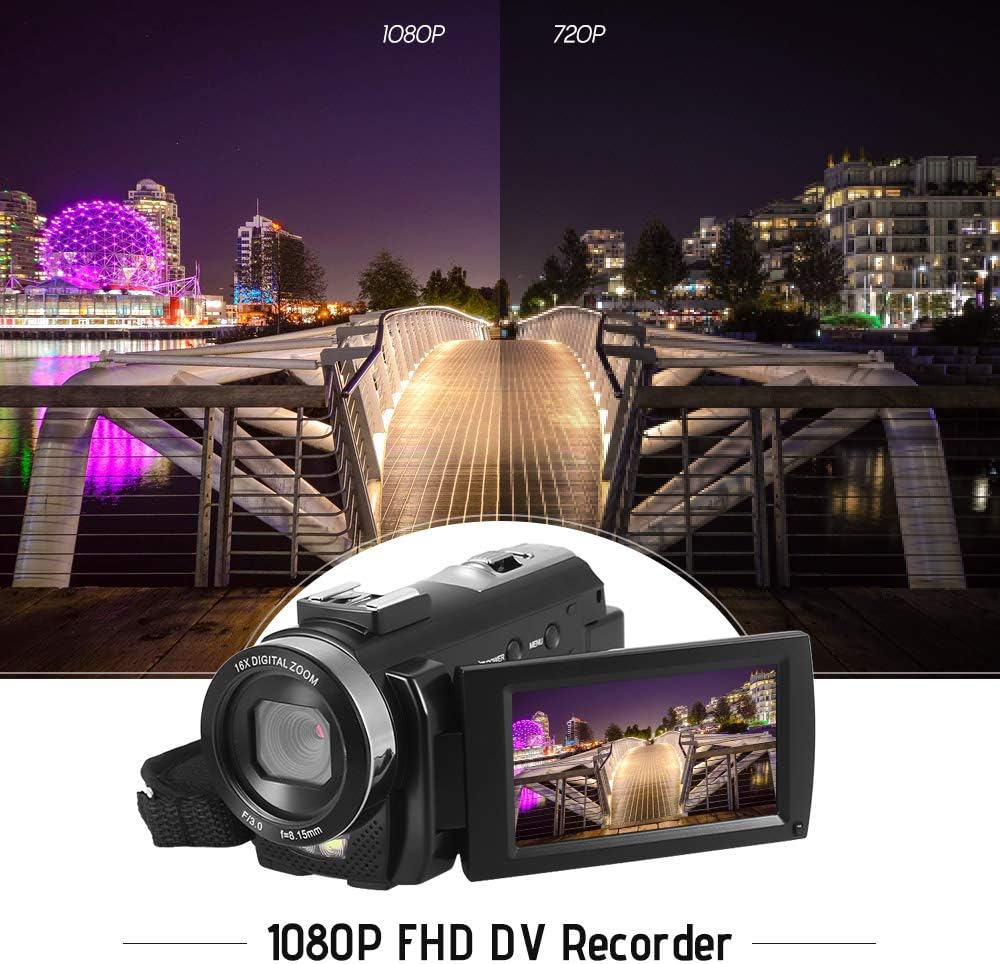
Figure 5.1: The camera is capable of recording in 1080p Full HD and 720p HD resolutions.
5.3. Фатаграфаванне
- Пераканайцеся, што камера знаходзіцца ў рэжыме фотаздымкі. Калі не, націсніце кнопку Рэжым кнопка для пераключэння.
- Скампануйце кадр з дапамогай ВК-экрана.
- Націсніце Фота кнопка для здымкі выявы.
5.4. Выкарыстанне лічбавага зуму
- Выкарыстоўвайце W (шырокі) і T (тэлеаб'ектыва) lever to adjust the 16X digital zoom.

Figure 5.2: The camera's 16X digital zoom allows for closer views of subjects.
5.5. Налады меню
- Націсніце Меню кнопка для доступу да налад.
- Use the navigation buttons to scroll through options such as:
- Баланс белага: Auto, Daylight, Cloudy, Fluorescent, Tungsten.
- Сюжэтны рэжым: Auto, Night, Portrait, Landscape, Backlight, Sport, Party, Beach, High Sensitivity.
- Рэжым здымкі: Single, Continuous.
- Уздзеянне: Adjust ±3.0EV.
- Аўтаспуск: Off, 2s, 5s, 10s.
- Аўтаматычнае выключэнне: Off, 1min, 3min, 5min.
- мова: English, German, French, Spanish, Italian, Turkish, Russian, Portuguese, Dutch, Simplified Chinese, Traditional Chinese, Japanese, Polish.
- Іншыя функцыі: Face Detection, Smile Capture, Beauty Face, Anti-Shake.
- Націсніце OK or Запіс/Стоп кнопку для пацверджання выбару.
- Націсніце Меню кнопку яшчэ раз, каб выйсці.
5.6. Падключэнне да тэлевізара
- Use the provided AV cable to connect the camera's AV output to your television's AV input.
- Select the correct AV input channel on your TV to view camera content.
6. Тэхнічнае абслугоўванне
6.1. Чыстка камеры
- Выкарыстоўвайце мяккую, сухую тканіну для чысткі корпуса камеры.
- Для чысткі аб'ектыва і ВК-экрана выкарыстоўвайце спецыяльную сурвэтку і раствор для чысткі аб'ектыва. Пазбягайце выкарыстання агрэсіўных хімічных рэчываў.
6.2. Захоўванне
- Захоўвайце камеру ў прахалодным, сухім месцы, удалечыні ад прамых сонечных прамянёў і экстрэмальных тэмператур.
- Выміце батарэю, калі камера не будзе выкарыстоўвацца на працягу доўгага часу.
7. Выпраўленне непаладак
| праблема | Магчымая прычына | Рашэнне |
|---|---|---|
| Камера не ўключаецца. | Батарэя разраджана або няправільна ўстаўлена. | Charge the battery fully. Ensure the battery is inserted with correct polarity and the insulator tab is removed. |
| Нельга запісваць відэа ці рабіць фота. | Карта памяці перапоўненая, не ўстаўлена або пашкоджана. | Устаўце карту памяці. Выдаліце непатрэбнае fileабо адфарматуйце карту (гэта сатрэ ўсе дадзеныя). Заменіце карту, калі яна пашкоджана. |
| Дрэнная якасць відэа/малюнкаў. | Insufficient lighting, dirty lens, or incorrect settings. | Ensure adequate lighting. Use the LED fill light if necessary. Clean the lens. Adjust white balance and scene mode settings. |
| Камера завісае або перастае рэагаваць. | Праграмны збой або разрад батарэі. | Remove and reinsert the battery to reset the camera. Ensure the battery is charged. |
8. Тэхнічныя характарыстыкі
| Асаблівасць | Спецыфікацыя |
|---|---|
| Марка | Андоер |
| мадэль | HDV-201LM |
| Датчык выявы | 5-мегапіксэльны CMOS-датчык |
| Дазвол відэа | 1920x1080P (FHD 30fps), 1280x720 (HD 30fps), 640x480 (VGA 30fps), 320x240 (VGA 30fps) |
| Фармат відэа | AVI |
| Дазвол выявы | 24MP (Interpolated), 20MP (Interpolated), 16MP (Interpolated), 12MP (Interpolated), 10MP (Interpolated), 7M Wide (Interpolated), 5MP, 3MP, 2M Wide, VGA |
| Фармат выявы | JPG |
| Лічбавы зум | 16X |
| Аб'ектыў | ff (F/3.0 f=8.15mm) |
| Макс дыяфрагмы | 8.15 F |
| ВК-экран | 3.0-inch TFT-LCD (16:9), 270-degree rotation |
| Захоўванне | SD Card (up to 32GB, Class 10 recommended) |
| Сувязь | USB 2.0, AV Output (NTSC/PAL) |
| Электразабеспячэнне | 1 х акумулятарная батарэя 3.7 В 800 мАг |
| Акумулятар пульта дыстанцыйнага кіравання | 1 x 3V CR2025 Battery |
| Падтрымка аперацыйнай сістэмы | Windows XP/Vista/7/8/10 |
| Асаблівасці | Anti-shake, Face Detection, Smile Capture, Beauty Face, Self-Timer, LED Fill Light, Hot Shoe Mount |
| Памеры | 13.5 х 5.5 х 6.5 см (5.3 х 2.2 х 2.6 цалі) |
| Вага | 273g (9.6oz) with battery |
| Колер | Чорны |
9. Гарантыя і падтрымка
Каб атрымаць інфармацыю аб гарантыі і тэхнічнай падтрымцы, звярніцеся да дакументацыі, якая пастаўляецца з пакупкай, або звярніцеся да прадаўца. Захоўвайце пацвярджэнне пакупкі для любых гарантыйных прэтэнзій.
Ask a question about this manual
Ask about setup, troubleshooting, compatibility, parts, safety, or missing instructions. Manuals+ will review the question and use this page’s manual context to help answer it.