
TOPTECH JET-4-BLUE
TOPTECH Jet-4 Bluetooth Speaker User Manual
Model: JET-4-BLUE
Уводзіны
Thank you for choosing the TOPTECH Jet-4 Portable Bluetooth Speaker. This manual provides essential information for setting up, operating, and maintaining your speaker to ensure optimal performance and longevity. Please read this manual thoroughly before using the product.

Image: The TOPTECH Jet-4 Bluetooth Speaker, showcasing its compact design and vibrant LED lighting.
Інфармацыя па бяспецы
To prevent fire or shock hazards, always follow basic safety precautions when using this product:
- Не падвяргайце дынамік уздзеянню дажджу або вільгаці.
- Do not disassemble or modify the speaker. Refer all servicing to qualified personnel.
- Keep the speaker away from direct sunlight, heat sources, and extreme temperatures.
- Пазбягайце падзення дынаміка і не падвяргайце яго моцным ударам.
- Выкарыстоўвайце толькі пазначаны кабель для зарадкі і адаптар сілкавання.
Змест пакета
- TOPTECH Jet-4 Bluetooth Speaker
- USB-кабель для зарадкі
- Кіраўніцтва карыстальніка
Прадукт скончаныview
Элементы кіравання і парты
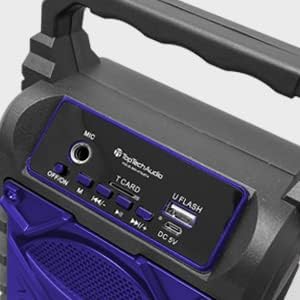
Выява: Падрабязная view of the speaker's top control panel, showing various buttons and input ports.
- Мікрафонны ўваход: Connect an external microphone for karaoke.
- Перамыкач OFF/ON: Уключыць або выключыць дынамік.
- Кнопка M (рэжым): Switch between Bluetooth, AUX, USB, and TF Card modes.
- Previous / Volume Down Button: Кароткае націсканне для папярэдняга трэка, доўгае націсканне для памяншэння гучнасці.
- Кнопка прайгравання / паўзы: Прайграць або прыпыніць прайграванне аўдыё.
- Next / Volume Up Button: Кароткае націсканне для наступнага трэка, доўгае націсканне для павелічэння гучнасці.
- T CARD Slot: Insert a TF (MicroSD) card for direct audio playback.
- U FLASH (USB) Port: Insert a USB flash drive for direct audio playback.
- Порт DC 5V: Connect the USB charging cable to power and charge the speaker.
Асноўныя характарыстыкі

Image: An infographic showing the TOPTECH Jet-4 speaker with icons representing its key features: easy portability, mic port, mode karaoke, disco light, TF card port, and USB port.
- Магутны гук: Dual-driver stereo output delivers crisp highs and deep bass for a premium audio experience.
- Multi-Mode Playback: Supports Bluetooth, AUX, USB, and TF card input for versatile music streaming.
- Караоке гатова: Built-in karaoke mode with light effects and mic support makes any party more fun.
- TWS Pairing Support: Connect two speakers wirelessly for immersive, room-filling sound.
- Доўгі тэрмін службы батарэі: Enjoy up to 6 hours of playtime with a rechargeable battery, perfect for all-day events.
Настройка
Першапачатковая плата
Before first use, fully charge the speaker. Connect the provided USB charging cable to the DC 5V port on the speaker and the other end to a USB power adapter (not included) or a computer USB port.

Image: A visual representation of a fully charged battery, symbolizing the speaker's long battery life.
The charging indicator light will illuminate during charging and turn off or change color when fully charged. A full charge typically takes a few hours.
Інструкцыя па эксплуатацыі
Спалучэнне Bluetooth
- Turn on the speaker by sliding the OFF/ON switch to the 'ON' position. The speaker will enter Bluetooth pairing mode automatically, indicated by a flashing LED light and an audible prompt.
- Уключыце Bluetooth на вашым смартфоне, планшэце або іншай прыладзе з падтрымкай Bluetooth.
- Пошук available Bluetooth devices and select "JET-4" from the list.
- Once connected, the speaker will provide an audible confirmation, and the LED light will stop flashing.
- Цяпер вы можаце прайграваць аўдыё з прылады праз дынамік.
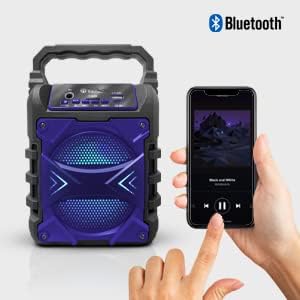
Image: The TOPTECH Jet-4 speaker positioned next to a smartphone, illustrating the seamless Bluetooth connection process.
Playback Modes (AUX, USB, TF Card)
Press the 'M' (Mode) button to cycle through available playback modes:
- AUX рэжым: Падключыце знешнюю аўдыёпрыладу з дапамогай аўдыёкабеля 3.5 мм (не ўваходзіць у камплект) да ўваходу AUX.
- Рэжым USB: Insert a USB flash drive into the 'U FLASH' port. The speaker will automatically detect and play compatible audio files.
- Рэжым карты TF: Insert a TF (MicroSD) card into the 'T CARD' slot. The speaker will automatically detect and play compatible audio files.
Рэжым караоке
To use the karaoke function, connect a microphone (not included) to the 'MIC' input port. Adjust the microphone volume as needed. The speaker's built-in light effects will enhance the karaoke experience.
TWS Pairing (True Wireless Stereo)
For an enhanced stereo sound experience, you can pair two TOPTECH Jet-4 speakers together:
- Ensure both Jet-4 speakers are powered on and not connected to any Bluetooth device.
- On one speaker (this will be the primary speaker), long press the 'M' (Mode) button until you hear a pairing tone.
- Два дынамікі аўтаматычна падключацца адзін да аднаго. Пасля падключэння вы пачуеце гукавое пацверджанне.
- Now, connect your Bluetooth device to the primary speaker as described in the 'Bluetooth Pairing' section. Audio will play through both speakers in stereo.

Image: Two TOPTECH Jet-4 speakers wirelessly connected to a smartphone, demonstrating the True Wireless Stereo (TWS) pairing feature for expanded sound.
Тэхнічнае абслугоўванне
- Працірайце дынамік мяккай сухой тканінай. Не выкарыстоўвайце абразіўныя ачышчальнікі або растваральнікі.
- Захоўвайце дынамік у прахалодным сухім месцы, калі ён не выкарыстоўваецца.
- Avoid prolonged exposure to extreme temperatures or humidity.
Ліквідацыю непаладак
| праблема | Рашэнне |
|---|---|
| Дынамік не ўключаецца. | Пераканайцеся, што акумулятар зараджаны. Падключыце дынамік да крыніцы харчавання з дапамогай кабеля USB. |
| Няма гуку з дынаміка. | Праверце ўзровень гучнасці як на дынаміку, так і на падлучанай прыладзе. Пераканайцеся, што выбраны правільны рэжым прайгравання. |
| Збой спалучэння Bluetooth. | Ensure the speaker is in pairing mode. Turn off Bluetooth on your device and turn it back on. Try restarting both the speaker and your device. Make sure no other devices are connected to the speaker. |
| Нізкая якасць гуку. | Каб паменшыць перашкоды, перамясціце дынамік бліжэй да прылады Bluetooth. Пераканайцеся, што крыніца гуку добрай якасці. |
Тэхнічныя характарыстыкі
| Асаблівасць | Дэталь |
|---|---|
| Марка | TOPTECH |
| Нумар мадэлі | JET-4-BLUE |
| Крыніца харчавання | Харчаванне ад батарэі |
| Тэхналогія падлучэння | Bluetooth, USB |
| Аўдыё ўваход | Guitar Input, Karaoke Input, USB |
| Колькасць каналаў | 2 |
| Матэрыял | Пластык, метал |
| Вага прадмета | 1.54 фунта |
| Памеры ўпакоўкі | 9.29 х 6.38 х 4.17 цалі |
| UPC | 689259338593 |
Гарантыя і падтрымка
For warranty information and customer support, please refer to the contact details provided on the product packaging or visit the official TOPTECH webсайт. Захоўвайце чэк аб куплі як пацвярджэнне пакупкі ў выпадку любых гарантыйных прэтэнзій.
Ask a question about this manual
Ask about setup, troubleshooting, compatibility, parts, safety, or missing instructions. Manuals+ will review the question and use this page’s manual context to help answer it.