
1. Уводзіны
Thank you for choosing the FeinTech LED Desk Lamp LTL00600. This high-quality desk lamp is designed to provide optimal lighting for your workspace while offering convenient features such as a USB charging port, adjustable brightness, and customizable color temperature. Please read this manual thoroughly before use to ensure proper operation and to maximize the lifespan of your product.
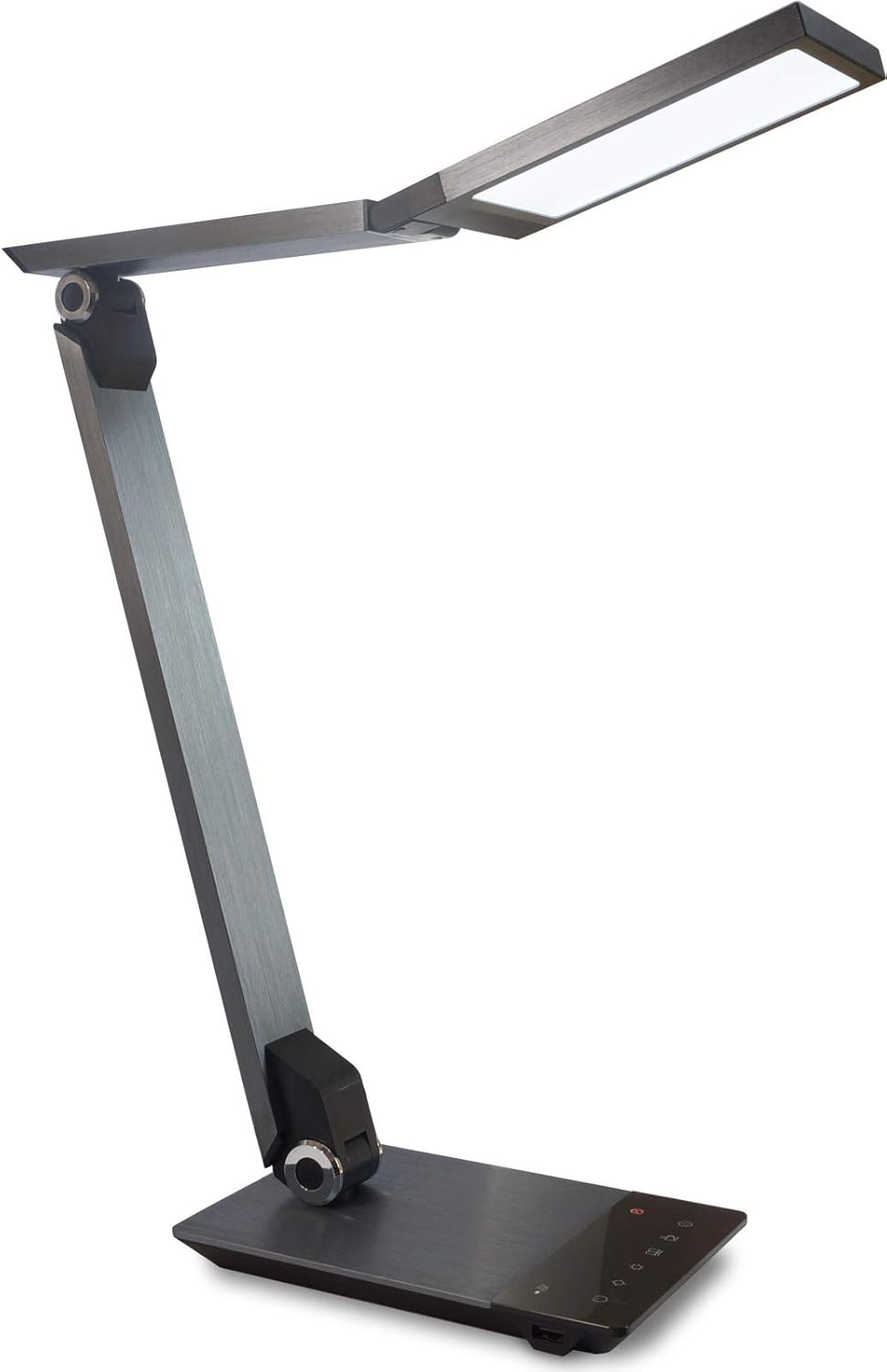
Image 1.1: FeinTech LED Desk Lamp LTL00600. This image displays the lamp у вертыкальным становішчы, паказвацьasing its brushed aluminum finish and sleek design.
2. Інструкцыі па тэхніцы бяспекі
To prevent damage or injury, please observe the following safety precautions:
- Пераканайцеся, што адаптар сілкавання падключаны да адпаведнай разеткі.
- Не агаляйце лamp to water or excessive humidity.
- Пазбягайце разборкі або мадыфікацыі лampРамонт павінен выконвацца толькі кваліфікаваным персаналам.
- Захоўвайце лamp далей ад крыніц цяпла і прамых сонечных прамянёў.
- Ачысціце лamp толькі мяккай сухой тканінай. Не выкарыстоўвайце абразіўныя ачышчальнікі або растваральнікі.
- Не глядзіце прама ў святлодыёдную крыніцу святла працяглы час.
3. Змесціва ўпакоўкі
Калі ласка, праверце наяўнасць усіх прадметаў у камплекце:
- Святлодыёдны стол FeinTech Lamp (Model: LTL00600)
- Адаптар сілкавання (12В/2А)
4. Прадукт скончыўсяview
Familiarize yourself with the components of your FeinTech LED Desk Lamp:
- Lamp Кіраўнік: Contains the LED light source.
- Рэгуляваныя рукі: Multiple joints for flexible positioning.
- База: Provides stability and houses the control panel and USB port.
- Панэль кіравання: Touch-sensitive buttons for power, brightness, color temperature, and timer.
- Порт для зарадкі USB: Located on the side of the base for device charging.

Малюнак 4.1: Зверху ўніз view з лamp's base and control panel. This image highlights the touch-sensitive buttons for various functions.

Малюнак 4.2: Збоку view з лamp's base, showing the integrated USB charging port. This port allows for convenient charging of compatible devices.
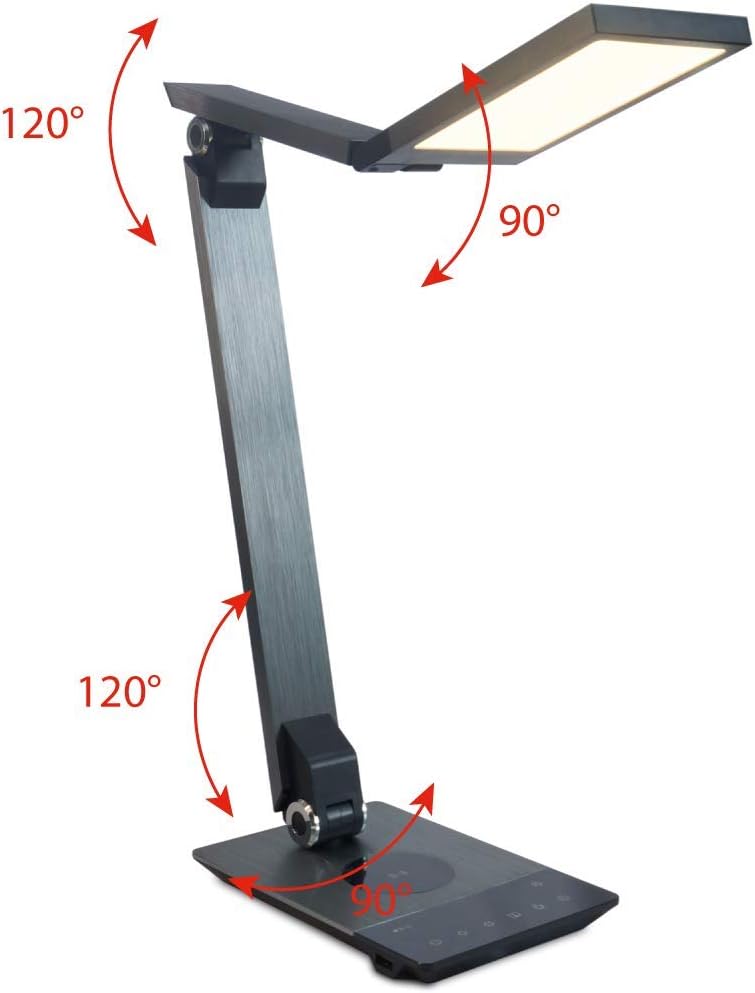
Image 4.3: Diagram illustrating the articulation angles of the lamp's joints. The lamp head can rotate 90 degrees, the upper arm 120 degrees, and the lower arm 120 degrees, allowing for flexible positioning.
5. Настройка
Выканайце наступныя дзеянні для першапачатковай налады:
- Распакуйце: Акуратна дастаньце ўсе кампаненты з упакоўкі.
- Размяшчэнне: Змесціце lamp base on a stable, flat surface. Ensure there is enough space for the lamp to be adjusted without obstruction.
- Падключыце харчаванне: Устаўце кабель адаптара харчавання ў ўваходны порт пастаяннага току на задняй панэліamp падстаўку. Падключыце адаптар сілкавання да стандартнай электрычнай разеткі.
6. Інструкцыя па эксплуатацыі
The FeinTech LED Desk Lamp features intuitive touch controls on its base.
6.1 Уключэнне/выключэнне сілкавання
- Дакраніцеся да Кнопка харчавання on the control panel (refer to Image 4.1) to turn the lamp уключана або выключана.
6.2 Рэгуляванне яркасці (зацямненне)
- З лamp on, touch and hold the Павышэнне яркасці or Зніжэнне яркасці buttons (refer to Image 4.1) to steplessly adjust the light intensity.
- У лamp base will vibrate slightly when the minimum or maximum brightness level is reached.
6.3 Рэгуляванне каляровай тэмпературы
- З лamp on, touch and hold the Color Temperature Up or Color Temperature Down buttons (refer to Image 4.1) to steplessly adjust the light color from warm white (2700K) to cool white (6500K).
- У лamp base will vibrate slightly when the minimum or maximum color temperature is reached.
6.4 Favorite Settings
- У лamp allows you to store and recall 3 favorite light settings (brightness and color temperature).
- To save a setting: Adjust the brightness and color temperature to your desired level. Then, touch and hold one of the Любімыя кнопкі (refer to Image 4.1) until the lamp flashes briefly, indicating the setting is saved.
- To recall a setting: Simply touch the corresponding Любімая кнопка.
- The last used brightness and color temperature settings are automatically saved even after the lamp выключана.
6.5 Функцыя зарадкі USB
- Connect your smartphone or other compatible device to the USB charging port on the side of the lamp base (refer to Image 4.2) using a suitable USB cable.
- The intelligent USB port delivers up to 2.4A for fast charging.
- An LED indicator will signal ongoing and completed charging status.
6.6 Функцыя таймера
- Дакраніцеся да Кнопка таймера (refer to Image 4.1) to activate the timer function.
- The first touch activates a 3-minute timer.
- A second touch activates a 1-hour timer.
- У лamp will automatically turn off after the selected time period.
7. Тэхнічнае абслугоўванне
Для падтрымання вашага лamp's appearance and functionality:
- Заўсёды адключайце lamp ад крыніцы сілкавання перад чысткай.
- Вытрыце лamp мяккай сухой тканінай без ворса.
- Не выкарыстоўвайце вадкія або аэразольныя ачышчальнікі, бо яны могуць пашкодзіць пакрыццё або ўнутраныя кампаненты.
- Avoid scratching the brushed aluminum surface.
8. Выпраўленне непаладак
Калі ў вас узнікнуць праблемы з вашым лamp, звярніцеся да наступных распаўсюджаных праблем і іх рашэнняў:
| праблема | Магчымая прычына | Рашэнне |
|---|---|---|
| Lamp не ўключаецца. | Няма крыніцы харчавання. | Check if the power adapter is securely connected to the lamp and the electrical outlet. Test the outlet with another device. |
| Зарадка праз USB не працуе. | Прылада несумяшчальная або няспраўны кабель. | Ensure your device is compatible with USB charging. Try a different USB cable. Verify the lamp уключана. |
| Сэнсарныя элементы кіравання не рэагуюць. | Часовы збой праграмнага забеспячэння або праблемы з харчаваннем. | Disconnect the power adapter for 30 seconds, then reconnect it. Ensure your fingers are clean and dry when operating the touch controls. |
9. Тэхнічныя характарыстыкі
| Нумар мадэлі | 00600 LTL |
| Памеры (Д х Ш х У) | 36 х 13.5 х 44 см (прыблізна 14.2 х 5.3 х 17.3 цалі) |
| Вага | 1.84 кг (прыбл. 4.06 фунта) |
| Матэрыял | Ачышчаны алюміній |
| Крыніца святла | святлодыёд |
| Max. Light Output | 500 lumens (1000 lux at 40 cm distance) |
| Каляровая тэмпература (CCT) | 2700 K (Warm White) to 6500 K (Cool White) |
| Power Consumption (Lamp толькі) | Макс. 10 Вт |
| Power Consumption (Lamp & Charging) | Макс. 22 Вт |
| USB выхад | Да 2.4 А |
| Уваходны кнtage (адаптар) | 12 В / 2 А |
| Тып перамыкача | Дакранацца |

Image 9.1: Diagram showing the dimensions of the FeinTech LED Desk Lamp. Лamp measures approximately 36 cm in length, 13.5 cm in width, and 44 cm in height.
10. Гарантыя і падтрымка
FeinTech products are designed for reliability and performance. For warranty information or technical support, please refer to the warranty card included with your purchase or visit the official FeinTech webсайт. Калі ласка, захавайце пацвярджэнне пакупкі для прэтэнзій па гарантыі.