
1. Уводзіны
The V7 KW550ESBT Bluetooth Keyboard is designed to enhance your productivity with versatile connectivity options. This compact, ultra-slim keyboard offers a comfortable and quiet typing experience, featuring laser-etched keys for long-lasting durability. It supports connection to multiple devices via Bluetooth or a 2.4 GHz USB dongle.
Асноўныя функцыі ўключаюць у сябе:
- Seamless switching between up to 2 Bluetooth devices or connection via the included 2.4 GHz USB dongle.
- Scissor-switch keys for comfortable and quiet typing.
- Laser-etched keys for enhanced durability.
- Ultra-slim and compact design.
- Includes two AAA batteries for immediate use.
2. Змесціва ўпакоўкі
Калі ласка, праверце ўпакоўку на наяўнасць наступных прадметаў:
- V7 KW550ESBT Bluetooth Keyboard
- 2.4 GHz USB Receiver (dongle)
- 2 х ААА батарэі
- Кіраўніцтва карыстальніка (гэты дакумент)

Image: The V7 KW550ESBT keyboard shown with its accompanying 2.4 GHz USB receiver, ready for connection.
3. Настройка
3.1. Устаноўка батарэі
- Знайдзіце адсек для батарэек на ніжняй панэлі клавіятуры.
- Адкрыйце крышку батарэйнага адсека.
- Устаўце дзве батарэйкі тыпу ААА, сачыце за правільнай палярнасцю (+/-).
- Надзейна зачыніце крышку батарэйнага адсека.
3.2. Connecting via 2.4 GHz USB Dongle
- Remove the 2.4 GHz USB receiver from its storage slot (usually within the battery compartment or a dedicated slot).
- Падключыце USB-прыёмнік да даступнага USB-порта на вашым кампутары або прыладзе.
- The keyboard should automatically connect. If not, ensure the keyboard is powered on and the connection indicator light (if present) is active.
3.3. Падключэнне праз Bluetooth
The V7 KW550ESBT keyboard supports connecting to up to two Bluetooth devices.
- Пераканайцеся, што клавіятура ўключана.
- Press and hold the Bluetooth pairing key (refer to keyboard layout for specific key, often indicated by a Bluetooth symbol or 'BT1'/'BT2') for a few seconds until the Bluetooth indicator light starts blinking, indicating it's in pairing mode.
- На вашай прыладзе (камп'ютары, планшэце, смартфоне) перайдзіце ў налады Bluetooth.
- Пошук available devices and select "V7 KW550ESBT" (or similar name) from the list.
- Выконвайце падказкі на экране, каб завяршыць працэс спалучэння. Вам можа быць прапанавана ўвесці код, які адлюстроўваецца на экране, з дапамогай клавіятуры.
- Repeat for a second Bluetooth device if desired, using the other Bluetooth pairing key.
3.4. Пераключэнне паміж падлучанымі прыладамі
To switch between connected devices (Bluetooth 1, Bluetooth 2, or 2.4 GHz USB), press the corresponding function key (e.g., Fn + BT1, Fn + BT2, or Fn + 2.4G if available). Refer to your keyboard's specific layout for these keys.
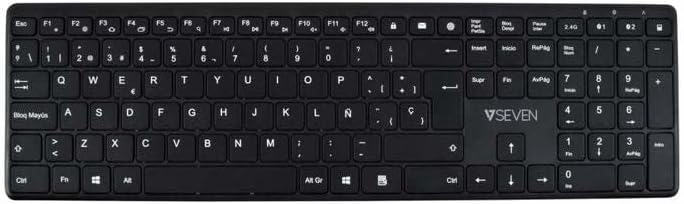
Выява: зверху ўніз view of the V7 KW550ESBT keyboard, showing the full QWERTY layout and function keys.
4. Кіраванне клавіятурай
4.1. Standard Key Functions
The keyboard features a standard QWERTY layout with all essential alphanumeric keys, punctuation, and modifier keys (Shift, Ctrl, Alt, Windows/Command).
4.2. Мультымедыйныя і функцыянальныя клавішы
The top row of keys (F1-F12) often doubles as multimedia or special function keys. These functions are typically accessed by pressing the Fn key simultaneously with the desired F-key. Common functions include:
- Volume control (mute, decrease, increase)
- Прайграванне медыяфайлаў (прайграванне/паўза, папярэдні, наступны)
- Рэгуляванне яркасці экрана
- Функцыя пошуку
- Блакаванне экрана
Refer to the icons printed on your specific keyboard's F-keys for exact functionality.
4.3. Quiet Typing Experience
The scissor-switch key design minimizes typing noise, making it suitable for quiet environments.

Выява: Side profile of the V7 KW550ESBT keyboard, highlighting its ultra-slim design.
5. Тэхнічнае абслугоўванне
5.1. Уборка
Каб ачысціць клавіятуру:
- Turn off the keyboard and disconnect it from your device.
- Выкарыстоўвайце мяккую безворсовую тканіну, злёгку dampзмыць вадой або мяккім мыйным растворам.
- Акуратна працірайце клавішы і паверхню. Пазбягайце празмернай вільгаці.
- Для выдалення пылу і смецця паміж клавішамі выкарыстоўвайце сціснутае паветра.
5.2. Замена батарэі
When the keyboard's performance degrades or the battery indicator (if present) signals low power, replace the AAA batteries as described in Section 3.1.
6. Выпраўленне непаладак
If you encounter issues with your V7 KW550ESBT keyboard, try the following solutions:
| праблема | Магчымае рашэнне |
|---|---|
| Клавіятура не адказвае |
|
| Клавішы заліпаюць або не рэагуюць |
|
| Збой спалучэння Bluetooth |
|
7. Тэхнічныя характарыстыкі
| Асаблівасць | Дэталь |
|---|---|
| Марка | V7 |
| Нумар мадэлі | KW550ESBT |
| Тэхналогія падлучэння | Bluetooth, 2.4 GHz Wireless (USB Dongle) |
| Апісанне клавіятуры | Мультымедыя |
| Рэкамендуемае выкарыстанне | Офіс |
| Асаблівасць | Bluetooth |
| Колер | Чорны |
| стыль | Класіка |
| Памеры прадукту | 16.1 Д х 4.7 Ш х 0.8 У сантыметраў |
| Матэрыял | Пластыкавыя |
| Крыніца харчавання | 2 х ААА батарэі (у камплекце) |
8. Гарантыя і падтрымка
For warranty information and technical support, please refer to the documentation provided with your purchase or visit the official V7 webсайт. Захоўвайце пацвярджэнне пакупкі для прэтэнзій па гарантыі.