
Уводзіны
This manual provides essential information for the safe and efficient operation of your Dual MCR 4 Portable DAB+/FM Radio. This device offers both digital DAB+ and analog FM radio reception, ensuring a wide range of listening options. Its color TFT display enhances usability by showing station names and additional information. With intuitive controls, auxiliary input, and headphone jack, the MCR 4 is designed for versatile and enjoyable audio experiences.
Інфармацыя па бяспецы
- Перад выкарыстаннем прылады ўважліва прачытайце ўсе інструкцыі.
- Трымайце прыладу далей ад вады, вільгаці і высокіх тэмператур.
- Не спрабуйце разбіраць або мадыфікаваць прыладу. Звяртайцеся да кваліфікаванага персаналу па любыя паслугі па абслугоўванні.
- Use only the provided power adapter or recommended battery types.
- Забяспечце належную вентыляцыю вакол прылады падчас працы.
- Утылізуйце батарэйкі адказна ў адпаведнасці з мясцовымі правіламі.
Змест пакета
Калі ласка, праверце наяўнасць усіх прадметаў у камплекце:
- Dual MCR 4 Main Unit
- Адаптар сілкавання
- Кіраўніцтва карыстальніка
Прадукт скончаныview
The Dual MCR 4 features a compact design with intuitive controls for easy access to its functions. Key components include:
- Color TFT Display: Паказвае інфармацыю пра станцыю, час і пункты меню.
- Паваротная ручка: For tuning, volume control, and menu navigation.
- Кнопкі памяці: To save and recall your favorite radio stations.
- Тэлескапічная антэна: For optimal radio signal reception.
- Auxiliary Input (AUX-IN): Located at the back, for connecting external audio devices.
- Раз'ём для навушнікаў: Located at the back, for private listening.
- Mechanical On/Off Switch: Located at the back, for direct power control.
- Passive Membrane: Located at the back, contributing to exceptional sound quality.
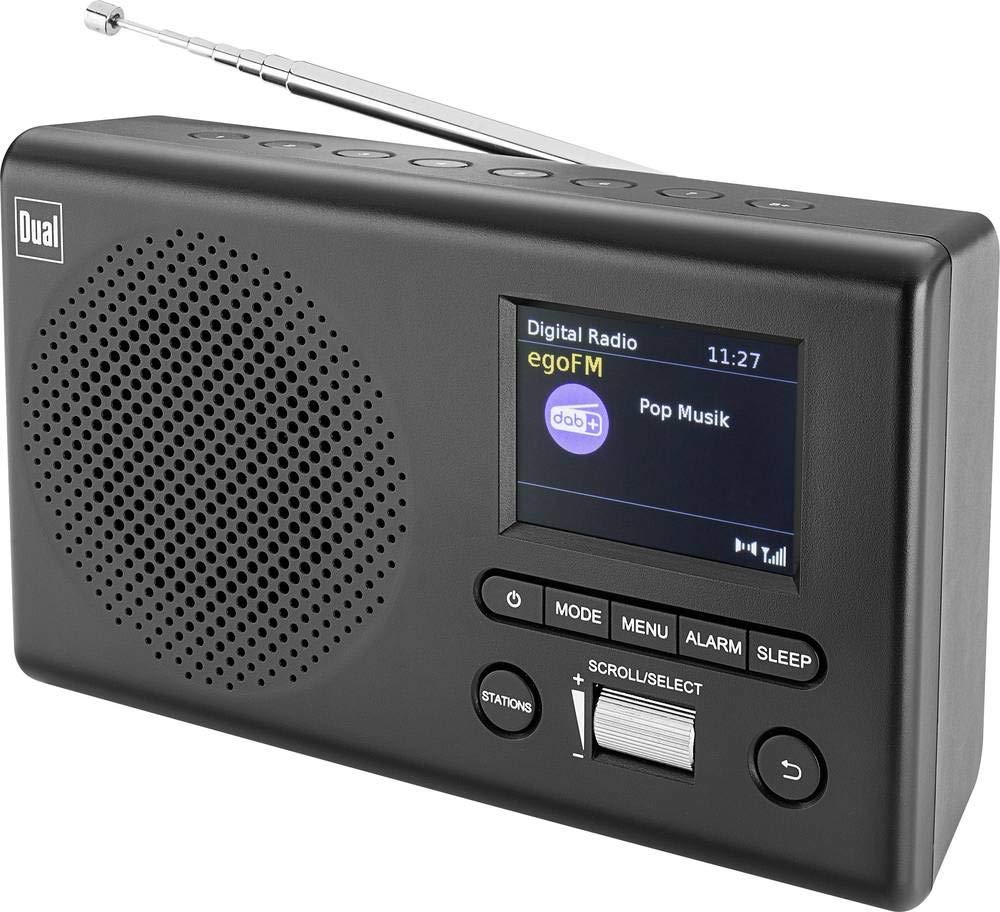
Выява: спераду view of the Dual MCR 4 Portable DAB+/FM Radio, showing the color TFT display, rotary knob, and control buttons. The radio has a black and silver finish.
Настройка
1. Харчаванне прылады
The Dual MCR 4 can be powered by either the included AC power adapter or batteries, offering portability.
- Выкарыстоўваючы адаптар пераменнага току: Connect the power adapter to the DC IN port on the back of the radio and plug the other end into a standard wall outlet.
- Выкарыстанне батарэек: Open the battery compartment on the bottom/back of the radio and insert the required batteries (type and quantity usually specified inside the compartment or in the full manual). Ensure correct polarity.
2. Рэгуляванне антэны
Extend the telescopic antenna fully for optimal reception of both DAB+ and FM radio signals. Adjust its position for the best signal quality.
3. Initial Power On and Station Scan
After connecting power, switch on the radio using the mechanical ON/OFF switch at the back. The radio will typically perform an automatic station scan upon first use, searching for available digital (DAB+) and analog (FM) radio stations. This process may take a few moments.
Інструкцыя па эксплуатацыі
1. Асноўная аперацыя
- Уключэнне/выключэнне харчавання: Use the mechanical switch at the back. For standby, a dedicated button on the front might be available (refer to physical unit).
- Рэгулятар гучнасці: Rotate the main rotary knob to adjust the listening volume.
2. DAB+ Radio Mode
- Selecting DAB+ Mode: Press the MODE button (if available) or navigate through the menu using the rotary knob until DAB+ mode is selected.
- Выбар станцыі: After an automatic scan, use the rotary knob to scroll through the list of available DAB+ stations. Press the knob to confirm your selection.
- Захаванне налад: Tune to your desired station. Press and hold a memory button (e.g., 1-5) until the display confirms the station is saved.
- Успамінаючы прасеты: Briefly press the corresponding memory button to recall a saved station.
- Інфармацыя пра дысплей: The color TFT display will show station name, program information (DLS), and potentially station logos or slideshows.
3. Рэжым FM-радыё
- Selecting FM Mode: Press the MODE button or navigate through the menu until FM mode is selected.
- Ручная настройка: Rotate the tuning knob to manually adjust the frequency.
- Аўтаматычнае сканаванне: Press and hold the tuning knob or a dedicated scan button to automatically search for the next available FM station.
- Захаванне налад: Tune to your desired FM station. Press and hold a memory button until the display confirms the station is saved.
- Успамінаючы прасеты: Briefly press the corresponding memory button to recall a saved station.
4. Auxiliary Input (AUX-IN)
Connect an external audio device (e.g., smartphone, MP3 player) to the AUX-IN port on the back of the radio using a 3.5mm audio cable. Select AUX mode on the radio to play audio from the connected device.
5. Выкарыстанне навушнікаў
For private listening, plug standard 3.5mm headphones into the headphone jack located on the back of the unit. The internal speaker will automatically mute.
Тэхнічнае абслугоўванне
- Уборка: Працірайце радыё мяккай сухой тканінай. Не выкарыстоўвайце абразіўныя ачышчальнікі або растваральнікі.
- захоўванне: If storing for an extended period, remove batteries and store the unit in a cool, dry place.
- Сыход за антэнай: Акуратна звяртайцеся з тэлескапічнай антэнай, каб пазбегнуць пашкоджанняў.
Ліквідацыю непаладак
| праблема | Магчымае рашэнне |
|---|---|
| Няма ўлады |
|
| Дрэнны прыём радыё |
|
| З дынамікаў няма гуку |
|
Тэхнічныя характарыстыкі
| Марка | Двайны |
| Нумар мадэлі | 76074 |
| Колер | Чорны, серабрысты |
| Тэхналогія цюнінгу | DAB+, FM |
| Тэхналогія падлучэння | Auxiliary (AUX-IN) |
| Асаблівасці | Portable, Color TFT Display |
| Сумяшчальныя прылады | Headphones, External Audio Devices (via AUX-IN) |
| Крыніца харчавання | Mains (AC Adapter), Battery Powered |
| Уключаныя кампаненты | Main Unit, Power Adapter, User Manual |
| Рэкамендуемае выкарыстанне | Музыка |
Гарантыя і падтрымка
For warranty information and technical support, please refer to the specific warranty card included with your product or contact Dual customer service. The included user manual provides detailed instructions and contact information.