
GLIDiC TW-5000s
GLIDiC Sound Air TW-5000s True Wireless Earbuds Instruction Manual
Model: TW-5000s
1. Уводзіны
Дзякуй за пакупкуasing the GLIDiC Sound Air TW-5000s True Wireless Earbuds. This manual provides essential information for the safe and effective use of your device. Please read it thoroughly before use and retain it for future reference.
2. Інфармацыя па бяспецы
- Не падвяргайце навушнікі або зарадны футляр уздзеянню экстрэмальных тэмператур, прамых сонечных прамянёў або высокай вільготнасці.
- Avoid dropping, impacting, or disassembling the device. This may cause damage and void the warranty.
- Keep the device away from water and liquids. While sweatproof, immersion can cause damage.
- Выкарыстоўвайце толькі зарадны кабель, які ўваходзіць у камплект, або яго сертыфікаваны эквівалент.
- Працяглае праслухоўванне на высокім узроўні гучнасці можа пашкодзіць слых. Адрэгулюйце гучнасць да бяспечнага ўзроўню.
- Будзьце ўважлівыя да навакольнага асяроддзя пры выкарыстанні навушнікаў-ўкладышаў, асабліва ў дарожным руху або небяспечных умовах.
3. Змесціва ўпакоўкі
Праверце, ці ёсць усе прадметы ў вашай упакоўцы:
- GLIDiC Sound Air TW-5000s True Wireless Earbuds (Left and Right)
- Чахол для зарадкі
- Зарадны кабель USB (тыпу A - Micro USB)
- Некалькі памераў вушных насадак (S, M, L)
- Інструкцыя па эксплуатацыі (гэты дакумент)
4. Прадукт скончыўсяview
Familiarize yourself with the components of your GLIDiC Sound Air TW-5000s earbuds and charging case.

Figure 4.1: GLIDiC Sound Air TW-5000s Earbuds and Charging Case. The image displays the black charging case with the GLIDiC logo on top, positioned next to the two black earbuds.
Кампаненты навушнікаў-ўкладышаў
- Шматфункцыянальная кнопка: Located on the outer surface of each earbud, used for playback control, call management, and voice assistant activation.
- Святлодыёдны індыкатар: Provides status information (pairing, charging, power).
- Мікрафон: For voice calls and voice assistant commands.
- Кантакты для зарадкі: Located on the underside of each earbud, for charging within the case.
- Насадка для вуха: Silicone tip for in-ear comfort and sound isolation.
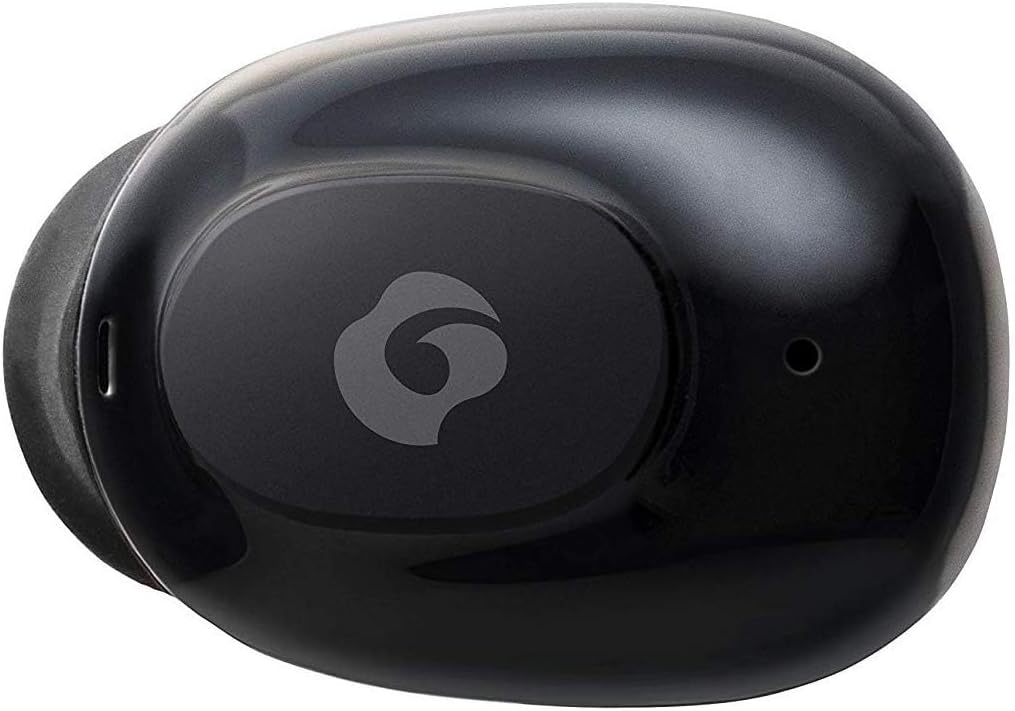
Малюнак 4.2: Буйны план view of a single GLIDiC earbud, highlighting the multifunction button with the GLIDiC logo and the microphone opening.
Кампаненты зараднага чахла
- Парты для зарадкі: Internal contacts for earbuds, external port for case charging.
- Святлодыёдны індыкатар корпуса: Паказвае стан зарадкі чахла.
- Вечка: Protects earbuds and secures them during charging.
5. Настройка
5.1 Першапачатковая зарадка
- Place both earbuds into the charging case. Ensure they are correctly seated, and the LED indicators on the earbuds illuminate.
- Падключыце USB-кабель для зарадкі да порта зарадкі на корпусе, а другі канец — да крыніцы харчавання USB (напрыклад, камп'ютара, адаптара для сеткі).
- The case LED indicator will show charging status. Allow approximately 2 hours for a full charge of both earbuds and the case.
- Once fully charged, disconnect the charging cable. The earbuds offer up to 60 days of standby time when stored in the fully charged case.
5.2 Спалучэнне з прыладай Bluetooth
- Пераканайцеся, што навушнікі зараджаны.
- Адкрыйце зарадны кейс. Навушнікі аўтаматычна пяройдуць у рэжым спалучэння, і іх святлодыёдныя індыкатары будуць міргаць.
- На прыладзе з падтрымкай Bluetooth (смартфоне, планшэце і г.д.) перайдзіце ў налады Bluetooth.
- Пошук available devices. Select "GLIDiC TW-5000s" from the list.
- Once connected, the earbud LED indicators will stop flashing and may show a solid light or turn off, depending on the model. A voice prompt may also confirm the connection.
- Калі спалучэнне не атрымалася, вярніце навушнікі ў чахол, зачыніце вечка, пачакайце некалькі секунд і паўтарыце дзеянні.
6. Інструкцыя па эксплуатацыі
6.1 Уключэнне/выключэнне сілкавання
- Уключэнне: Open the charging case, or press and hold the multifunction button on each earbud for approximately 3 seconds.
- Выключэнне: Place the earbuds back into the charging case and close the lid, or press and hold the multifunction button on each earbud for approximately 5 seconds.
6.2 Прайграванне музыкі
- Прайграванне/Паўза: Націсніце шматфункцыянальную кнопку адзін раз на любым навушніку.
- Наступны трэк: Double-press the multifunction button on the right earbud.
- Папярэдні трэк: Double-press the multifunction button on the left earbud.
- Павялічыць гучнасць: Triple-press the multifunction button on the right earbud.
- Паменшыць гучнасць: Triple-press the multifunction button on the left earbud.
6.3 Кіраванне выклікамі
- Адказ/завяршэнне выкліку: Націсніце шматфункцыянальную кнопку адзін раз на любым навушніку.
- Адхіліць выклік: Press and hold the multifunction button on either earbud for approximately 2 seconds.
6.4 Галасавы памочнік
- Актываваць галасавы памочнік: Press and hold the multifunction button on either earbud for approximately 2 seconds (when not on a call).
6.5 Multi-Communication Mode
The GLIDiC Sound Air TW-5000s features a multi-communication mode that allows select ambient sounds to be heard without compromising audio quality. This enhances user awareness and safety.
- Activate/Deactivate Multi-Communication Mode: Consult the specific instructions provided with your device, as activation methods can vary. Typically, this involves a specific press sequence on the multifunction button or an option within a companion app if available.
7. Тэхнічнае абслугоўванне
7.1 Ачыстка
- Працярыце навушнікі і зарадны футляр мяккай, сухой тканінай без ворса.
- Не выкарыстоўвайце абразіўныя ачышчальнікі, спірт або хімічныя растваральнікі.
- Gently remove ear tips and clean them with mild soap and water if necessary. Ensure they are completely dry before reattaching.
- Выкарыстоўвайце сухую ватовую палачку, каб старанна ачысціць зарадныя кантакты як на навушніках, так і на чахле.
7.2 Захоўванне
- Калі навушнікі не выкарыстоўваюцца, захоўвайце іх у зарадным чахле, каб абараніць і забяспечыць іх зарадку.
- Захоўвайце прыладу ў прахалодным, сухім месцы, удалечыні ад прамых сонечных прамянёў і экстрэмальных тэмператур.
8. Выпраўленне непаладак
If you encounter issues with your GLIDiC Sound Air TW-5000s, refer to the following common problems and solutions:
| праблема | Магчымае рашэнне |
|---|---|
| Навушнікі не ўключаюцься. | Ensure earbuds are charged. Place them in the charging case and connect the case to a power source. |
| Навушнікі не падключаюцца да прылады. |
|
| Толькі адзін навушнік мае гук. |
|
| Зарадны чахол не зараджаецца. |
|
| Якасць гуку дрэнная або гучыць перарывіста. |
|
9. Тэхнічныя характарыстыкі
| Асаблівасць | Дэталь |
|---|---|
| Назва мадэлі | TW-5000s |
| Тэхналогія падлучэння | Бесправадная сувязь (Bluetooth) |
| Дыяпазон Bluetooth | 10 метраў |
| Дыяпазон частот | 20 Гц - 20 000 Гц |
| Battery Life (Carrying Case Standby) | Да 60 дзён |
| Узровень воданепранікальнасці | Воданепранікальнасць (непашкоджанасць ад поту) |
| Тып кіравання | Кіраванне медыя, сэнсарнае, голас |
| Асаблівасці | Microphone Included, Noise Cancellation, Multi-communication mode |
| Матэрыял | Plastic, TPE, and Silicone |
| Памеры (навушнікі) | 0.98 х 0.67 х 0.91 цалі (прыблізна) |
| Вага прадмета | 9.6 унцый (агульная вага ўпакоўкі) |
| UPC | 811559030024 |
10. Гарантыя і падтрымка
GLIDiC products are designed for reliability and performance. For specific warranty details, please refer to the warranty card included with your purchase or visit the official GLIDiC website. If you require technical support or have questions not covered in this manual, please contact GLIDiC customer service through their official channels.
Калі ласка, захавайце доказы пакупкі для прэтэнзій па гарантыі.