
1. Уводзіны
This manual provides essential information for the proper installation, operation, and maintenance of your PowerColor Radeon RX 5600 XT 6GB graphics card. Please read this guide thoroughly before proceeding with installation to ensure optimal performance and longevity of your product.
2. Змесціва ўпакоўкі
Пераканайцеся, што ўсе пералічаныя ніжэй элементы прысутнічаюць у камплекце з вашым прадуктам:
- PowerColor Radeon RX 5600 XT 6GB Graphics Card
- Кіраўніцтва па ўстаноўцы

Image: The PowerColor Radeon RX 5600 XT graphics card shown alongside its retail packaging.
3. Прадукт скончыўсяview
3.1 Асноўныя магчымасці
- Graphics Engine: RX 5600 XT
- Video Memory: 6 GB GDDR6
- Stream Processors: 2304 Units
- Engine Clock: 1420 MHz
- Boost Clock: Up to 1620 MHz
- Memory Clock: 14.0 Gbps
- Інтэрфейс памяці: 192-разрадны
- Bus Standard: PCIE 4.0
- Display Connectors: HDMI x1, DisplayPort x3
- Power Connector: 8-pin
3.2 Тэхнічныя характарыстыкі
| Спецыфікацыя | Каштоўнасць |
|---|---|
| Графічны супрацэсар | AMD Radeon RX 5600 XT |
| Хуткасць памяці | 14 ГГц |
| Памер аператыўнай памяці відэакарты | 6 ГБ |
| Інтэрфейс вываду відэа | DisplayPort, HDMI |
| Нумар мадэлі тавару | AXRX 5600XT 6GBD6-3DH/OC |
| Вага прадмета | 2.14 фунта (прыблізна 0.97 кг) |
| Памеры прадукту (ДxШxВ) | 9.06 х 5.51 х 1.18 цалі (прыблізна 23 х 14 х 3 см) |
4. Настройка і ўстаноўка
4.1 Кантрольны спіс перад устаноўкай
- Ensure your computer's power supply unit (PSU) has sufficient wattage and a free 8-pin PCIe power connector.
- Verify your motherboard has an available PCI Express 4.0 x16 slot (or compatible PCI Express 3.0 x16 slot).
- Перад тым, як уносіць змены ў абсталяванне, зрабіце рэзервовую копію важных дадзеных.
- Выключыце камп'ютар і адлучыце кабель сілкавання ад разеткі.
- Зазямліцеся, каб зняць статычную электрычнасць.
4.2 Фізічная ўстаноўка
- Адкрыйце корпус кампутара.
- Locate an empty PCI Express x16 slot on your motherboard.
- Remove any expansion slot covers that correspond to the graphics card's size.
- Carefully align the graphics card with the PCIe slot and press it down firmly until it is securely seated. A click may be heard.
- Замацуеце відэакарту да корпуса кампутара шрубамі.
- Connect the 8-pin PCIe power connector from your power supply to the corresponding port on the graphics card. Ensure a secure connection.
- Зачыніце корпус кампутара.
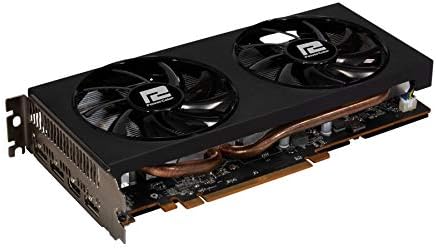
Выява: буйны план view of the PowerColor Radeon RX 5600 XT graphics card, highlighting its dual-fan cooling system and heat pipes.
4.3 Ўстаноўка драйвера
- Падключыце кабель дысплея (HDMI або DisplayPort) ад відэакарты да манітора.
- Reconnect the power cable to your computer and turn it on.
- Once your operating system loads, download the latest AMD Radeon drivers from the official AMD webсайт (www.amd.com/en/support).
- Follow the on-screen instructions to install the drivers. A restart may be required.
5. Інструкцыя па эксплуатацыі
5.1 Падключэнне дысплеяў
The PowerColor Radeon RX 5600 XT 6GB graphics card supports up to four displays simultaneously. Use the available HDMI and DisplayPort connectors to connect your monitors. Ensure your display cables are securely connected to both the graphics card and the monitor.
5.2 Software and Settings
After driver installation, you can access the AMD Radeon Software to configure various settings, including display resolution, refresh rate, gaming profiles, and performance monitoring. Refer to the AMD Radeon Software documentation for detailed instructions on using these features.
6. Тэхнічнае абслугоўванне
6.1 Ачыстка
Regularly clean your graphics card to prevent dust buildup, which can affect cooling performance. Use compressed air to gently clear dust from the fans and heatsink fins. Ensure the computer is powered off and unplugged before cleaning.
6.2 Абнаўленні драйвераў
Periodically check the official AMD website for updated graphics drivers. Keeping your drivers current ensures optimal performance, stability, and access to the latest features and bug fixes.
7. Выпраўленне непаладак
7.1 Агульныя праблемы
- Няма вываду на дысплей: Ensure the graphics card is fully seated in the PCIe slot and the 8-pin power connector is securely attached. Verify that your monitor is connected to the graphics card, not the motherboard's integrated graphics port.
- Праблемы з устаноўкай драйвераў: If you encounter problems installing drivers, try using AMD's Clean Uninstall Utility to remove any previous graphics drivers before attempting a fresh installation.
- Праблемы з прадукцыйнасцю: Ensure your drivers are up to date. Check system temperatures to rule out overheating. Verify that your power supply meets the minimum requirements for the graphics card.
- Нестабільнасць/збоі сістэмы: This can be caused by outdated drivers, insufficient power, or overheating. Ensure proper ventilation within your PC case.
For further troubleshooting or technical assistance, please refer to the support section of the PowerColor or AMD official webсайты.
8. Гарантыя і падтрымка
For detailed information regarding warranty coverage, terms, and conditions for your PowerColor Radeon RX 5600 XT 6GB graphics card, please visit the official PowerColor website. You can find support resources, FAQs, and contact information for technical assistance there.
Афіцыйны прадстаўнік PowerColor Webсайт: www.powercolor.com