
1. Уводзіны
Welcome to the user manual for your Energizer E241S+ 4G Feature Phone. This guide provides essential information on how to set up, operate, and maintain your device. The E241S+ combines the simplicity of a classic feature phone with the capabilities of a smartphone, powered by the KaiOS operating system. Enjoy 4G connectivity, Wi-Fi, and access to various applications.
2. Змесціва ўпакоўкі
Калі ласка, пастаўце галачку для наступных пунктаў:
- Energizer E241S+ Feature Phone
- Акумулятар (1900 мАг)
- Мабільны зарадная прылада
- Навушнікі
- Кіраўніцтва карыстальніка (гэты дакумент)
3. Прылада скончанаview
Familiarize yourself with the physical components of your Energizer E241S+ phone.

Малюнак 3.1: Спераду і ззаду view of the Energizer E241S+ phone. The front features the display and keypad, while the back shows the rear camera and speaker grille.
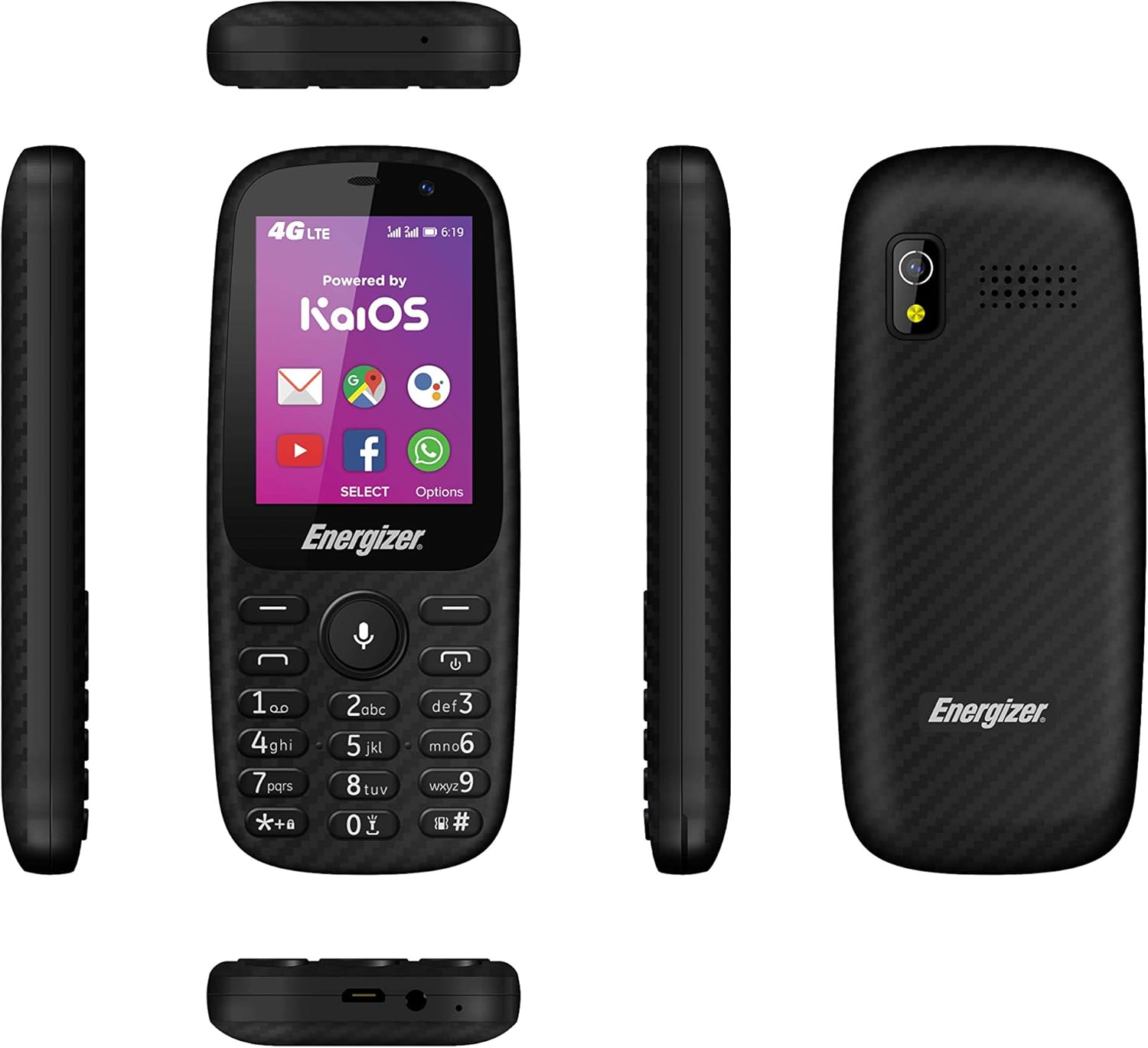
Малюнак 3.2: Various side views of the Energizer E241S+ phone, illustrating the slim profile, top-mounted ports, and bottom-mounted ports.
4. Настройка
4.1. Installing the SIM Card(s) and MicroSD Card
- Акуратна зніміце заднюю крышку тэлефона.
- Insert your Mini SIM card(s) into the designated SIM slots. The E241S+ supports dual SIM functionality.
- If desired, insert a MicroSD card (up to 128GB) into the memory card slot for expanded storage.
- Ensure all cards are seated correctly.
4.2. Устаноўка акумулятара
- Align the battery contacts with the terminals inside the phone's battery compartment.
- Gently press the battery into place.
- Устаўце заднюю крышку на месца, пераканаўшыся, што яна надзейна зашчоўкне.
4.3. Зарадка тэлефона
- Connect the Micro USB end of the charger cable to the phone's charging port.
- Падключыце другі канец зараднай прылады да разеткі.
- Allow the phone to charge fully before initial use. The battery indicator on the screen will show charging status.
5. Інструкцыя па эксплуатацыі
5.1. Уключэнне/выключэнне харчавання
- Каб уключыць: націсніце і ўтрымлівайце кнопку харчавання, пакуль не загарыцца экран.
- To power off: Press and hold the Power button, then select 'Power Off' from the options on the screen.
5.2. Здзяйсненне званкоў
- From the home screen, use the keypad to dial the desired phone number.
- Націсніце кнопку выкліку (звычайна зялёная), каб пачаць званок.
- Каб завяршыць званок, націсніце кнопку «Завяршыць званок» (звычайна чырвоная).
5.3. Адпраўка паведамленняў
- Перайдзіце ў праграму «Паведамленні» з галоўнага меню.
- Select 'New Message' or 'Create Message'.
- Увядзіце нумар тэлефона атрымальніка або выберыце яго са спісу кантактаў.
- Набярыце паведамленне з дапамогай клавіятуры.
- Націсніце «Адправіць».
5.4. Internet and Applications (KaiOS)
Your E241S+ runs on KaiOS, providing access to essential smartphone features:
- Падключэнне 4G: Access high-speed internet for browsing and app usage.
- Wi-Fi: Падключыцеся да даступных сетак Wi-Fi для доступу ў Інтэрнэт.
- KaiStore: Download and install various applications, including popular social media and communication tools.
- GPS: Utilize the built-in GPS for navigation and location services.
5.5. Функцыі камеры
The phone is equipped with both front and rear cameras, each with a flash, allowing you to capture photos and videos.
- Navigate to the 'Camera' application.
- Use the navigation keys to switch between front and rear cameras.
- Press the center key to capture a photo or start/stop video recording.
6. Тэхнічнае абслугоўванне
- Трымайце прыладу сухім. Вільгаць можа пашкодзіць электронныя схемы.
- Пазбягайце экстрэмальных тэмператур. Высокія тэмпературы могуць скараціць тэрмін службы электронных прылад і дэфармаваць або расплавіць некаторыя віды пластмас.
- Не выкарыстоўвайце агрэсіўныя хімікаты, ачышчальныя растваральнікі або моцныя мыйныя сродкі для чысткі тэлефона. Працірайце яго мяккай сухой тканінай.
- Handle the phone with care. Dropping, knocking, or shaking the device can damage internal circuit boards.
- The phone is water-resistant; however, avoid prolonged submersion or exposure to high-pressure water.
7. Выпраўленне непаладак
| праблема | Магчымае рашэнне |
|---|---|
| Тэлефон не ўключаецца | Пераканайцеся, што акумулятар правільна ўсталяваны і зараджаны. Падключыце зарадную прыладу і паспрабуйце яшчэ раз. |
| Немагчыма рабіць або прымаць званкі | Check if the SIM card is properly inserted and activated. Verify network signal strength. |
| Дрэнны тэрмін службы батарэі | Reduce screen brightness, close unused applications, or disable Wi-Fi/Bluetooth when not in use. |
| Тэлефон завісае або не рэагуе | Remove and reinsert the battery to perform a soft reset. If the issue persists, consider a factory reset (backup data first). |
| Немагчыма падключыцца да Інтэрнэту | Check 4G/Wi-Fi settings. Ensure data plan is active or Wi-Fi password is correct. |
8. Тэхнічныя характарыстыкі
| Асаблівасць | Дэталь |
|---|---|
| Марка | Энерджайзер |
| Назва мадэлі | E241S |
| Аперацыйная сістэма | KaiOS |
| АЗП | 512 Мб |
| Унутраная памяць | 1 ГБ |
| Сховішча з магчымасцю пашырэння | Да 128 ГБ (MicroSD) |
| Памер экрана | 2.4 цаляў |
| Дазвол дысплея | 320 x 240 (LCD) |
| Сотавая тэхналогія | 4G LTE |
| Сувязь | USB, Bluetooth, Wi-Fi |
| Слоты для SIM-карт | Dual SIM (Mini SIM) |
| Ёмістасць батарэі | 1900 мАг (літый-іённы) |
| Час размовы | Да 28 гадзін |
| Раз'ём для навушнікаў | 3.5 мм |
| Камеры | Front and Rear with Flash |
| GPS | так |
| Воданепранікальнасць | так |
| Памеры | 14 х 50 х 116 мм |
9. Гарантыя і падтрымка
For warranty information, customer service, and additional resources, please visit the official Energizer webсайт або звярніцеся да прадаўца.
You can also find information regarding free applications and services at: energizeyourdevice.com/customer-services/free-apps/