
1. Уводзіны
This manual provides detailed instructions for the setup, operation, and maintenance of your Explore Scientific WSX-1001 Professional WiFi 5-in-1 Weather Station. This advanced weather station is designed to provide accurate and detailed local weather data, including outdoor temperature, humidity, wind speed, wind direction, and rainfall. It features a vibrant color LCD display and WiFi connectivity for uploading data to online weather services like Weather Underground and Weathercloud.

Figure 1: Explore Scientific WSX-1001 Weather Station, showing the main display unit and the integrated 5-in-1 outdoor sensor array.
2. Змесціва ўпакоўкі
Перад пачаткам усталёўкі пераканайцеся, што ўсе кампаненты наяўныя:
- Base Station (Display Unit)
- 5-in-1 Multi-Sensor Array (for outdoor measurements)
- Mounting Material (for sensor array)
- Блок харчавання (адаптар пераменнага току)
- Кіраўніцтва карыстальніка (гэты дакумент)
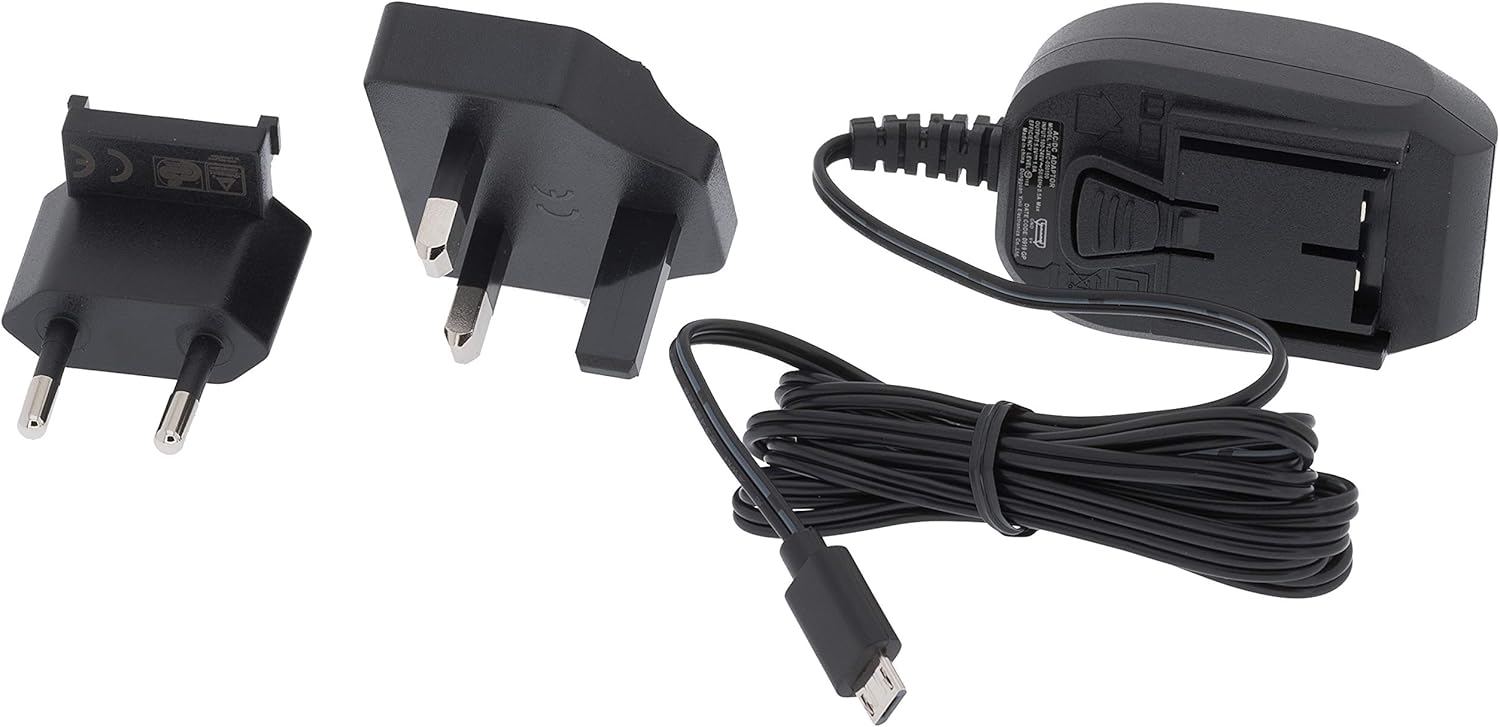
Figure 2: Included power supply and cable for the base station.
3. Інфармацыя па бяспецы
Калі ласка, прачытайце і зразумейце наступныя меры бяспекі перад выкарыстаннем прылады:
- Do not expose the base station to extreme temperatures, direct sunlight, or high humidity.
- Ensure the outdoor sensor array is mounted securely to prevent damage from wind or falling.
- Use only the specified power adapter for the base station.
- Трымайце батарэйкі ў месцах, недаступных для дзяцей. Утылізуйце выкарыстаныя батарэйкі адказна.
- Не спрабуйце рамантаваць або мадыфікаваць прыладу самастойна. Звярніцеся па дапамогу ў службу падтрымкі кліентаў.
4. Настройка
4.1. Installing the 5-in-1 Multi-Sensor Array
The 5-in-1 multi-sensor array measures wind speed, wind direction, rainfall, outdoor temperature, and humidity. For accurate readings, select an open location free from obstructions.
- Выберыце месца: Select an elevated, open area, such as a rooftop or a pole in your yard, where wind, rain, and sunlight are not obstructed.
- Assemble the Sensor: Attach the wind cups, wind vane, and mounting pole to the sensor body as per the diagrams in the quick start guide.
- Усталюйце батарэі: Open the battery compartment on the sensor array and insert 3 AAA batteries (not included). Ensure correct polarity.
- Устанавіце датчык: Use the provided mounting bracket and screws to securely attach the sensor array to a pole or flat surface. Ensure it is level for accurate rain measurements.

Figure 3: The 5-in-1 outdoor sensor array installed on a rooftop for optimal exposure.
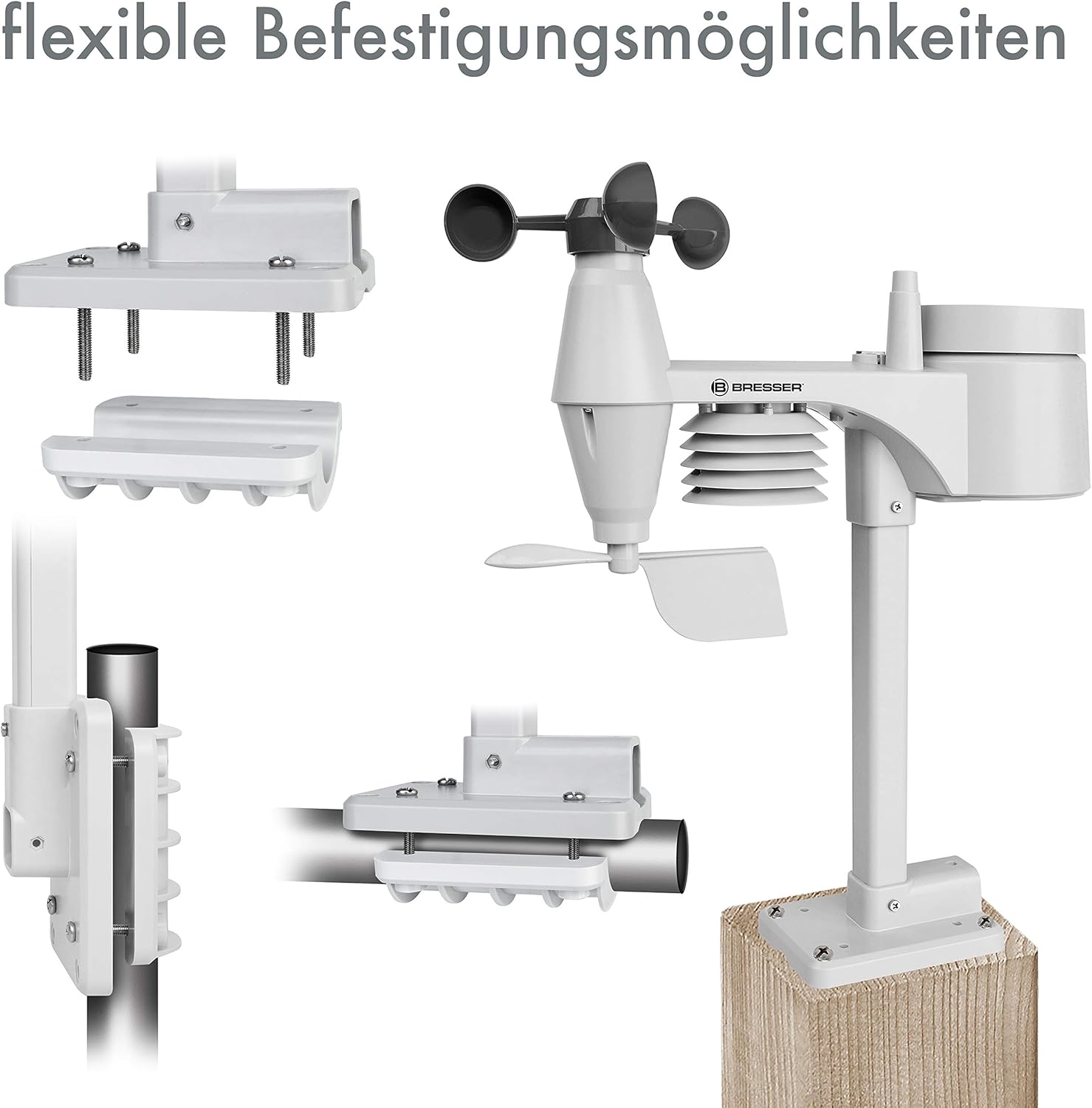
Малюнак 4: Выпamples of flexible mounting options for the outdoor sensor array.
4.2. Налада базавай станцыі
- Уключэнне: Connect the provided AC adapter to the base station and plug it into a power outlet. The display will light up.
- Optional Backup Batteries: Для ўлады нашайtage backup, insert 3 AAA batteries into the battery compartment on the back of the base station.
- Падключэнне датчыка: The base station will automatically search for and connect to the 5-in-1 multi-sensor array. This may take a few minutes. Ensure the sensor is within range.
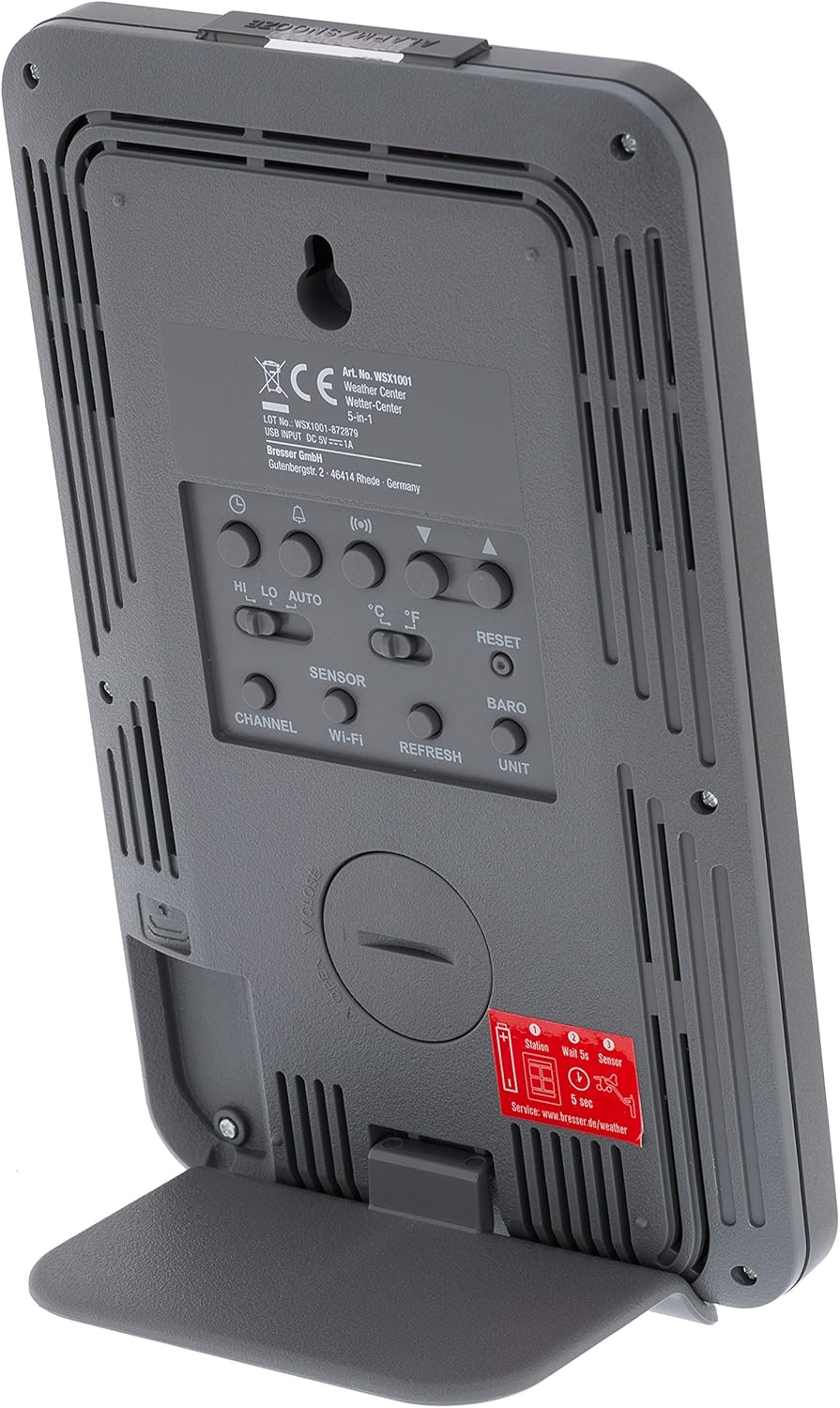
Малюнак 5: Задняя частка view of the base station, highlighting the battery compartment and control buttons.
4.3. WiFi Connection and Online Services
The WSX-1001 allows you to upload your weather data to online platforms like Weather Underground and Weathercloud.
- Access Setup Mode: Refer to the detailed instructions in the quick start guide for entering WiFi setup mode on your base station.
- Падключэнне да сеткі: Use a smartphone or computer to connect to the weather station's temporary WiFi network and configure it to join your home WiFi network.
- Рэгістрацыя онлайн: Create an account on Weather Underground (www.wunderground.com) or Weathercloud (www.weathercloud.net) and register your weather station. You will need your station ID and key.
- Загрузіць дадзеныя: Once configured, your weather station will automatically upload data to the chosen online service, allowing you to view your data remotely via their websites or mobile applications.
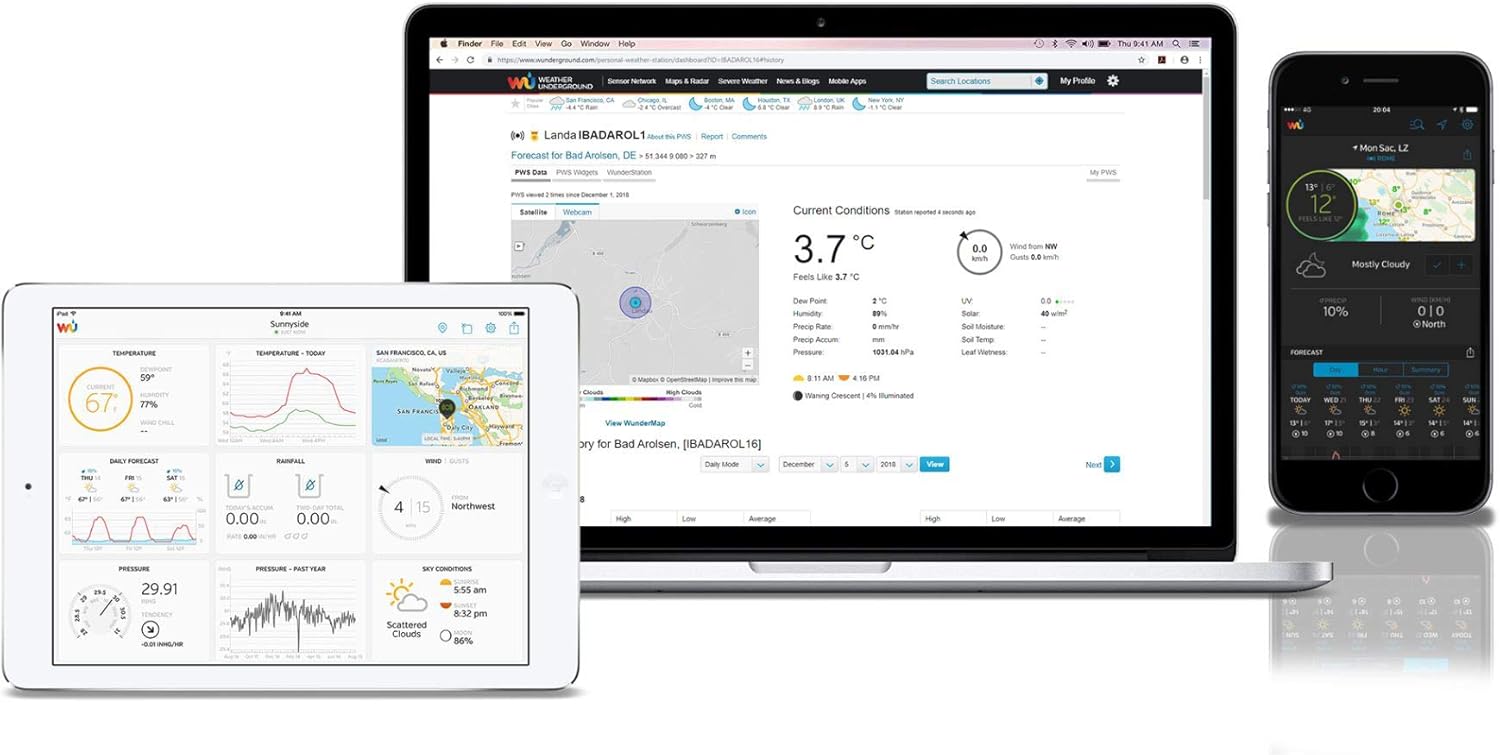
Малюнак 6: Выпample of the Weather Underground interface on different devices, displaying weather data.
5. Эксплуатацыя метэастанцыі
5.1. Адлюстраваннеview
The color LCD display provides a comprehensive overview of current weather conditions. Key areas include:
- Outdoor Readings: Temperature, humidity, and signal strength from the 5-in-1 sensor.
- Indoor Readings: Temperature and humidity measured by the base station.
- атмасферны ціск: Current atmospheric pressure with historical trend.
- Прагноз надвор'я: Graphical representation of upcoming weather conditions.
- Дадзеныя аб ветры: Wind speed (average and gust), wind direction (compass rose).
- Ападкі: Daily, weekly, monthly, and total rainfall measurements.
- Час і дата: Synchronized via WiFi.

Малюнак 7: падрабязна view of the color LCD display, showing outdoor/indoor temperature, humidity, pressure, wind, and rainfall data.
5.2. Data Interpretation and Features
- Высокія/нізкія паказчыкі: The display shows daily high and low records for temperature and humidity.
- сігналізацыя: Set customizable alarms for various weather parameters (e.g., high wind speed, low temperature).
- Каліброўка: The station supports calibration for certain measurements to fine-tune accuracy. Refer to the full manual for calibration procedures.
- Moon Phase & Sunrise/Sunset: Displays current moon phase and calculated sunrise/sunset times.
6. Тэхнічнае абслугоўванне
6.1. Замена батарэі
The outdoor sensor array requires 3 AAA batteries. It is recommended to replace these annually to ensure continuous operation, especially before winter. The base station uses 3 AAA batteries for backup power, which should also be checked periodically.
6.2. Ачыстка датчыка
Periodically inspect the outdoor sensor array for dirt, debris, or insect nests that could affect accuracy. Gently clean the rain collector funnel, wind cups, and wind vane with a soft, damp cloth. Ensure the solar panel (if present) is clean for optimal charging.
7. Выпраўленне непаладак
- Няма дысплея/харчавання: Check the AC adapter connection to the base station and the power outlet. If using backup batteries, ensure they are correctly inserted and charged.
- Няма дадзеных вонкавага датчыка: Ensure the outdoor sensor has fresh batteries and is within range of the base station. Try resetting both units.
- Няправільныя паказанні: Verify the outdoor sensor is mounted correctly and free from obstructions. Calibrate sensors if necessary (refer to the full manual).
- Праблемы з падключэннем да Wi-Fi: Ensure your home WiFi network is operational and the password is correct. Try restarting your router and the weather station.
- Data Not Uploading to Online Services: Check your internet connection. Verify your station ID and key are correctly entered in the weather station's settings and on the online service's webсайт.
8. Тэхнічныя характарыстыкі
| Асаблівасць | Спецыфікацыя |
|---|---|
| Нумар мадэлі | WSX-1001 (WSX1001CM3LC2) |
| Марка | Даследуйце Scientific |
| Тэхналогія падлучэння | Wi-Fi |
| Power Source (Base Station) | AC Adapter, 3 AAA Batteries (backup) |
| Power Source (Multi-Sensor) | 3 батарэйкі ААА |
| Памеры прадукту | 16.8 x 14.3 x 2.4 cm (Base Station) |
| Вага | 100 g (Base Station) |
| Спецыяльная функцыя | Сігналізацыя |
| Дакладнасць тэмпературы | Менш за 1 °C |
| Рэкамендуемае выкарыстанне | дадому |
9. Гарантыя і падтрымка
For warranty information and technical support, please refer to the warranty card included with your product or visit the official Explore Scientific webсайт. Захоўвайце чэк аб куплі як пацверджанне пакупкі.