
ТоЛуЛу Webкамера
ToLuLu 1080P HD WebКіраўніцтва карыстальніка cam
мадэль: Webкамера
1. Уводзіны
Thank you for choosing the ToLuLu 1080P HD Webcam. This manual provides detailed instructions for the proper setup, operation, and maintenance of your webcam. Designed for professional-quality video calls, recording, conferencing, and gaming, this webcam delivers crisp images and clear video at 30 frames per second. It features automatic light correction, HDR technology, and a built-in noise-reduction microphone to ensure optimal performance in various lighting conditions.
2. Што ў скрынцы
- ToLuLu 1080P HD Webкамера
- Кіраўніцтва карыстальніка
- Палітыка прыватнасці
- Штатыў
3. Прадукт скончыўсяview
The ToLuLu 1080P HD Webcam is equipped with a full HD glass lens and an integrated digital stereo microphone. It features a flexible clip for mounting on various displays and a standard tripod thread for the included tripod stand. A privacy cover is also provided for enhanced security.

Image 3.1: ToLuLu 1080P Webcam with included privacy cover and tripod.

Малюнак 3.2: Webcam with privacy cover and tripod stand. The privacy cover can be closed when the webкамера не выкарыстоўваецца.
4. Інструкцыі па ўсталёўцы
- Мантаж Webкамера:
The webcam features an adjustable universal clip. You can place it securely on top of your laptop screen, desktop monitor, or any flat surface. For alternative placement, attach the webcam to the included tripod stand using the standard tripod thread at the bottom of the clip. - Падключэнне да кампутара:
Падключыце кабель USB ад webcam to an available USB port on your computer (laptop, desktop, Mac, PC). The webcam is designed for plug-and-play functionality, meaning no additional drivers are typically required for most operating systems. - Першапачатковае прызнанне:
Ваш камп'ютар павінен аўтаматычна выявіць і ўсталяваць webcam. A notification may appear indicating that the device is ready for use. - Канфігурацыя праграмнага забеспячэння:
Open your preferred video conferencing or streaming application (e.g., Zoom, Skype, OBS, YouTube, Facetime). Navigate to the video and audio settings within the application and select the "ToLuLu Webcam" as your video input device and its integrated microphone as your audio input device.

Image 4.1: Connecting the webпадключыце камеру праз USB для падключэння і налады.
5. Інструкцыя па эксплуатацыі
- Якасць відэа: The 1080P Full HD glass lens delivers clear video at 30 frames per second. The webcam features automatic light correction and HDR technology, which adjusts color and brightness for natural lighting, even in dim or poorly backlit environments.
- Якасць гуку: The built-in digital stereo microphone includes automatic noise reduction, ensuring your voice is captured clearly from up to 10 feet away.
- Шырокаэкранны View: The fixed-focus lens provides a 110-degree wide-angle view, suitable for individual use or group video conferencing.
- Пакрыццё прыватнасці: Use the included privacy cover to physically block the camera lens when not in use. This protects your privacy and prevents unauthorized access to your video feed.

Image 5.1: Comparison illustrating the clarity of the 1080P Full HD webкулачок.

Малюнак 5.2: webcam's 110-degree wide-angle view, suitable for multiple participants.
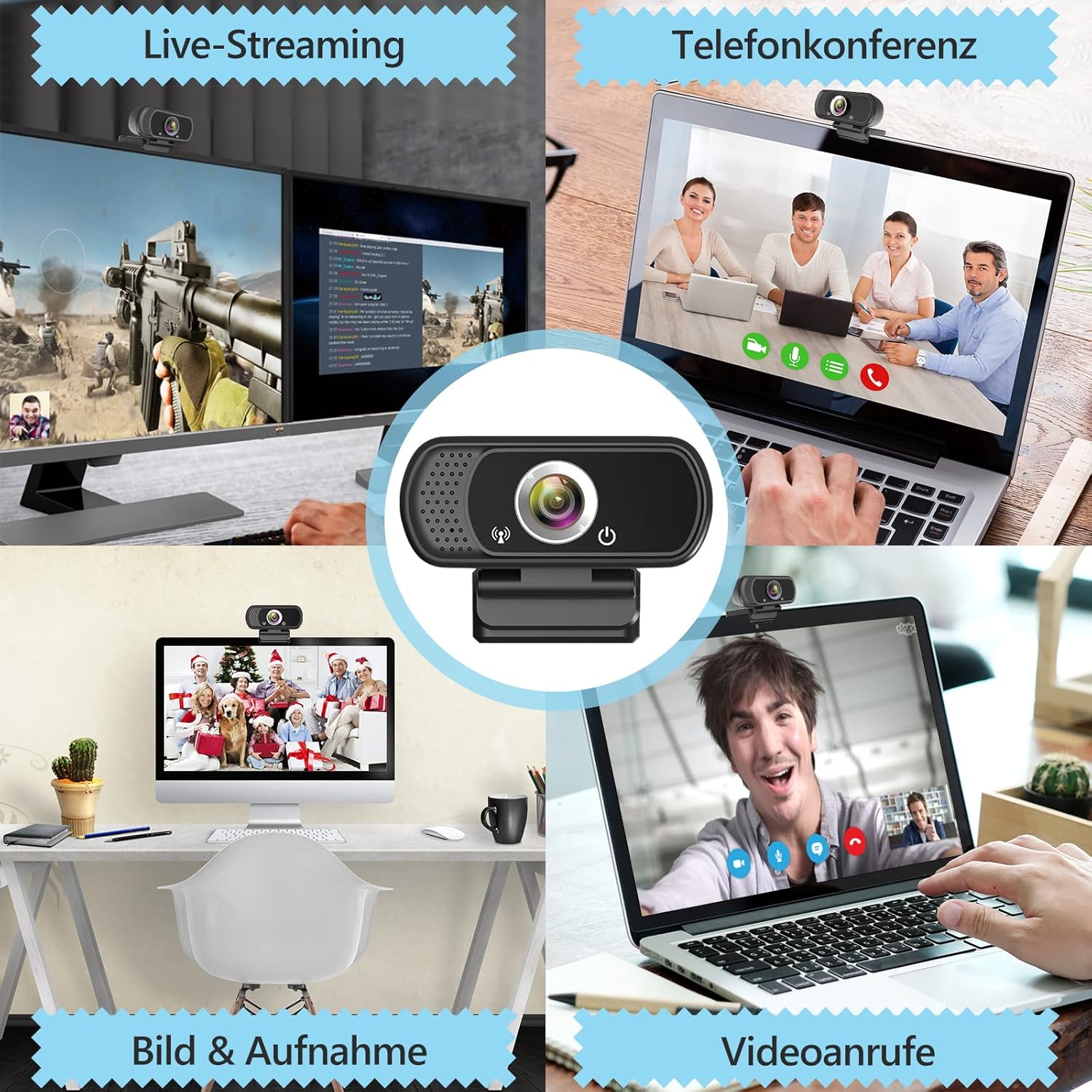
Малюнак 5.3: Прыкладampлес з webcam use in live streaming, teleconferencing, and video calls.
6. Сумяшчальнасць
The ToLuLu 1080P HD Webcam offers broad compatibility with various operating systems and applications:
- Аперацыйныя сістэмы: Windows 2000, XP, 7, 8, 10 and above; macOS 10.6 and above; Chrome OS 29.0.1547 or above; Android V5.0 or above; Smart TV.
- Hardware Platforms: Mac, PC, Laptops, Desktops, Smart TVs.
- Сумяшчальныя прыкладання: Skype, OBS, YouTube, Facebook, Twitch, Facetime, Zoom, Xbox One, Hangouts, and more.

Малюнак 6.1: webcam is compatible with multiple operating systems and popular communication platforms.
7. Тэхнічнае абслугоўванне
- Ачыстка аб'ектыва: Выкарыстоўвайце мяккую тканіну без ворса, спецыяльна распрацаваную для аптычных лінзаў, каб акуратна працерці webcam lens. Avoid abrasive materials or harsh chemicals, which can scratch or damage the lens.
- Генеральная ўборка: Працярыце цела webкулачок з мяккім, damp cloth. Ensure no moisture enters the device.
- захоўванне: Калі ён не выкарыстоўваецца, захоўвайце яго webЗахоўвайце камеру ў чыстым, сухім месцы. Выкарыстоўвайце ахоўную вечка, каб абараніць аб'ектыў ад пылу і драпін.
- Сыход за кабелем: Пазбягайце празмернага згінання або скручвання USB-кабеля, каб пазбегнуць унутраных пашкоджанняў.
8. Выпраўленне непаладак
| праблема | Магчымая прычына | Рашэнне |
|---|---|---|
| Webcam not detected / No image | USB connection issue, driver conflict, or incorrect software selection. |
|
| Дрэнная якасць выявы (размытая, цёмная, зерністая) | Insufficient lighting, dirty lens, or software settings. |
|
| Microphone not working / Poor audio quality | Microphone not selected, system audio settings, or environmental noise. |
|
| Intermittent connection issues | Loose USB connection, USB port power issues, or system resource conflicts. |
|
9. Тэхнічныя характарыстыкі
| Асаблівасць | Дэталь |
|---|---|
| Дазвол відэазахопу | 1080p Full HD (1920 x 1080) at 30fps |
| Тып аб'ектыва | Full HD Glass Lens, Fixed Focus |
| Поле в View | 110 Degrees Widescreen |
| Мікрафон | Built-in Digital Stereo Microphone with Automatic Noise Reduction |
| Карэкцыя святла | Automatic Light Correction, HDR Technology |
| Сувязь | USB Plug & Play (1.8m / 6 feet USB cable) |
| Мантаж | Adjustable Universal Clip, Tripod Ready |
| Аперацыйныя сістэмы | Windows 2000/XP/7/8/10+, macOS, Chrome OS, Android, Smart TV |
| Памеры (ДхШхВ) | 3.8 х 3.1 х 2.5 цалі |
| Вага прадмета | 6.3 унцыі |
10. Гарантыя і падтрымка
ToLuLu is committed to providing quality products and customer satisfaction.
- Палітыка вяртання: This product is eligible for return within 30 days for an exchange or refund, subject to the retailer's return policy.
- Тэхнічная падтрымка: ToLuLu offers lifetime professional technical team support for this product.
For further assistance or inquiries, please refer to the contact information provided with your purchase or visit the official ToLuLu support channels.