
1. Уводзіны
The ANCEL FX1000 is a professional vehicle diagnostic tool designed to read and clear trouble codes, view live data, and perform various special functions for a single-car manufacturer. It supports full OBD service modes and is compatible with vehicles manufactured from 1996 onwards. This manual provides detailed instructions for setting up and operating your device.
2. Асаблівасці прадукту
- Full OBDII Service Modes: Supports 8 OBDII service modes for comprehensive diagnostics.
- Multi-System Diagnostics: Capable of diagnosing all major vehicle systems including Engine, Transmission, SRS (Supplemental Restraint System), SAS (Steering Angle Sensor), TPMS (Tire Pressure Monitoring System), ABS (Anti-lock Braking System), and more.
- Спецыяльныя функцыі: Includes advanced functions such as DPF (Diesel Particulate Filter) Regeneration, Battery Replacement, ABS Bleeding, Oil Service Reset, EPB (Electronic Parking Brake) Reset, and Throttle Position Adaption.
- Падтрымка некалькіх моў: Supports 7 languages: English, French, Spanish, German, Russian, Polish, and Portuguese.
- Manufacturer-Specific Tool: Designed for a single-car manufacturer, allowing in-depth diagnostics for a specific brand's vehicle series.
- Lifetime Free Online Updates: Забяспечвае, каб ваша прылада заўсёды мела найноўшае праграмнае забеспячэнне і пакрыццё транспартных сродкаў.
3. Змесціва ўпакоўкі
Your ANCEL FX1000 package should include the following items:
- ANCEL FX1000 Diagnostic Tool
- OBDII Connection Cable
- Micro USB Cable (for PC connection and updates)
- Спампаваць кіраўніцтва
- Кейс Hard Shell
4. Схема прылады
Familiarize yourself with the buttons and ports on your ANCEL FX1000 device for optimal operation.

Image: ANCEL FX1000 device showing LCD display, Return button, Scroll Left/Right/Up/Down buttons, Fn button, and Ok button. Dimensions are also indicated.
- ВК-дысплей: Shows diagnostic information and menu options.
- Кнопка вяртання: Вяртанне да папярэдняга экрана або меню.
- Scroll Buttons (Up/Down/Left/Right): Выкарыстоўваецца для навігацыі па меню і выбару опцый.
- Кнопка Fn: Function button, may have context-specific uses.
- Кнопка ОК: Пацвярджае выбар або пераходзіць да падменю.
- Раз'ём OBDII: Connects the device to the vehicle's OBDII port.
- Порт USB: For connecting to a computer for software updates.
5. Налада і падключэнне
Follow these steps to connect your ANCEL FX1000 to your vehicle:
- Locate your vehicle's OBDII port. This is typically found under the dashboard on the driver's side.
- Ensure the vehicle's ignition is ON, but the engine is NOT running. For push-button start vehicles, press the start button until all dashboard lights illuminate without starting the engine.
- Plug the OBDII connector from the ANCEL FX1000 into your vehicle's OBDII port. The device will power on automatically.
- Once powered on, the device is ready for use.
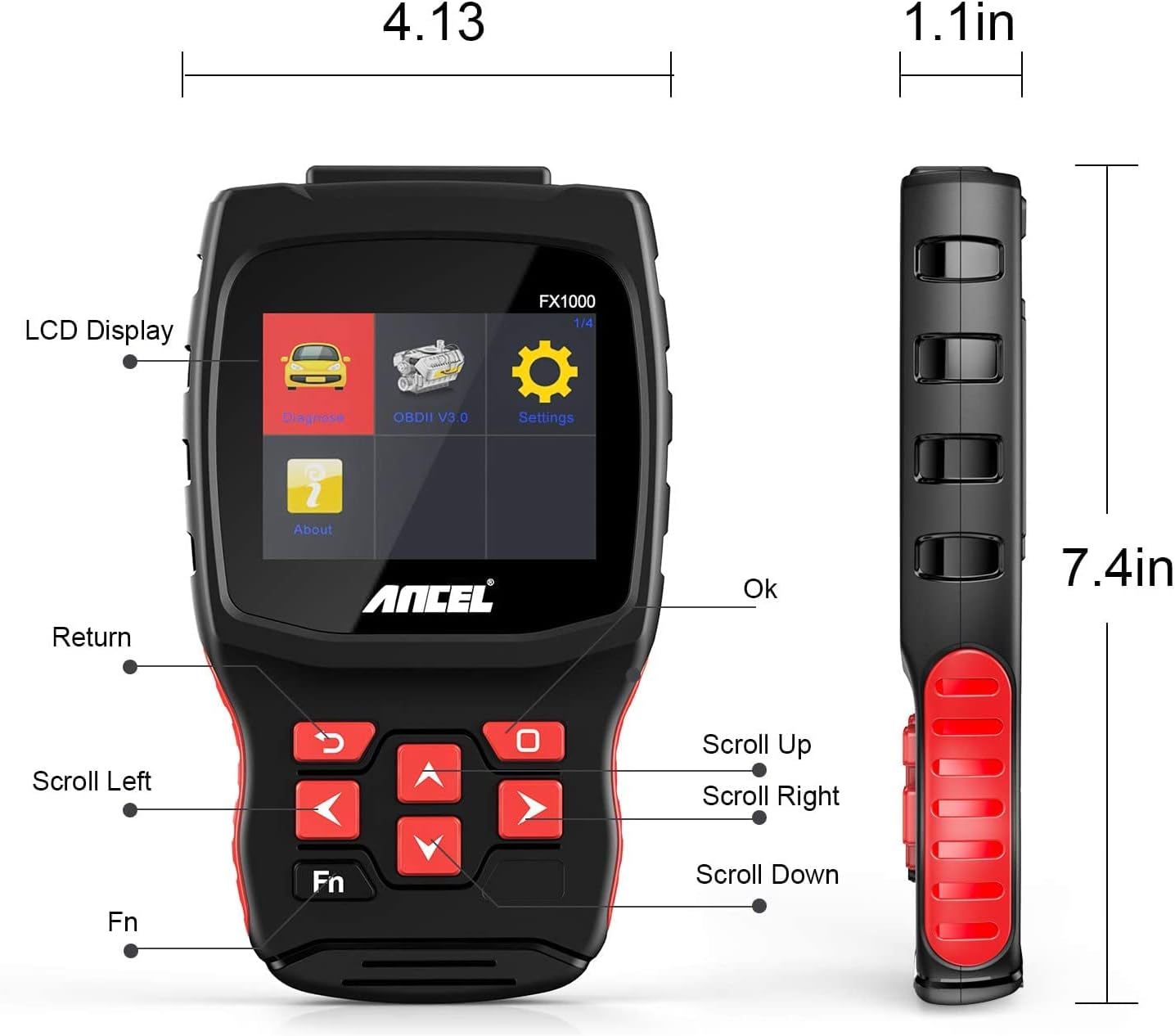
Image: A hand holding the ANCEL FX1000 connected to a vehicle's OBDII port, with the car's dashboard visible.
6. Навігацыя і налады
The ANCEL FX1000 features a user-friendly interface. Use the arrow buttons to navigate and the OK button to select.
- Дыягназ: Access vehicle-specific diagnostic functions.
- OBDII V3.0: Access general OBDII functions for all compatible vehicles.
- Налады: Configure device preferences.
- Аб: View device information such as serial number, firmware version, and software version.
Параметры меню налад:
- мова: Змяніць мову дысплея.
- Адзінка вымярэння: Пераключайцеся паміж градусамі Цэльсія і Фарэнгейта для паказанняў тэмпературы.
- Гукавы сігнал: Enable or disable audible feedback.
- запіс: View recorded diagnostic data.
- Тэст кнопкі: Test the functionality of the device buttons.
- LCD Test: Test the LCD display.
7. Дыягностыка сістэмы
The ANCEL FX1000 allows you to perform in-depth diagnostics on various vehicle systems. After selecting 'Diagnose' and your vehicle's manufacturer (e.g., Toyota), you can choose specific systems.
Image: Visual representation of systems diagnosed by FX1000, including Engine, ABS, TPMS, Transmission, Oil Service, Airbag, Battery, Audio, and Headlight Activate.
Дыягнастычныя функцыі:
- Read Trouble Code: Retrieves current, pending, and history Diagnostic Trouble Codes (DTCs).
- Clear Trouble Code: Erases DTCs from the vehicle's computer.
- Чытаць паток дадзеных: Displays real-time data parameters from the vehicle's sensors.
- Актыўны тэст: Allows bidirectional control to test specific components.
- Спецыяльныя функцыі: Accesses advanced maintenance and service functions.
8. Спецыяльныя функцыі
The ANCEL FX1000 offers several special functions for vehicle maintenance:

Image: Visual representation of special functions including Oil Service Reset, ABS Bleeding, TPMS Reset, and EPB Reset.
- Oil Service Reset: Скідае індыкатар замены алею пасля яго замены.
- Крывацёк з АБС: Выконвае функцыі прапампоўкі антыблакіровачнай тармазной сістэмы.
- Скід EPB: Resets the Electronic Parking Brake system.
- Throttle Position Adaption: Adapts the throttle position sensor.
- Рэгенерацыя DPF: Initiates the regeneration process for the Diesel Particulate Filter.
- Замена батарэі: Registers new battery replacements.
9. OBDII Functions (General)
The 'OBDII V3.0' menu provides general diagnostic functions compatible with all OBDII-compliant vehicles (1996 and newer).
- Read Current Trouble Code: Displays active DTCs.
- Clear Trouble Code: Erases all stored DTCs.
- Read Current Data: View live sensor data.
- Read Pending Trouble Code: Displays DTCs that have not yet fully matured.
- Read Freeze Frame Data: Shows a snapshot of vehicle conditions when a DTC was set.
- Readiness Tests: Checks the status of emission-related monitors.
Readiness Test:
The Readiness Test is crucial for emissions inspections. It indicates whether various emission control systems have completed their self-tests. Look for 'Complete' or 'Supported' status for all monitors. If a monitor shows 'Not Complete' or 'Not Supported', it may indicate an issue or that the drive cycle has not been completed.
10. Clearing Trouble Codes
To clear trouble codes, navigate to the 'Clear Trouble Code' option within the relevant diagnostic menu. The device will prompt you to confirm. After clearing, it is recommended to cycle the vehicle's ignition off and on to ensure all related warning lights are reset.
Note: The ANCEL FX1000 can only read and clear SRS error codes; it does NOT support SRS reset functions.
11. Абнаўленне праграмнага забеспячэння
To ensure your ANCEL FX1000 has the latest vehicle coverage and features, regular software updates are recommended. The device offers lifetime free online updates.
- Connect the device to your computer using the provided Micro USB cable.
- Follow the instructions in the 'Download Guide' included in your package to install the update software on your computer.
- Register your device using the serial number and your email address.
- Select the specific car manufacturer software you need for your device.
- Perform the update as prompted by the software.

Image: ANCEL FX1000 connected via USB cable to a laptop, illustrating the update process.
12. Выпраўленне непаладак
If you encounter issues while using your ANCEL FX1000, refer to the following common scenarios:
-
Звязаныя дакументы - FX1000

Кіраўніцтва па ліквідацыі непаладак выкарыстання, абнаўлення і зваротнай сувязі ANCEL AD410
Падрабязнае кіраўніцтва з падрабязным апісаннем распаўсюджаных праблем, якія ўзнікаюць пры выкарыстанні аўтамабільнага дыягнастычнага сканера ANCEL AD410, ахоплівае выкарыстанне, абнаўленне праграмнага забеспячэння і апрацоўку дадзеных зваротнай сувязі, а таксама рашэнні і крокі па ліквідацыі непаладак.
Кіраўніцтва карыстальніка лічбавага счытвальніка OBD2-кодаў Innova 3100C
Падрабязнае кіраўніцтва карыстальніка для лічбавага счытвальніка кодаў няспраўнасцей OBD2 Innova 3100C, якое змяшчае інструкцыі па дыягностыцы аўтамабіля, ліквідацыі непаладак і разуменні дыягнастычных кодаў няспраўнасцей для аўтамабіляў 1996 года выпуску і навейшых, сумяшчальных з OBD II.
ANCEL FX2000 User Manual: Automotive OBD II Diagnostic Tool Guide
Comprehensive user manual for the ANCEL FX2000 automotive OBD II diagnostic scanner. Learn about its features, connection, diagnosis, registration, and troubleshooting for vehicle maintenance.
ANCEL AD310 Firmware Update Guide: Step-by-Step Instructions
This guide provides clear, step-by-step instructions for updating the firmware of your ANCEL AD310 OBD II scanner. Learn how to download, decompress, install drivers, and perform the update process for your vehicle diagnostic tool.
ANCEL BD200 OBD2 Bluetooth Scanner User Manual
Comprehensive user manual for the ANCEL BD200 OBD2 Bluetooth scanner, detailing setup, operation, app connection, and diagnostic features for iPhone and Android devices.
Кіраўніцтва па ліквідацыі непаладак для сканера кодаў MOTOPOWER MP69033 OBD2
Поўнае кіраўніцтва па ліквідацыі непаладак для сканера OBD2-кодаў MOTOPOWER MP69033, якое ахоплівае распаўсюджаныя праблемы, такія як праблемы з падключэннем, неўключэнне сканера, памылкі счытвання VIN-кода і сумяшчальнасць з станам акумулятара аўтамабіля. Змяшчае пакрокавыя рашэнні і кантактную інфармацыю для падтрымкі.Ask a question about this manual
Ask about setup, troubleshooting, compatibility, parts, safety, or missing instructions. Manuals+ will review the question and use this page’s manual context to help answer it.