
1. Уводзіны
Дзякуй за пакупкуasing the Media Tech MT-3333 3-in-1 Home Theater System. This manual provides essential information for the safe and efficient operation of your new audio system. Please read it thoroughly before use and retain it for future reference.
Змест пакета:
- 1 x Media Tech MT-3333 Subwoofer Unit
- 3 сатэлітных дынамікаў
- 1 х пульт дыстанцыйнага кіравання
- 1 x Audio/Video Cable
- 1 х Кіраўніцтва карыстальніка
- 1 х аптычны кабель

Малюнак 1.1: Спераду view of the Media Tech MT-3333 Home Theater System, showing the central subwoofer unit and two tall satellite speakers, along with a smaller center speaker.
2. Інструкцыі па тэхніцы бяспекі
Каб забяспечыць бяспечную працу і пазбегнуць пашкоджанняў, калі ласка, выконвайце наступныя меры бяспекі:
- Крыніца харчавання: Connect the system only to a power outlet with the specified voltage (AC220-240V 50Hz).
- Вентыляцыя: Ensure adequate ventilation around the subwoofer and speakers. Do not block any ventilation openings.
- Вада і вільгаць: Do not expose the system to rain, moisture, or dripping/splashing liquids. Do not place objects filled with liquids, such as vases, on the apparatus.
- Крыніцы цяпла: Трымайце сістэму далей ад крыніц цяпла, такіх як радыятары, абагравальнікі, пліты або іншыя прыборы (у тым ліку ampLifiers), якія вырабляюць цяпло.
- Размяшчэнне: Place the system on a stable, flat surface. Avoid placing it in direct sunlight or in areas with excessive dust or vibrations.
- Уборка: Unplug the system from the power outlet before cleaning. Use a dry cloth only.
- Абслугоўванне: Не спрабуйце самастойна абслугоўваць гэты прадукт. Звярніцеся да ўсіх абслугоўванняў кваліфікаванага абслуговага персаналу.
- дзеці: Трымайце ўпаковачныя матэрыялы і дробныя дэталі ў месцах, недаступных для дзяцей.
3. Настройка
Follow these steps to set up your home theater system:
3.1 Распакаванне
- Акуратна дастаньце ўсе кампаненты з упакоўкі.
- Check that all items listed in the "Package Contents" section are present.
- Захавайце ўпакоўку для будучай транспарціроўкі або захоўвання.
Падключэнне дынамікаў 3.2
Connect the satellite speakers to the corresponding output ports on the rear of the subwoofer unit. Ensure correct polarity (positive to positive, negative to negative) for optimal sound quality.
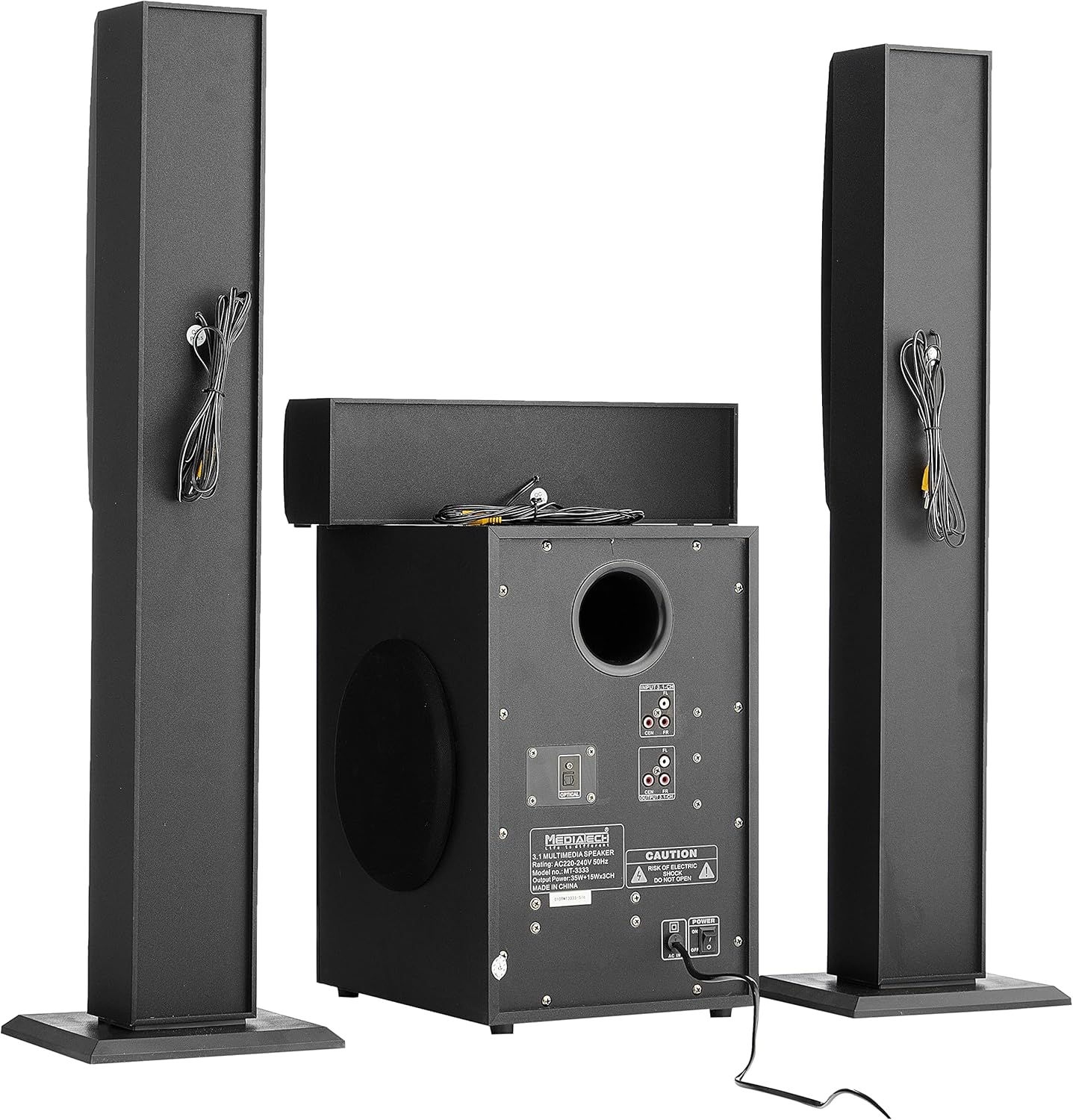
Малюнак 3.1: Задняя частка view of the system, illustrating the subwoofer and satellite speakers connected via cables.
3.3 Падключэнне крыніц гуку
The MT-3333 offers multiple input options. Choose the appropriate connection for your audio source:
- Аптычны ўваход: For high-quality digital audio from TVs, game consoles, or Blu-ray players. Connect an optical cable from your source to the OPTICAL port on the subwoofer.
- AUX (MP3) Input: For connecting devices with a 3.5mm audio output (e.g., smartphones, tablets, laptops). Use the provided audio cable to connect to the MP3/AUX port.
- USB ўвод: Устаўце USB-назапашвальнік з аўдыя files у порт USB.
- Уваход SD карты: Insert an SD memory card containing audio files у слот для SD-карты.
- Bluetooth: For wireless audio streaming from Bluetooth-enabled devices. (Refer to Section 4.3 for pairing instructions).

Малюнак 3.2: падрабязна view of the subwoofer's rear panel, highlighting the various input and output connections, including the Optical port and 3.1-channel audio inputs/outputs.
3.4 Падключэнне харчавання
- Пераканайцеся, што ўсе гукавыя злучэнні надзейныя.
- Connect the power cord to the AC IN port on the rear of the subwoofer.
- Plug the two-pin power plug into a suitable wall outlet.
4. Інструкцыя па эксплуатацыі
4.1 Уключэнне/выключэнне
Locate the power switch on the rear panel of the subwoofer. Flip it to the "ON" position to power on the system. Flip it to "OFF" to power off. You can also use the power button on the remote control or the front panel of the subwoofer.
4.2 Выбар уводу
Press the "MODE" button on the remote control or the front panel to cycle through available input sources: Bluetooth, USB, SD, AUX, and Optical.
4.3 Спалучэнне па Bluetooth
- Switch the system to Bluetooth mode using the "MODE" button. The display will indicate "BT".
- Уключыце Bluetooth на мабільнай прыладзе або камп'ютары.
- Пошук available devices and select "MT-3333" from the list.
- Once paired, you can stream audio wirelessly to the system.
4.4 Volume, Bass, and Treble Control
- Аб'ём: Use the "VOL+" and "VOL-" buttons on the remote or the main volume knob on the subwoofer to adjust the overall volume.
- Бас: Use the "BASS+" and "BASS-" buttons on the remote to adjust the bass level.
- Высокія частоты: Use the "TRE+" and "TRE-" buttons on the remote to adjust the treble level.
4.5 Функцыі дыстанцыйнага кіравання
The remote control provides full functionality for your MT-3333 system:

Figure 4.1: The remote control for the Media Tech MT-3333, showing buttons for power, input selection (USB, SD, BT, AUX, OPTICAL), volume, bass, treble, equalizer presets (EQ1-EQ4), and media playback controls.
- Кнопка харчавання (чырвоная): Уключае або выключае сістэму.
- Input Selection (USB, SD, BT, AUX, DIS, LED): Selects the desired audio source. 'DIS' might refer to display or another input. 'LED' controls lighting.
- Volume Control (VOL+, VOL-): Рэгулюе галоўную гучнасць.
- Bass Control (BASS+, BASS-): Adjusts the bass output.
- Treble Control (TRE+, TRE-): Adjusts the treble output.
- EQ (EQ1-EQ4): Selects preset equalizer modes.
- Media Playback Controls (Play/Pause, Next, Previous, Repeat): For USB/SD card playback.
- Адключэнне гуку: Адключае гук.
- Лічбавая клавіятура (0-9): For direct track selection on USB/SD.
- Lighting Control (LED): Activates or adjusts any integrated lighting features.
5. Тэхнічнае абслугоўванне
Proper maintenance ensures the longevity and optimal performance of your home theater system.
5.1 Ачыстка
- Заўсёды адключайце сістэму ад электрычнай разеткі перад чысткай.
- Use a soft, dry cloth to wipe the surfaces of the subwoofer and speakers.
- Не выкарыстоўвайце вадкія ачышчальнікі, аэразолі або абразіўныя ачышчальнікі, бо яны могуць пашкодзіць пакрыццё або ўнутраныя кампаненты.
- Use a soft brush or compressed air to gently clean dust from speaker grilles and ventilation openings.
5.2 Захоўванне
Калі вы плануеце захоўваць сістэму працяглы час:
- Адключыце ўсе кабелі і шнуры харчавання.
- Store the system in a cool, dry place, away from direct sunlight and extreme temperatures.
- If possible, use the original packaging to protect the components from dust and physical damage.
6. Выпраўленне непаладак
If you encounter any issues with your Media Tech MT-3333, refer to the following table for common problems and solutions.
| праблема | Магчымая прычына | Рашэнне |
|---|---|---|
| Няма ўлады | Power cord not connected; Power switch off; Wall outlet faulty | Ensure power cord is securely plugged in; Turn power switch ON; Test wall outlet with another device. |
| Няма гуку | Incorrect input selected; Volume too low; Speaker cables loose; Mute function active | Press MODE to select correct input; Increase volume; Check speaker connections; Press MUTE on remote. |
| Дрэнная якасць гуку | Loose connections; Source audio quality low; Incorrect EQ setting | Check all cable connections; Try a different audio source; Adjust BASS/TREBLE or EQ settings. |
| Пульт дыстанцыйнага кіравання не працуе | Batteries depleted; Obstruction between remote and system; Remote not pointed correctly | Replace remote control batteries; Remove any obstructions; Point remote directly at the subwoofer's sensor. |
| Памылка спалучэння Bluetooth | System not in BT mode; Device too far; Interference | Ensure system is in BT mode; Move device closer; Turn off other Bluetooth devices nearby. |
Калі праблема не знікне пасля выкарыстання гэтых рашэнняў, звярніцеся ў службу падтрымкі кліентаў.
7. Тэхнічныя характарыстыкі
| Асаблівасць | Спецыфікацыя |
|---|---|
| Нумар мадэлі | МТ-3333 |
| Выходная магутнасць | Subwoofer: 35W, Satellite Speakers: 3 x 15W (Total 80W) |
| Памер дынаміка | Subwoofer: 6.5 inches, Satellite Speakers: 3 x 3 inches |
| Матэрыял | Wood and ABS Plastic |
| Уваходы | USB, AUX (MP3), SD Card, Bluetooth, Optical |
| Электразабеспячэнне | AC220-240V 50Hz |
| Approx. Shipping Dimensions | 76 х 26 х 21 см |
| Прыбл. Вага дастаўкі | 3.1 кг |
8. Гарантыя і падтрымка
Media Tech products are designed for reliability and performance. This product comes with a standard manufacturer's warranty against defects in materials and workmanship under normal use.
For warranty claims, technical support, or service inquiries, please refer to the contact information provided on your purchase receipt or visit the official Media Tech webсайт.
Звярніце ўвагу: The warranty may not cover damage caused by improper installation, accident, misuse, abuse, negligence, or unauthorized modification.