
Уводзіны
Thank you for choosing the Donerton P32 Smartwatch. This manual provides essential information for setting up, operating, maintaining, and troubleshooting your device. Please read it carefully to ensure optimal performance and longevity of your smartwatch.
Што ў скрынцы
- Donerton P32 Smartwatch
- Магнітны USB-кабель для зарадкі
- Кіраўніцтва карыстальніка
Кіраўніцтва па ўстаноўцы
1. Зарадка разумнага гадзінніка
Before first use, fully charge your smartwatch. Connect the magnetic charging cable to the charging contacts on the back of the watch and plug the USB end into a standard USB power adapter (not included) or a computer USB port.
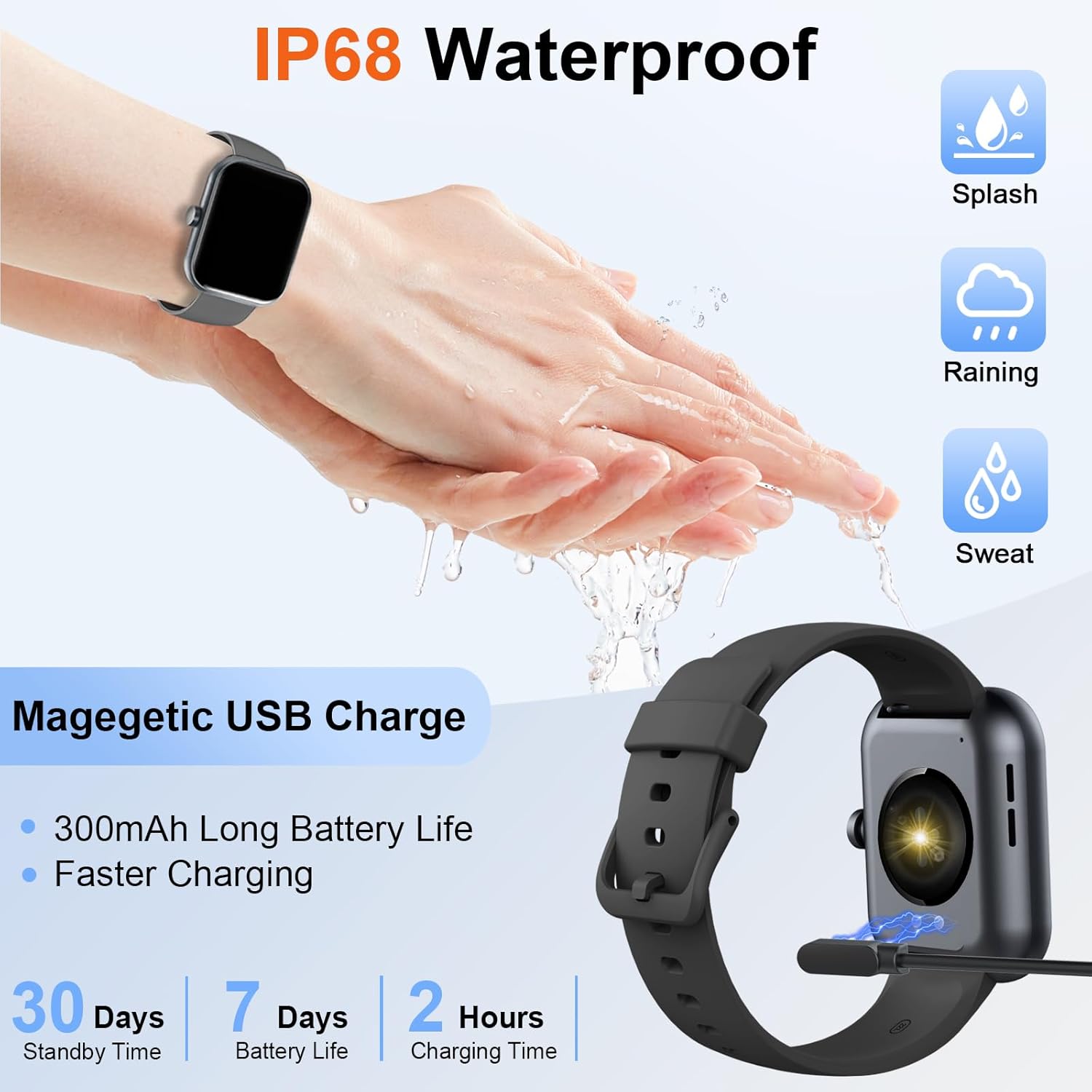
Image: The Donerton P32 Smartwatch connected to its magnetic USB charging cable, illustrating the charging process. Icons for IP68 waterproof rating and battery life are also visible.
A full charge typically takes approximately 1.5 to 2 hours. The battery indicator on the screen will show the charging status.
2. App Installation (Glory Fit)
To unlock all features and synchronize data, download the "Glory Fit" app on your smartphone. You can find it on the App Store (for iOS devices) or Google Play Store (for Android devices).
- Scan the QR code in the manual or on the watch screen (if available) to directly download the app.
- Alternatively, search for "Glory Fit" in your phone's app store.
- Install the app and grant necessary permissions for Bluetooth, notifications, and location services.
3. Спалучэнне прылады
Пераканайцеся, што на вашым смартфоне ўключаны Bluetooth.
- Open the "Glory Fit" app on your smartphone.
- Navigate to the "Device" or "Mine" section within the app.
- Tap "Add Device" or "Bind Device" and select your Donerton P32 Smartwatch from the list of available Bluetooth devices. The watch name usually appears as "P32" or similar.
- Пацвердзіце запыт на спалучэнне як на тэлефоне, так і на разумным гадзінніку.
- Пасля спалучэння гадзіннік сінхранізуе час і дадзеныя з вашым тэлефонам.
Інструкцыя па эксплуатацыі
Базавая навігацыя
- Сэнсарны экран: Правядзіце пальцам улева/управа, уверх/уніз, каб перамяшчацца па меню і функцыях. Націсніце, каб выбраць.
- Бакавая кнопка: Press to wake up the screen, return to the previous screen, or go to the main watch face.
- Адчуванне запясця: The screen will illuminate automatically when you raise your wrist.

Image: The Donerton P32 Smartwatch showcasing its main features through a series of icons, including alarm, sedentary reminder, stopwatch, calorie tracking, step counting, multiple sports modes, find phone function, and a full touch screen interface.
Асноўныя характарыстыкі
- Activity Tracking (Pedometer, Distance, Calories): The integrated high-performance motion sensor accurately records your steps, distance covered, and calories burned throughout the day. View detailed statistics in the Glory Fit app.
- Манітор сардэчнага рытму: The smartwatch continuously tracks your heart rate in real-time. This data helps you monitor your cardiovascular health and optimize workout intensity.
- Адсочванне сну: Automatically monitors your sleep duration and quality, distinguishing between light, deep, and REM sleep stages. Access comprehensive sleep analysis in the Glory Fit app to understand your sleep patterns.
- 24 спартыўных рэжымаў: Select from a variety of sports modes to track specific activities. The watch records relevant data for each mode, such as duration, calories, and heart rate.

Image: A man running outdoors, wearing the Donerton P32 Smartwatch. The image highlights the '100+ Sport Modes Fitness Tracker' feature, displaying activity tracking metrics such as steps, distance, and calories on the watch face and a smartphone screen.
- Апавяшчэнні аб паведамленнях: Receive alerts for incoming calls, SMS messages, and notifications from social media apps (Facebook, Messenger, Twitter, WhatsApp, Instagram) directly on your wrist.
- Bluetooth Call and Answer: Make and receive calls directly from your smartwatch when connected to your phone via Bluetooth.

Image: A man interacting with the Donerton P32 Smartwatch to manage a Bluetooth call. The watch screen displays options for dialing, an incoming call, call history, and contacts, demonstrating its call management capabilities.
- Прагноз надвор'я: After setting your location in the app, view current and upcoming weather conditions directly on your smartwatch.
- Будзільнік: Set alarms through the Glory Fit app to wake you up or remind you of important events.
- Кіраванне музыкай: Control music playback on your smartphone (play, pause, skip tracks) directly from your watch.
- Сядзячы напамін: The watch can remind you to move if you've been inactive for too long, promoting a healthier lifestyle.
- Секундамер і таймер: Выкарыстоўвайце ўбудаваныя функцыі секундамера і таймера для розных заняткаў.
- Знайсці тэлефон: If your phone is misplaced, use this feature on your watch to make your phone ring (if within Bluetooth range).
- Кіраванне камерай: Remotely control your smartphone's camera by shaking your wrist while the camera function is active in the app.

Image: The Donerton P32 Smartwatch interface showing a selection of its multifunctional capabilities, including weather forecasts, alarm clock settings, camera remote control, timer, flashlight, and the 'Find Phone' feature.
Тэхнічнае абслугоўванне
Воданепранікальнасць (IP68)
The Donerton P32 Smartwatch is IP68 waterproof, meaning it is resistant to daily moisture such as hand washing, bathing, and swimming. It is not necessary to remove it frequently for these activities.
Важная заўвага: Do not use the smartwatch for diving or in hot water environments like hot springs or saunas, as extreme temperatures and high-pressure water can compromise the seal and cause damage.
Уборка
- Рэгулярна працірайце экран гадзінніка і раменьчык мяккай сухой тканінай.
- Для ўстойлівых забруджванняў выкарыстоўвайце злёгку damp тканінай, а затым старанна высушыце.
- Пазбягайце выкарыстання агрэсіўных хімікатаў або абразіўных матэрыялаў, якія могуць пашкодзіць пакрыццё.
Сыход за батарэяй
- Пазбягайце частай поўнай разрадкі акумулятара.
- Charge the watch when the battery level is low.
- Захоўвайце гадзіннік у прахалодным, сухім месцы, калі ён не выкарыстоўваецца працяглы час.
Ліквідацыю непаладак
| праблема | Магчымае рашэнне |
|---|---|
| Гадзіннік не ўключаецца | Пераканайцеся, што гадзіннік цалкам зараджаны. Падключыце яго да зараднай прылады як мінімум на 10 хвілін. |
| Немагчыма спалучыцца з тэлефонам | 1. Пераканайцеся, што на вашым тэлефоне ўключаны Bluetooth. 2. Make sure the watch is within Bluetooth range. 3. Перазагрузіце гадзіннік і тэлефон. 4. Clear Bluetooth cache on your phone (if applicable). 5. Ensure the "Glory Fit" app has necessary permissions. |
| Апавяшчэнні не атрыманы | 1. Check if the watch is successfully paired with the app. 2. Ensure notification permissions are granted to the "Glory Fit" app on your phone. 3. Verify that app notifications are enabled within the "Glory Fit" app settings. 4. Пераканайцеся, што налады апавяшчэнняў вашага тэлефона дазваляюць праграме паказваць абвесткі. |
| Недакладныя дадзеныя пра здароўе | 1. Ensure the watch is worn snugly on your wrist, about one finger's width from the wrist bone. 2. Keep the sensor clean and free from sweat or dirt. 3. Звярніце ўвагу, што разумныя гадзіннікі не з'яўляюцца медыцынскімі прыладамі, і дадзеныя прыведзены толькі для даведкі. |
| Кароткі тэрмін службы батарэі | 1. Зменшце яркасць экрана. 2. Limit frequent screen wake-ups. 3. Turn off unnecessary features if not in use. 4. Пераканайцеся, што гадзіннік цалкам зараджаны. |
Тэхнічныя характарыстыкі
| Асаблівасць | Дэталь |
|---|---|
| Марка | Донертан |
| Нумар мадэлі | P32 |
| Памер экрана | 1.69 inches TFT-LCD |
| Аперацыйная сістэма | Proprietary (Compatible with Android, iOS) |
| Сувязь | Bluetooth 5.0 |
| Сумяшчальныя прылады | Smartphones with iOS 9.0+ / Android 5.0+ |
| Тып батарэі | Літый-палімерны |
| Тэрмін службы батарэі (звычайнае выкарыстанне) | Да 7 дзён |
| Час чакання | Да 30 дзён |
| Час зарадкі | Прыблізна 1.5 - 2 гадзіны |
| Воданепранікальнасць | IP68 |
| Назва праграмы | Слава Фіт |
Гарантыя і падтрымка
For warranty information and customer support, please refer to the documentation provided with your purchase or contact Donerton customer service directly. Details are typically available on the official Donerton webна сайце або праз вашага прадаўца.