
1. Уводзіны
Дзякуй за пакупкуasing the Lenco SPR-100BK Splash-Proof Bluetooth Speaker. This portable speaker delivers powerful sound with strong bass and features FM radio, USB, SD card playback, and integrated light effects. Designed for durability, it is splash-proof, making it suitable for various environments. This manual provides essential information for safe and optimal use of your device.
2. Важныя інструкцыі па бяспецы
- Не падвяргайце прыладу ўздзеянню экстрэмальных тэмператур, прамых сонечных прамянёў або высокай вільготнасці.
- Ensure the charging port cover is securely closed when near water to maintain splash-proof integrity.
- Не разбірайце і не мадыфікуйце прыладу. Звяртайцеся па ўсё абслугоўванне да кваліфікаванага персаналу.
- Выкарыстоўвайце толькі пазначаны зарадны кабель.
- Трымайце прыладу далей ад моцных магнітных палёў.
- Не кідайце прыладу і не падвяргайце яе моцным ударам.
3. Прадукт скончыўсяview
Familiarize yourself with the components of your Lenco SPR-100BK speaker.
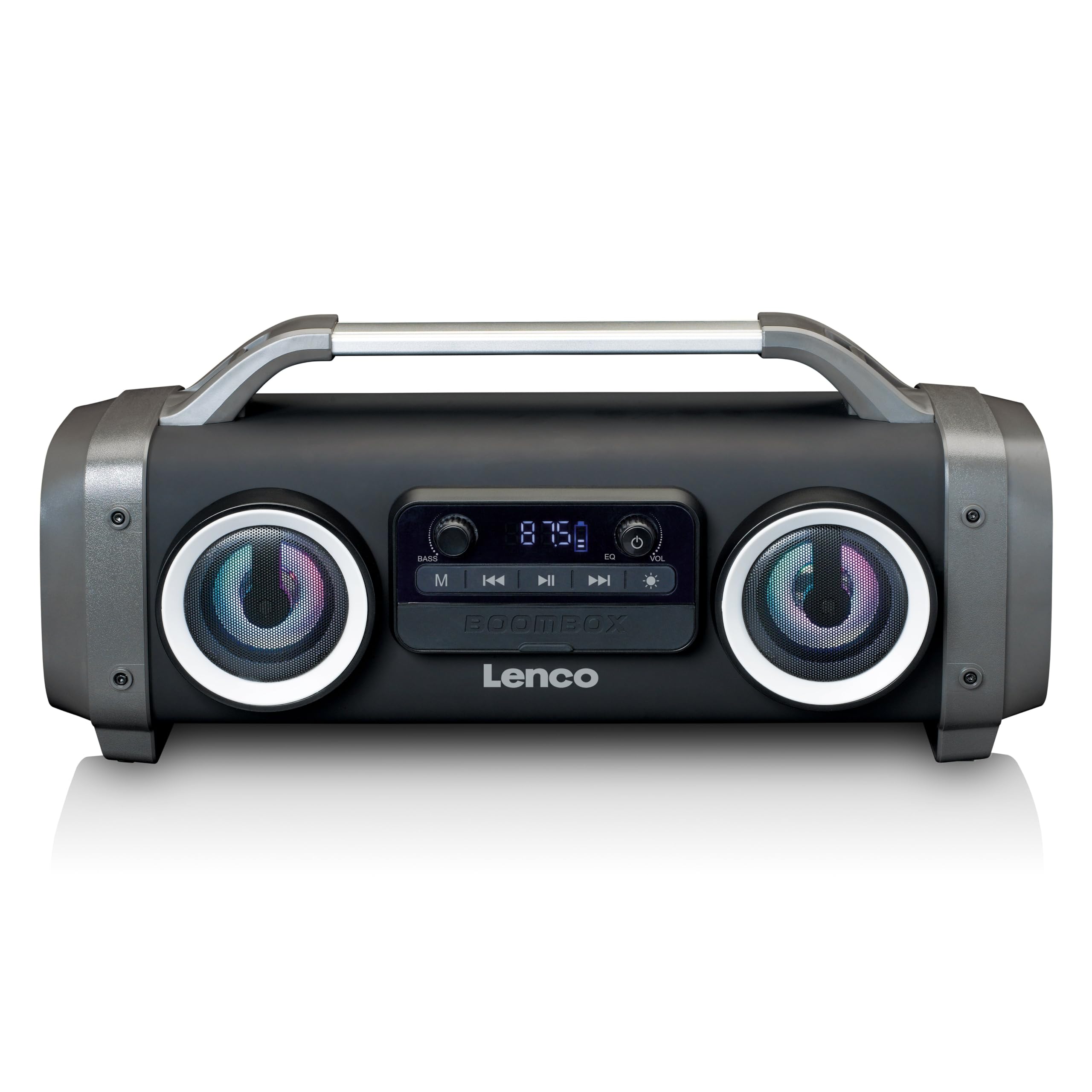
Малюнак 1: Спераду view of the Lenco SPR-100BK speaker, showing the main speaker grille, control panel, and integrated light effects.
3.1 Элементы кіравання і парты
- Кнопка харчавання: Уключае або выключае дынамік.
- Кнопка рэжыму: Switches between Bluetooth, FM Radio, USB, SD, and AUX modes.
- Кнопка прайгравання/паўзы: Прайграе або прыпыняе аўдыё.
- Ручка рэгулявання гучнасці: Рэгулюе галоўную гучнасць.
- Bass Boost Knob: Рэгулюе ўзровень баса.
- Кнопка светлавога эфекту: Cycles through or turns off light effects.
- Порт USB: Для прайгравання з USB-флэшкі.
- Слот для SD-карты: Для прайгравання з SD-карты.
- AUX-уваход (3.5 мм): Для падлучэння знешніх аўдыёпрылад.
- Charging Port (Mini USB): Для зарадкі ўнутранай батарэі.
4. Настройка
4.1 Распакаванне
Carefully remove the speaker and all accessories from the packaging. Ensure the following items are present:
- Lenco SPR-100BK Bluetooth Speaker
- USB-кабель для зарадкі
- 3.5mm Audio Cable (AUX cable)
- Кіраўніцтва карыстальніка
4.2 Зарадка акумулятара
- Locate the Mini USB charging port on the speaker.
- Падключыце зарадны кабель USB, які ўваходзіць у камплект, да зараднага порта дынаміка.
- Connect the other end of the USB cable to a compatible USB power adapter (5V/1A, not included) or a computer's USB port.
- Індыкатар зарадкі будзе гарэць, звычайна чырвоным, падчас зарадкі. Пры поўнай зарадцы ён выключыцца або зменіць колер (напрыклад, стане сінім).
- A full charge takes approximately 4-5 hours and provides up to 15 hours of playback (without light effects).
4.3 Першапачатковае ўключэнне
Націсніце і ўтрымлівайце Кнопка харчавання for a few seconds until the speaker powers on and you hear an audible prompt or see the display light up.
5. Аперацыя
5.1 Уключэнне/выключэнне сілкавання
- Каб уключыць: націсніце і ўтрымлівайце Кнопка харчавання.
- Каб выключыць: націсніце і ўтрымлівайце Кнопка харчавання зноў.
5.2 Злучэнне Bluetooth
- Уключыце дынамік. Ён аўтаматычна пяройдзе ў рэжым спалучэння Bluetooth, пра што будзе сведчыць мігценне святлодыёда.
- Уключыце Bluetooth на мабільнай прыладзе (смартфоне, планшэце і г.д.).
- Пошук даступныя прылады Bluetooth і выберыце "СПР-100БК" са спісу.
- Пасля спалучэння дынамік выдасць гук пацверджання, і святлодыёд перастане міргаць.
- Рэжым True Wireless Stereo (TWS): If you have two SPR-100BK speakers, you can pair them for stereo sound.
- Пераканайцеся, што абодва дынамікі ўключаны і знаходзяцца ў рэжыме Bluetooth.
- On one speaker (the master), press and hold the Кнопка рэжыму until you hear a TWS pairing prompt.
- The two speakers will automatically connect. Once connected, pair your device to the master speaker as described above.
5.3 FM -радыё
- Націсніце Кнопка рэжыму repeatedly until you select FM Radio mode.
- To auto-scan and save stations: Press and hold the Кнопка прайгравання/паўзы. The speaker will scan for available FM stations and save them automatically.
- To switch between saved stations: Use the Кнопкі папярэдняга/наступнага трэка (if available, otherwise it will cycle through automatically).
- Заўвага: For better FM reception, ensure the included 3.5mm audio cable is plugged into the AUX input, as it acts as an external antenna.
5.4 Прайграванне з USB/SD-карты
- Insert a USB flash drive or an SD card (with supported audio files) у адпаведны порт/слот.
- The speaker will automatically switch to USB or SD mode and begin playback. If not, press the Кнопка рэжыму каб выбраць правільную крыніцу.
- Выкарыстоўвайце Кнопка прайгравання/паўзы і Кнопкі папярэдняга/наступнага трэка каб кіраваць прайграваннем.
5.5 AUX ўваход
- Connect one end of the supplied 3.5mm audio cable to the AUX input on the speaker.
- Падключыце другі канец да раздыма для навушнікаў або аўдыёвыхаду вашай знешняй прылады.
- Націсніце Кнопка рэжыму каб выбраць рэжым AUX.
- Кіруйце прайграваннем і гучнасцю з вашай знешняй прылады.
5.6 светлавыя эфекты
Націсніце Кнопка са светлавымі эфектамі to cycle through different light modes or to turn the lights off. The speaker features 12 color light effects.
5.7 Рэгуляванне гуку
- Аб'ём: Павярнуць Ручка рэгулявання гучнасці to increase or decrease the overall sound level.
- Бас: Павярнуць Bass Boost Knob to adjust the intensity of the bass.
6. Тэхнічнае абслугоўванне
6.1 Ачыстка
Wipe the speaker with a soft, dry cloth. Do not use abrasive cleaners, waxes, or solvents. For stubborn dirt, a slightly damp cloth can be used, ensuring all port covers are sealed.
6.2 Сыход за акумулятарам
- To prolong battery life, fully charge the speaker before first use.
- Пазбягайце частай поўнай разрадкі акумулятара.
- If storing the speaker for an extended period, charge it to about 50% every few months.
6.3 Захоўванне
Захоўвайце дынамік у прахалодным, сухім месцы, удалечыні ад прамых сонечных прамянёў і экстрэмальных тэмператур.
7. Выпраўленне непаладак
| праблема | Магчымая прычына | Рашэнне |
|---|---|---|
| Дынамік не ўключаецца. | Акумулятар разраджаны. | Зараджайце дынамік з дапамогай USB-кабеля, які ўваходзіць у камплект. |
| Няма гуку. | Volume is too low; incorrect mode selected; device not connected. | Increase volume; press Mode button to select correct source; ensure Bluetooth device is paired or AUX cable is connected. |
| Збой спалучэння Bluetooth. | Дынамік не ў рэжыме спалучэння; прылада занадта далёка; перашкоды. | Ensure speaker is in Bluetooth pairing mode (flashing LED); move device closer; turn off other Bluetooth devices. |
| Слабы прыём FM-радыё. | No external antenna; weak signal. | Plug in the 3.5mm AUX cable to act as an antenna; try moving the speaker to a different location. |
| USB/SD playback not working. | Не падтрымліваецца file фармат; карта/дыск няправільна ўстаўлены; пашкоджаны files. | Забяспечыць files are in a supported format (e.g., MP3); reinsert the USB drive/SD card; try a different drive/card. |
8. Тэхнічныя характарыстыкі
| Нумар мадэлі | СПР-100БК |
| Марка | Ленка |
| Выхадная магутнасць | 25 Вт RMS |
| Сувязь | Bluetooth, USB, SD Card, 3.5mm AUX Input |
| Тып батарэі | Літый-іённы (4400 мАг) |
| Час прайгравання | Up to 15 hours (reduced with light effects) |
| Уваход для зарадкі | 5V/1A (Mini USB) |
| Асаблівасці | Splash-proof design, Integrated light effects, FM Radio, TWS function |
| Памеры (Д х Ш х У) | 60 х 60 х 85 см |
| Вага | 2 кілаграма |
Заўвага: тэхнічныя характарыстыкі могуць быць зменены без папярэдняга паведамлення.
9. Гарантыя і падтрымка
9.1 Інфармацыя аб гарантыі
This Lenco product is covered by a warranty for a period of 2 гады on parts from the date of purchase. This warranty covers manufacturing defects and workmanship under normal use. It does not cover damage caused by misuse, accidents, unauthorized modifications, or normal wear and tear.
9.2 Абнаўленне праграмнага забеспячэння
Software updates for this product are guaranteed until 13 красавіка 2030 г.
9.3 Падтрымка кліентаў
For technical assistance, warranty claims, or product inquiries, please contact Lenco customer support through their official website or the retailer where the product was purchased. Please have your model number (SPR-100BK) and proof of purchase ready.
Афіцыйны Lenco Webсайт: www.lenco.com