
1. Уводзіны
Welcome to the user manual for your Nokia 216 Dual SIM mobile phone. This guide provides essential information to help you set up, operate, and maintain your device. The Nokia 216 (RM-1187) is a classic feature phone designed for reliable communication, featuring dual SIM capability, a 2.4-inch display, and a VGA camera.
Please read this manual carefully to ensure proper use and to get the most out of your phone.
2. Змесціва ўпакоўкі
Пераканайцеся, што ўсе прадметы прысутнічаюць у камплекце з вашым прадуктам:
- Nokia 216 Dual SIM Mobile Phone (RM-1187)
- акумулятар
- Адаптар сілкавання
- Кабель USB
3. Прылада скончанаview
Familiarize yourself with the key components of your Nokia 216 phone.
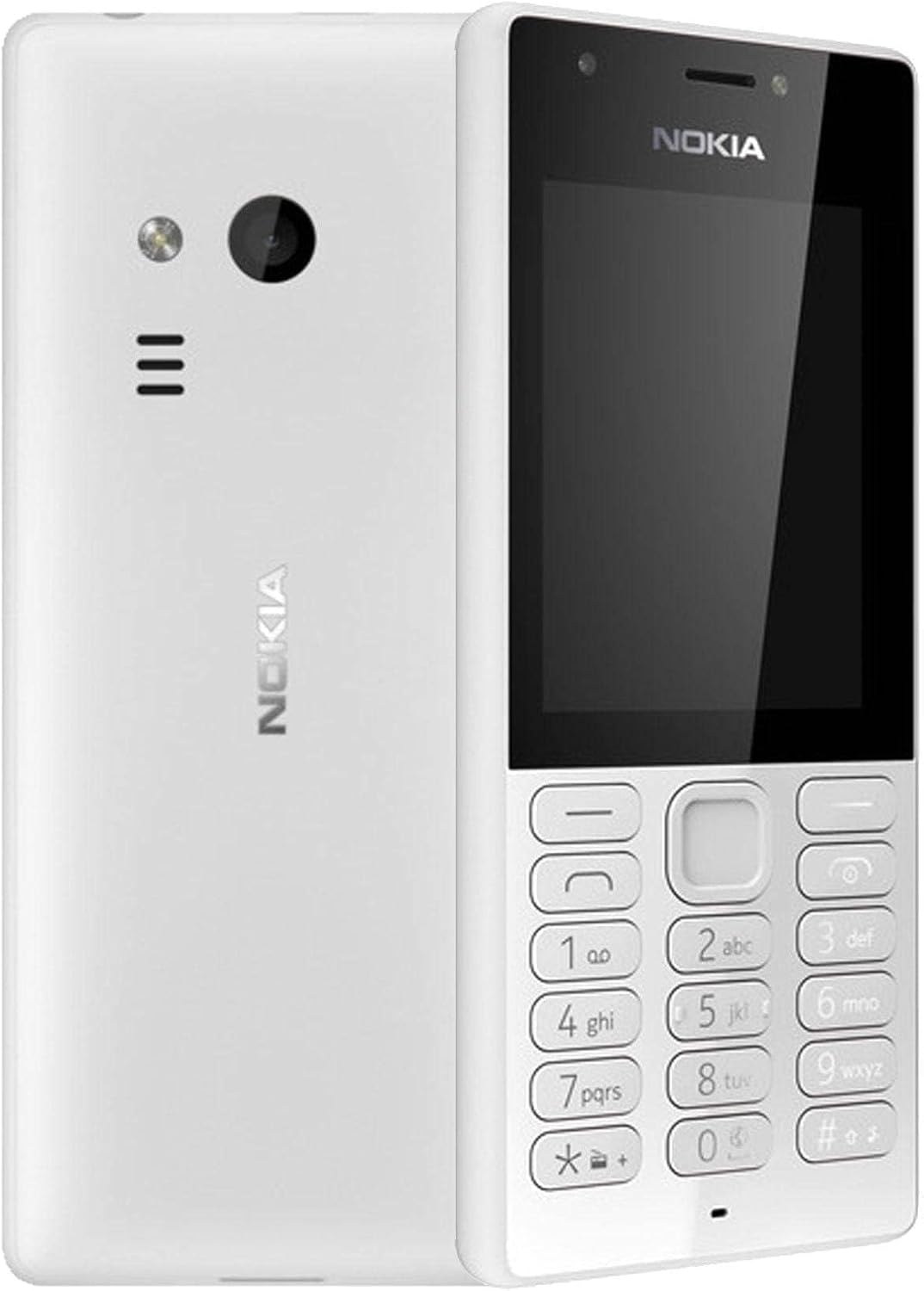
Малюнак 3.1: Спераду і ззаду view of the Nokia 216 Dual SIM mobile phone. The front shows the display, earpiece, and numeric keypad. The back features the rear camera, LED flash, and loudspeaker grille.

Малюнак 3.2: Фронт view of the Nokia 216 Dual SIM mobile phone. This image highlights the 2.4-inch display, the navigation keys, and the alphanumeric keypad for dialing and text input.

Малюнак 3.3: Назад view of the Nokia 216 Dual SIM mobile phone. This view shows the rear VGA camera lens, the LED flash, and the Nokia branding.
Ключавыя кампаненты:
- Дысплей: 2.4-inch QVGA screen.
- Клавіятура: Alphanumeric keypad for dialing and text entry, with navigation keys.
- Задняя камера: VGA camera with LED flash.
- гучнагаварыцель: For audio playback and hands-free calls.
- Мікрафон: For voice input during calls and recordings.
- 3.5 мм аўдыяраз'ём: Для навушнікаў або знешніх дынамікаў.
- Порт для зарадкі: Micro-USB port for charging and data transfer.
4. Настройка
4.1. Устаўце SIM-карту(-ы)
- Turn off the phone and disconnect any charger.
- Carefully remove the back cover by prying it open from the notch.
- Калі батарэя ўстаўлена, падніміце яе.
- Insert the SIM card(s) into the designated slot(s) with the gold contacts facing down. For dual SIM models, ensure both SIMs are correctly seated.
- If applicable, insert a microSD card into its slot for additional storage.
- Заменіце батарэю.
- Align the back cover and press it firmly until it clicks into place.
4.2. Зарадзіце акумулятар
- Падключыце адаптар сілкавання да насценнай разеткі.
- Plug the micro-USB end of the cable into the phone's charging port.
- Індыкатар батарэі на экране будзе паказваць стан зарадкі.
- Пасля поўнай зарадкі адключыце зарадную прыладу ад тэлефона, а затым ад разеткі.
5. Інструкцыя па эксплуатацыі
5.1. Уключэнне/выключэнне харчавання
- Каб уключыць: Press and hold the power key (usually the red 'End Call' key) until the phone vibrates and the Nokia logo appears.
- Каб выключыць: Press and hold the power key until the 'Power off' option appears on the screen, then select it.
5.2. Здзяйсненне званкоў
- From the home screen, enter the phone number using the numeric keypad.
- Press the green 'Call' key to initiate the call.
- To end a call, press the red 'End Call' key.
5.3. Адпраўка тэкставых паведамленняў (SMS)
- Перайсці да Меню > Паведамленні > Стварыць паведамленне.
- Набярыце паведамленне з дапамогай клавіятуры.
- Увядзіце нумар тэлефона атрымальніка або выберыце з кантактаў.
- Выберыце Адправіць.
5.4. Выкарыстанне камеры
- Перайсці да Меню > Камера.
- Скампануйце здымак з дапамогай дысплея.
- Націсніце цэнтральную навігацыйную клавішу, каб зрабіць фота.
6. Тэхнічнае абслугоўванне і догляд
To ensure the longevity and optimal performance of your Nokia 216, follow these care guidelines:
- Трымайце прыладу сухім: Вільгаць можа пашкодзіць электронныя схемы.
- Use original accessories: Only use batteries, chargers, and accessories approved by Nokia.
- Акуратна чысціце: Use a soft, clean, dry cloth to clean the surface of the device.
- Пазбягайце экстрэмальных тэмператур: Do not expose your device to very high or low temperatures.
- Асцярожна звяртацца: Не кідайце прыладу і не падвяргайце яе моцным ударам.
7. Выпраўленне непаладак
If you encounter issues with your Nokia 216, try these common troubleshooting steps:
| праблема | Рашэнне |
|---|---|
| Тэлефон не ўключаецца | Пераканайцеся, што акумулятар зараджаны. Падключыце зарадную прыладу і паспрабуйце яшчэ раз. Праверце, ці акумулятар правільна ўстаўлены. |
| Няма сігналу сеткі | Check if the SIM card is correctly inserted. Move to an area with better network coverage. Restart the phone. |
| Акумулятар не зараджаецца | Ensure the charger is properly connected to both the phone and the power outlet. Try a different power outlet or charger. Check for any damage to the charging port. |
| Немагчыма рабіць або прымаць званкі | Check network signal. Ensure your SIM card is active and has sufficient credit/plan. Verify that call barring is not enabled. |
8. Тэхнічныя характарыстыкі
| Асаблівасць | Дэталь |
|---|---|
| Марка | Nokia |
| Назва мадэлі | РМ-1187 |
| Аперацыйная сістэма | Symbian 9.1 (Series 30) |
| Памер экрана | 2.4 цаляў |
| Дазвол экрана | 240 х 320 пікселяў |
| Частата абнаўлення | 90 Гц |
| Памер усталяванай аператыўнай памяці | 256 Мб |
| Ёмістасць памяці | 3.9 GB (Internal, likely for system/apps, expandable via microSD) |
| Мадэль працэсара | A10 |
| Сотавая тэхналогія | 2G |
| Тэхналогіі бесправадной сувязі | Сотавы |
| Тэхналогіі падключэння | USB, Bluetooth, Wi-Fi |
| GPS | A-GPS |
| Primary Device User Interface | Buttons, Numeric Keypad, Microphone |
| Іншыя функцыі камеры | Rear Camera (VGA) |
| Аўдыёраз'ём | 3.5 мм |
| Формаў-фактар | Класіка |
| Колер | Шэры |
| Час размовы | Да 18 гадзін |
| Вага прадмета | 339 грамаў |
| Памеры ўпакоўкі | 13.4 х 12.6 х 3.6 см |
| Што ў скрынцы | Адаптар харчавання, кабель USB |
9. Гарантыя і падтрымка
For warranty information, please refer to the warranty card included in your product package or visit the official Nokia website. If you require further assistance or technical support, please contact Nokia customer service through their official channels.
Захоўвайце чэк аб куплі ў якасці пацверджання пакупкі для прэтэнзій па гарантыі.