
Launch CRP239
LAUNCH CRP239 PREMIUM CODE READER SCANNER User Manual
Model: CRP239
1. Уводзіны
The LAUNCH CRP239 is an intelligent and networkable automotive diagnostic tool designed for passenger cars. It offers comprehensive OBD II full functionality and rapid testing capabilities for four major vehicle systems: Engine, Automatic Transmission (A/T), Anti-lock Braking System (ABS), and Supplemental Restraint System (SRS). Additionally, the CRP239 includes advanced reset functions such as Oil Reset, Steering Angle Reset, Brake-Pad Reset, Battery Matching, Throttle Adaptation, and Diesel Particulate Filter (DPF) Regeneration, catering to the needs of professional technicians and DIY enthusiasts.
2. Інфармацыя па бяспецы
Always observe the following safety precautions when operating the LAUNCH CRP239:
- Ensure the vehicle's ignition is off before connecting or disconnecting the diagnostic tool.
- Не выкарыстоўвайце інструмент у вільготных умовах або побач з лёгкаўзгаральнымі вадкасцямі ці газамі.
- Пры працы з транспартнымі сродкамі выкарыстоўвайце адпаведныя сродкі індывідуальнай абароны, такія як ахоўныя акуляры.
- Refer to the vehicle's service manual for specific diagnostic procedures and safety warnings.
- Keep the tool away from strong magnetic fields.
- Выкарыстоўвайце толькі кабелі і аксэсуары, якія пастаўляюцца.
3. Змесціва ўпакоўкі
Праверце наяўнасць усіх прадметаў у камплекце:
- LAUNCH CRP239 Main Unit
- Дыягнастычны кабель OBD II
- Кабель USB
- Кіраўніцтва карыстальніка
- Сумка для пераноскі

Figure 3.1: Contents of the LAUNCH CRP239 package, showing the diagnostic tool, cables, and storage case.
4. Прадукт скончыўсяview
The LAUNCH CRP239 features a robust design with a 5.0-inch 720p touch screen for intuitive navigation. It includes physical buttons for common operations and a durable rubber exterior for protection.

Малюнак 4.1: Спераду view of the LAUNCH CRP239, highlighting the touch screen display and navigation buttons.
4.1. Кампаненты
- 5.0-цалевы сэнсарны экран: High-resolution display for clear data presentation and touch input.
- Кнопкі навігацыі: Directional pad, OK button, and Return button for menu navigation.
- OBD II Connector: Стандартны 16-кантактны раз'ём для сувязі з аўтамабілем.
- Порт USB: For connecting to a computer for updates or data transfer.
- Індыкатар харчавання: LED light indicating power status.
5. Настройка
Follow these steps for initial setup of your LAUNCH CRP239:
- Зарадзіць прыладу: Connect the CRP239 to a power source using the provided USB cable to ensure the internal 4000mAh lithium-polymer battery is fully charged before first use.
- Уключэнне: Націсніце і ўтрымлівайце кнопку харчавання, каб уключыць прыладу.
- Выбар мовы: On the initial setup screen, select your preferred language. The device supports multilingual operation.
- Падключэнне Wi-Fi: Navigate to the 'Settings' menu and select 'Wi-Fi'. Connect to an available wireless network to enable online updates and diagnostic report sharing.
- Абнаўленне праграмнага забеспячэння: It is recommended to perform a software update immediately after connecting to Wi-Fi to ensure you have the latest features and vehicle coverage. Navigate to the 'Update' section and follow the on-screen prompts.

Figure 5.1: The LAUNCH CRP239 with its diagnostic cable connected, ready for vehicle communication.
6. Інструкцыя па эксплуатацыі
The LAUNCH CRP239 provides a comprehensive suite of diagnostic functions. Below are instructions for common operations.
6.1. Падключэнне да аўтамабіля
- Locate the vehicle's 16-pin OBD II diagnostic port (usually under the dashboard).
- Пераканайцеся, што запальванне аўтамабіля выключана.
- Connect the OBD II diagnostic cable to the vehicle's OBD II port and to the CRP239.
- Turn the vehicle's ignition to the ON position (engine off). The CRP239 will power on automatically.
6.2. Навігацыя па галоўным меню
З галоўнага меню вы можаце атрымаць доступ да розных функцый:
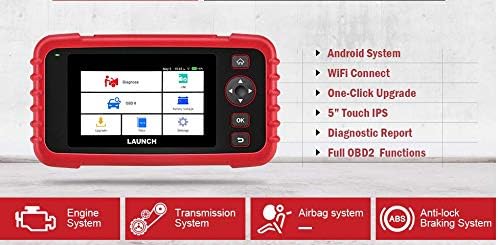
Figure 6.1: The main menu interface of the LAUNCH CRP239, providing access to all primary functions.
- Дыягназ: For full system diagnostics (Engine, A/T, ABS, SRS).
- Я/М: Readiness status for emissions.
- БД II: Standard OBD II functions (read/clear DTCs, live data, freeze frame, O2 sensor test, etc.).
- Скінуць: Access various maintenance reset functions.
- Акумулятар Voltage: Паказвае ўзровень зарада акумулятара аўтамабіля ў рэжыме рэальнага часуtage.
- Абнаўленне: For software and firmware updates via Wi-Fi.
- дадзеныя: Review saved diagnostic data and reports.
- Налады: Configure device settings such as language, Wi-Fi, and display.
6.3. Performing a Diagnostic Scan
- У галоўным меню абярыце "Дыягназ".
- The tool will attempt to automatically identify the vehicle via VIN scan. If unsuccessful, you may need to manually select the vehicle make, model, and year.
- Choose the system you wish to diagnose (e.g., Engine, Transmission, ABS, SRS).
- Выберыце "Read Fault Codes" каб view Diagnostic Trouble Codes (DTCs).
- Выберыце "Clear Fault Codes" to erase DTCs after repairs have been made. Caution: Clearing codes without addressing the underlying issue will result in the codes reappearing.
- Выберыце "Read Data Stream" каб view live sensor data.
6.4. Using Reset Functions
The CRP239 supports several common maintenance reset functions:
- Скід алею: Скідае напамін аб тэрміне службы алею пасля замены алею.
- Скід вугла павароту: Скідае датчык вугла павароту рулявога кіравання пасля выраўноўвання або замены кампанента.
- Brake-Pad Reset (EPB): Скідае налады электроннай сістэмы стаяначнага тормазу пасля замены тармазных калодак.
- Battery Matching (BMS): Registers a new battery with the vehicle's Battery Management System.
- Адаптацыя дросельнай засланкі: Relearns the throttle body position after cleaning or replacement.
- Рэгенерацыя DPF: Initiates the Diesel Particulate Filter regeneration process.
To use a reset function, select "Reset" from the main menu, then choose the desired function and follow the on-screen instructions.
6.5. Абнаўленне праграмнага забеспячэння
The CRP239 supports one-click Wi-Fi updates for software and vehicle coverage, ensuring you always have the latest diagnostic capabilities.
- Пераканайцеся, што прылада падключана да стабільнай сеткі Wi-Fi.
- У галоўным меню абярыце "Update".
- The device will check for available updates. Select the updates you wish to install and confirm.
- Allow the update process to complete without interruption. The device may restart during this process.

Figure 6.2: The update screen on the LAUNCH CRP239, showing available software updates for various vehicle brands.
6.6. Diagnostic Report Generation
The CRP239 can automatically generate diagnostic reports, which can be shared via email.
- After completing a diagnostic session, the tool will prompt you to generate a report.
- Confirm to generate the report.
- Перайдзіце да "Data" меню для view saved reports.
- Select a report and choose the option to share via email. Ensure your Wi-Fi is connected and email settings are configured in the 'Settings' menu.
7. Тэхнічнае абслугоўванне
Proper maintenance ensures the longevity and optimal performance of your LAUNCH CRP239:
- Уборка: Для чысткі прылады выкарыстоўвайце мяккую сухую тканіну. Не выкарыстоўвайце абразіўныя ачышчальнікі або растваральнікі.
- захоўванне: Захоўвайце прыладу ў чахле ў прахалодным, сухім месцы, калі яна не выкарыстоўваецца. Пазбягайце экстрэмальных тэмператур.
- Сыход за батарэяй: Charge the battery regularly, even if the device is not in frequent use, to maintain battery health. Avoid fully discharging the battery for extended periods.
- Праверка кабеля: Periodically inspect the diagnostic and USB cables for any signs of damage. Replace damaged cables immediately.
8. Выпраўленне непаладак
This section addresses common issues you might encounter with the LAUNCH CRP239.
| праблема | Магчымая прычына | Рашэнне |
|---|---|---|
| Прылада не ўключаецца. | Low battery; faulty connection to vehicle. | Charge the device fully. Ensure the OBD II cable is securely connected to both the CRP239 and the vehicle. Check vehicle's ignition is ON. |
| Cannot communicate with vehicle. | Incorrect vehicle protocol; faulty OBD II port; damaged cable. | Verify vehicle compatibility. Check the vehicle's OBD II port for power. Try a different vehicle or cable if available. Ensure vehicle ignition is ON. |
| Абнаўленне праграмнага забеспячэння не атрымалася. | Нестабільнае злучэнне з Wi-Fi; недастаткова месца для захоўвання. | Ensure a strong and stable Wi-Fi connection. Check available storage space on the device. Restart the update process. |
| Экран не рэагуе. | Праграмны збой; фізічнае пашкоджанне. | Perform a soft reset by holding the power button until the device restarts. If the issue persists, contact customer support. |
9. Тэхнічныя характарыстыкі
| Асаблівасць | Дэталь |
|---|---|
| мадэль | CRP239 (CREADER PROFESSIONAL 239) |
| Дысплей | 5.0-inch 720p Touch Screen |
| акумулятар | Літый-палімерны акумулятар ёмістасцю 4000 мАг (у камплекце) |
| Сувязь | OBD II, Wi-Fi, USB |
| Пакрыццё аўтамабіля | Domestic, Asian, European vehicles (1996 and newer OBD2) |
| Падтрымоўваныя сістэмы | Engine, Automatic Transmission (A/T), ABS, SRS |
| Спецыяльныя функцыі | Oil Reset, Steering Angle Reset, Brake-Pad Reset (EPB), Battery Matching (BMS), Throttle Adaptation, DPF Regeneration |
| Памеры | 32.4 x 25.4 x 8 см (упакоўка) |
| Вага прадмета | 560 г |
| Знешні матэрыял | Гумавая |
10. Інфармацыя аб гарантыі
The LAUNCH CRP239 comes with a standard manufacturer's warranty. For specific warranty terms and conditions, please refer to the warranty card included in your product package or visit the official Launch webсайт. Захоўвайце чэк аб куплі як пацвярджэнне пакупкі для гарантыйных прэтэнзій.
Пашыраная гарантыя можа быць даступная ад старонніх пастаўшчыкоў. НапрыкладampНа гэты прадукт кампанія Salama Care прадастаўляе пашыраную гарантыю на 1 год і 2 гады.
11. Падтрымка
For technical assistance, product inquiries, or support, please contact Launch customer service through their official website or the contact information provided in your product documentation. Ensure you have your product model number (CRP239) and serial number ready when contacting support.
Каб атрымаць дадатковыя рэсурсы, наведайце Launch Official Webсайт.