
1. Уводзіны
Thank you for choosing the Arcam SA10 Class A/B Integrated Amplifier. This manual provides essential information for setting up, operating, and maintaining your amplifier to ensure years of high-quality audio enjoyment. The SA10 is designed to deliver class-leading sound quality, bringing your music to life with its powerful 50W per channel output, high-performance ESS9016K2M Sabre DAC, and low noise floor. It offers a listening experience as close to the artist's original performance as possible.
2. Інфармацыя па бяспецы
Калі ласка, уважліва прачытайце ўсе інструкцыі па тэхніцы бяспекі перад пачаткам эксплуатацыі прылады. Захоўвайце гэтую інструкцыю для далейшага выкарыстання.
- Не падвяргайце прыладу ўздзеянню дажджу або вільгаці.
- Не блакуйце вентыляцыйныя адтуліны. Усталюйце ў адпаведнасці з інструкцыямі вытворцы.
- Не ўстанаўлівайце побач з крыніцамі цяпла, такімі як радыятары, абагравальнікі, пліты або іншыя прылады (у тым ліку ampLifiers), якія вырабляюць цяпло.
- Абараняйце сеткавы шнур ад наступання або заціскання, асабліва ў месцах вілкі, разеткі і месца выхаду з прылады.
- Выкарыстоўвайце толькі насадкі/аксэсуары, указаныя вытворцам.
- Адключайце гэты прыбор ад сеткі падчас навальніцы або калі ён не выкарыстоўваецца на працягу доўгага часу.
- Звяртайцеся да кваліфікаванага абслугоўваючага персаналу. Тэхнічнае абслугоўванне патрабуецца, калі прыбор быў пашкоджаны якім-небудзь чынам.
- Гэты прадукт змяшчае хімічныя рэчывы, якія, як вядома ў штаце Каліфорнія, выклікаюць рак і прыроджаныя дэфекты або іншыя рэпрадуктыўныя парушэнні.
3. Змесціва ўпакоўкі
Upon opening the box, please ensure all the following items are present:
- Arcam SA10 Integrated Ampзадымнік
- Шнур сілкавання
- Пульт дыстанцыйнага кіравання (з 2 батарэйкамі тыпу ААА ў камплекце)
- Кіраўніцтва карыстальніка (гэты дакумент)
4. Прадукт скончыўсяview
Familiarize yourself with the front and rear panels of your Arcam SA10 ampзадымнік.
4.1 Пярэдняя панэль
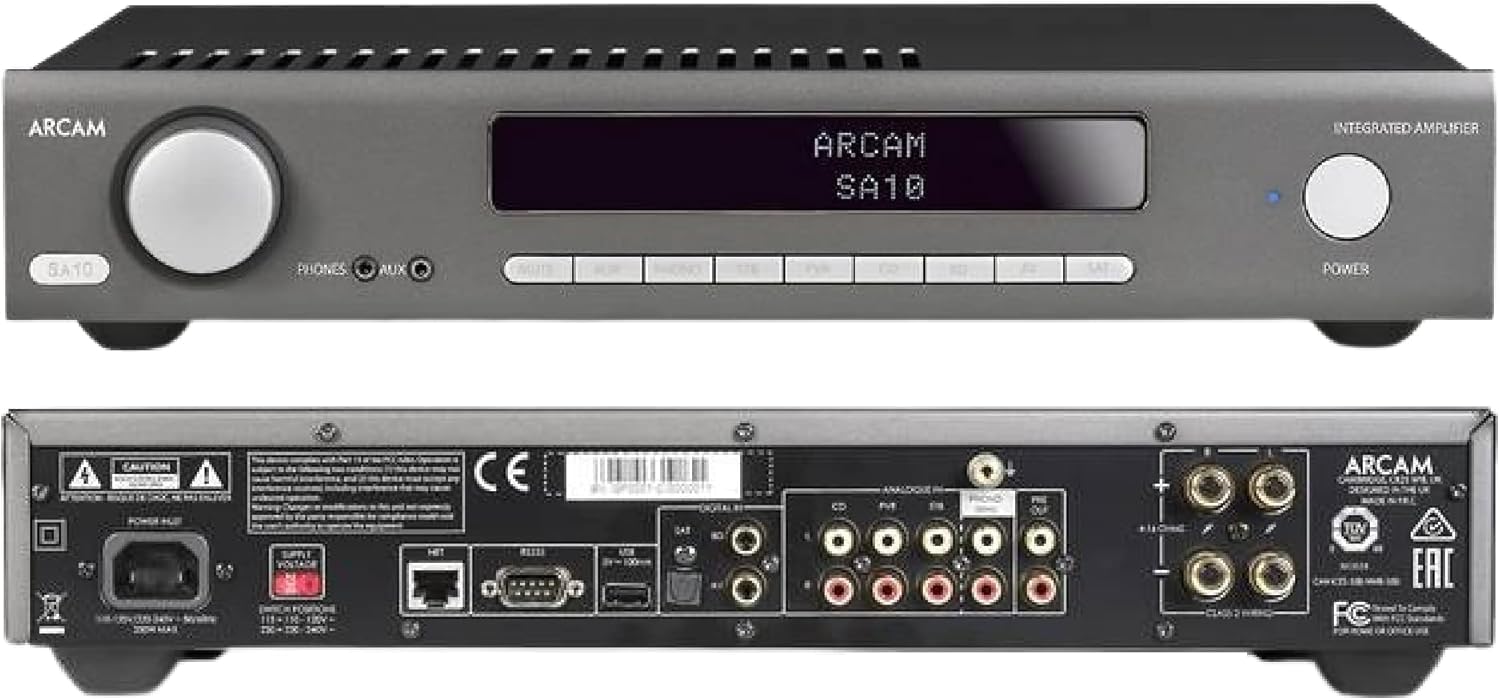
Figure 4.1: Front and Rear Panels of the Arcam SA10. The front panel features a large volume knob on the left, a display screen in the center, input selection buttons below the display, and a power button on the right. Headphone and auxiliary inputs are also present.
- Рэгулятар гучнасці: Рэгулюе агульную гучнасць выхаднога гуку.
- Экран дысплея: Паказвае бягучы ўваходны сігнал, узровень гучнасці і іншую інфармацыю аб стане.
- Кнопкі выбару ўваходнага сігналу: Allows selection between various audio sources (CD, Tuner, AV, SAT, etc.).
- Кнопка харчавання: Пераключае amplifier between standby and operational modes.
- Выхад для навушнікаў: Раз'ём 3.5 мм для падлучэння навушнікаў.
- Дапаможны ўваход: 3.5mm jack for connecting portable audio devices.
4.2 Задняя панэль
The rear panel provides all the necessary connections for your audio system.
Figure 4.2: Detailed Rear Panel Connections. This view highlights the speaker terminals, analog RCA inputs (including Phono), digital optical and coaxial inputs, and the power inlet.
- Калонкі: Connect your passive speakers (left and right channels).
- Аналагавыя ўваходы (RCA): Multiple stereo RCA inputs for connecting analog audio sources like CD players, tuners, or other line-level devices.
- Фанаканектар (RCA): Dedicated input for turntables with moving magnet (MM) cartridges.
- Лічбавыя ўходы:
- Аптычны (Toslink): For digital audio sources like TVs or game consoles.
- Кааксіяльны: For digital audio sources like CD players or network streamers.
- Pre-Out: Для падлучэння да знешняга сілкавання amplifier або актыўны сабвуфер.
- Порт USB: Для абнаўлення прашыўкі або абслугоўвання.
- Ethernet порт: For network control and future updates.
- Уваход для харчавання пераменнага току: Злучае amplifier да электрычнай сеткі.
5. Настройка
5.1 Размяшчэнне
Place the Arcam SA10 on a stable, level surface away from direct sunlight, heat sources, and excessive moisture. Ensure adequate ventilation around the unit to prevent overheating. Do not place other components directly on top of the ampзадымнік.
5.2 Падключэнне дынамікаў
Connect your passive speakers to the speaker terminals on the rear panel. Ensure correct polarity (+ to + and - to -) for both left and right channels. Use high-quality speaker cables for optimal sound performance.
5.3 Падключэнне аўдыёкрыніц

Figure 5.3: The Arcam SA10 offers convenient connections including Toslink optical, two digital coaxial inputs, and three stereo analog RCA inputs, plus a dedicated phono input.
- Аналагавыя крыніцы: Connect CD players, tuners, or other line-level devices to the RCA analog inputs (CD, Tuner, AV, SAT).
- Табліца: Connect a turntable with a moving magnet (MM) cartridge to the dedicated PHONO input.
- Лічбавыя крыніцы: Connect digital audio sources using either the optical (Toslink) or coaxial digital inputs.
- Portable Devices: Use the 3.5mm AUX input on the front panel for quick connection of portable media players.
5.4 Падключэнне харчавання
Once all audio connections are made, connect the supplied AC power cord to the AC power inlet on the rear panel of the amplifier and then to a suitable wall outlet.
6. Інструкцыя па эксплуатацыі
6.1 Уключэнне/выключэнне
Націсніце УЛАДА button on the front panel or the remote control to switch the amplifier on or into standby mode. The blue LED next to the power button indicates operational status.
6.2 Выбар уводу
Use the input selection buttons on the front panel or the remote control to choose your desired audio source. The selected input will be displayed on the front panel screen.
6.3 Рэгулятар гучнасці
Павярніце вялікі АБ'ЁМ knob on the front panel clockwise to increase volume and counter-clockwise to decrease it. Alternatively, use the volume up/down buttons on the remote control.
6.4 Выкарыстанне навушнікаў
Plug your headphones into the 3.5mm ТЭЛЕФОНЫ jack on the front panel. Connecting headphones will automatically mute the main speaker outputs.
6.5 Дыстанцыйнае кіраванне і кіраванне праз праграму

Figure 6.5: Control your SA10 with the included remote or via UPnP audio and basic functions using the FREE MusicLife App on your iPad, iPhone, or Android device.
The included remote control provides full functionality for the SA10. Ensure the supplied AAA batteries are correctly inserted. For advanced control and UPnP audio streaming, download the free Arcam MusicLife App from your device's app store (available for iOS and Android).
7. Тэхнічнае абслугоўванне
To maintain the appearance and performance of your Arcam SA10:
- Працярыце вонкавыя паверхні мяккай, сухой тканінай без ворса.
- Не выкарыстоўвайце абразіўныя ачышчальнікі, воск або растваральнікі.
- Ensure the ventilation grilles are free from dust and obstructions.
- Disconnect the power cord from the wall outlet before cleaning.
8. Выпраўленне непаладак
If you experience issues with your Arcam SA10, refer to the following common problems and solutions:
| праблема | Магчымая прычына | Рашэнне |
|---|---|---|
| Няма ўлады | Шнур сілкавання не падключаны; разетка няспраўная. | Пераканайцеся, што шнур харчавання надзейна падключаны. Паспрабуйце іншую разетку. |
| Няма гуку | Incorrect input selected; speaker cables loose; volume too low; mute activated. | Select correct input. Check speaker cable connections. Increase volume. Deactivate mute. |
| Скажоны гук | Source signal too high; speaker impedance mismatch; faulty cables. | Reduce source output level. Ensure speakers are compatible (8 ohms recommended). Check/replace cables. |
| Пульт дыстанцыйнага кіравання не працуе | Batteries depleted or incorrectly inserted; obstruction between remote and ampзадымнік. | Замяніце батарэйкі. Забяспечце правільную палярнасць. Выдаліце перашкоды. |
If the problem persists, please contact Arcam customer support or your authorized dealer.
9. Тэхнічныя характарыстыкі
Key technical specifications for the Arcam SA10 Integrated Ampпадпітка:

Figure 9.1: The Arcam SA10 delivers 50 watts per channel, features 5 analog inputs (including phono), 3 digital inputs, a 32-bit DAC, and boasts a low total harmonic distortion + noise of 0.003%.
- Выходная магутнасць: 50W per channel (8 ohms, 20-20,000 Hz, at 0.5% THD)
- AmpТып ліфікацыі: Клас A/B
- Лічбава-аналагавы пераўтваральнік (ЦАП): 32-bit ESS9016K2M Sabre DAC
- Аналагавыя ўводзіны: 5 (including 1 dedicated Phono input for Moving Magnet cartridges)
- Лічбавыя ўходы: 3 (1 Optical Toslink, 2 Coaxial)
- Агульныя гарманічныя скажэнні + шум: 0.003%
- Памеры (Ш х Г х У): 17.05 х 12.72 х 3.43 цалі (433 х 323 х 87 мм)
- Вага: 2.03 фунта (0.92 кг)
- кантроль: Full I/P control, Remote Control, MusicLife App compatibility
- Батарэйкі для пульта дыстанцыйнага кіравання: 2 AAA (у камплекце)
10. Гарантыя і падтрымка
Arcam products are designed and manufactured to the highest standards. For information regarding warranty coverage, technical support, or service, please refer to the warranty card included with your product or visit the official Arcam webсайт. Захоўвайце пацвярджэнне пакупкі для прэтэнзій па гарантыі.