
Prtukyt Prtukyt 8S
Prtukyt 8S Wireless Bluetooth Headset User Manual
Model: Prtukyt 8S (PT-1088)
1. Уводзіны
Thank you for choosing the Prtukyt 8S Wireless Bluetooth Headset. This manual provides detailed instructions on how to set up, operate, and maintain your new headset. Please read this manual carefully before use to ensure optimal performance and longevity of your device.
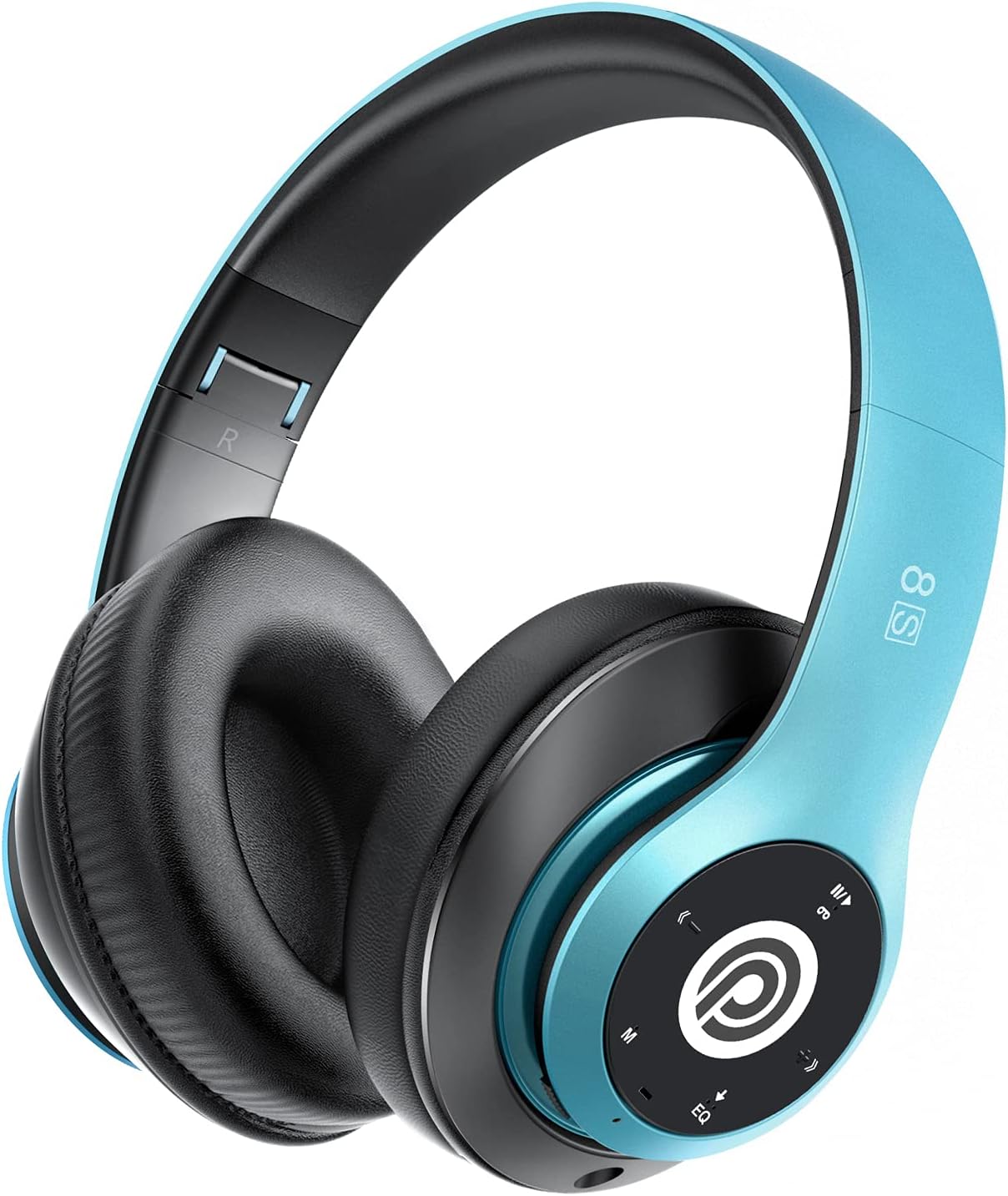
Image: The Prtukyt 8S Wireless Bluetooth Headset in blue, showcasing its sleek design and comfortable earcups.
2. Інфармацыя па бяспецы
To ensure safe and proper use, please observe the following guidelines:
- Не падвяргайце гарнітуру ўздзеянню экстрэмальных тэмператур, вільготнасці або агрэсіўных рэчываў.
- Пазбягайце падзення або моцных удараў гарнітуры.
- Do not disassemble or modify the headset. This will void the warranty and may cause damage.
- Keep the headset away from water and liquids as it is not waterproof.
- Працяглае праслухоўванне на высокім узроўні гучнасці можа пашкодзіць слых. Адрэгулюйце гучнасць да ўмеранага ўзроўню.
- Утылізуйце выраб і яго батарэю адказна ў адпаведнасці з мясцовымі правіламі.
3. Змесціва ўпакоўкі
Калі ласка, праверце ўпакоўку на наяўнасць наступных прадметаў:
- 1 x Prtukyt 8S Wireless Bluetooth Headset
- 1 х аўдыёкабель (раз'ём 3.5 мм)
- 1 х USB-кабель для зарадкі
- 1 х Кіраўніцтва карыстальніка
4. Прадукт скончыўсяview
Familiarize yourself with the various parts and controls of your Prtukyt 8S headset.
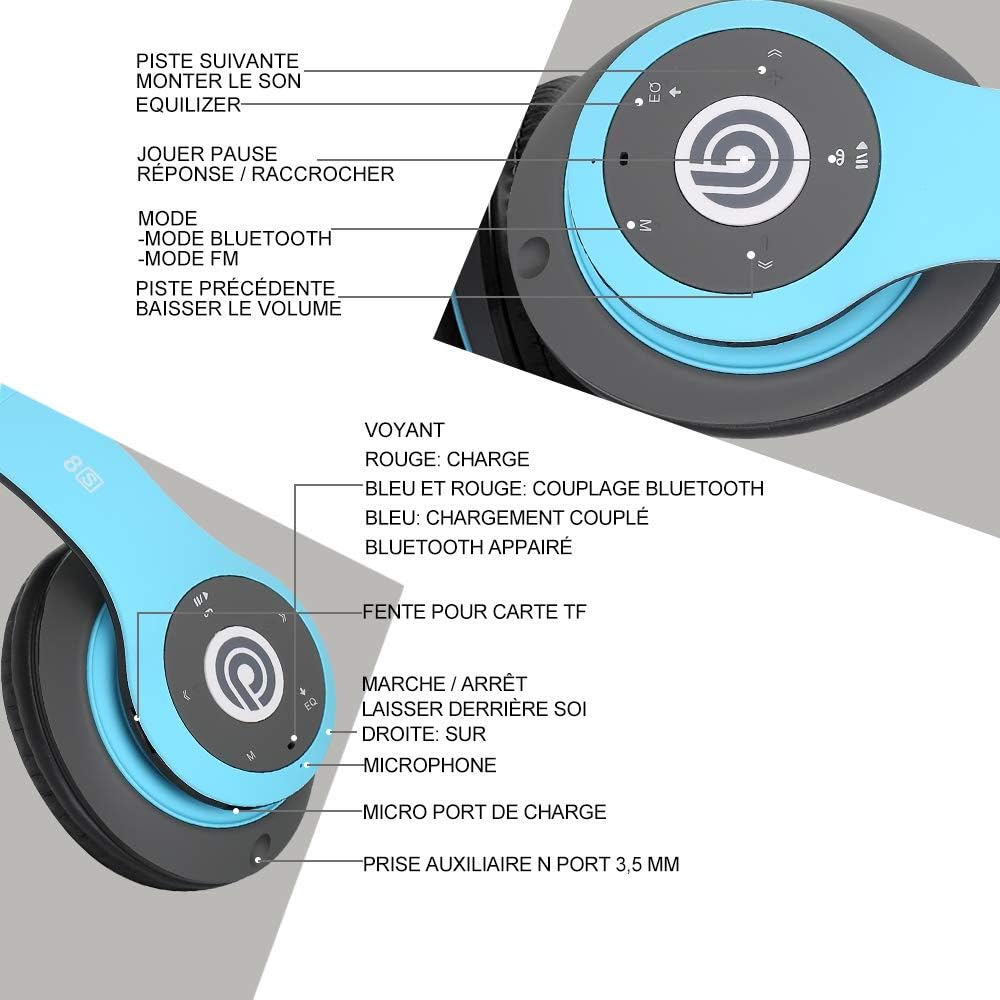
Выява: Падрабязная view of the Prtukyt 8S headset's control panel and ports, including buttons, indicator light, TF card slot, microphone, charging port, and 3.5mm AUX port.
Панэль кіравання і парты:
- 1. Наступны трэк / Павелічэнне гучнасці: Кароткае націсканне для наступнага трэка, доўгае націсканне для павелічэння гучнасці.
- 2. EQ Button: Press to cycle through equalizer sound effects.
- 3. Play / Pause / Answer / Hang Up: Multi-function button for music and calls.
- 4. Mode Button (M): Short press to switch between Bluetooth, FM Radio, and TF Card modes.
- 5. Папярэдні трэк / Зніжэнне гучнасці: Кароткае націсканне для папярэдняга трэка, доўгае націсканне для памяншэння гучнасці.
- 6. Светлавы індыкатар: Shows charging status, Bluetooth pairing, and connection status.
- 7. Слот для карты памяці TF: Insert a Micro SD/TF card for direct music playback.
- 8. Power On/Off Switch: Ссуньце, каб уключыць або выключыць гарнітуру.
- 9. Мікрафон: Для гучнай сувязі.
- 10. Порт для зарадкі Micro USB: Падключыце сюды кабель для зарадкі USB.
- 11. 3.5mm AUX Port: Для праваднога падключэння да аўдыёпрылад.
Асаблівасці дызайну:
- Складаны дызайн: The headset features a unique foldable design for easy portability and storage, saving space.

Image: The Prtukyt 8S headset demonstrating its multi-angle rotation and adjustable headband for ultimate comfort.
- Comfortable Earcups: Super soft foam earcups and an adjustable headband ensure a comfortable fit for extended listening sessions.
- Аўдыё высокай дакладнасці: Equipped with powerful 57mm stereo drivers and Bluetooth 5.0 chip for deep bass and clear sound.

Выява: Унутраная view highlighting the large aperture drivers and Bluetooth 5.0 chip for powerful performance.
5. Настройка
5.1 Першапачатковая зарадка
Before first use, fully charge the headset. Connect the USB charging cable to the Micro USB charging port on the headset and the other end to a USB power adapter (not included) or a computer's USB port.
- The indicator light will be ЧЫРВОНЫ падчас зарадкі.
- Індыкатар загарыцца СІНІ калі зарадка завершана.
- Поўная зарадка звычайна займае каля 2-3 гадзін.

Image: The Prtukyt 8S headset illustrating its impressive 52-hour battery life on a single charge.
6. Інструкцыя па эксплуатацыі
6.1 Уключэнне/выключэнне сілкавання
- Уключэнне: Slide the Power On/Off switch to the "ON" position. The indicator light will flash blue, indicating it's ready for pairing or connecting.
- Выключэнне: Slide the Power On/Off switch to the "OFF" position. The indicator light will turn off.
6.2 Спалучэнне па Bluetooth
- Пераканайцеся, што гарнітура адключана.
- Slide the Power On/Off switch to the "ON" position. The headset will enter pairing mode, and the indicator light will flash СІНІ і ЧЫРВОНЫ па чарзе.
- Enable Bluetooth on your device (smartphone, tablet, PC, etc.).
- Пошук "Prtukyt 8S" or "PT-1088" in the list of available Bluetooth devices.
- Select "Prtukyt 8S" to connect. Once successfully paired, the indicator light will flash СІНІ павольна.
- Калі будзе запытаны пароль, увядзіце «0000».
Заўвага: Пры ўключэнні гарнітура аўтаматычна паспрабуе падключыцца да апошняй спалучанай прылады.
6.3 Прайграванне музыкі (рэжым Bluetooth)
- Прайграванне/Паўза: Кароткае націсканне Прайграванне/Паўза кнопка.
- Наступны трэк: Кароткае націсканне Наступны трэк / павелічэнне гучнасці кнопка.
- Папярэдні трэк: Кароткае націсканне Папярэдні трэк / памяншэнне гучнасці кнопка.
- Павялічыць гучнасць: Доўгі націск Наступны трэк / павелічэнне гучнасці кнопка.
- Паменшыць гучнасць: Доўгі націск Папярэдні трэк / памяншэнне гучнасці кнопка.
6.4 Функцыі выкліку
- Адказаць на званок: Кароткае націсканне Прайграванне/Паўза/Адказ/Пакладка трубкі кнопку, калі паступае ўваходны званок.
- Завяршыць выклік: Кароткае націсканне Прайграванне/Паўза/Адказ/Пакладка трубкі кнопку падчас размовы.
- Адхіліць выклік: Доўгі націск Прайграванне/Паўза/Адказ/Пакладка трубкі кнопку, калі паступае ўваходны званок.
- Паўторны набор апошняга нумара: Двойчы націсніце Прайграванне/Паўза/Адказ/Пакладка трубкі кнопка.
6.5 Рэжым FM-радыё
- Уключыце гарнітуру.
- Кароткае націсканне Рэжым (M) button to switch to FM Radio mode. You will hear a voice prompt indicating the mode change.
- Кароткае націсканне Прайграванне/Паўза кнопку для аўтаматычнага сканавання і захавання даступных FM-станцый.
- Выкарыстоўвайце Наступны трэк і Папярэдні трэк кнопкі для навігацыі паміж захаванымі станцыямі.
6.6 Рэжым TF-карты
- Устаўце карту Micro SD/TF (з аўдыё ў фармаце MP3) files) into the TF Card Slot.
- Turn on the headset. It should automatically switch to TF Card mode and begin playing music. If not, short press the Рэжым (M) button to select TF Card mode.
- Выкарыстоўвайце Прайграванне/Паўза, Наступны трэк, Папярэдні трэк, and volume buttons as in Bluetooth mode.
6.7 Функцыя эквалайзера
The headset features an equalizer function to customize your listening experience.
- Кароткае націсканне EQ button to cycle through different equalizer presets (e.g., Pop, Rock, Jazz, Classic, Bass, Normal).
6.8 Правадны рэжым (AUX)
You can use the headset with non-Bluetooth devices via the included 3.5mm audio cable.
- Connect one end of the 3.5mm audio cable to the 3.5mm AUX Port on the headset.
- Connect the other end to the audio output jack of your device (e.g., computer, MP3 player).
- In wired mode, the headset's buttons (except volume control on some devices) will not function. Control playback and volume directly from your connected device.
7. Тэхнічнае абслугоўванне
- Рэгулярна працірайце гарнітуру мяккай сухой тканінай. Не выкарыстоўвайце абразіўныя ачышчальнікі або растваральнікі.
- Store the headset in a cool, dry place when not in use. The foldable design helps save space.
- Пазбягайце працяглага знаходжання пад прамымі сонечнымі прамянямі або экстрэмальнымі тэмпературамі.
- Do not expose the headset to water or moisture.
8. Выпраўленне непаладак
| праблема | Магчымая прычына | Рашэнне |
|---|---|---|
| Гарнітура не ўключаецца. | Батарэя разраджана або разраджана. | Цалкам зарадзіце гарнітуру. |
| Немагчыма спалучыцца з прыладай Bluetooth. | Bluetooth на прыладзе выключаны; гарнітура не ў рэжыме спалучэння; занадта далёка ад прылады. | Ensure Bluetooth is enabled on your device. Put headset in pairing mode (flashing blue/red). Keep devices within 10 meters. Clear previous pairings on your device. |
| Няма гуку або нізкі ўзровень гучнасці. | Volume too low on headset or device; incorrect mode selected; loose cable in wired mode. | Increase volume on both headset and connected device. Ensure correct mode (Bluetooth, FM, TF, AUX) is selected. Check 3.5mm cable connection. |
| Прыём FM-радыё дрэнны. | Слабы сігнал; перашкоды ад навакольнага асяроддзя. | Try moving to a different location. The audio cable can act as an antenna; ensure it's connected if using FM. |
| TF-карта не прайграваецца. | Карта ўстаўлена няправільна; не падтрымліваецца file фармат; пашкоджаная карта. | Reinsert TF card firmly. Ensure music fileФайлы ў фармаце MP3. Паспрабуйце іншую карту TF. |
9. Тэхнічныя характарыстыкі
| Назва мадэлі | Prtukyt 8S |
| Нумар мадэлі | PT-1088 |
| Тэхналогія падлучэння | Бесправадное падключэнне (Bluetooth 5.0), правадное падключэнне (раздым 3.5 мм) |
| Дыяпазон частот | 20 Гц - 20 000 Гц |
| Памер драйвера | 57mm Stereo Drivers |
| Асаблівасці | Integrated Microphone, FM Radio, TF Card Playback, EQ Function, Foldable Design |
| Тэрмін службы батарэі (прыблізна) | Up to 52 hours (Music/Talk time) |
| Порт для зарадкі | Micro USB |
| Воданепранікальнасць | Не воданепранікальны |
| Колер | Сіні |
10. Гарантыя і падтрымка
Prtukyt is committed to providing an excellent customer experience. If you encounter any quality issues with your product, please contact us immediately. Our customer support team is ready to assist you with any questions or concerns regarding your Prtukyt 8S Wireless Bluetooth Headset.
For support, please refer to the contact information provided on your purchase platform or the official Prtukyt webсайт.
Ask a question about this manual
Ask about setup, troubleshooting, compatibility, parts, safety, or missing instructions. Manuals+ will review the question and use this page’s manual context to help answer it.