
1. Уводзіны
This manual provides detailed instructions for the setup, operation, and maintenance of your HENEX HC-3208 2D Barcode Scanner. This device is a versatile USB wired scanner capable of reading both 1D and 2D barcodes, including those displayed on screens. It features both manual and automatic induction scanning modes, offering flexibility for various business environments.
2. Прадукт скончыўсяview
The HENEX HC-3208 is designed for efficient and accurate barcode scanning. Key features include:
- Induction Scanning Mode: Supports both manual trigger and automatic induction scanning.
- Plug & Play: No software or driver installation required; simply connect via USB.
- Высокая сумяшчальнасць: Works with Windows, Linux, and MAC operating systems, and common software like Word and Excel.
- Сканіраванне экрана: Capable of reading barcodes from labels, paper, mobile phones, or computer displays, including dirty or incomplete codes.
- Моцная магчымасць дэкадавання: Utilizes advanced decoding algorithms for various 1D and 2D codes (DataMatrix (ECC 200), QR Code, PDF417, UPC-A, UPC-E, EAN-8, EAN-13, Code 39, Code 93, Code 32, Code39 (ASCII), etc.).

Figure 2.1: HENEX HC-3208 2D Barcode Scanner demonstrating its ability to scan various 1D and 2D QR codes, including blurry and long barcodes, and codes from screens. Sample barcode data shown: QR Code, 0076950450479, 110120102011.

Figure 2.2: The HENEX HC-3208 2D Barcode Scanner with its main unit, USB cable, and flexible stand. A caution is displayed regarding the scanner laser beam.
3. Настройка
The HENEX HC-3208 barcode scanner is designed for easy setup with its plug-and-play functionality. Follow these steps to get started:
- Распакуйце кампаненты: Carefully remove all items from the packaging: the barcode scanner unit, the USB cable, and the adjustable stand.
- Збярыце падстаўку: Insert the flexible arm of the stand into the base, ensuring it is securely fastened. Then, attach the scanner holder to the top of the flexible arm.
- Падключыце кабель USB: Plug the USB cable into the port at the base of the scanner unit.
- Падключыцеся да кампутара: Insert the other end of the USB cable into an available USB port on your computer (Laptop or Desktop).
- Распазнаванне сістэмы: Your computer should automatically detect and install the necessary drivers. No additional software installation is typically required.

Figure 3.1: The USB wired connection of the HENEX HC-3208 scanner, emphasizing its simple plug-and-play setup without the need for drivers.

Figure 3.2: The main scanner unit and the components of the adjustable stand, showing how they fit together for desktop use.
4. Інструкцыя па эксплуатацыі
The HENEX HC-3208 offers flexible scanning modes to suit various operational needs.
4.1. Рэжым ручнога сканавання
In manual mode, you activate the scanner by pressing the trigger button. This mode is ideal for precise scanning of individual items.
- Hold the scanner comfortably in your hand.
- Point the scanner's light beam at the barcode you wish to scan.
- Press and hold the trigger button. The scanner will emit a light and a beep upon successful scan.
- Release the trigger button after the scan is complete.
4.2. Аўтаматычны рэжым індукцыйнага сканавання
In automatic induction mode, the scanner will automatically detect a barcode placed within its scanning field and initiate a scan without needing to press the trigger. This mode is convenient for hands-free operation, especially when using the stand.
- Place the scanner on its stand.
- To activate automatic mode, scan the 'Automatic Mode' barcode from the provided setup sheet (refer to the video for demonstration).
- Present the barcode to the scanner's window. The scanner will automatically activate its light and scan the barcode.
- A successful scan will be indicated by a beep.
4.3. Scanning Various Barcode Types
The HC-3208 is capable of scanning a wide range of 1D and 2D barcodes, including those on physical labels, mobile phone screens, and computer monitors. It can also read dirty or incomplete codes due to its advanced decoding technology.

Figure 4.1: The scanner positioned on its stand, actively scanning a QR code from a mobile phone, showcasing its screen scanning capability. Sample barcode data shown: 134818719994658501.
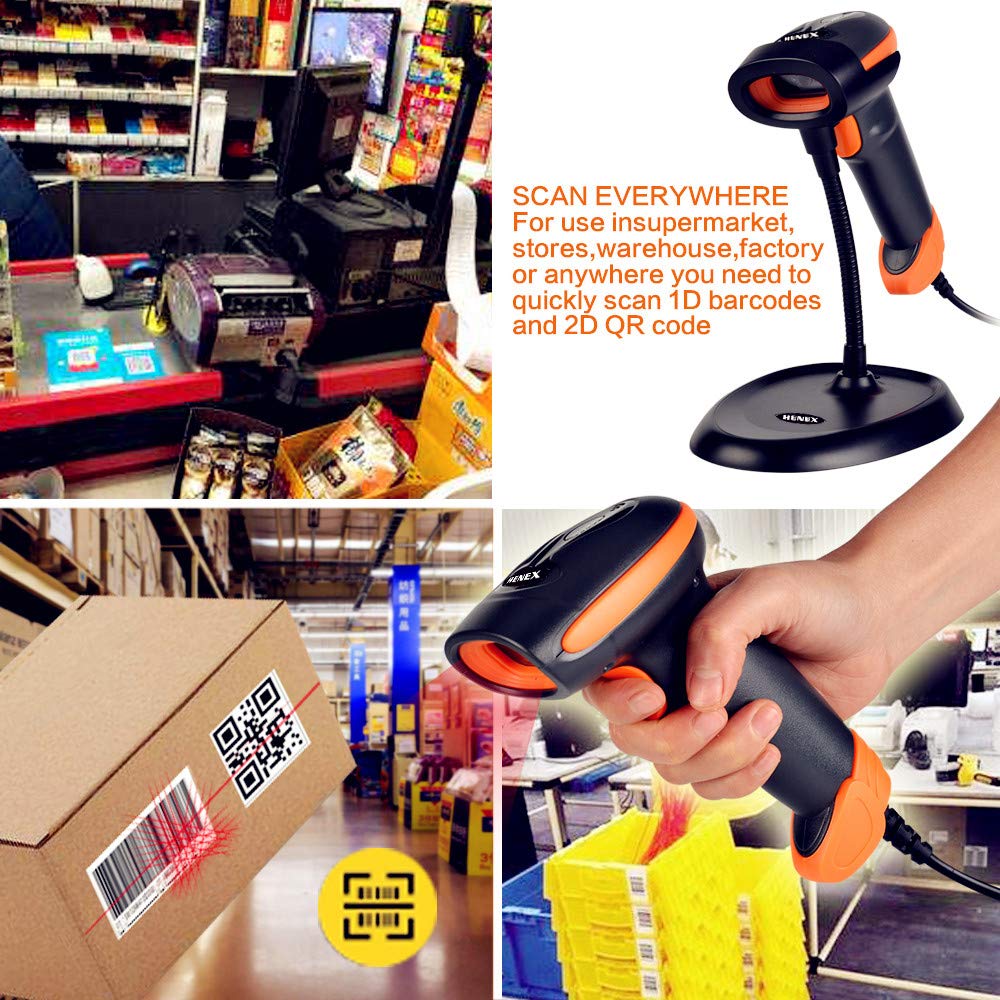
Малюнак 4.2: Выпamples of the scanner's application in various settings, including supermarket checkout, warehouse inventory, and handheld scanning of a QR code on a package. Sample barcode data shown: 01234567891011121314151617181920.
5. Тэхнічнае абслугоўванне
Proper maintenance ensures the longevity and optimal performance of your HENEX HC-3208 barcode scanner.
- Уборка: Regularly clean the scanner's window and exterior with a soft, lint-free cloth. For stubborn dirt, dampen the cloth with a mild, non-abrasive cleaning solution. Avoid harsh chemicals or abrasive materials that could scratch the scanning window.
- Сыход за кабелем: Ensure the USB cable is not bent sharply, twisted, or subjected to excessive pulling, which can damage internal wires.
- захоўванне: Калі сканер не выкарыстоўваецца, захоўвайце яго ў чыстым, сухім месцы, удалечыні ад прамых сонечных прамянёў, экстрэмальных тэмператур і празмернай колькасці пылу.
- Апрацоўка: Пазбягайце падзення сканера або моцных удараў, бо гэта можа пашкодзіць унутраныя кампаненты.
6. Выпраўленне непаладак
If you encounter issues with your HENEX HC-3208 scanner, refer to the following common troubleshooting steps:
- Сканер не адказвае:
- Check if the USB cable is securely connected to both the scanner and the computer.
- Паспрабуйце падключыць кабель USB да іншага порта USB на вашым кампутары.
- Перазагрузіце кампутар.
- Немагчыма сканаваць штрых-коды:
- Ensure the scanner's light beam is correctly aimed at the barcode.
- Verify that the barcode is not excessively damaged, smudged, or poorly printed.
- Check if the correct scanning mode (manual or automatic) is selected. Refer to the operating instructions for switching modes.
- Ensure the barcode type is supported by the scanner (e.g., 1D or 2D).
- Вывад няправільных даных:
- Confirm that your computer's keyboard layout matches the scanner's default settings.
- If scanning specific types of barcodes results in incorrect data, you may need to adjust advanced settings using the programming barcodes in the full user manual (available for download).
- No Beep or Light:
- This usually indicates a power or connection issue. Recheck the USB connection.
- Калі праблема не знікне, звярніцеся ў службу падтрымкі.
For more detailed troubleshooting or advanced configuration, please refer to the complete user manual available for download from the manufacturer's webсайта або звярніцеся да дыстрыб'ютара.
7. Тэхнічныя характарыстыкі
Below are the technical specifications for the HENEX HC-3208 2D Barcode Scanner:
| Асаблівасць | Спецыфікацыя |
|---|---|
| Марка | HENEX |
| мадэль | HC-3208 |
| Тэхналогія падлучэння | USB Cable (Wired) |
| Рэжымы сканавання | Manual, Automatic Induction |
| Падтрымліваюцца штрых-коды | 1D and 2D codes (DataMatrix (ECC 200), QR Code, PDF417, UPC-A, UPC-E, EAN-8, EAN-13, Code 39, Code 93, Code 32, Code39 (ASCII), etc.) |
| Сумяшчальнасць | Windows, Linux, MAC, Android |
| Асаблівасці | Automatic induction reading and handheld scanning (2-in-1), Screen scanning, Plug and Play (no driver needed) |
| Памеры прадукту | 17.3 х 6.7 х 9.4 см |
| Вага прадмета | 300 г |
| Крыніца харчавання | рубчатая |
| Патрабуюцца батарэі | няма |
| Максімальная тэмпература захоўвання | 70 градусы па Цэльсіі |

Малюнак 7.1: Памеры view of the scanner stand, indicating its height (7.87 inches / 20 cm) and base dimensions (6.69 inches / 17 cm by 4.92 inches / 12.5 cm).
8. Гарантыя і падтрымка
Your HENEX HC-3208 2D Barcode Scanner comes with a standard warranty. For specific details regarding the warranty period and coverage, please refer to the warranty policy provided at the time of purchase or contact your retailer.
For technical support, service, or further inquiries, please reach out to your product vendor or the official HENEX customer service channels. Keep your purchase receipt or proof of purchase handy when contacting support.