
Уводзіны
The myGEKOgear Orbit 960 is a 4K UHD dash camera designed to record your journeys with high clarity. Featuring a Sony STARVIS sensor for enhanced low-light performance, built-in Wi-Fi for mobile app connectivity, and GPS logging for location and speed data, this device provides comprehensive recording capabilities. It also includes advanced driver assistance systems (ADAS) such as Forward Collision Warning System (FCWS) and Lane Departure Warning System (LDWS) to promote safer driving habits.
Што ў скрынцы
- даш камеры
- 12 Volt Power Cable
- Клейкая мацаванне
- Мацаванне прысоскі
- 16 GB Micro SD Card & Card Reader
- Кіраўніцтва карыстальніка
- Гарантыйны талон
Прадукт скончаныview

Малюнак 1: Спераду View of the Dash Cam

Малюнак 2: Задняя частка View with Screen and Controls
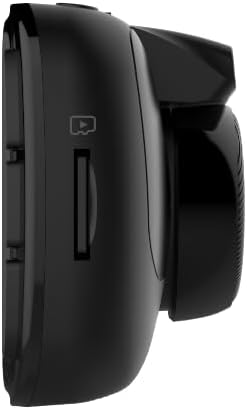
Малюнак 3: бок View with MicroSD Card Slot

Малюнак 4: Верх View з партамі
Настройка
1. Мантаж Dash Cam
Абярыце падыходнае месца на лабавым шкле, звычайна за задняй часткайview люстэрка, каб забяспечыць бесперашкодны агляд view of the road. Clean the area thoroughly before applying the mount.
- Мацаванне на прысосцы: Attach the suction cup to the cleaned windshield and press firmly while engaging the locking mechanism to secure it.
- Клейкае мацаванне: Peel off the protective film from the adhesive pad and firmly press the mount onto the cleaned windshield for at least 30 seconds. Allow 24 hours for the adhesive to fully cure before attaching the dash cam.
Once the mount is secure, slide the dash cam onto the mount until it clicks into place.

Figure 5: Dash Cam Mounted in Vehicle
2. Устаўка карты MicroSD
Insert the provided 16GB MicroSD card (or your own, up to 512GB) into the MicroSD card slot on the side of the dash cam until it clicks. Ensure the card is inserted correctly to avoid damage.
3. Харчаванне прылады
Connect the 12 Volt Power Cable to the dash cam's USB port and plug the other end into your vehicle's cigarette lighter socket. The dash cam will automatically power on and begin recording when your vehicle starts.
4. Пачатковае ўключэнне і асноўныя налады
Upon first power-on, the dash cam may prompt you to set the date and time. Use the control buttons on the side of the device to navigate the menu and adjust settings. It is recommended to format the MicroSD card through the dash cam's settings menu before first use.
5. Mobile App Connection (Wi-Fi)
Download the GEKO DVR app from your smartphone's app store. Enable Wi-Fi on your dash cam via the settings menu. On your smartphone, connect to the dash cam's Wi-Fi network (SSID typically starts with 'Orbit_960-'). The default password is '12345678'. Once connected, you can view жывы footage, adjust settings, and transfer recordings directly to your phone.
Інструкцыя па эксплуатацыі
1. Рэжымы запісу
- цыклічны запіс: The dash cam continuously records video in segments (e.g., 1, 3, or 5 minutes). When the MicroSD card is full, the oldest files перазапісваюцца новымі запісамі.
- Экстраны запіс (G-сенсор): In the event of a sudden impact or collision, the built-in G-Sensor automatically detects the event and locks the current video segment, preventing it from being overwritten.
2. З дапамогай мабільнага прыкладання
The GEKO DVR app allows for convenient control and management of your dash cam. After connecting via Wi-Fi, you can:
- View жывая відэастужка.
- Access and download recorded videos and photos.
- Adjust various settings, including resolution, loop recording duration, and driver assistance features.
3. Driver Assist Features
The Orbit 960 includes several driver assistance features to enhance safety:
- Forward Collision Warning System (FCWS): Папярэджвае вас, калі вы набліжаецеся да транспартнага сродку занадта хутка.
- Lane Departure Warning System (LDWS): Notifies you if your vehicle drifts out of its lane without signaling.
- Headlight Reminder: Prompts you to turn on your headlights in low-light conditions.
- Driver Fatigue Alarm: Provides alerts to prevent drowsy driving during long trips.
These features can be enabled or disabled through the dash cam's settings menu or the mobile app.
4. GPS Logging
The built-in GPS module records your vehicle's speed and location data, which is embedded in the video fileс. Гэтая інфармацыя можа быць viewed during playback using compatible software or the mobile app, providing crucial context for recorded events.
5. Рэжым паркоўкі
When enabled, parking mode allows the dash cam to monitor your vehicle while parked. If an impact is detected (via the G-Sensor), the dash cam will automatically record a short video segment. For continuous parking surveillance, the dash cam requires a constant power supply (e.g., hardwired installation).
Асноўныя характарыстыкі
- 4K UHD Video & Sony STARVIS Sensor: Records videos at 3840 x 2160p at 30 fps, offering high clarity even in low-light conditions.
- Шырокавугольны аб'ектыў 140°: Ахоплівае шырокі view of the road, minimizing blind spots.
- 2.7-цалевы ВК-дысплей: Provides a clear interface for viewING жыць Footage and navigating settings.
- Wi-Fi уключаны: Дазваляе карыстальнікам view and transfer footage to a smartphone via the GEKO DVR app.
- Запіс GPS: Records accurate speed and location information, vital for incident analysis.
- G-сэнсар: Аўтаматычна выяўляе ўдары і блакуе відэа files to prevent overwriting.
- Выяўленне руху: Initiates recording when motion is detected in front of the vehicle, useful for parking surveillance.
- Driver Assist Features: Includes Speed Limit Alert, Lane Departure Warning System (LDWS), and Front Collision Warning System (FCWS) to promote safer driving.
- Падтрымка карт MicroSD: Supports up to 512GB, with a 16GB card included for immediate use.
Відэа 1: Скончанаview of myGEKOgear Orbit 960 4K Dash Cam features, including Wi-Fi and GPS logging.
Тэхнічныя характарыстыкі
| Асаблівасць | Дэталь |
|---|---|
| Памеры прадукту | 7 х 5 х 3 цалі |
| Вага прадмета | 3.5 унцыі |
| Нумар мадэлі тавару | GO96016G |
| Батарэі | Патрабуецца 1 літый-іённыя батарэі (у камплекце) |
| Тэхналогіі падключэння | Wi-Fi |
| GPS | GPS Built-In; Location Capture |
| Асаблівасці | 4K Resolution, Auto Incident Recording, Built-in GPS logging, Night Vision, WiFi - Instant File Доступ |
| Колер | Чорны |
| Вытворца | myGEKOgear |
| Назва мадэлі | Арбіта 960 |
| Дазвол відэазахопу | 2160p |
| Тып мацавання | Camera Mount (Suction Cup, Adhesive) |
| Поле View | 140 градусаў |
Тэхнічнае абслугоўванне
- Фарматаванне SD-карты: Regularly format your MicroSD card (at least once a month) to ensure optimal performance and prevent data corruption. This can typically be done through the dash cam's settings menu or the mobile app.
- Уборка: Keep the dash cam lens and screen clean using a soft, dry cloth. Avoid abrasive materials or harsh chemicals.
- Абнаўленні прашыўкі: Check the myGEKOgear website or the GEKO DVR app periodically for available firmware updates. Keeping your device updated ensures access to the latest features and performance improvements.
Ліквідацыю непаладак
- Відэарэгістратар не ўключаецца: Ensure the power cable is securely connected to both the dash cam and the vehicle's 12V socket. Check if the vehicle's 12V socket is receiving power.
- Памылка SD-карты: Format the MicroSD card. If the issue persists, try a different, high-quality MicroSD card (Class 10 or higher recommended).
- Праблемы з падключэннем да Wi-Fi: Ensure Wi-Fi is enabled on the dash cam and your smartphone is connected to the correct dash cam network. Verify the Wi-Fi password.
- App Not Connecting/Functioning: Ensure location permissions are granted to the app on your smartphone. Restart both the dash cam and the app. Check for app updates.
- Дрэнная якасць відэа: Ensure the lens is clean and free from obstructions. Check the resolution settings in the dash cam or app.
For further assistance, refer to the detailed user manual included in the box or contact myGEKOgear customer support.
Гарантыя і падтрымка
The myGEKOgear Orbit 960 Dash Cam comes with a manufacturer's warranty. Please refer to the Warranty Card included in your product packaging for specific terms and conditions. For technical support, product inquiries, or warranty claims, please visit the official myGEKOgear website or contact their customer service department. Keep your purchase receipt as proof of purchase for warranty services.


