1. Прадукт скончыўсяview
The Alecto WS-1560 is a wireless weather station designed to provide accurate indoor and outdoor environmental data. Featuring a clear color display and a remote outdoor sensor, it offers comprehensive weather information and additional useful functions for your home.
Асноўныя характарыстыкі:
- Measures indoor and outdoor temperature and humidity.
- Long-range wireless outdoor sensor (up to 100 meters).
- 5.7-inch well-lit color display with animated weather forecast icons.
- Temperature and ice alarm functions.
- Будзільнік з функцыяй адкладання.
- Memory function for latest and highest readings.
- Moon phase indicator, date, day, and time display.
- Battery-operated main unit and outdoor sensor with backup batteries.

Figure 1.1: Alecto WS-1560 Main Unit and Wireless Outdoor Sensor.
2. Змесціва ўпакоўкі
Ensure all components are present and in good condition upon unpacking:
- Alecto WS-1560 Main Unit (Indoor Display)
- Бесправадны вонкавы датчык
- Кіраўніцтва карыстальніка
- (Power adapter and batteries may be included depending on package)
Video 2.1: Illustrative video showing typical weather station components and basic setup. (Note: This video is for a related product and may not show the exact Alecto WS-1560 model.)
3. Настройка і ўстаноўка
3.1. Устаноўка батарэі
Both the main unit and the outdoor sensor require batteries for operation. Ensure you use the correct type and polarity.
- Знешні датчык:
- Адкрыйце батарэйны адсек на задняй панэлі бесправаднога вонкавага датчыка.
- Insert 2x AA batteries (not included) according to the polarity markings (+/-).
- Надзейна зачыніце батарэйны адсек.
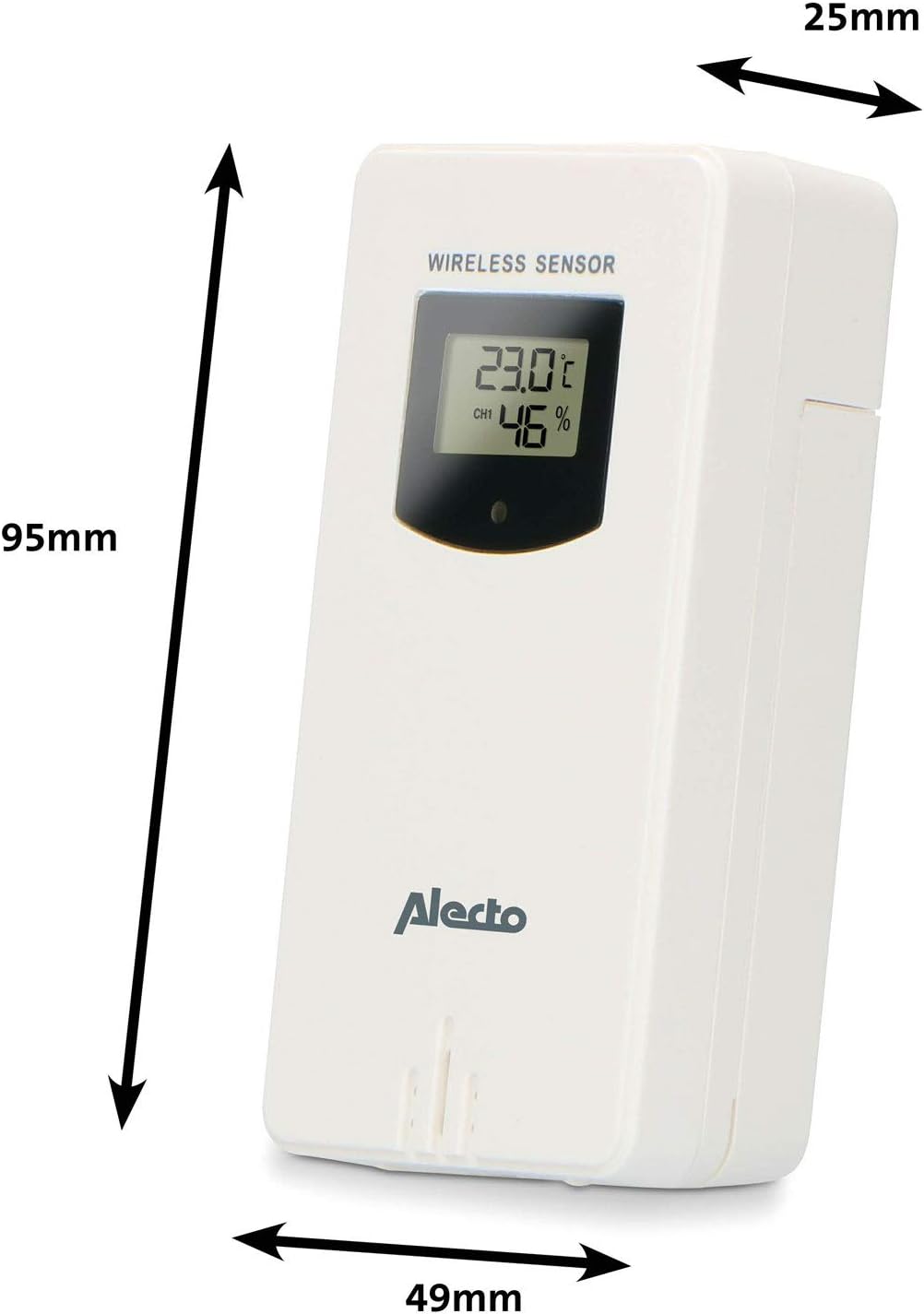
Figure 3.1: Wireless Outdoor Sensor dimensions and battery compartment location.
- Асноўны блок:
- Адкрыйце батарэйны адсек на задняй панэлі асноўнага блока.
- Insert 2x AA batteries (not included) according to the polarity markings (+/-). These serve as backup batteries.
- Надзейна зачыніце батарэйны адсек.
- Connect the main unit to a power outlet using the provided power adapter (if included).

Figure 3.2: Main Unit dimensions and power input.
3.2. Размяшчэнне датчыка
For accurate outdoor readings, proper placement of the wireless sensor is crucial:
- Place the sensor in a shaded area, away from direct sunlight, to prevent inaccurate temperature readings.
- Ensure good air circulation around the sensor.
- Усталюйце датчык вертыкальна, прыблізна на вышыні 1.5–2.5 метры (5–8 футаў) над зямлёй.
- Avoid placing the sensor near heat sources (e.g., vents, windows) or moisture sources.
- The maximum transmission range is 100 meters (328 feet) in open air. Walls and other obstacles will reduce this range.

Малюнак 3.3: Выпample of outdoor sensor placement on a wall.
3.3. Спалучэнне датчыка з асноўным блокам
The main unit and sensor should automatically pair once both are powered on. If pairing does not occur:
- Ensure both units have fresh batteries and are within range.
- Press the "TX" button inside the outdoor sensor's battery compartment to manually send a signal.
- On the main unit, you may need to initiate a search for the outdoor sensor (refer to the "Operation" section for specific button functions).
4. Аперацыя
4.1. Дысплей Макет
The 5.7-inch color display provides a clear overview of all measured data. Key areas include:
- Тэмпература і вільготнасць на вуліцы: Displays current outdoor conditions.
- Тэмпература і вільготнасць у памяшканні: Паказвае бягучыя ўмовы ў памяшканні.
- Animated Weather Forecast: Icons predict upcoming weather (sunny, partly cloudy, cloudy, rainy, snowy).
- Час і дата: Бягучы час, дзень і дата.
- атмасферны ціск: Бягучы атмасферны ціск.
- Фаза Месяца: Graphical representation of the current moon phase.
- Temperature/Ice Alarm Indicators: Alerts for specific temperature thresholds or potential ice conditions.

Малюнак 4.1: падрабязна view of the main unit's color display.
4.2. Функцыі кнопак
The main unit features several buttons for setting and adjusting functions. Common buttons include:
- УСТАВ: Enters setup mode for time, date, and other settings.
- Рэжым: Switches between display modes or confirms settings.
- УВЕРХ/УНІЗ (або +/-): Adjusts values during setup or cycles through channels.
- ТРЫВОГА: Sets or activates the alarm function.
- MEM: Displays maximum/minimum temperature and humidity records. Long press to clear records.
- АДРЫМКА/СВЯТЛО: Activates snooze during an alarm or adjusts backlight brightness.
Video 4.2: Illustrative video demonstrating various features and settings of a weather station. (Note: This video is for a related product and may not show the exact Alecto WS-1560 model.)
4.3. Устаноўка часу і даты
- Націсніце і ўтрымлівайце кнопку «SET», пакуль не пачне міргаць індыкатар часу.
- Use the "UP" or "DOWN" buttons to adjust the hour, then press "SET" to confirm and move to minutes.
- Паўтарыце для хвілін, года, месяца і дня.
- Press "SET" again to exit the setting mode.
4.4. Налады будзільніка
- Press the "ALARM" button once to view час будзільніка.
- Press and hold the "ALARM" button until the alarm time starts flashing.
- Use the "UP" or "DOWN" buttons to set the desired alarm hour and minute.
- Націсніце кнопку «Трывога» для пацверджання.
- To activate/deactivate the alarm, press the "ALARM" button briefly when the alarm time is displayed. An alarm icon will appear/disappear.
4.5. Запісы максімальных/мінімальных значэнняў
The weather station automatically records the maximum and minimum temperature and humidity values over a 24-hour period.
- Press the "MEM" button briefly to view the maximum recorded values.
- Press "MEM" again to view the minimum recorded values.
- Press "MEM" a third time to return to current readings.
- To clear the records, press and hold the "MEM" button for a few seconds.
5. Тэхнічнае абслугоўванне
- Уборка: Працірайце паверхні дысплея і прылады мяккай губкайamp тканіна. Не выкарыстоўвайце абразіўныя ачышчальнікі або растваральнікі.
- Замена батарэі: Replace batteries in both the main unit and the outdoor sensor when the low battery indicator appears on the display. Always replace all batteries at the same time with new ones of the same type.
- Сыход за датчыкам: Periodically check the outdoor sensor for debris or obstructions that might affect its readings. Ensure it remains in a shaded, well-ventilated area.
6. Выпраўленне непаладак
| праблема | Магчымая прычына | Рашэнне |
|---|---|---|
| No outdoor temperature/humidity reading (or "---" displayed) |
|
|
| Няправільныя паказанні тэмпературы/вільготнасці |
|
|
| Дысплей цьмяны або пусты |
|
|
7. Тэхнічныя характарыстыкі
| Нумар мадэлі | WS-1560 |
| Марка | Алекта |
| Крыніца харчавання (асноўны блок) | Power Adapter (if included) + 2x AA batteries (backup) |
| Крыніца харчавання (вонкавы датчык) | 2x батарэйкі АА |
| Памеры прадукту (асноўны блок) | 5.1 х 16.5 х 12.3 см |
| Вага прадукту | 440 г |
| Дыяпазон бесправаднога датчыка | Да 100 метраў (на адкрытым паветры) |
| Памер дысплея | 5.7 цалі / 14.5 см |
| Паходжанне | Кітай |
8. Гарантыя і падтрымка
For warranty information, technical support, or service inquiries, please refer to the warranty card included with your product or visit the official Alecto webсайт. Захоўвайце чэк аб куплі як пацверджанне пакупкі.
Алекта Webсайт: www.alecto.nl (General Alecto webсайт, канкрэтная старонка падтрымкі можа адрознівацца)