
POPOMAN MTM320B
Кіраўніцтва карыстальніка па зялёным лазерным узроўні POPOMAN MTM320B
мадэль: MTM320B | Брэнд: POPOMAN
1. Важная інфармацыя па бяспецы
Please read and understand all safety instructions before operating the POPOMAN MTM320B Laser Level. Failure to follow these instructions may result in serious injury.
- Лазернае выпраменьванне: This equipment is a Class 2 laser product. Do not stare directly into the laser beam. Avoid direct eye exposure to the laser.
- Крыніца харчавання: Use only the specified charging cable and power source. Do not attempt to open or modify the battery pack.
- Працоўнае асяроддзе: Не выкарыстоўвайце прыладу ў выбуханебяспечных асяроддзях, напрыклад, у прысутнасці лёгкаўзгаральных вадкасцей, газаў або пылу.
- Устойлівасць да вады і пылу: The device has an IP54 rating, providing protection against splashes and dust. However, it is not fully waterproof and should not be submerged.
- дзеці: Keep the device out of reach of children and unauthorized personnel.
- захоўванне: Калі прылада не выкарыстоўваецца, захоўвайце яе ў прахалодным сухім месцы.
2. Змесціва ўпакоўкі
Праверце, ці ўсе пералічаныя ніжэй прадметы ўваходзяць у вашу ўпакоўку:
- 1 x POPOMAN MTM320B Green Laser Level
- 1 х зарадны кабель USB Type-C
- 1 x Rectangular Magnetic Bracket
- 1 x Rotating Base
- 1 х ахоўны чахол
- 1 х Кіраўніцтва карыстальніка
- 1 x 4500mAh Lithium Battery (internal)
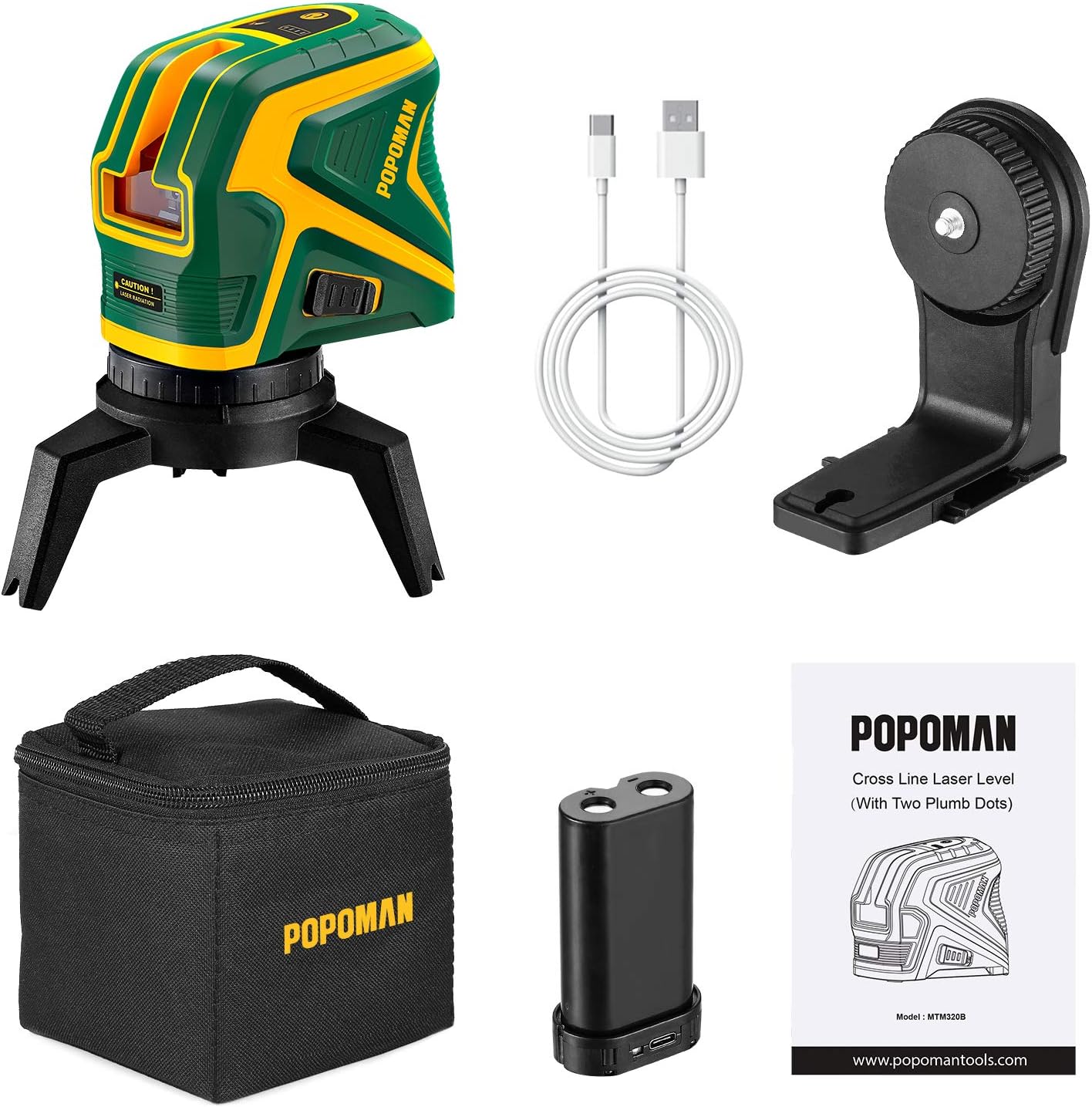
Малюнак 2.1: Included components of the POPOMAN MTM320B Laser Level kit.
3. Прадукт скончыўсяview
The POPOMAN MTM320B is a versatile green laser level designed for various leveling and alignment tasks. It features a bright green laser, USB charging, and multiple operating modes.
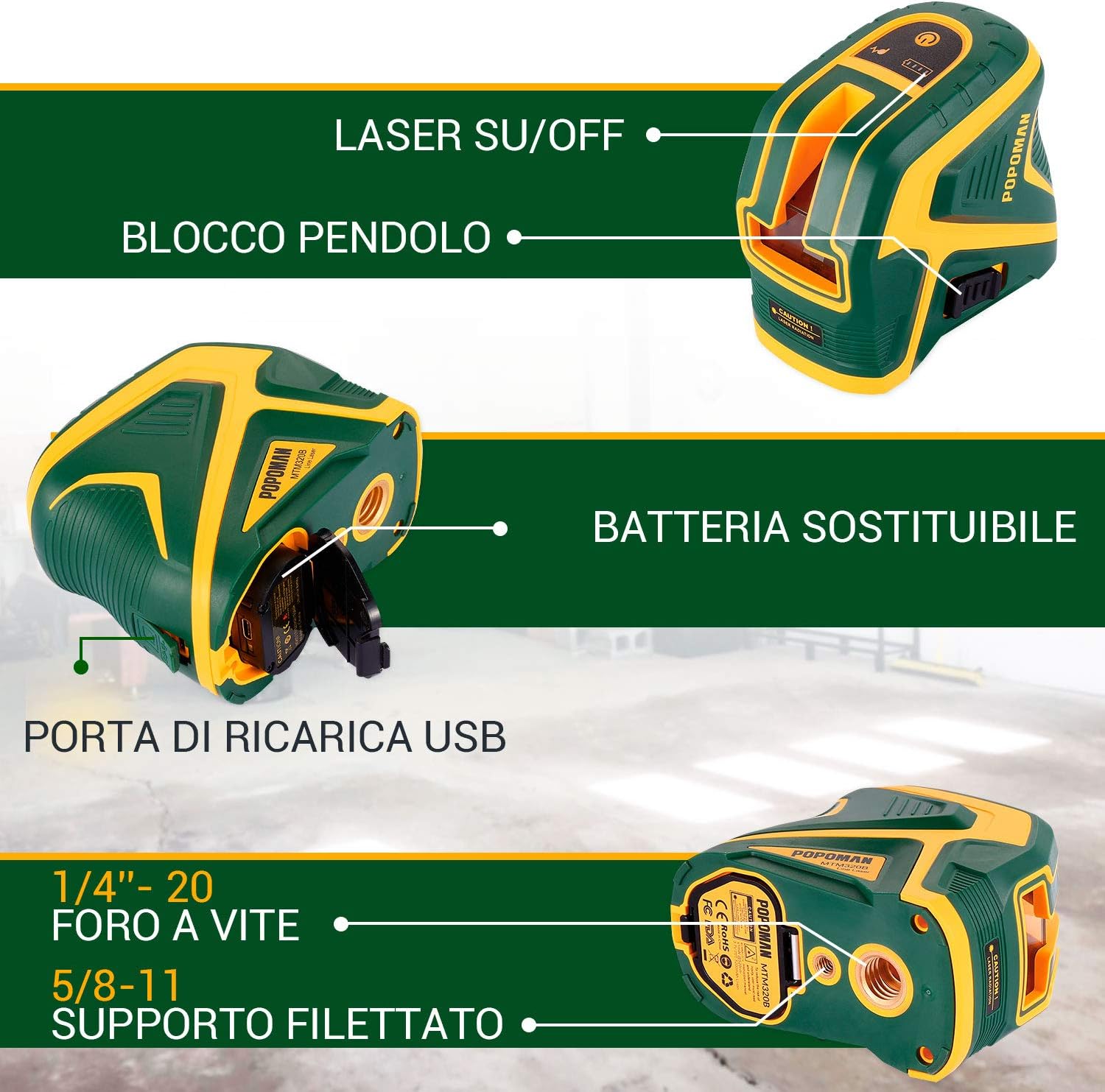
Малюнак 3.1: Key components and features of the MTM320B Laser Level.
- Laser On/Off Switch: Controls the power and mode of the laser.
- Замак маятніка: Secures the pendulum for transport and enables manual mode.
- Порт для зарадкі USB: Для зручнай падзарадкі ўбудаванай батарэі.
- Зменная батарэя: The 4500mAh lithium battery can be replaced.
- Tripod Screw Holes: 1/4''-20 and 5/8''-11 threads for mounting on tripods or other accessories.
4. Тэхнічныя характарыстыкі
| Асаблівасць | Спецыфікацыя |
|---|---|
| Тып лазера | Green Laser, Class 2, <1mW power output |
| Праекцыя | Cross Line + 2 Laser Plumb Dots (Up/Down) |
| Працоўная адлегласць (лінія) | 25 метраў (82 футы) |
| Working Distance (Dot) | 60 метраў (197 футы) |
| Working Distance (Pulse Mode with Detector) | 40 метраў (131 футы) |
| Дакладнасць выраўноўвання | ± 3 mm at 10 meters (± 1/8 inch at 33 feet) |
| Дыяпазон самовыравнивания | 4° ± 1° |
| Крыніца харчавання | 4500mAh Lithium-Ion Battery (rechargeable via USB-C) |
| Час працы | Up to 20 hours (all lasers on) |
| Нітка штатыва | 1/4''-20, 5/8''-11 |
| Рэйтынг IP | IP54 (абаронены ад пырскаў і пылу) |
| Памеры | 11.2 х 6.8 х 9.7 см (4.4 х 2.7 х 3.8 цалі) |
| Вага | 340 г (0.75 фунта) |
5. Настройка і зарадка
5.1 Зарадка акумулятара
The POPOMAN MTM320B is equipped with a 4500mAh rechargeable lithium battery. Before first use, ensure the battery is fully charged.
- Connect the provided USB Type-C cable to the charging port on the laser level.
- Connect the other end of the USB cable to a compatible USB power source (e.g., wall adapter, power bank, computer USB port, car charger).
- The battery indicator on the device will show the charging status. A full charge provides approximately 20 hours of continuous operation with all lasers on.

Малюнак 5.1: Flexible USB charging options for the MTM320B.
5.2 Мантаж лазернага ўзроўню
The MTM320B can be used freestanding or mounted using its accessories.
- Асобна стаяць: Place the laser level on a stable, flat surface.
- Using the Rotating Base: Attach the laser level to the rotating base via the 1/4''-20 screw thread for 360-degree rotation and fine positioning.
- Using the Magnetic Bracket: The rectangular magnetic bracket allows attachment to metal surfaces. It also has a 1/4''-20 thread for mounting the laser level and a 5/8''-11 thread for larger tripods.
- Мацаванне штатыва: The device is compatible with standard tripods using either the 1/4''-20 or 5/8''-11 screw threads located at the bottom.

Малюнак 5.2: Versatile mounting options with the magnetic bracket and rotating base.
6. Інструкцыя па эксплуатацыі
The POPOMAN MTM320B offers multiple operating modes for different applications.
6.1 Уключэнне/выключэнне харчавання і выбар рэжыму
- To power on the device, slide the pendulum lock switch to the unlocked position. The laser will automatically enter self-leveling mode.
- Press the power button (usually on top) to cycle through different laser line combinations (e.g., horizontal line, vertical line, cross lines, plumb dots).
- To power off, slide the pendulum lock switch back to the locked position. This also protects the pendulum during transport.
6.2 Рэжым саманівеліравання
- When the pendulum lock is in the unlocked position, the device will automatically self-level within a 4° range.
- If the device is placed on a surface with an inclination greater than 4°, the laser lines will flash rapidly to indicate that it is out of level. Adjust the position of the device until the lines stop flashing and become steady.
- This mode is ideal for applications requiring precise horizontal and vertical alignment, such as hanging pictures, installing cabinets, or tiling.
6.3 Ручны рэжым (рэжым блакавання)
- To activate manual mode, ensure the pendulum lock switch is in the заблакаваны становішча.
- Press and hold the power button for a few seconds until the laser lines appear. The lines will not self-level and can be projected at any angle.
- This mode is useful for projecting angled lines, such as for staircase installations or decorative painting.
6.4 Імпульсны рэжым
- Pulse mode extends the working range of the laser and improves visibility in brighter conditions when used with a laser detector (not included).
- To activate pulse mode, typically press a dedicated pulse mode button or hold the power button in self-leveling mode. Refer to the device's specific button layout for exact activation.
- In pulse mode, the working distance can extend up to 40 meters (131 feet).

Малюнак 6.1: Examples of MTM320B applications in construction and home renovation.
7. Тэхнічнае абслугоўванне і догляд
Proper maintenance ensures the longevity and accuracy of your POPOMAN MTM320B Laser Level.
- Уборка: Працярыце прыладу мяккай, damp cloth. Do not use abrasive cleaners, solvents, or harsh chemicals. Ensure the laser output window is clean for optimal beam clarity.
- захоўванне: When not in use, store the laser level in its protective pouch in a cool, dry place, away from direct sunlight and extreme temperatures. Ensure the pendulum lock is engaged to protect the internal mechanism.
- Сыход за батарэяй: For long-term storage, it is recommended to charge the battery to about 50% every few months to maintain battery health. Avoid fully discharging the battery for extended periods.
- Абарона IP54: The IP54 rating means the device is protected against dust ingress and splashing water from any direction. While it can withstand light splashes, avoid exposing it to heavy rain or submerging it in water.

Малюнак 7.1: MTM320B's IP54 water and dust resistance features.
8. Выпраўленне непаладак
If you encounter issues with your POPOMAN MTM320B, refer to the following common problems and solutions:
| праблема | Магчымая прычына | Рашэнне |
|---|---|---|
| Laser lines are blinking rapidly in self-leveling mode. | The device is placed on a surface that is outside its self-leveling range (>4° inclination). | Adjust the position of the laser level to a flatter surface until the lines become steady. |
| Laser lines appear dim or are not visible. |
|
|
| Прылада не ўключаецца. |
|
|
| Недакладныя вымярэнні. |
|
|
9. Гарантыя і падтрымка
POPOMAN offers a 2-year quality commitment for the MTM320B Laser Level.
If you have any questions, concerns, or require technical assistance, please contact POPOMAN customer support through the email address provided on our Amazon Shop page or through the contact information in your purchase documentation.
Калі ласка, захавайце доказы пакупкі для прэтэнзій па гарантыі.
Ask a question about this manual
Ask about setup, troubleshooting, compatibility, parts, safety, or missing instructions. Manuals+ will review the question and use this page’s manual context to help answer it.