
1. Уводзіны
The ScopeAround MS450 Digital Otoscope Ear Camera is designed to provide a clear and detailed view of the ear canal and eardrum. This device features a 4.5-inch IPS screen, a high-definition camera with adjustable LED lights, and an intelligent gyroscope for image stabilization. It is intended for personal ear inspection and can assist in monitoring ear health. This manual provides essential information for the safe and effective use of your otoscope.
2. Інфармацыя па бяспецы
- Do not insert the otoscope too deeply into the ear canal. Excessive insertion can cause injury to the eardrum or inner ear structures.
- Always use the provided ear specula to prevent over-insertion and protect the ear canal.
- Clean the camera lens and ear specula thoroughly before and after each use with alcohol wipes to prevent infection.
- This device is for observation and minor earwax removal only. For significant earwax impaction or ear infections, consult a medical professional.
- Keep the device out of reach of children. Adult supervision is required if used on children.
- Avoid using the device if you experience pain, discomfort, or bleeding during examination. Seek medical attention immediately.
- Не спрабуйце разбіраць або мадыфікаваць прыладу. Гэта можа ануляваць гарантыю і стварыць пагрозу бяспецы.
3. Змесціва ўпакоўкі
Праверце наяўнасць усіх прадметаў у камплекце:
- MS450 Otoscope Camera Unit
- Зарадны кабель (USB Type-C)
- Кіраўніцтва карыстальніка
- 4 x Silicone Ear Spoons (various types)
- 3 x Ear Specula (protective cones)
- 1 Pack of Alcohol Prep Pads
- 32GB MicroSD Memory Card (pre-installed or included separately)

4. Прадукт скончыўсяview
The MS450 otoscope consists of a main display unit and a connected camera probe. Familiarize yourself with the components and controls:

- Дысплейны блок: Features a 4.5-inch IPS screen for real-time viewінж.
- Зонд камеры: Equipped with an HD camera, 6 adjustable LED lights, and a gyroscope.
- Кнопкі кіравання: Power, Photo/Video, Light Control, Mode Switch, Navigation (Up/Down), OK, and Settings.
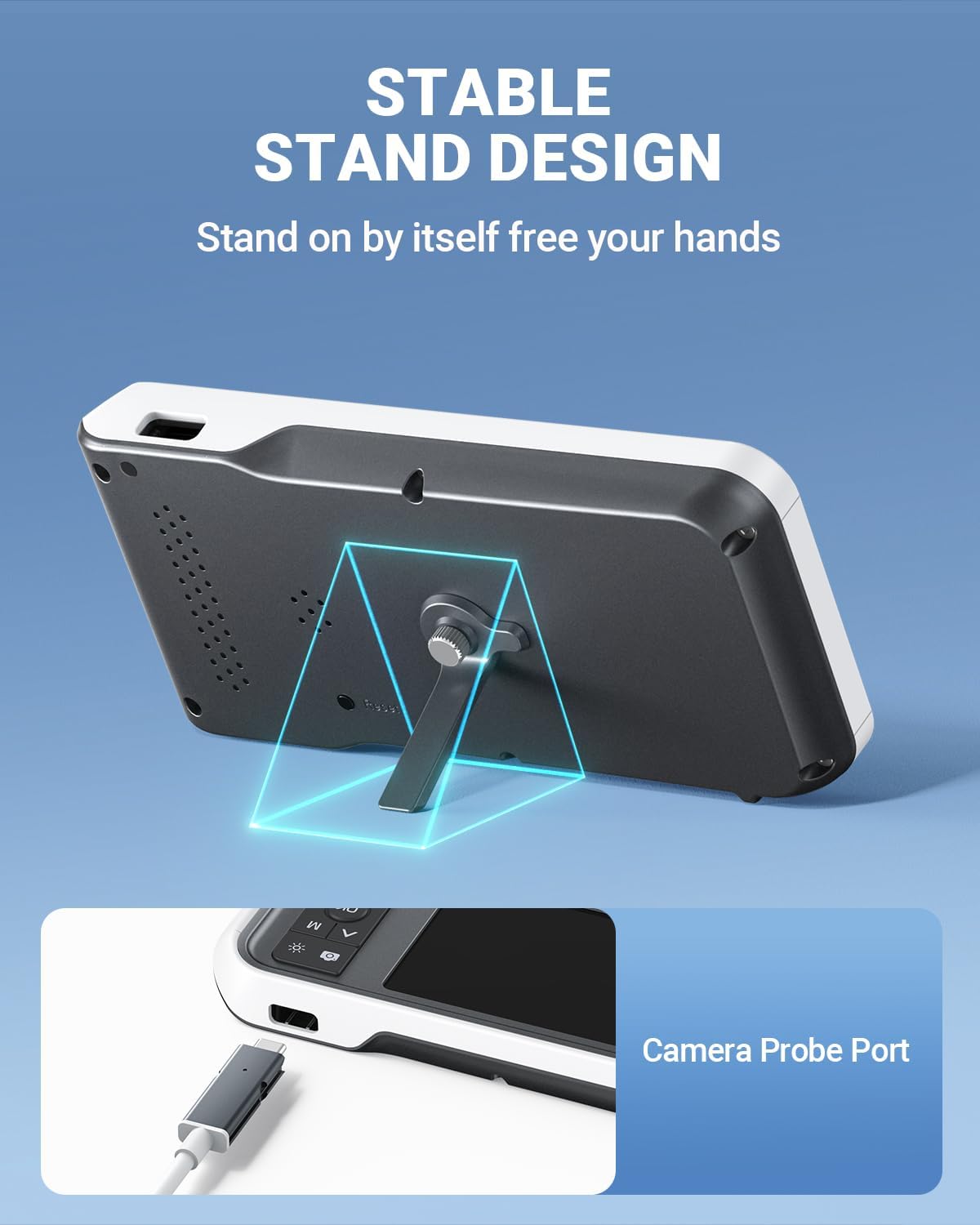
- парты: USB Type-C Charging Port, TF Card Slot, Camera Probe Connector.
- Інтэграваная падстаўка: Дазваляе працаваць без выкарыстання рук.
5. Настройка
- Зарадзіць прыладу: Before first use, fully charge the otoscope using the provided USB Type-C cable and a compatible power adapter (not included). The charging port is located on the side of the display unit. A full charge provides over 4 hours of continuous use.
- Устаўце карту MicroSD: Ensure the 32GB MicroSD card is properly inserted into the TF Card Slot. This card is used to store photos and videos.
- Падключыце зонд камеры: Connect the camera probe cable securely to the Camera Probe Connector on the display unit.
- Select and Attach Specula/Ear Spoon: Choose an appropriate ear speculum (protective cone) or silicone ear spoon. Gently push it onto the tip of the camera probe until it is secure. Always use a speculum to protect the ear canal.


6. Інструкцыя па эксплуатацыі
- Уключэнне: Press and hold the Power Button (blue button) for a few seconds until the screen turns on.
- Рэгуляванне яркасці святлодыёда: Use the Light Control Button (sun icon) to cycle through 3 levels of LED brightness to achieve optimal illumination for your ear canal.
- пазіцыянаванне: Gently insert the camera probe into the ear canal. The 4.5-inch IPS screen will display a real-time view. The intelligent directional gyroscope helps stabilize the image, preventing disorientation.
- Аперацыя без рук: Utilize the integrated stand on the back of the display unit to position the device on a flat surface, allowing for hands-free viewing and easier manipulation of the probe.
- Capture Photos/Videos:
- Press the Mode Switch Button (M) to switch between photo and video modes.
- In photo mode, press the Photo/Video Button (camera icon) once to take a picture.
- In video mode, press the Photo/Video Button once to start recording, and press again to stop.
- Review СМІ: Use the navigation buttons (Up/Down) to browse captured photos and videos. Press the OK button to view абраны элемент.
- Перадача дадзеных: Connect the device to a computer using the USB Type-C cable to transfer photos and videos from the MicroSD card. Alternatively, remove the MicroSD card and insert it into a card reader.
- Выключэнне: Press and hold the Power Button until the screen turns off.

7. Тэхнічнае абслугоўванне
- Ачыстка аб'ектыва камеры: After each use, gently wipe the camera lens with an alcohol prep pad or a soft, dry cloth. Ensure no residue remains.
- Cleaning Ear Spoons/Specula: Wash reusable ear spoons and specula with soap and water, then sterilize with alcohol prep pads. Replace disposable specula after each use.
- Ачыстка прылады: Wipe the main unit with a soft, dry cloth. Do not immerse the main unit in water. The camera probe is waterproof and can be cleaned with water and alcohol.
- захоўванне: Store the otoscope in a clean, dry place at room temperature, away from direct sunlight and extreme temperatures.
- Сыход за батарэяй: Каб падоўжыць тэрмін службы батарэі, пазбягайце частай поўнай разрадкі прылады. Рэгулярна зараджайце яе, нават калі яна не выкарыстоўваецца працяглы час.

8. Выпраўленне непаладак
| праблема | Магчымая прычына | Рашэнне |
|---|---|---|
| Прылада не ўключаецца. | Нізкі зарад батарэі; прылада завісла. | Charge the device fully. If unresponsive, press the Reset button with a pin. |
| Няма выявы на экране. | Camera probe not connected; faulty probe. | Ensure camera probe is securely connected. If problem persists, contact support. |
| Выява размытая. | Dirty lens; incorrect focal distance. | Clean the camera lens. Ensure the probe is within the optimal focal distance (approx. 1 inch / 2.5 cm). |
| Немагчыма рабіць фота/відэа. | MicroSD card full or not inserted; incorrect mode. | Check MicroSD card status and ensure it is inserted. Verify device is in photo or video mode. |
| Святлодыёдныя лямпы не працуюць. | Святло выключана або ўстаноўлена на мінімальную яркасць. | Press the Light Control Button to adjust brightness levels. |
9. Тэхнічныя характарыстыкі
- мадэль: MS450
- Дысплей: 4.5-цалевы экран IPS
- Раздзяленне камеры: Full HD (1080P for images, 720P for video)
- Крыніца святла: 6 adjustable LED lights (3 brightness levels)
- акумулятар: 2500mAh Lithium Polymer (rechargeable)
- Тэрмін службы батарэі: Прыкладна 4 гадзін бесперапыннага выкарыстання
- захоўванне: 32GB MicroSD Card (included)
- Фокусная адлегласць: Approximately 1 inch (2.5 cm)
- Гіраскоп: Intelligent directional gyroscope for image stabilization
- Падключэнне: USB Type-C for charging and data transfer
- Памеры прадукту: 5.9 х 2.9 х 0.79 цалі
- Вага прадмета: 12 унцыі
- матэрыял: Glass (lens), other components as specified by manufacturer
10. Гарантыя
ScopeAround products are covered by a limited manufacturer's warranty against defects in materials and workmanship. Please refer to the warranty card included in your package or visit the official ScopeAround webпадрабязныя ўмовы гарантыі глядзіце на сайце. Захоўвайце пацвярджэнне пакупкі для прэтэнзій па гарантыі.
11. Падтрымка
For technical assistance, troubleshooting, or product inquiries, please contact ScopeAround customer support:
- Webсайт: Visit the official ScopeAround webсайт з часта задаванымі пытаннямі і рэсурсамі падтрымкі.
- электронная пошта: Звярніцеся да ўпакоўкі прадукту або да афіцыйнай webсайт для электроннай пошты службы падтрымкі кліентаў.
- тэлефон: Звярніцеся да ўпакоўкі прадукту або да афіцыйнай webсайт з нумарам тэлефона службы падтрымкі кліентаў.
Our US-based after-sales support team is available to assist you.