
Уводзіны
This manual provides detailed instructions for the assembly, operation, and maintenance of your RFIVER TF3001 TV Floor Stand. Please read these instructions carefully before installation to ensure safe and correct usage. This stand is designed for televisions ranging from 32 to 65 inches, with a maximum VESA pattern of 400x400mm and a weight capacity of up to 35 kg (77 lbs).
Інфармацыя па бяспецы
- Не перавышайце максімальную грузападымальнасць 35 кг (77 фунтаў).
- Пераканайцеся, што ваш тэлевізар сумяшчальны з шаблонам VESA (ад 100x100 мм да 400x400 мм).
- Заўсёды збірайце падстаўку на мяккай, чыстай паверхні, каб пазбегнуць драпін.
- Verify all screws and bolts are securely tightened before placing the TV on the stand.
- Не дапускайце дзяцей і хатніх жывёл падчас зборкі.
- Do not attempt to modify the stand in any way.
Змест пакета
Please check that all components are present and undamaged before beginning assembly. If any parts are missing or damaged, contact customer support.
- Галоўная апорная стойка
- Аснова з загартаванага шкла
- Мантажны кранштэйн для тэлевізара
- VESA Adapter Plates (if applicable)
- Hardware Kit (screws, washers, spacers, nuts)
- Кліпы для кіравання кабелем
- Інструменты для зборкі (напрыклад, шасцігранны ключ)
- Кіраўніцтва па эксплуатацыі
Інструкцыя па наладзе
Для правільнай зборкі ўважліва выканайце гэтыя дзеянні.
Step 1: Assemble the Base and Support Pole
Attach the main support pole to the tempered glass base using the provided hardware. Ensure the pole is securely fastened to the base for stability.

Image: The assembled RFIVER TF3001 TV Floor Stand, ready for TV mounting.
Step 2: Determine VESA Pattern and Attach Brackets to TV
Identify your TV's VESA mounting pattern (the distance between the mounting holes on the back of your TV). Select the appropriate screws, washers, and spacers from the hardware kit. Attach the TV mounting brackets to the back of your television. Ensure the brackets are level and securely tightened.

Малюнак: Example of VESA mounting holes on a TV back panel.

Image: VESA compatibility chart and stand dimensions.
Крок 3: Усталюйце тэлевізар на падстаўку
Carefully lift the TV (with assistance if necessary) and hook the attached brackets onto the mounting plate of the stand. Ensure the TV is centered and level. Secure the TV using the safety lock mechanism to prevent accidental dislodgement.

Image: Detail of the safety lock for securing the TV.
Інструкцыя па эксплуатацыі
Рэгуляванне вышыні
The TV stand allows for height adjustment between 1000mm and 1300mm. To adjust the height, loosen the securing bolts on the main support pole, carefully raise or lower the TV to the desired position, and then securely tighten the bolts. Always ensure the TV is stable after adjustment.

Малюнак: Ілюстрацыя механізму рэгулявання вышыні.
Функцыя павароту
The TV mounting bracket can swivel 60 degrees (30 degrees left and 30 degrees right) to provide optimal viewing angles. Gently rotate the TV to your preferred position. No tools are required for this adjustment.
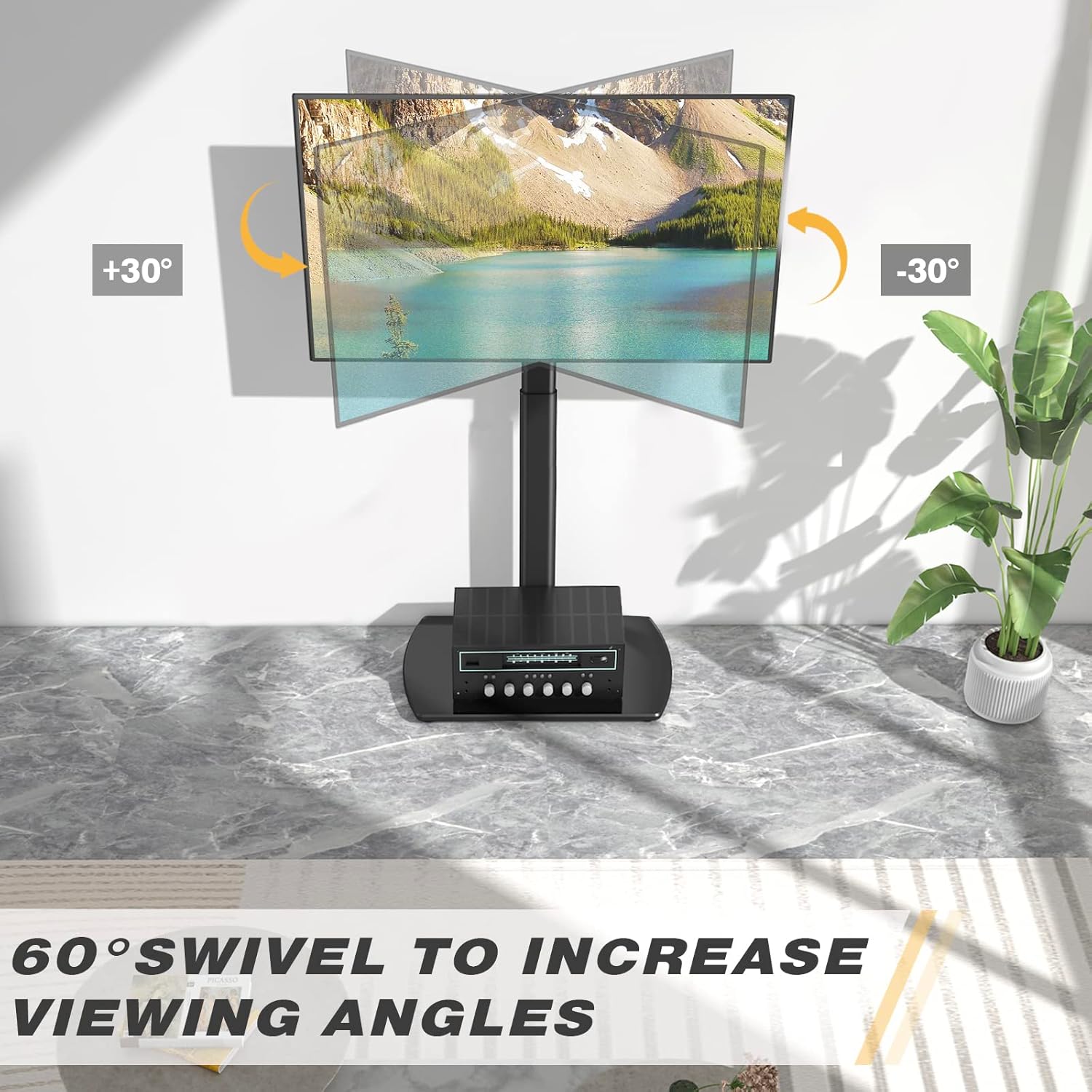
Image: Visual representation of the 60-degree swivel range.

Image: Close-up of the swivel joint.
Кіраванне кабелем
Utilize the integrated cable management clips on the rear of the main support pole to organize and conceal TV cables. This helps maintain a tidy appearance and prevents cable clutter.

Image: Cable management clips on the stand's pole.
Тэхнічнае абслугоўванне
- Уборка: Працярыце падстаўку мяккай губкайamp тканінай. Пазбягайце абразіўных ачышчальнікаў або растваральнікаў, якія могуць пашкодзіць пакрыццё.
- Перыядычныя праверкі: Перыядычна правярайце ўсе шрубы і балты, каб пераканацца, што яны зацягнуты. Пры неабходнасці падцягвайце.
- Glass Base Care: The tempered glass base is durable but can be scratched. Use coasters for items placed on it and avoid dropping heavy objects.
Ліквідацыю непаладак
| праблема | Магчымая прычына | Рашэнне |
|---|---|---|
| Тэлевізар не стаіць на адным узроўні. | Mounting brackets are not aligned or tightened unevenly. | Re-check the alignment of the TV mounting brackets and ensure all screws are tightened evenly. |
| Стойка адчуваецца няўстойлівай. | Loose connections or uneven floor surface. | Verify all assembly bolts are securely tightened. Ensure the stand is placed on a flat, stable surface. Check non-slip feet. |
| Тэлевізар нельга падключыць. | Няправільны шаблон VESA або памер/вага тэлевізара. | Confirm your TV's VESA pattern and weight are within the stand's specifications (Max VESA 400x400mm, Max 35kg/77lbs). |
Тэхнічныя характарыстыкі
| Марка: | RFIVER |
| мадэль: | TF3001 |
| Сумяшчальныя памеры тэлевізараў: | 32 - 65 цалі |
| Max VESA Compatibility: | 400x400mm (also supports 100x100, 100x200, 200x100, 200x200, 300x200, 200x300, 300x300, 400x200, 400x300) |
| Максімальная ёмістасць: | 35 кг (77 фунтаў) |
| Дыяпазон рэгулявання вышыні: | 1000 мм - 1300 мм |
| Кут павароту: | ±30 degrees (60 degrees total) |
| матэрыял: | Легаваная сталь, загартаванае шкло |
| колер: | Чорны |
| Памеры прадукту (Д х Ш х У): | 55 x 38 x 130 cm (approximate, at max height) |
| Вага прадукту: | 8.8 кг |
Гарантыя і падтрымка
RFIVER products are designed for durability and performance. For any questions, missing parts, or support needs, please contact RFIVER customer service. Please retain your proof of purchase for warranty claims.
For further assistance, please visit the official RFIVER webсайт або звярніцеся да іх каналаў падтрымкі кліентаў.


