
1. Уводзіны
Thank you for choosing the IMILAB EC2 Outdoor IP Security Camera. This manual provides essential information for the proper installation, operation, and maintenance of your device. The IMILAB EC2 is a versatile security camera designed for both indoor and outdoor use, featuring Full HD resolution, infrared night vision, motion detection, and two-way audio communication. Please read this manual thoroughly before using the product to ensure optimal performance and safety.
2. Змесціва ўпакоўкі
Праверце, ці ўсе пералічаныя ніжэй прадметы ўваходзяць у камплект. Калі якія-небудзь прадметы адсутнічаюць або пашкоджаныя, звярніцеся ў службу падтрымкі кліентаў.
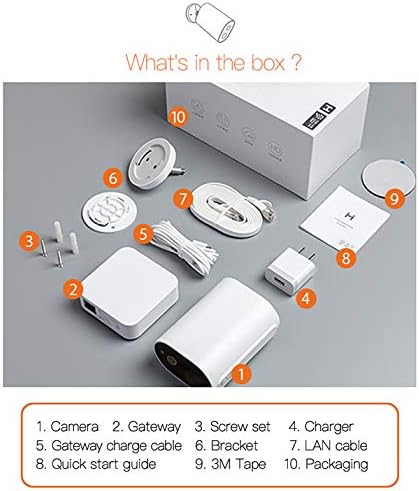
Image: Contents of the IMILAB EC2 package, including the camera, gateway, and accessories.
- Камера
- Шлюз
- Набор шруб
- Зарадная прылада
- Gateway charge cable
- Кранштэйн
- ЛВС-кабель
- Кароткае кіраўніцтва
- 3M стужка
- Ўпакоўка
3. Прадукт скончыўсяview
The IMILAB EC2 camera is designed for robust security monitoring with several key features:
- Бесправадная канструкцыя: Offers flexible placement without power cable limitations.
- AI Scanning: Advanced artificial intelligence for improved detection accuracy.
- Павялічаны тэрмін службы батарэі: Up to 4 months on a single charge under typical usage conditions.
- Без штомесячнай платы: Cloud storage for recorded events is available without subscription.
- IP66 Воданепранікальнасць: Certified for dust and water resistance, suitable for outdoor environments.
- Passive IR Detection: Utilizes Passive Infrared (PIR) for motion sensing.
- Начное бачанне: Integrated infrared LEDs for clear monitoring in low-light or dark conditions.
- Раздзяленне 1080P HD: Забяспечвае выразнае і падрабязнае відэа footage.
- Шыфраванне AES128: Ensures secure data transmission and storage.

Image: Visual representation of the IMILAB EC2's main features.
4. Настройка
Follow these steps to set up your IMILAB EC2 camera:
- Зарадзіць камеру: Before initial use, fully charge the camera using the provided charger and gateway charge cable.
- Спампаваць прыкладанне: Download the official IMILAB Home app (or compatible Xiaomi Home app) from your smartphone's app store (available for Android and iOS).
- Уключэнне шлюза: Connect the Gateway to a power source and to your router via the LAN cable. Wait for the indicator light to show it's ready for pairing.
- Спалучэнне камеры: Open the app, create an account, and follow the on-screen instructions to add the Gateway and then the EC2 camera. Ensure your smartphone is connected to a 2.4GHz Wi-Fi network during setup.
- Устанавіце камеру: Choose a suitable location for mounting. The camera can be mounted on a wall or other flat surface using the provided bracket, screws, and 3M tape. Ensure the camera has a clear field of view and is within Wi-Fi range of the Gateway.

Image: The IMILAB EC2 camera shown mounted on a wall, illustrating its installation flexibility.
5. Інструкцыя па эксплуатацыі
5.1 У прамым эфіры View і запіс
Access the live video feed from your camera through the IMILAB Home app. You can manually record video or capture screenshots directly from the live view інтэрфейс.
5.2 Выяўленне руху і сігналізацыя
The camera features a PIR motion sensor and AI-powered human detection to minimize false alarms. When motion is detected, the camera can automatically record a short video clip and send a notification to your smartphone.
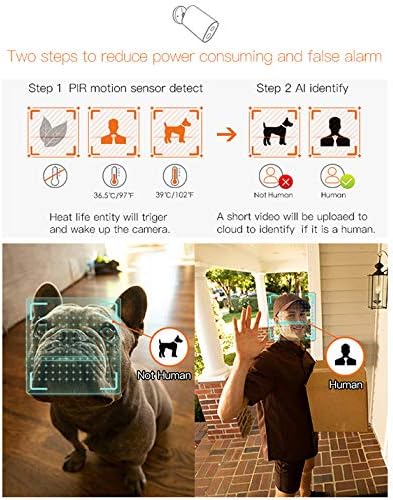
Image: Illustration of the camera's PIR motion detection and AI human identification process.
5.3 Начное бачанне
The IMILAB EC2 is equipped with infrared night vision, allowing it to capture clear video footage even in complete darkness. This feature activates automatically in low-light conditions.

Image: Comparison demonstrating the superior night vision capabilities of the IMILAB EC2 camera.
5.4 Двухбаковае аўдыё
Utilize the built-in microphone and speaker to communicate with individuals near the camera, directly through the app.
5.5 Воблачнае сховішча
The camera offers free cloud storage for recorded events for a limited duration (e.g., 7 days), eliminating the need for a local memory card. This ensures your footage is securely backed up.

Image: The IMILAB EC2 camera highlighting its free cloud storage feature.
6. Тэхнічнае абслугоўванне
6.1 Устойлівасць да ўздзеяння надвор'я
The IMILAB EC2 camera has an IP66 rating, making it resistant to dust and powerful water jets. It is designed to withstand various outdoor weather conditions, including heat, wind, snow, and rain.

Image: The IMILAB EC2 camera's internal structure and its resilience to extreme weather conditions.
6.2 Зарадка акумулятара
The camera is powered by a rechargeable Lithium Polymer battery. When the battery level is low, you will receive a notification via the app. Recharge the camera using the provided charging cable and adapter. A full charge can last up to 4 months, depending on usage and environmental factors.

Image: The IMILAB EC2 camera demonstrating its long battery life, capable of 4 months on a single charge.
6.3 Ачыстка
Periodically clean the camera lens and housing with a soft, dry cloth to ensure clear image quality and proper operation. Do not use harsh chemicals or abrasive materials.
7. Выпраўленне непаладак
If you encounter issues with your IMILAB EC2 camera, refer to the following common solutions:
- Камера не падключаецца да Wi-Fi: Ensure the Gateway is powered on and connected to your router. Verify your Wi-Fi network is 2.4GHz. Restart the camera and Gateway, then attempt pairing again.
- Дрэнная якасць відэа: Check your Wi-Fi signal strength at the camera's location. Ensure the camera lens is clean and free from obstructions.
- Датчык руху не працуе: Verify motion detection settings are enabled in the app. Adjust sensitivity levels if necessary. Ensure the camera's view не перашкаджае.
- Акумулятар хутка разраджаецца: Frequent motion detection events, live view access, or poor Wi-Fi signal can increase battery consumption. Reduce detection sensitivity or optimize camera placement.
- Няма апавяшчэнняў: Check your smartphone's app notification settings and ensure they are enabled for the IMILAB Home app.
8. Тэхнічныя характарыстыкі
Detailed technical specifications for the IMILAB EC2 Outdoor IP Security Camera (Model CMSXJ11A):
| Асаблівасць | Спецыфікацыя |
|---|---|
| Назва мадэлі | Xiaomi CMSXJ11A |
| Дазвол відэазахопу | 1080p (поўны HD) |
| Эфектыўнае дазвол відэа | 1080 |
| Частата кадраў | 30 кадраў у секунду |
| Тэхналогія падлучэння | Бесправадная сувязь (Wi-Fi) |
| Тэхналогіі бесправадной сувязі | Wi-Fi |
| Пратакол злучэння | Wi-Fi |
| Выкарыстанне ў памяшканні/на вуліцы | У памяшканні, на адкрытым паветры |
| Асаблівасці | Night Vision, Motion Detector |
| Крыніца харчавання | Харчаванне ад батарэі |
| Батарэі | Патрабуецца 1 літый-палімерная батарэя (у камплекце) |
| Змест энергіі літыевай батарэі | 0.6 Вт гадзін |
| Літыевая батарэя Voltage | 5 вольт |
| Вага літыевай батарэі | 0.9 грам |
| Рэйтынг IP | IP66 (Dust and Water Resistance) |
| Сумяшчальныя прылады | Смартфон (Android, iOS) |
| Тып мацавання | Насценнае мацаванне |
| Колер | Белы |
| Памеры прадмета (Д х Ш х У) | 3 х 2 х 4 см |
| Вага прадмета | 530 г |
9. Гарантыя і падтрымка
For warranty information, please refer to the documentation provided with your purchase or contact your retailer. Specific warranty terms may vary by region and seller.
For technical support or further assistance, please visit the official IMILAB website or contact their customer service. You may also find support resources on the IMILAB brand page on Amazon.