
Mumusuki Mumusuki2xt0yqs8ew
Stage Light Controller 512 Channel USB to DMX DMX512 LED Light DMX Stage Lighting Controller Channels Decoder Module User Manual
Brand: Mumusuki | Model: Mumusuki2xt0yqs8ew
Уводзіны
This manual provides comprehensive instructions for the setup, operation, and maintenance of your Mumusuki 512 Channel USB to DMX DMX512 LED Light Controller. This device is designed to control various DMX512 stage lighting fixtures, including computer scanning lights, moving headlights, LED lights, fog machines, color changers, and dimmers, offering versatile lighting control for professional and amateur applications.
Прадукт скончаныview і кампаненты
The Mumusuki USB-DMX512 controller is a compact and powerful tool for managing stage lighting. It connects to your computer via USB and provides DMX512 output for your lighting fixtures.

Figure 1: The complete package including the USB-DMX512 controller, a USB cable for PC connection, and a software installation CD.

Малюнак 2: Верх view of the controller, displaying the model number CYL-6602 and USB-DMX512 designation, along with two DMX output ports.
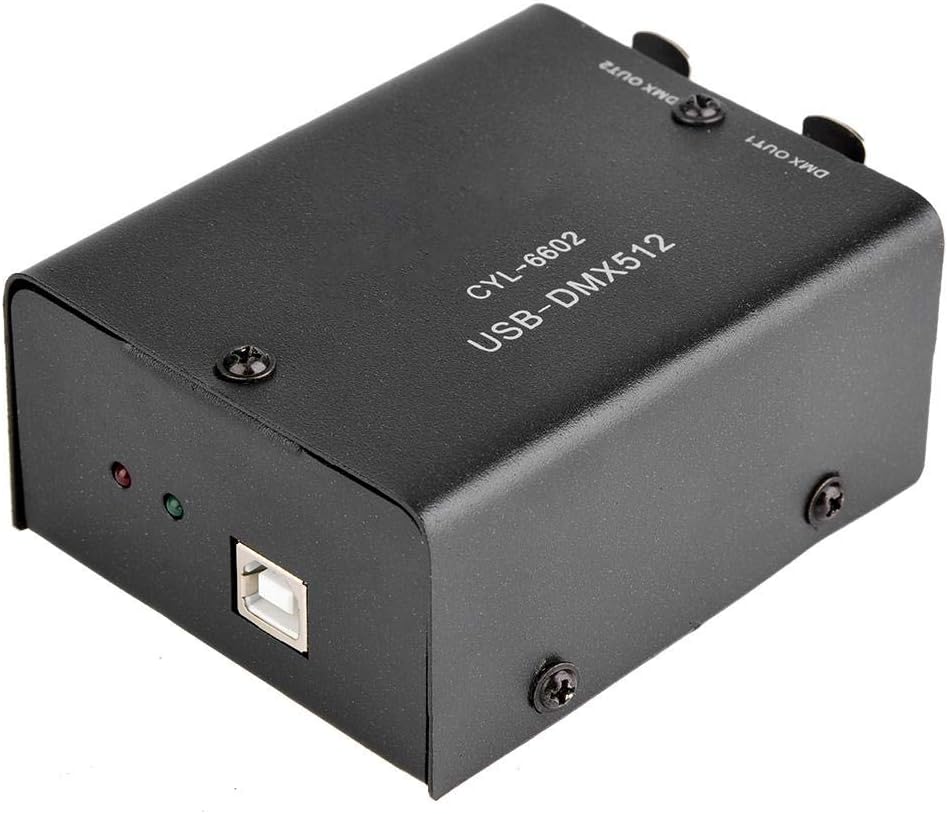
Figure 3: The included white USB cable, used to connect the controller to your computer's USB port.

Figure 4: The software installation CD, containing necessary drivers and control software for the DMX controller.
Інструкцыя па наладзе
- Ўстаноўка праграмнага забеспячэння:
Insert the provided software CD into your computer's CD/DVD drive. Follow the on-screen instructions to install the DMX control software and necessary drivers. This device supports over 30 DMX512 control software applications. Ensure your operating system is compatible (Win98SE / Win2000 / WinXP / Windows Vista, and Windows 7 (32-bit and 64-bit)).
- Падключэнне да ПК:
Connect the USB-DMX512 controller to your computer using the provided USB cable. The controller is powered directly via the PC's USB port.
- Connect DMX Lighting:
Connect your DMX512 compatible stage lighting fixtures to the DMX OUT ports (DMX OUT1 or DMX OUT2) on the controller using standard DMX cables. Ensure proper DMX chaining if connecting multiple fixtures.

Figure 5: Schematic illustrating the connection flow from the computer to the USB-DMX512 controller, then to a DMX dimmer, and finally to various lighting fixtures.
Інструкцыя па эксплуатацыі
Once the software and hardware are properly set up, you can begin controlling your DMX lighting fixtures.
- Запуск праграмнага забеспячэння: Open the installed DMX control software on your computer.
- Распазнаванне прылады: The software should automatically detect the USB-DMX512 controller. If not, check USB connections and driver installation.
- Patching Fixtures: Within the software, "patch" or assign DMX addresses to your lighting fixtures according to their individual manuals. The controller supports 512 DMX channels.
- Кіраванне і праграмаванне: Use the software interface to control individual channels, create scenes, chases, and shows. You can control various parameters such as color, intensity, movement, and effects for different types of DMX lights.

Figure 6: The DMX controller positioned in front of a dynamic stage lighting setup, demonstrating its application in controlling stagэлектронныя эфекты.

Малюнак 7: Выхample of the vibrant and dynamic lighting effects achievable with the DMX controller, showcasing various spotlights and colored beams on a stage.
Тэхнічнае абслугоўванне
To ensure the longevity and optimal performance of your DMX controller, follow these maintenance guidelines:
- Уборка: Gently wipe the exterior of the controller with a soft, dry cloth. Avoid using liquid cleaners or abrasive materials.
- захоўванне: Store the controller in a cool, dry place away from direct sunlight, extreme temperatures, and excessive dust when not in use.
- Сыход за кабелем: Inspect USB and DMX cables regularly for any signs of wear or damage. Replace damaged cables immediately to prevent connectivity issues.
- Абнаўленні праграмнага забеспячэння: Periodically check the software provider's website for any updates to the DMX control software or drivers to ensure compatibility and access to new features.
Ліквідацыю непаладак
| праблема | Магчымая прычына | Рашэнне |
|---|---|---|
| Controller not recognized by PC/software. |
|
|
| Фары не рэагуюць на кантролер. |
|
|
| Праграмнае забеспячэнне завісае або дае збой. |
|
|
Тэхнічныя характарыстыкі
| Марка | Мумусукі |
| Нумар мадэлі | Mumusuki2xt0yqs8ew |
| Матэрыял | Полікарбанат (ПК) |
| Тып крыніцы святла | Light Emitting Diode (for controlled lights) |
| Крыніца харчавання | Электрычны шнур (праз USB) |
| Вага прадмета | 0.04 кілаграма (1.41 унцыі) |
| тtage | 5 В (пастаянны ток) |
| Тып мацавання | Настольнае мацаванне |
| Number of Light Sources (Channels) | 512 |
| Памеры прадукту | 0.39"Д х 0.39"Ш х 0.39"В (8.27 х 7.09 х 2.76 цалі) |
| Краіна паходжання | Кітай |
| Дата першай даступнасці | 21 красавіка 2020 г |
| Падтрымліваюцца аперацыйныя сістэмы | Win98SE / Win2000 / WinXP / Windows Vista, and Windows 7 (32-bit and 64-bit) |
Падтрымка і гарантыя
For technical support or inquiries regarding your Mumusuki USB-DMX512 controller, please refer to the contact information provided with your purchase or visit the official Mumusuki store on Amazon: Mumusuki Store.
While specific warranty details are not provided in this manual, it is recommended to check your purchase documentation or contact the seller for information on warranty coverage and available protection plans.