
1. Уводзіны
This manual provides instructions for the proper setup, operation, and maintenance of your IPD IPH-160 Monaural Wired Headset. The IPH-160 is designed for clear communication in various environments, featuring a noise-cancelling microphone and a 3.5mm jack for broad compatibility.
2. Змесціва ўпакоўкі
Калі ласка, пераканайцеся, што ўсе прадметы прысутнічаюць у вашай упакоўцы:
- IPD IPH-160 Monaural Headset
- Quick Disconnect (QD) to 3.5mm Jack Cable (4-pole)
- Ear Cushions (pre-installed or spare)
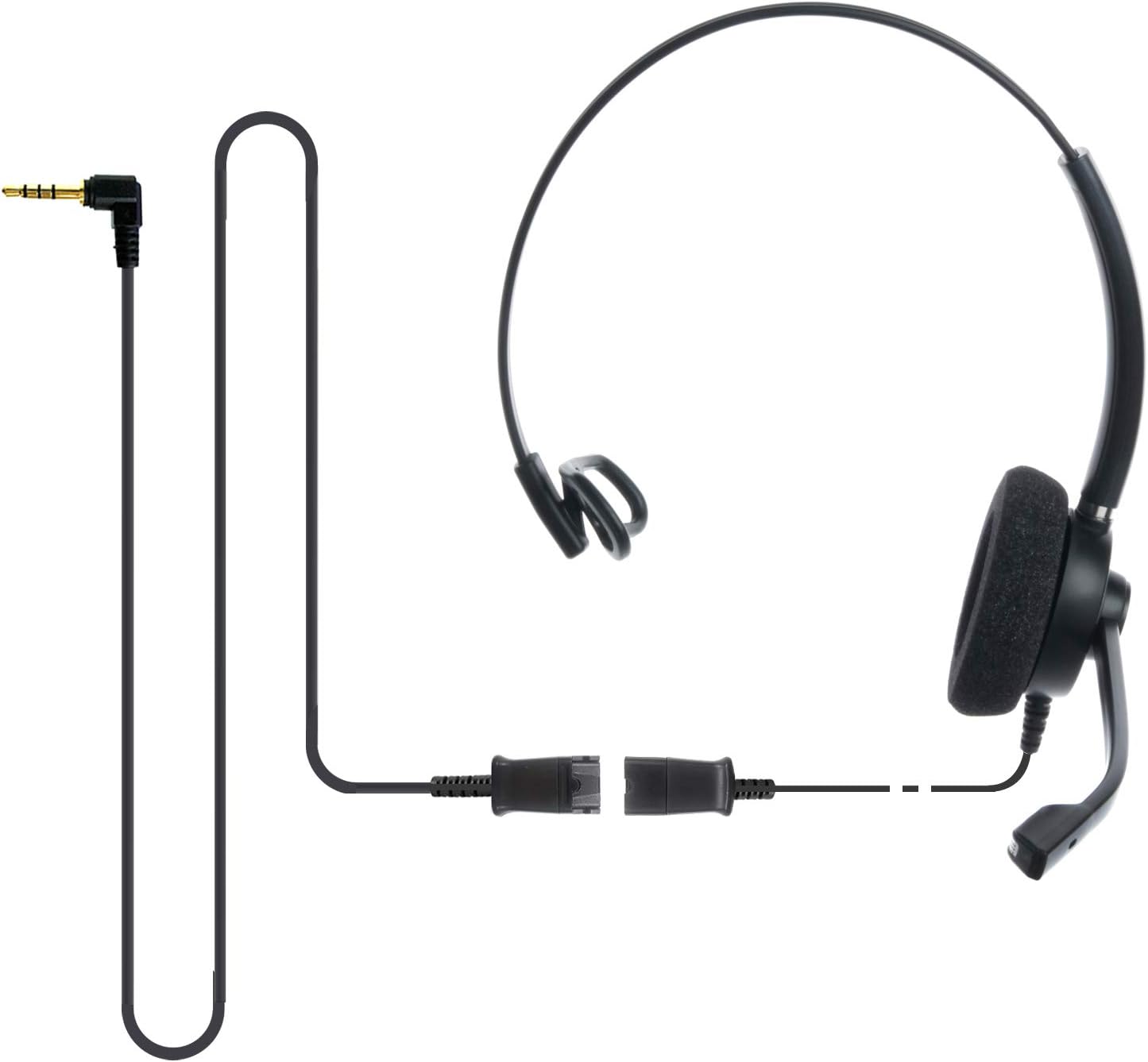
Image: The IPD IPH-160 headset with its detachable Quick Disconnect cable and 3.5mm jack connector.
3. Настройка
3.1 Падключэнне гарнітуры
- Connect the Quick Disconnect (QD) cable to the headset. Ensure a secure connection.
- Insert the 3.5mm jack of the cable into the corresponding port on your device (Android cell phone, laptop, tablet, Apple MacBook, or other smart device).

Выява: буйны план view of the 3.5mm jack connector, illustrating its connection to a mobile device and laptop.
3.2 Сумяшчальнасць прылад
The 3.5mm jack (4 poles) is compatible with a wide range of devices including:
- Android cell phones (e.g., Samsung, Huawei, HTC, ZTE)
- Ноўтбукі
- Таблеткі
- Apple MacBooks with a single 3.5mm headset port
Заўвага:
- iPhone 7/7S and later models may require an additional Lightning to 3.5mm adapter (not included).
- If your specific phone model is not listed or you encounter compatibility issues, please contact IPD support for assistance.

Image: The IPD headset shown with various connection options for desk phones, PCs/softphones, and mobile phones, highlighting the versatility of Quick Disconnect cables.
4. Кіраванне гарнітурай
4.1 Нашэнне і рэгуляванне
The IPH-160 headset is designed for all-day comfort. Adjust the headband for a secure yet comfortable fit. The microphone boom is flexible; position it approximately 1-2 inches from your mouth for optimal voice pickup.
4.2 мікрафон з шумапрыглушэннем
The headset features a passive noise-cancelling microphone to reduce background noise, ensuring clearer conversations. Proper microphone positioning is crucial for effective noise cancellation.

Image: A user wearing the headset, demonstrating the microphone's position and illustrating the effect of noise cancellation on audio waveforms.
4.3 Acoustic Shock Protection (ASP)
The headset incorporates an Acoustic Shock Protection (ASP) circuit on the speaker. This feature protects your hearing from sudden, unwanted loud noises by cutting sounds over 105dB and maintaining levels below 105dB.
4.4 Wideband Audio
The HD Wideband speaker delivers clear sound, enhancing the quality of your calls and audio monitoring.

Image: A close-up of the headset's ear cushion, visually representing the distinction between acoustic noise and clear sound for high-quality voice communication.
5. Тэхнічнае абслугоўванне
5.1 Ачыстка
To maintain hygiene and performance, regularly clean the ear cushions and other surfaces of the headset with a soft, dry cloth. Avoid using harsh chemicals or abrasive materials.
5.2 Захоўванне
When not in use, store the headset in a clean, dry place away from direct sunlight and extreme temperatures. Avoid tangling the cable to prevent damage.
6. Выпраўленне непаладак
6.1 Няма гуку або нізкі ўзровень гучнасці
- Пераканайцеся, што 3.5-мм раз'ём цалкам устаўлены ў прыладу.
- Праверце налады гучнасці вашай прылады.
- Verify that the headset is selected as the audio output device in your computer's sound settings.
- Confirm the Quick Disconnect (QD) cable is securely connected to the headset.
6.2 Мікрафон не працуе
- Ensure the microphone boom is positioned correctly near your mouth.
- Праверце налады мікрафона вашай прылады і пераканайцеся, што ў якасці ўваходнай прылады выбрана гарнітура.
- Test the headset with another compatible device to rule out a device-specific issue.
6.3 Праблемы сумяшчальнасці
If you experience compatibility problems with your device, especially if it's not explicitly listed as compatible, please contact IPD customer support for guidance.
7. Тэхнічныя характарыстыкі
| Асаблівасць | Спецыфікацыя |
|---|---|
| Назва мадэлі | IPH-160-35 |
| Тэхналогія падлучэння | Правадная |
| Гняздо для навушнікаў | 3.5 mm Jack (4-pole) |
| Кантроль шуму | Пасіўнае падаўленне шуму |
| АЧХ | 10 кГц |
| Адчувальнасць | 58 дБ |
| Імпеданс | 150 Ом |
| Вага прадмета | 198 грам (7 унцый) |
| Матэрыял | Пластыкавыя |
| Размяшчэнне вушэй | Над вухам |
| Асаблівасць | Шумапрыглушэнне |
| Уключаныя кампаненты | Амбушюры |
8. Інфармацыя аб гарантыі
The IPD IPH-160 Headset comes with a Гарантыя 3 год з даты пакупкі. Гэтая гарантыя распаўсюджваецца на вытворчыя дэфекты пры нармальным выкарыстанні. Калі ласка, захавайце пацвярджэнне пакупкі для прэтэнзій па гарантыі.
9. Падтрымка
For technical assistance, warranty claims, or any questions regarding your IPD IPH-160 Headset, please contact IPD customer support. You can find contact information on the official IPD webна сайце або праз вашага прадаўца.
Наведайце ст IPD Store для атрымання дадатковай інфармацыі і прадуктаў.