
1. Прадукт скончыўсяview
The Billboard BB425 Gaming Headset is designed for an immersive audio experience across various gaming platforms. It features a boom microphone for clear communication, enhanced bass for rich sound, and convenient in-line controls for volume adjustment and instant muting. The headset is lightweight and adjustable, ensuring a comfortable fit during extended use, and comes with a durable fabric cord.
- Мікрафон-штамб: For clear voice communication.
- Палепшаныя басы: Delivers a rich audio experience.
- In-line Control: Easily adjust volume and mute the microphone.
- Рэгуляваны дызайн: Lightweight and comfortable for prolonged gaming sessions.
- Durable Fabric Cord: Designed for longevity.
2. Інструкцыі па ўсталёўцы
Follow these steps to connect your Billboard BB425 Gaming Headset to your device.
- Вызначце злучальнікі: The headset features a single 3.5mm TRRS jack for combined audio and microphone functionality. An included Y-splitter cable separates this into two 3.5mm TRS jacks: one for audio output (typically green) and one for microphone input (typically pink).
- For Devices with a Single 3.5mm Port (e.g., most laptops, gaming controllers, smartphones):
- Plug the headset's single 3.5mm TRRS jack directly into your device's combined audio/microphone port.
- For Devices with Separate Audio and Microphone Ports (e.g., most desktop PCs):
- Connect the headset's single 3.5mm TRRS jack into the female end of the Y-splitter cable.
- Plug the audio output jack (often green) of the Y-splitter into your device's audio output port.
- Plug the microphone input jack (often pink) of the Y-splitter into your device's microphone input port.
- Наладзіць Fit: Place the headset over your ears and adjust the headband for a comfortable and secure fit. Position the boom microphone near your mouth for optimal voice pickup.
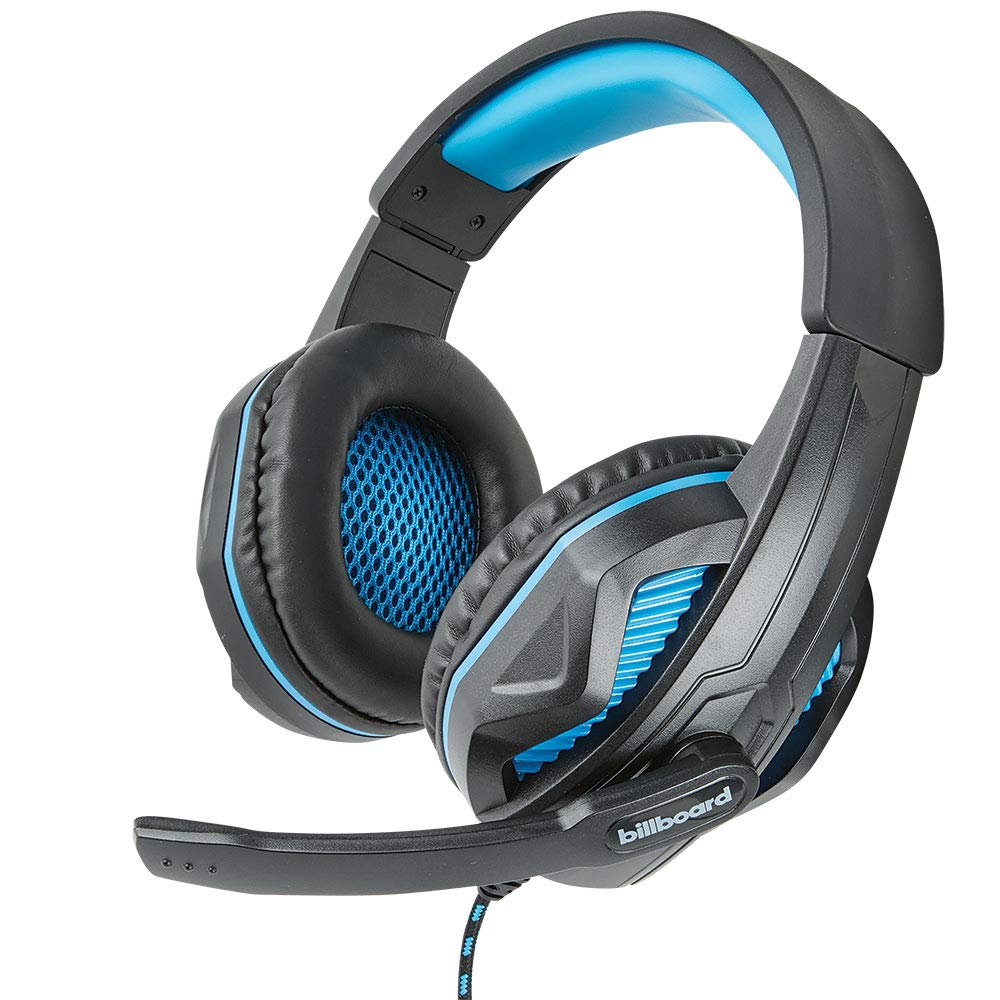
Image: The Billboard BB425 Gaming Headset's braided cable, in-line control unit, and the included Y-splitter cable with two 3.5mm TRS jacks for separate audio and microphone connections.
3. Інструкцыя па эксплуатацыі
The in-line control unit provides easy access to essential audio functions.
- Рэгулятар гучнасці: Use the scroll wheel on the in-line control unit to adjust the audio volume. Scroll up to increase volume and down to decrease it.
- Адключэнне мікрафона: The in-line control unit features a switch to mute or unmute the microphone. Slide the switch to the "OFF" position to mute your microphone, and to the "ON" position to enable it.
- Boom Microphone Adjustment: The flexible boom microphone can be positioned closer or further from your mouth to optimize voice clarity.
4. Тэхнічнае абслугоўванне і догляд
Правільны догляд падоўжыць тэрмін службы вашай гарнітуры.
- Уборка: Выкарыстоўвайце мяккую сухую тканіну, каб выцерці гарнітуру. Для амбушур злёгкуamp cloth with mild soap can be used, but ensure they are completely dry before use. Do not use harsh chemicals or abrasive cleaners.
- захоўванне: Захоўвайце гарнітуру ў чыстым, сухім месцы, удалечыні ад экстрэмальных тэмператур і прамых сонечных прамянёў. Пазбягайце заблытвання кабеля.
- Апрацоўка: Не цягніце за кабель, каб адключыць гарнітуру. Заўсёды трымайце вілку моцна. Пазбягайце падзення або моцных удараў гарнітуры.
5. Выпраўленне непаладак
If you encounter issues with your Billboard BB425 Gaming Headset, refer to the following common solutions.
- Няма гуку або нізкая гучнасць:
- Ensure the headset's 3.5mm jack(s) are fully inserted into the correct port(s) on your device.
- Check the in-line volume control wheel and adjust it to an audible level.
- Verify your device's audio output settings. Ensure the headset is selected as the default playback device.
- Праверце гарнітуру з іншай прыладай, каб выключыць праблему, характэрную для гэтай прылады.
- Мікрафон не працуе:
- Ensure the microphone mute switch on the in-line control unit is in the "ON" position.
- If using the Y-splitter, ensure the microphone jack (typically pink) is correctly plugged into your device's microphone input port.
- Check your device's microphone input settings. Ensure the headset microphone is selected as the default recording device and that its input volume is not muted or set too low.
- Праверце мікрафон з дапамогай іншага прыкладання або прылады.
- Static or Distorted Audio:
- Ensure all connections are secure and free from dust or debris.
- Try connecting the headset to a different audio port or device to check if the issue persists.
- Пазбягайце размяшчэння кабеля паблізу крыніц моцных электрамагнітных перашкод.
6. Тэхнічныя характарыстыкі
| Асаблівасць | Дэталь |
|---|---|
| Назва мадэлі | BB425 |
| Марка | Білборд |
| Тэхналогія падлучэння | Правадная |
| Раз'ём для навушнікаў | 3.5 мм Jack |
| Размяшчэнне вушэй | Над вухам |
| Формаў-фактар | На вуха |
| Сумяшчальныя прылады | Gaming Consoles, Desktops, Laptops, Telephones |
| Асаблівасці | Enhanced bass |
| Тып кіравання | In-line control (Volume, Mute) |
| Функцыя кабеля | Retractable, Durable Fabric Cord |
| Матэрыял | Пластыкавыя |
| Колер | Чорны |
| Памеры прадукту | 25.15 х 22.86 х 8.89 см |
| Вага прадмета | 386 г |
| Патрабуюцца батарэі | няма |
7. Інфармацыя аб гарантыі
This product is covered by a manufacturer's warranty. For specific details regarding warranty coverage, duration, and terms, please refer to the warranty card included with your product or visit the official Billboard webсайт. Захоўвайце чэк аб куплі як пацвярджэнне пакупкі ў выпадку любых гарантыйных прэтэнзій.
8. Падтрымка кліентаў
If you require further assistance or have questions not addressed in this manual, please contact Billboard customer support. Contact information can typically be found on the product packaging or the official Billboard webсайт.
вытворца: Чахлы і аксэсуары ESI