
OttLite CSN97G5P
Святлодыёдны стол OttLite Lamp with Adjustable Magnifier User Manual
Model: CSN97G5P
1. Прадукт скончыўсяview
Святлодыёдны стол OttLite Lamp with Adjustable Magnifier is designed to provide optimal lighting for various tasks, including reading, studying, crafting, and sewing. It features OttLite's exclusive ClearSun LED technology, which aims to reduce eyestrain by matching the spectral output of natural sunlight. The lamp includes an optical-grade magnifier and offers multiple brightness settings for customized illumination.

Figure 1: OttLite LED Desk Lamp with Adjustable Magnifier, showcasing its sleek design and integrated magnifying lens.
Official Product Video: OttLite Wellness Series
Video 1: This video from OttLite Technologies explains the benefits of the OttLite Wellness Series with ClearSun LED, highlighting how it is designed to promote eye health and reduce eyestrain.
2. Асноўныя магчымасці
2.1 ClearSun LED Technology
OttLite's exclusive ClearSun LED technology is engineered to closely replicate the spectral output of natural sunlight. This advanced lighting solution significantly reduces eyestrain by up to 51%, providing a balanced and smooth light that is gentle on the eyes. It boasts a Color Rendering Index (CRI) of 95+, ensuring colors are seen with exceptional accuracy and vibrancy, unlike typical LEDs that can cause visual fatigue due to unbalanced lightwaves.

Figure 2: Illustration demonstrating the lamp's ability to reduce eyestrain by up to 51% with ClearSun LED technology.

Figure 3: Visual comparison highlighting the unmatched color accuracy provided by ClearSun LEDs with a CRI of 95+.
2.2 Optical-Grade Magnifier
Інтэграваны ў лamp head is a high-quality 1.7x optical-grade magnifier, which also includes a 3.4x spot viewer for even finer detail work. A protective, easy-close lid covers the magnifier when not in use, keeping it clean and safe. This feature is particularly beneficial for intricate tasks such as crafting, sewing, reading small print, or examining medicine labels.

Малюнак 4: Падрабязны view з лamp's optical-grade magnifier, showing its clarity and the protective lid.
2.3 Adjustable Settings and Design
У лamp features a flexible, sturdy neck that allows for easy height adjustment, ranging from 10 to 21 inches, to direct light precisely where needed. Control is intuitive with a touch-sensitive switch on the base, offering four distinct brightness levels to suit various lighting preferences and tasks.

Figure 5: Diagram illustrating the lamp's key adjustable features, including the flexible neck, touch-sensitive switch, and four brightness settings.
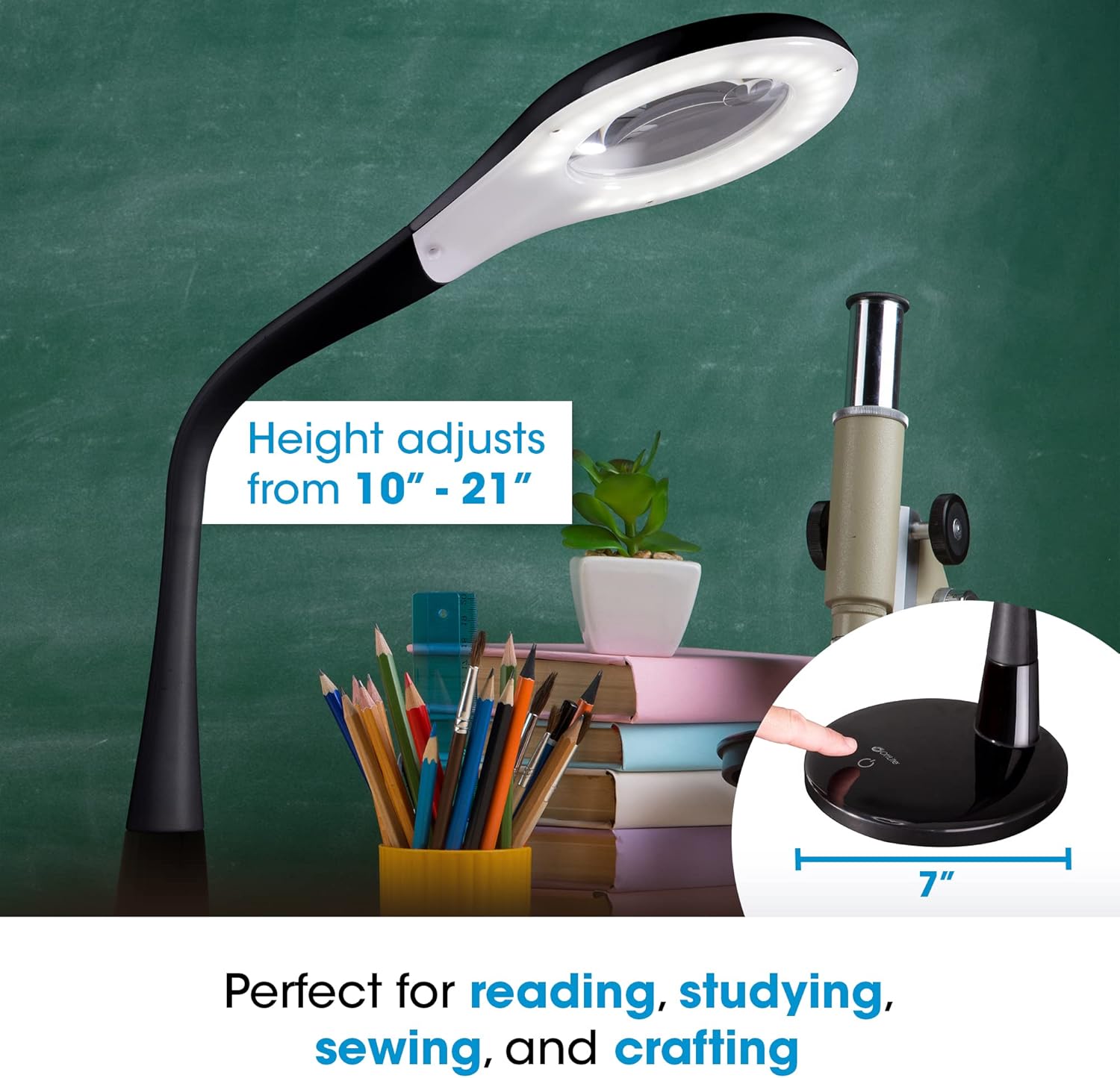
Малюнак 6: lamp positioned on a desk with books and art supplies, demonstrating its adjustable height and suitability for various activities.
3. Настройка
Your OttLite LED Desk Lamp requires minimal assembly. Follow these steps for initial setup:
- Распакуйце: Асцярожна выміце ўсе кампаненты з упакоўкі. Пераканайцеся, што ўсе дэталі наяўныя: lamp base, flexible neck with lamp head, and power adapter.
- пазіцыянаванне: Змесціце lamp base on a stable, flat surface. The base diameter is 7 inches, providing a sturdy foundation.
- Падключэнне сілкавання: Insert the power adapter into the power input port located on the back or side of the lamp base. Plug the other end of the adapter into a standard electrical outlet (120 Volts).
- Адрэгуляваць шыю: Gently adjust the flexible neck to your desired height and angle. The neck is designed for easy manipulation to direct light effectively.
У лamp цяпер гатовы да працы.
4. Інструкцыя па эксплуатацыі
Святлодыёдны стол OttLite Lamp is designed for user-friendly operation with its touch-sensitive controls.
- Уключэнне/выключэнне харчавання: Каб павярнуць лamp on or off, lightly touch the power icon on the lamp база.
- Наладзіць яркасць: У лamp offers 4 brightness settings. With the lamp on, repeatedly touch the power icon to cycle through the different brightness levels. The lamp will dim with each subsequent touch until it reaches the lowest setting, then cycle back to the brightest.
- Выкарыстанне лупы: To use the optical-grade magnifier, gently lift the protective lid located on the lamp head. Position the object you wish to magnify directly under the lens. When finished, close the lid to protect the lens from dust and scratches.
- Наладжванне Лamp Пасада: The flexible neck allows for precise positioning of the light and magnifier. Bend and twist the neck to achieve the optimal angle and height for your task.
5. Тэхнічнае абслугоўванне
Proper care and maintenance will ensure the longevity and optimal performance of your OttLite LED Desk Lamp.
- Уборка: Пераканайцеся, што lamp адключаны ад сеткі перад чысткай. Выцірайце прыладу мяккай сухой тканінайamp's surfaces. For the magnifier lens, use a lens cleaning cloth and a suitable lens cleaning solution to avoid scratches. Do not use abrasive cleaners or solvents.
- святлодыёды: У лamp uses integrated LEDs that are designed for long life and are not user-replaceable. Do not attempt to replace the LEDs.
- захоўванне: Пры захоўванні lamp for an extended period, unplug it and gently fold the flexible neck to a compact position. Store in a cool, dry place.
6. Выпраўленне непаладак
If you encounter any issues with your OttLite LED Desk Lamp, калі ласка, звярніцеся да наступных распаўсюджаных крокаў па ліквідацыі непаладак:
| праблема | Магчымая прычына | Рашэнне |
|---|---|---|
| Lamp не ўключаецца. |
|
|
| Святло мігціць або цьмянае. |
|
|
| Magnifier lens is blurry or dirty. |
|
|
If the problem persists after trying these solutions, please contact OttLite customer support for further assistance.
7. Тэхнічныя характарыстыкі
| Асаблівасць | Дэталь |
|---|---|
| Нумар мадэлі | CSN97G5P |
| Памеры (Д x Ш x В) | 7"D x 7"W x 10"H (adjustable height up to 21") |
| Вага прадмета | 3.7 фунта |
| Тып крыніцы святла | LED (ClearSun Technology) |
| Яркасць | 356 люмен |
| Каляровая тэмпература | 5000 кельвінаў |
| Індэкс колераперадачы (CRI) | 95+ |
| Налады яркасці | 4 узроўняў |
| Magnifier Strength | 1.7x (with 3.4x spot viewэ) |
| Метад кантролю | Дакранацца |
| Крыніца харчавання | Правадная электрычная (120 вольт) |
| Матэрыял | Пластыкавыя |
| UPC | 761712018768 |
8. Гарантыя і падтрымка
OttLite products are designed for quality and durability. For specific warranty information regarding your LED Desk Lamp with Adjustable Magnifier, please refer to the documentation included with your purchase or visit the official OttLite website. For technical support, troubleshooting assistance beyond this manual, or to inquire about replacement parts, please contact OttLite customer service.
You can often find support resources and contact information on the manufacturer's webсайт: www.ottlite.com
Ask a question about this manual
Ask about setup, troubleshooting, compatibility, parts, safety, or missing instructions. Manuals+ will review the question and use this page’s manual context to help answer it.