
Уводзіны
Thank you for choosing the ARREGUI CI10D-AL Electronic Invisible Lock with Alarm. This advanced security device is designed to provide an additional layer of protection for your home or business. Its invisible design ensures that potential intruders are unaware of its presence, making forced entry significantly more difficult. This manual will guide you through the installation, operation, and maintenance of your new lock.
Інфармацыя па бяспецы
- Перад устаноўкай і выкарыстаннем уважліва прачытайце ўсе інструкцыі.
- Трымайце прыладу далей ад вады і празмернай вільготнасці.
- Use only the specified battery types (4 AAA for the main unit, CR2032 for remotes).
- Do not attempt to disassemble or repair the lock yourself. Contact qualified personnel for service.
- Ensure proper alignment during installation to prevent damage to the lock or door.
- Утылізуйце выкарыстаныя батарэі ў адпаведнасці з мясцовымі правіламі.
Змест пакета
Праверце наяўнасць усіх кампанентаў у камплекце:
- 1x ARREGUI CI10D-AL Electronic Invisible Lock Unit
- 1x Запорная пласціна
- 4x Remote Controls (with CR2032 batteries included)
- Мантажныя элементы (шрубы, анкеры)
- 4 батарэйкі тыпу AAA (для асноўнага блока)
- 1x Emergency Battery (for main unit)
- Кіраўніцтва карыстальніка (гэты дакумент)
Прадукт скончаныview
The ARREGUI CI10D-AL is an invisible electronic lock designed for enhanced security. It features a robust alloy steel construction and operates via radio frequency remote controls with encrypted codes.
Асноўныя характарыстыкі:
- Invisible Design: Installed on the interior side of the door, making it undetectable from the outside.
- High-Power Alarm: Integrated 110 dB alarm activates upon forced entry attempts or door opening.
- Пульт дыстанцыйнага кіравання: Lock and unlock using the included radio frequency remote controls.
- Аварыйнае харчаванне: Includes an emergency battery to ensure operation even if main batteries are depleted.
- Папярэджанне пра нізкі зарад батарэі: Audible alert when main batteries are low.
- Fail-Safe Open: The lock remains open if batteries are completely exhausted, preventing lockout.
Кампаненты:
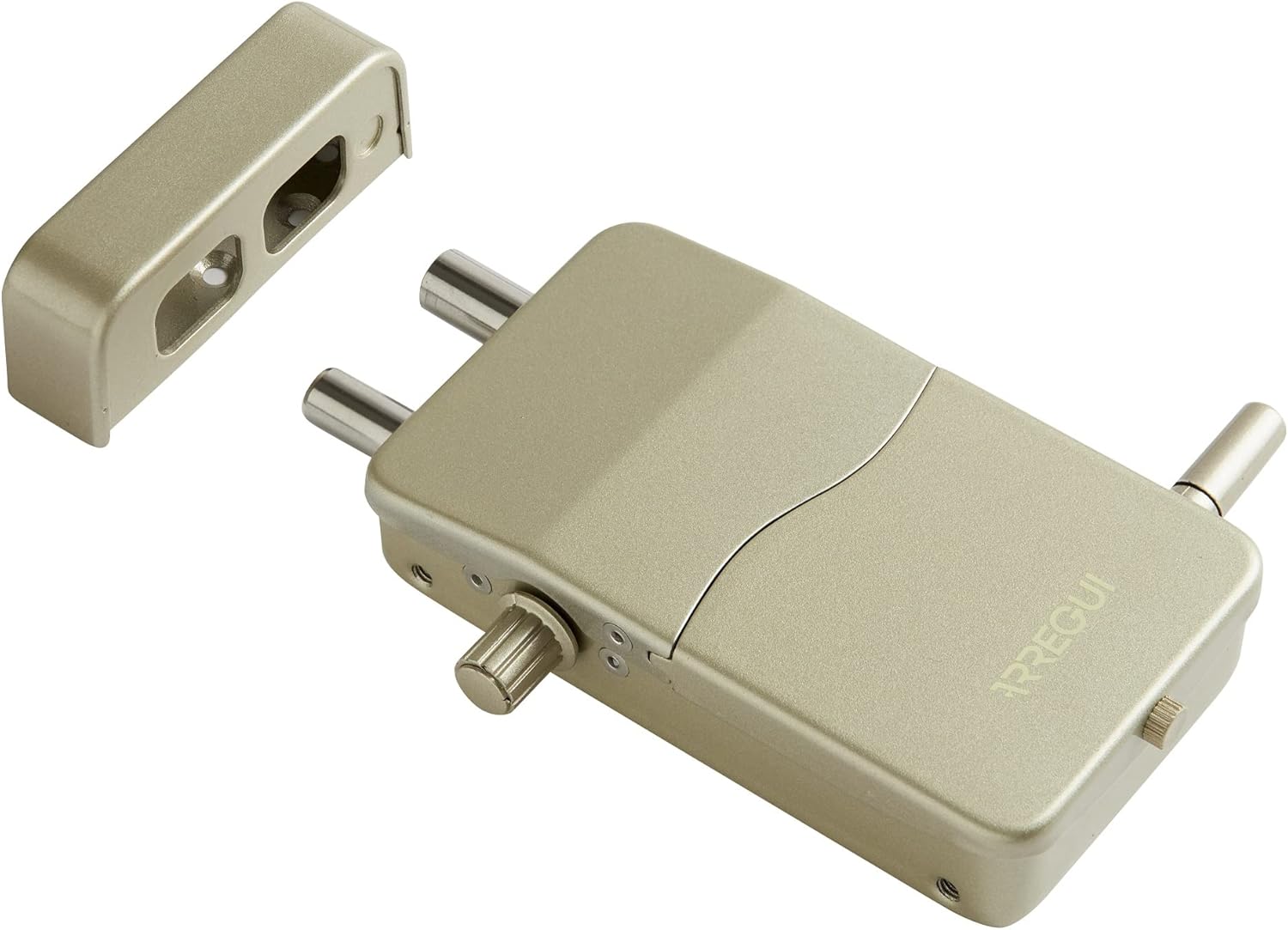
This image displays the primary components of the ARREGUI CI10D-AL lock system. On the right is the main lock body, showing its two robust locking bolts and the manual override knob. The ARREGUI brand name is visible on its surface. To the left is the strike plate, designed to receive the locking bolts when the door is secured. Both components are finished in a gold tone.

This image shows the ARREGUI CI10D-AL lock with its battery cover detached, exposing the internal battery compartment. The compartment is designed to hold four AAA batteries, which power the main unit. The cover, also gold-colored, is shown next to the lock, along with a small screw used to secure it.

This image illustrates the remote control in use. A hand is shown holding the black remote control, which features three buttons for locking, unlocking, and potentially activating the alarm. In the background, the ARREGUI CI10D-AL invisible lock is visible, mounted on the interior of a white door, demonstrating its discreet placement.
Настройка і ўстаноўка
The ARREGUI CI10D-AL lock is designed for simple, wireless installation on both wooden and metal doors. Ensure you have the necessary tools (e.g., drill, screwdriver, measuring tape) before beginning.
1. Battery Installation (Main Unit):
- Remove the battery cover from the main lock unit (refer to Figure 2).
- Insert 4 AAA batteries into the designated slots, ensuring correct polarity (+/-).
- Insert the emergency battery into its dedicated slot.
- Replace the battery cover and secure it with the small screw.
- The lock will emit a short beep to indicate successful power-up.
2. Mounting the Lock Unit:
- Choose an appropriate location on the interior side of your door, ensuring it does not interfere with the existing lock mechanism or door frame. The lock should be positioned so its bolts can extend freely into the strike plate.
- Hold the lock unit in place and mark the drilling points for the mounting screws.
- Прасвідруйце пілотныя адтуліны ў адзначаных кропках.
- Secure the main lock unit to the door using the provided screws. Do not overtighten.
3. Mounting the Strike Plate:
- Close the door and extend the bolts of the main lock unit.
- Align the strike plate with the extended bolts on the door frame, ensuring a smooth engagement.
- Mark the drilling points for the strike plate.
- Drill pilot holes and secure the strike plate to the door frame using the provided screws.
- Test the locking mechanism to ensure proper alignment and smooth operation. Adjust if necessary.
4. Спалучэнне з пультам дыстанцыйнага кіравання:
The included remote controls are pre-paired. If you need to pair new remotes or re-pair existing ones:
- Locate the pairing button on the main lock unit (refer to the detailed diagram in the full manual if available).
- Press and hold the pairing button until the lock emits a specific sound or light indicator.
- Within a few seconds, press any button on the remote control you wish to pair.
- The lock will confirm successful pairing with another sound or light indicator.
- Repeat for all additional remote controls.
Інструкцыя па эксплуатацыі
Замыканне дзвярэй:
- Пераканайцеся, што дзверы цалкам зачыненыя.
- Націсніце Замак button on your remote control (usually indicated by a closed padlock icon).
- The lock bolts will extend, and you will hear a confirmation sound.
Адмыканне дзвярэй:
- Націсніце Разблакіраваць button on your remote control (usually indicated by an open padlock icon).
- The lock bolts will retract, and you will hear a confirmation sound.
Функцыя сігналізацыі:
The integrated 110 dB alarm is designed to deter intruders. It activates automatically when the lock detects:
- Attempts to force the door open.
- Significant impacts or vibrations on the door.
- The alarm will sound for a set duration and then reset. To manually deactivate the alarm, press the Разблакіраваць кнопку на вашым пульце дыстанцыйнага кіравання.
Ручное перавызначэнне:
In case of remote control malfunction or battery depletion, the lock can be manually operated from the interior using the knob on the main unit.
Тэхнічнае абслугоўванне
Battery Replacement (Main Unit):
The lock will emit an audible warning when the main AAA batteries are low. Replace them promptly to ensure continuous operation.
- Адамкніце дзверы.
- Remove the battery cover (refer to Figure 2).
- Remove the old AAA batteries and dispose of them responsibly.
- Insert 4 new AAA batteries, observing correct polarity.
- Замяніце крышку батарэйнага адсека.
Замена батарэі (пульт дыстанцыйнага кіравання):
Each remote control uses a CR2032 3V lithium button cell battery.
- Асцярожна адкрыйце пульт дыстанцыйнага кіравання casing (usually by prying it open with a small flat-head screwdriver).
- Выміце старую батарэю CR2032.
- Устаўце новую батарэю CR2032 станоўчым (+) бокам уверх.
- Зачыніце пульт дыстанцыйнага кіравання casinг надзейна.
Уборка:
Wipe the lock unit and remote controls with a soft, dry cloth. Do not use abrasive cleaners or solvents.
Ліквідацыю непаладак
| праблема | Магчымая прычына | Рашэнне |
|---|---|---|
| Lock does not respond to remote. |
|
|
| Lock bolts do not extend/retract smoothly. |
|
|
| Нечакана гучыць сігнал трывогі. |
|
|
| Low battery warning persists after replacement. |
|
|
Тэхнічныя характарыстыкі
| Нумар мадэлі | CI10D-AL |
| Марка | АРЭГУІ |
| Матэрыял | Легаваная сталь |
| Тып замка | Электронныя |
| Асаблівасць | Alarm (110 dB) |
| Метад кантролю | Remote Control (Radio Frequency) |
| Магутнасць асноўнага блока | 4x AAA Batteries (included) + Emergency Battery (included) |
| Магутнасць дыстанцыйнага кіравання | CR2032 3V Lithium Button Cell (included) |
| Памеры (Д х Ш х У) | 133 х 75 х 35 мм (5.24 х 2.95 х 1.38 цалі) |
| Вага | 1.21 кілаграмаў (2.67 фунта) |
| Уключаныя кампаненты | Lock unit, strike plate, 4 remote controls, mounting hardware, batteries |
Інфармацыя аб гарантыі
Specific warranty details for the ARREGUI CI10D-AL Electronic Invisible Lock with Alarm are not provided within this manual. Please refer to the product packaging, the manufacturer's official webна сайце або ў месцы пакупкі, каб даведацца пра ўсе ўмовы гарантыі.
Падтрымка
For technical assistance, troubleshooting beyond this guide, or inquiries regarding your ARREGUI CI10D-AL lock, please contact ARREGUI customer support. Contact information can typically be found on the manufacturer's official webсайце або на ўпакоўцы прадукту.
When contacting support, please have your product model number (CI10D-AL) and purchase details ready.