
Altec Lansing AL-5003
Altec Lansing AL-5003 Multimedia DJ Trolly Speaker User Manual
Мадэль: AL-5003
Уводзіны
Дзякуй за пакупкуasing the Altec Lansing AL-5003 Multimedia DJ Trolly Speaker. This speaker is designed to deliver powerful audio for various applications, including parties and surround sound systems. Featuring wireless connectivity, a built-in trolley for portability, and multiple input options, the AL-5003 offers a versatile audio experience. Please read this manual carefully to ensure proper setup, operation, and maintenance of your speaker.
Важныя інструкцыі па бяспецы
- Read these instructions thoroughly before operating the speaker.
- Захоўвайце гэта кіраўніцтва для выкарыстання ў будучыні.
- Не падвяргайце дынамік уздзеянню дажджу або вільгаці.
- Не закрывайце вентыляцыйныя адтуліны.
- Не ўстанаўлівайце побач з крыніцамі цяпла, такімі як радыятары, абагравальнікі, пліты або іншыя прылады (у тым ліку ampLifiers), якія вырабляюць цяпло.
- Абараняйце сеткавы шнур ад наступання або заціскання, асабліва ў месцах вілкі, разеткі і месца выхаду з прылады.
- Выкарыстоўвайце толькі насадкі/аксэсуары, указаныя вытворцам.
- Адключайце гэты прыбор ад сеткі падчас навальніцы або калі ён не выкарыстоўваецца на працягу доўгага часу.
- Звяртайцеся да кваліфікаванага абслугоўваючага персаналу.
Змест пакета
Калі ласка, праверце ўпакоўку на наяўнасць наступных прадметаў:
- Altec Lansing AL-5003 Multimedia DJ Trolly Speaker
- Шнур харчавання
- Пульт дыстанцыйнага кіравання
- Кіраўніцтва карыстальніка
- Auxiliary Cable (may vary by region)
Прадукт скончаныview
The AL-5003 speaker features a robust design with integrated wheels and a handle for easy transport. It includes a powerful 10-inch speaker and a 1-inch tweeter, providing clear and dynamic sound. The control panel is located on the top of the unit, offering easy access to various functions.
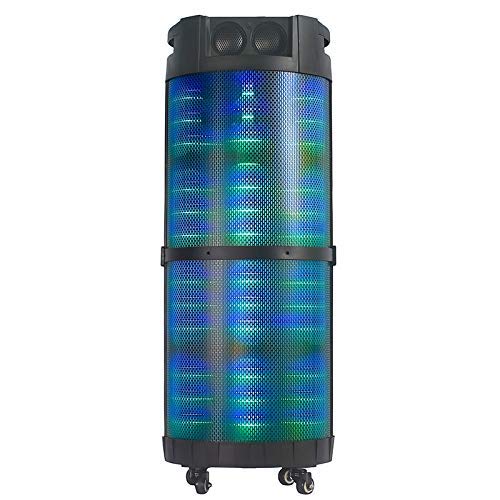
Малюнак 1: Фронт view of the Altec Lansing AL-5003 speaker, showcasing its cylindrical design and illuminated grille. The speaker features a sturdy build with integrated wheels at the base for portability.
Панэль кіравання і злучэння
The top panel of the speaker houses the main controls and input/output ports.
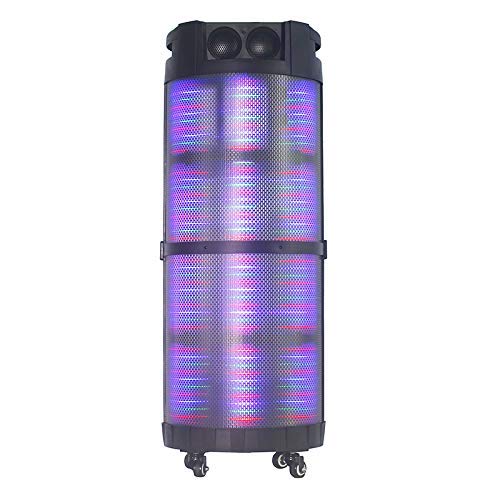
Малюнак 2: Зверху ўніз view of the AL-5003 speaker, highlighting the control panel with various buttons and knobs, along with the top-mounted speakers. This view also shows the integrated handle for easy transport.
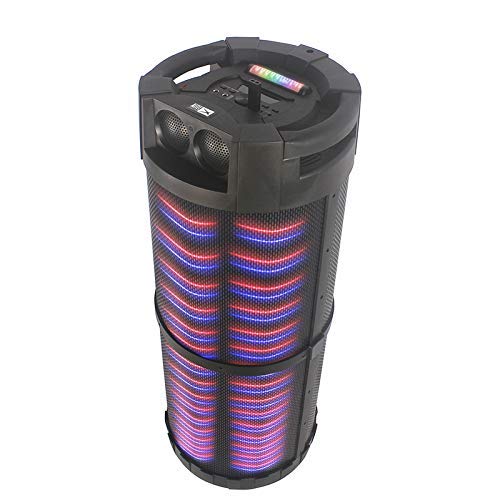
Малюнак 3: Вуглавы view of the AL-5003 speaker, providing a perspective of its overall structure, including the side grille and the top control area. The dynamic lighting effects are visible through the mesh.
Common controls include Power, Volume, Mode selection, Play/Pause, Track Skip, and inputs for USB, Auxiliary, and potentially Microphone (if available on the model).
Інструкцыя па наладзе
- Распакаванне: Carefully remove the speaker and all accessories from the packaging. Retain the packaging for future transport or storage.
- Размяшчэнне: Place the speaker on a stable, flat surface. Ensure there is adequate ventilation around the unit. For optimal sound, position the speaker in a central location within the listening area.
- Падключэнне сілкавання: Connect the provided power cord to the AC input on the speaker and then plug it into a standard wall outlet (AC 100-240V, 50/60Hz).
- Пачатковая аплата (калі ёсць): If the speaker has an internal battery (Lead Acid battery mentioned in specs), it is recommended to fully charge it before first use. The charging indicator light will typically show charging status.
- Уключэнне: Press the Power button on the control panel or remote control to turn on the speaker.
Інструкцыя па эксплуатацыі
1. Рэжым Bluetooth
- Актываваць Bluetooth: Turn on the speaker. Press the "Mode" button on the control panel or remote until "Bluetooth" or "BT" is displayed (or indicated by a blue LED). The speaker will enter pairing mode, indicated by a flashing light or audible prompt.
- Спалучэнне з прыладай: On your mobile device (smartphone, tablet, laptop), go to Bluetooth settings and enable Bluetooth. Пошук available devices. You should see "AL-5003" or "Altec Lansing" in the list. Select it to pair.
- Пацверджанне падключэння: Once successfully paired, the speaker will emit a confirmation sound, and the Bluetooth indicator light will become solid.
- Прайграванне: Start playing audio on your connected device. Use the speaker's volume controls or your device's volume controls to adjust the sound level. Use the Play/Pause, Next, and Previous buttons on the speaker or remote to control playback.
2. Auxiliary (AUX) Mode
- Падключыце кабель AUX: Insert one end of a 3.5mm auxiliary cable into the AUX input port on the speaker. Connect the other end to the headphone jack or audio output of your external audio device (e.g., MP3 player, laptop).
- Выберыце рэжым AUX: Press the "Mode" button on the speaker or remote until "AUX" is displayed or indicated.
- Прайграванне: Play audio from your connected device. Adjust volume using both the speaker's controls and your device's volume.
3. USB Playback Mode
- Устаўце USB-назапашвальнік: Устаўце флэш-назапашвальнік USB з аўдыёфайлам у фармаце MP3 fileу USB-порт на дынаміку.
- Выберыце рэжым USB: The speaker may automatically switch to USB mode. If not, press the "Mode" button until "USB" is displayed or indicated.
- Прайграванне: Дынамік аўтаматычна пачне прайграваць аўдыё files from the USB drive. Use the Play/Pause, Next, and Previous buttons to control playback.
4. Karaoke Function (if applicable)
If your AL-5003 model includes a microphone input, you can use it for karaoke:
- Падключэнне мікрафона: Plug a wired microphone into the designated microphone input jack.
- Наладзіць гучнасць: Use the dedicated Microphone Volume knob (if present) to adjust the microphone's volume.
- Кіраванне рэхам: Some models may have an Echo knob to add an echo effect to the microphone audio.
5. Аперацыя дыстанцыйнага кіравання
The included remote control provides convenient access to all major functions:
- Магутнасць: Turn the speaker On/Off.
- рэжым: Switch between Bluetooth, AUX, USB, and other available modes.
- Гучнасць +/-: Адрэгулюйце галоўны гучнасць.
- Прайграванне/Паўза: Пачаць або прыпыніць прайграванне.
- Папярэдні/Наступны: Пераход да папярэдняга або наступнага трэка.
- EQ: Select different equalizer presets (if available).
- Адключэнне гуку: Адключыць або ўключыць гук.
Тэхнічнае абслугоўванне
- Уборка: Выкарыстоўвайце мяккую сухую тканіну для чысткі вонкавага боку дынаміка. Не выкарыстоўвайце вадкія ачышчальнікі або абразіўныя матэрыялы.
- захоўванне: Калі дынамік не выкарыстоўваецца працяглы час, захоўвайце яго ў прахалодным, сухім месцы, удалечыні ад прамых сонечных прамянёў і экстрэмальных тэмператур.
- Сыход за батарэяй: If the speaker has a built-in rechargeable battery, avoid fully discharging it frequently. For long-term storage, charge the battery to approximately 50-70% every few months to prolong its lifespan.
- Вентыляцыя: Пераканайцеся, што вентыляцыйныя адтуліны не заблакіраваны, каб прадухіліць перагрэў.
Ліквідацыю непаладак
| праблема | Магчымая прычына | Рашэнне |
|---|---|---|
| Няма ўлады | Power cord not connected; Power outlet not working; Speaker is off; Battery drained. | Ensure power cord is securely connected. Try a different outlet. Press the Power button. Charge the battery. |
| Няма гуку | Volume too low; Incorrect mode selected; Device not connected properly; Mute function active. | Increase volume on speaker and source device. Select the correct input mode (Bluetooth, AUX, USB). Reconnect device. Check if mute is active on remote. |
| Памылка спалучэння Bluetooth | Speaker not in pairing mode; Device Bluetooth off; Speaker too far from device; Interference. | Ensure speaker is in Bluetooth pairing mode. Turn on Bluetooth on your device. Move device closer to speaker. Turn off other Bluetooth devices nearby. |
| Прайграванне з USB не працуе | USB-назапашвальнік няправільна ўстаўлены; несумяшчальны file фармат; USB-назапашвальнік пашкоджаны. | Reinsert USB drive. Ensure files are in MP3 format. Try a different USB drive. |
| Пульт дыстанцыйнага кіравання не працуе | Batteries drained; Obstruction between remote and speaker; Remote not pointed at sensor. | Replace remote control batteries. Remove any obstructions. Point remote directly at the speaker's IR sensor. |
Тэхнічныя характарыстыкі
| Асаблівасць | Дэталь |
|---|---|
| Назва мадэлі | Altec Lansing AL-5003 Multimedia DJ Trolly Speaker |
| Тып дынаміка | Аб'ёмны гук |
| Асаблівасць | Бесправадная сувязь |
| Рэкамендуемае выкарыстанне | For Surround Sound Systems, Party |
| Сумяшчальныя прылады | Gaming Console, Karaoke Machine, Laptop, MP3 Player, Smartphone, Tablet |
| Канфігурацыя канала аб'ёмнага гуку | 1.0 |
| Метад кантролю | Дыстанцыйнае |
| Тэхналогія бесправадной сувязі | Bluetooth |
| Памер дынаміка | 10 цалі |
| Крыніца харчавання | Правадная электрычная |
| Дыяметр твітэра | 1 цалі |
| Сумяшчальнасць з аўдыёўваходам | Дапаможны, USB |
| Падключэнне дынамікаў | Wired (for power), Wireless (Bluetooth) |
| Аўдыё Wattage | 100 ват |
| Склад батарэі | Свінцовая кіслата |
| Тып мацавання | падлогавы |
Гарантыя і падтрымка
Altec Lansing products are manufactured to the highest quality standards. For information regarding warranty coverage, technical support, or service inquiries, please refer to the warranty card included with your product or visit the official Altec Lansing website. Please have your model number (AL-5003) and purchase details ready when contacting support.
Webсайт: www.alteclansing.com (This is a generic link, actual link might vary by region)
Ask a question about this manual
Ask about setup, troubleshooting, compatibility, parts, safety, or missing instructions. Manuals+ will review the question and use this page’s manual context to help answer it.