
Mesqool CR1001F
Mesqool Projection Alarm Clock User Manual
Мадэль: CR1001F
Марка: Mesqool
Уводзіны
Дзякуй за пакупкуasing the Mesqool Projection Alarm Clock. This manual provides comprehensive instructions for setting up, operating, and maintaining your new alarm clock. Please read this manual carefully before use to ensure proper function and to maximize your experience with the product.
Асноўныя характарыстыкі
- 180° Adjustable Projector: Projects ultra-clear time onto a wall or ceiling with a 1.6-9.8ft (0.5-3m) optimum projection distance. Features a focus ring for clarity adjustment and a projection flip function.
- Двайны будзільнік з функцыяй паўтору: Set two independent alarms with a large, easy-to-press snooze button for an extra 9 minutes of sleep.
- Рэгуляваная гучнасць будзільніка: Alarm volume (Level 1-5) can be adjusted from 76dB to 106dB, with a progressive increase to gently wake you.
- 7.5'' Large LED Display: Super-clear time display visible across the room, with 5 levels of brightness dimmer to protect your eyes.
- Порт для зарадкі USB: Built-in 5V/1.0A USB output interface for convenient charging of mobile devices.
- Рэзервовае капіраванне батарэі: Requires 2 AAA batteries (not included) to retain time and alarm settings during power outages, ensuring alarms still trigger.
- 12/24H Time Format & DST: Easily switch between 12-hour and 24-hour time formats and activate Daylight Saving Time (DST) with a dedicated button.
- Easy-to-Set: Simple and intuitive buttons for straightforward setup and operation.
Змест пакета
- Mesqool Projection Alarm Clock Unit
- Адаптар сілкавання 5 В/2 А
- Кіраўніцтва карыстальніка
Прадукт скончаныview
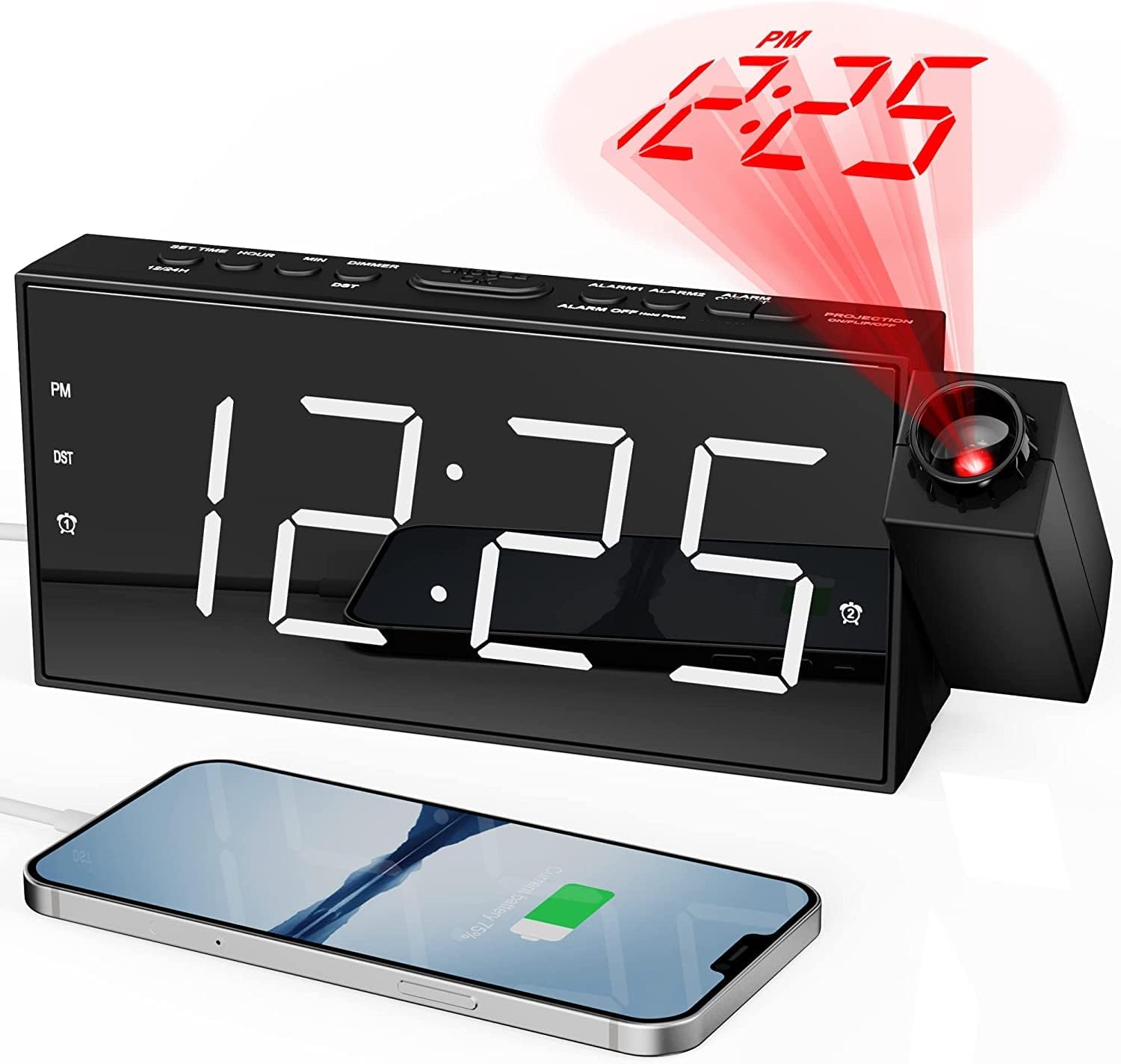
Фронт view of the Mesqool Projection Alarm Clock, showing the large LED display, the rotatable projector, and a phone connected to the USB charging port.
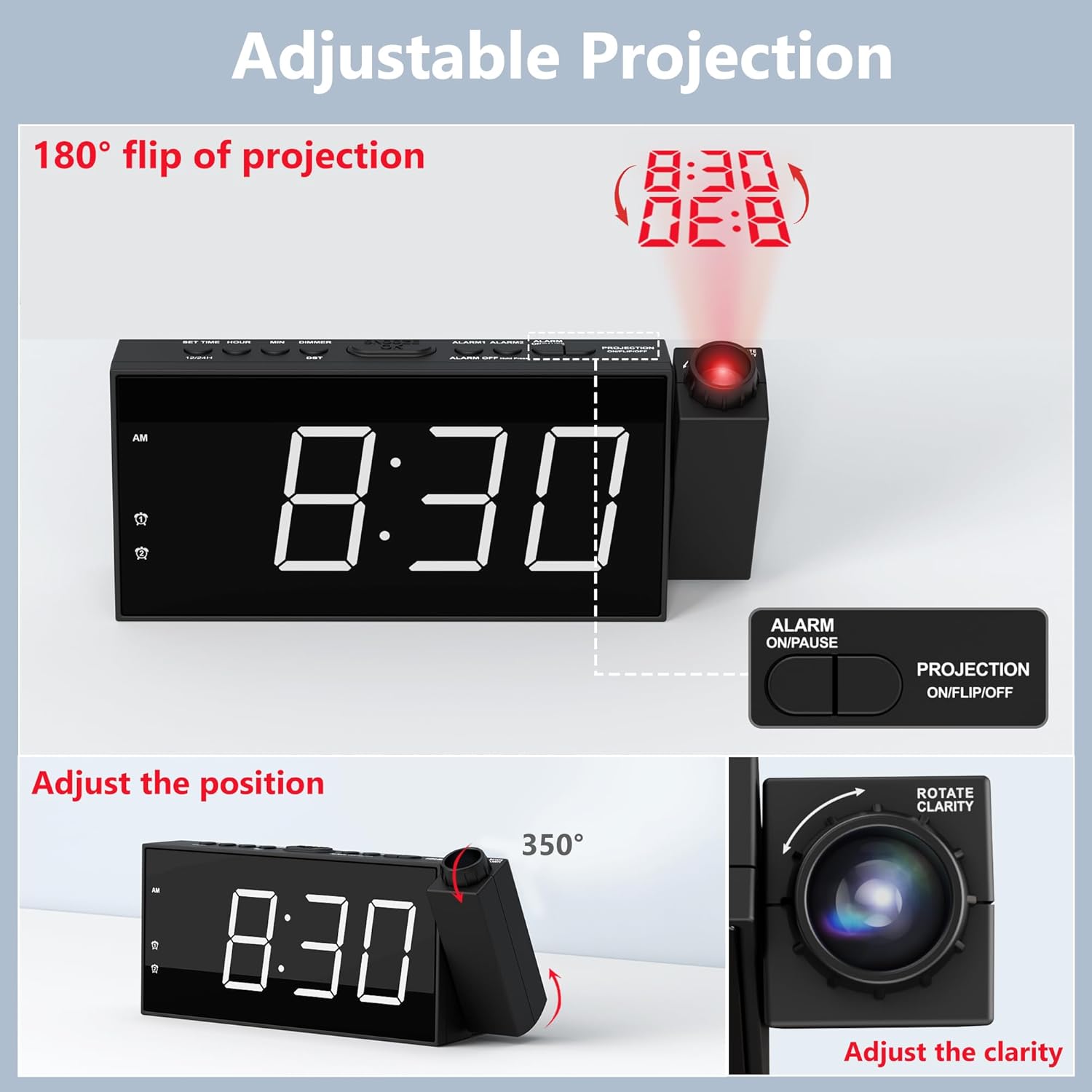
Падрабязны view of the adjustable projection feature, illustrating the 180° rotation, projection flip, and the focus ring for clarity adjustment.

Illustration of the 7.5-inch LED display with its 5-level brightness dimmer and options for 12-hour, 24-hour, and DST time formats.

Depiction of the dual alarm functionality, the convenient snooze button, and the 5 adjustable alarm volume levels (76dB-106dB).

Тыл view of the clock highlighting the battery backup compartment and the USB charging port for external devices.

A visual guide demonstrating the four steps to operate and adjust the projection feature, including rotation, flipping, focusing, and brightness adjustment.
Настройка
1. Падключэнне сілкавання
Connect the provided 5V/2A power adapter to the DC IN port on the back of the alarm clock and plug the adapter into a standard electrical outlet (100-240V). The clock display will light up.
2. Устаноўка рэзервовага акумулятара
Open the battery compartment on the back of the clock. Insert 2 AAA batteries (not included) according to the polarity markings (+/-). These batteries serve as a backup to retain time and alarm settings during a power outage. The clock requires AC power for full functionality, including the display and projection.
3. Пачатковая ўстаноўка часу
- Press and hold the "SET TIME" button located on the top of the clock. The hour digits will begin to flash.
- Выкарыстоўвайце кнопкі «+» або «-», каб наладзіць гадзіну.
- Press "SET TIME" again to confirm the hour and move to minute setting. The minute digits will flash.
- Выкарыстоўвайце кнопкі «+» або «-», каб наладзіць хвіліны.
- Press "SET TIME" one more time to save the time setting and exit.
4. 12/24H Time Format
To switch between 12-hour and 24-hour time formats, long press the "12/24H" button on the top of the clock. In 12-hour format, "AM" or "PM" indicators will be displayed.
5. Пераход на летні час (DST)
To activate or deactivate the Daylight Saving Time (DST) function, simply press the "DST" button on the top of the clock. The time will adjust by one hour forward or backward accordingly.
Інструкцыя па эксплуатацыі
1. Налада сігналаў трывогі (сігнал трывогі 1 і сігнал трывогі 2)
- Press and hold the "ALARM 1" or "ALARM 2" button (depending on which alarm you want to set). The hour digits for that alarm will flash.
- Use the "+" or "-" buttons to adjust the alarm hour.
- Press the respective alarm button again to confirm the hour and move to minute setting. The minute digits will flash.
- Use the "+" or "-" buttons to adjust the alarm minutes.
- Press the alarm button one more time to save the alarm setting. The alarm icon will appear on the display, indicating the alarm is active.
- To turn an alarm ON or OFF, short press the corresponding "ALARM 1" or "ALARM 2" button. The alarm icon will appear or disappear.
2. Рэгуляванне гучнасці будзільніка
When an alarm is sounding, or during alarm setup, use the "V+" or "V-" buttons on the side of the clock to adjust the alarm volume from Level 1 (76dB) to Level 5 (106dB). The alarm sound will progressively increase in volume when it triggers.
3. Выкарыстанне функцыі паўтору будзільніка
When the alarm sounds, press the large "SNOOZE/OK" button on the top of the clock to temporarily silence the alarm for 9 minutes. The alarm will sound again after 9 minutes. To turn off the alarm completely, press any other button (e.g., ALARM ON/PAUSE) or let it ring for its full duration.
4. Projection Feature
- Activating/Deactivating Projection: Press the "PROJECTION ON/FLIP/OFF" button on the top of the clock to turn the projection ON or OFF.
- Рэгуляванне вугла праекцыі: Manually rotate the projector lens unit up to 180° to direct the time display onto your desired surface (wall or ceiling).
- Flipping Projection: If the projected time appears upside down, short press the "PROJECTION ON/FLIP/OFF" button to flip the orientation of the projected image.
- Adjusting Projection Clarity (Focus): Rotate the focus ring around the projector lens to achieve a clear and sharp projected image.
- Adjusting Projection Brightness: Press the "PROJECTION DIMMER" button repeatedly to cycle through 5 levels of projection brightness.
5. Яркасць дысплея
Press the "DIMMER" button repeatedly to cycle through 5 levels of LED display brightness, allowing you to adjust it to your comfort level, especially at night.
6. Порт для зарадкі USB
The USB charging port (5V/1.0A output) on the back of the clock can be used to charge your mobile devices, such as smartphones and tablets. Simply connect your device's USB charging cable to this port.
Тэхнічнае абслугоўванне
Уборка
To clean the clock, gently wipe the surface with a soft, dry cloth. Do not use abrasive cleaners, waxes, or solvents as they may damage the finish. Keep the projector lens clean for optimal clarity.
Замена батарэі
Калі гадзіннік збівае час або налады будзільніка падчас адключэння электраэнергііtage, it may be time to replace the AAA backup batteries. Ensure the clock is connected to AC power before replacing batteries to avoid losing current settings.
Ліквідацыю непаладак
| праблема | Магчымая прычына | Рашэнне |
|---|---|---|
| Clock display is off / No power. | Адаптар харчавання не падключаны або няспраўны. | Ensure the power adapter is securely plugged into the clock and a working electrical outlet. Check the outlet with another device. |
| Сігналізацыя не гучыць. | Сігналізацыя не ўключана або настроена няправільна. | Verify that the alarm is set and activated (alarm icon visible). Check the alarm time. Ensure volume is not set to minimum. |
| Projected time is blurry or unclear. | Патрабуецца карэкціроўка фокусу праекцыі. | Rotate the focus ring around the projector lens until the image is clear. Ensure projection distance is within 1.6-9.8ft. |
| Projected time is upside down. | Projection orientation needs flipping. | Short press the "PROJECTION ON/FLIP/OFF" button to flip the projected image. |
| Гадзіннік губляе час падчас адключэння электрычнасціtage. | Рэзервовыя акумулятары разрадзіліся або не ўсталяваныя. | Устаўце 2 новыя батарэйкі тыпу AAA або заменіце існуючыя. |
| Не працуе порт зарадкі USB. | Прылада несумяшчальная або няспраўны кабель. | Ensure the clock is powered by AC. Try a different USB cable or device. |
Тэхнічныя характарыстыкі
| Марка | Мескул |
| Нумар мадэлі | CR1001F |
| Тып дысплея | Лічбавы святлодыёд |
| Крыніца харчавання | Corded Electric (AC 100-240V) |
| Рэзервовы акумулятар | 2 х ААА батарэі (не ўключаны) |
| USB выхад | 5 В/1.0 А |
| Адлегласць праекцыі | 1.6 - 9.8 ft (0.5 - 3 m) |
| Дыяпазон гучнасці сігналізацыі | 76dB - 106dB (5 levels) |
| Памеры прадукту | 7.99"Ш х 3.58"В |
| Вага прадмета | 8.5 унцыі |
| Матэрыял | Акрыланітрылбутадыенстырол (пластык) |
Гарантыя і падтрымка
Інфармацыя аб гарантыі
Mesqool provides an 18-month warranty for this product. This warranty covers manufacturing defects and issues arising from normal use. Please retain your proof of purchase for warranty claims.
Падтрымка кліентаў
For any questions, concerns, or technical assistance regarding your Mesqool Projection Alarm Clock, please contact our customer support team. You can find our support email address in this User Manual or on the product packaging. We are committed to providing prompt and helpful assistance.
Ask a question about this manual
Ask about setup, troubleshooting, compatibility, parts, safety, or missing instructions. Manuals+ will review the question and use this page’s manual context to help answer it.