
BESDER ZX-X2-W/200W
BESDER Smart Home Security FULL HD 1080P IP WiFi Camera User Manual
Model: ZX-X2-W/200W
Уводзіны
Thank you for choosing the BESDER Smart Home Security Camera. This manual provides detailed instructions for setting up, operating, and maintaining your camera. Please read this manual carefully before use to ensure proper functionality and safety.
This camera offers Full HD 1080P resolution, Pan/Tilt functionality, Two-Way Audio, and IR Night Vision for comprehensive home surveillance. It supports both wired and WiFi connections, mobile monitoring via iOS and Android apps, and cloud services.
Змест пакета
Калі ласка, праверце змесціва ўпакоўкі пасля адкрыцця. Калі якія-небудзь прадметы адсутнічаюць або пашкоджаныя, звярніцеся ў службу падтрымкі кліентаў.
- 1 x BESDER IP Camera 1080P
- 1 х Кіраўніцтва карыстальніка
- 1 х DC 5V Блок харчавання
- 1 х Малы кранштэйны
- Мантажныя шрубы і дзюбелі
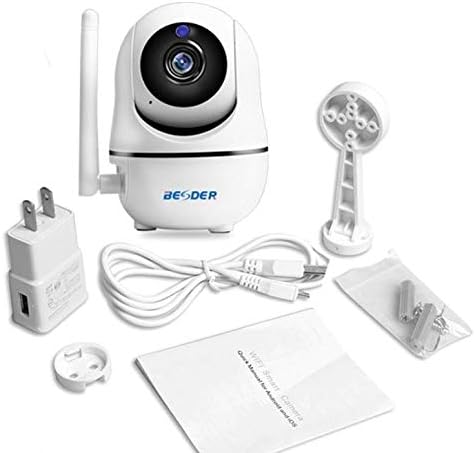
Малюнак 1: Package contents of the BESDER Smart Home Security Camera, showing the camera unit, power adapter, USB cable, mounting bracket, screws, and the user manual.
Прадукт скончаныview
Familiarize yourself with the various components of your BESDER Smart Home Security Camera.
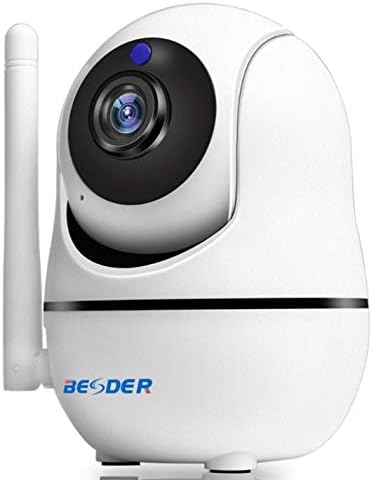
Малюнак 2: Фронт view of the BESDER Smart Home Security Camera, highlighting the camera lens, infrared LEDs for night vision, and the status indicator light.

Малюнак 3: Тыл view of the BESDER Smart Home Security Camera, detailing the memory card slot (for microSD up to 128GB), reset button, built-in speaker, DC 5V power input, and the Ethernet network port for wired connection.
Ключавыя кампаненты:
- Аб'ектыў камеры: Захоплівае відэа footage.
- ВК-святлодыёды: Provide infrared illumination for night vision.
- Светлавы індыкатар стану: Indicates camera status (e.g., power on, network connection).
- Мікрафон: For audio input and two-way audio communication.
- Дакладчык: For audio output and two-way audio communication.
- Слот для карты памяці: Supports microSD cards up to 128GB for local storage.
- Кнопка скіду: Выкарыстоўваецца для аднаўлення заводскіх налад.
- Уваходная магутнасць 5 В пастаяннага току: Падключаецца да прадастаўленага адаптара харчавання.
- Сеткавы порт (RJ45): Для праваднога падлучэння да Ethernet.
Настройка
1. Уключэнне
- Connect the DC 5V power adapter to the camera's power input port.
- Падключыце адаптар сілкавання да насценнай разеткі.
- The camera will power on, and the status indicator light will illuminate. Wait for the camera to complete its self-test (it may pan and tilt).
2. Network Connection (Wired or Wireless)
The camera supports both wired (Ethernet) and wireless (Wi-Fi) connections.
Правадное злучэнне:
- Connect one end of an Ethernet cable (not included) to the camera's network port.
- Падключыце другі канец кабеля Ethernet да маршрутызатара або сеткавага камутатара.
- The camera will automatically connect to the network.
Wireless (Wi-Fi) Connection:
- Download the recommended mobile application (e.g., XMEYE or iCsee) from your device's app store (iOS or Android).
- Зарэгіструйце ўліковы запіс і ўвайдзіце ў сістэму.
- Follow the in-app instructions to add your camera. This typically involves scanning a QR code on the camera or using a Wi-Fi configuration method (e.g., AP mode, SmartLink).
- Ensure your mobile device is connected to the 2.4GHz Wi-Fi network you intend to connect the camera to.
- Enter your Wi-Fi password when prompted by the app.
- The camera will attempt to connect to your Wi-Fi network. Once connected, the status indicator light will change (refer to app or camera manual for specific light indications).
3. Усталёўка карты MicroSD (неабавязкова)
- Ensure the camera is powered off before inserting or removing the microSD card.
- Locate the microSD card slot (refer to Figure 3).
- Акуратна ўстаўце карту microSD у слот залацістымі кантактамі ўніз, пакуль яна не зафіксуецца са шчоўкам.
- Power on the camera. You may need to format the SD card via the mobile app settings for optimal performance.
Інструкцыя па эксплуатацыі
1. Mobile Monitoring (iOS/Android)
- Open the XMEYE or iCsee app on your smartphone.
- Выберыце камеру са спісу прылад, каб view жывы канал.
- Use the on-screen controls to pan (horizontal rotation) and tilt (vertical rotation) the camera lens.
- Access playback of recorded footage stored on the microSD card or cloud service.
2. Двухбаковая аўдыёсувязь
- Пакуль viewing the live feed in the app, tap the microphone icon to speak through the camera's speaker.
- Націсніце на значок дынаміка, каб праслухаць гук з мікрафона камеры.
3. IR Night Vision
- The camera automatically switches to IR night vision mode in low-light conditions.
- The IR LEDs will illuminate, providing clear black and white video up to 15 meters.
4. Выяўленне руху і сігналізацыя
- Уключыце выяўленне руху ў наладах праграмы.
- Configure sensitivity levels and detection zones as needed.
- When motion is detected, the camera can send push notifications to your phone and/or record footage.
5. Воблачны сэрвіс
- The camera supports cloud storage services (subscription may be required).
- Refer to the mobile app for details on activating and managing cloud storage.
Тэхнічнае абслугоўванне
- Уборка: Выкарыстоўвайце мяккую сухую тканіну для чысткі аб'ектыва і корпуса камеры. Не выкарыстоўвайце вадкія ачышчальнікі або аэразолі.
- Абнаўленні прашыўкі: Regularly check for firmware updates via the mobile app to ensure optimal performance and security.
- Размяшчэнне: Ensure the camera is placed in a location where it is protected from direct water exposure and extreme temperatures.
- Кіраванне SD-картай: Periodically check the status of your microSD card. If it becomes full, older recordings may be overwritten, or recording may stop.
Ліквідацыю непаладак
| праблема | Магчымая прычына | Рашэнне |
|---|---|---|
| Камера па-за сеткай/Немагчыма падключыцца да Wi-Fi | Няправільны пароль Wi-Fi; камера занадта далёка ад маршрутызатара; праблемы з маршрутызатарам; сетка Wi-Fi 5 ГГц. |
|
| No image/Black screen | Power issue; Network issue; Lens obstruction. |
|
| Двухбаковы аўдыё не працуе | Microphone/speaker disabled in app; Volume too low; Network latency. |
|
| Motion detection not triggering | Выяўленне руху адключана; занадта нізкая адчувальнасць; няправільная зона выяўлення. |
|
| SD-карта не запісвае | SD card full/corrupted; Incorrect format; SD card not inserted properly. |
|
Тэхнічныя характарыстыкі
| Асаблівасць | Дэталь |
|---|---|
| Назва мадэлі | BESDER Smart Home Security |
| Даведка вытворцы | ZX-X2-W/200W |
| Дазвол відэа | Full HD 1080P (1920x1080) |
| Датчык | 1/2.8'' F22 CMOS sensor (for 1080P) |
| Кампрэсія відэа | H.264, supports dual stream, 0.1 – 6 Mpbs |
| Аб'ектыў | 3.6 mm G7 (default) |
| ІЧ-дыстанцыя начнога бачання | Max 15 meters (6 IR LEDs) |
| Сувязь | Wi-Fi (2.4 ГГц), правадны Ethernet |
| Захоўванне | MicroSD card up to 128GB (not included), Cloud Service |
| Аўдыё | Двухбаковы гук (убудаваны мікрафон і дынамік) |
| Мабільны маніторынг | iOS, Android (APP: XMEYE or iCsee) |
| Электразабеспячэнне | Пастаянны ток 5 В 2 А |
| Працоўная тэмпература | -5 to 60°C (23 - 140°F) |
| Памеры | 6.39 х 4.33 х 3.11 см (прыблізныя памеры ўпакоўкі) |
Гарантыя і падтрымка
For warranty information and technical support, please refer to the contact details provided with your purchase or visit the official BESDER webсайт. Захоўвайце чэк аб куплі як пацверджанне пакупкі.
вытворца: ЛЕПАНА