
SONGMICS ULGS131K101S
SONGMICS BELLAH Collection TV Stand
Model: ULGS131K101S
Уводзіны
Thank you for choosing the SONGMICS BELLAH Collection TV Stand. This manual provides essential information for the safe assembly, operation, and maintenance of your new media console. Please read these instructions carefully before beginning assembly and retain them for future reference.
Інфармацыя па бяспецы
- Always follow assembly instructions precisely. Do not skip steps or use unauthorized parts.
- Перад тым, як класці прадметы на падстаўку, пераканайцеся, што ўсе злучэнні надзейныя.
- Do not overload the stand. Refer to the "Specifications" section for weight capacities.
- Install the anti-tip kit to prevent accidental tipping, especially in households with children or pets.
- Keep electrical components (LED strip, charging ports) away from water and moisture.
- Не дазваляйце дзецям залазіць на падстаўку для тэлевізара або гуляць з ёй.
Уключаныя кампаненты
Перад зборкай пераканайцеся, што ўсе пералічаныя ніжэй дэталі ёсць у наяўнасці і не пашкоджаны. Калі якія-небудзь дэталі адсутнічаюць або пашкоджаныя, звярніцеся ў службу падтрымкі кліентаў.
- 1 x TV Stand (main structure)
- 1 камплект аксесуараў (шрубы, раздымы і г.д.)
- 1 х камплект супраць перакульвання
- 1 х Інструкцыя па эксплуатацыі (гэты дакумент)
- Required assembly tool (usually an Allen wrench)
Ўстаноўка і зборка
Assembly is designed to be straightforward. Follow the numbered steps in the provided accessory kit instructions. An Allen wrench is typically included for assembly.
Крок 1: Распакоўка і вызначэнне дэталяў
Carefully unpack all components and lay them out on a clean, soft surface to prevent scratches. Identify each part using the labels or diagrams in the separate assembly guide.
Крок 2: Збярыце раму
Begin by connecting the steel frame components as instructed. Ensure all screws are tightened securely but do not overtighten.
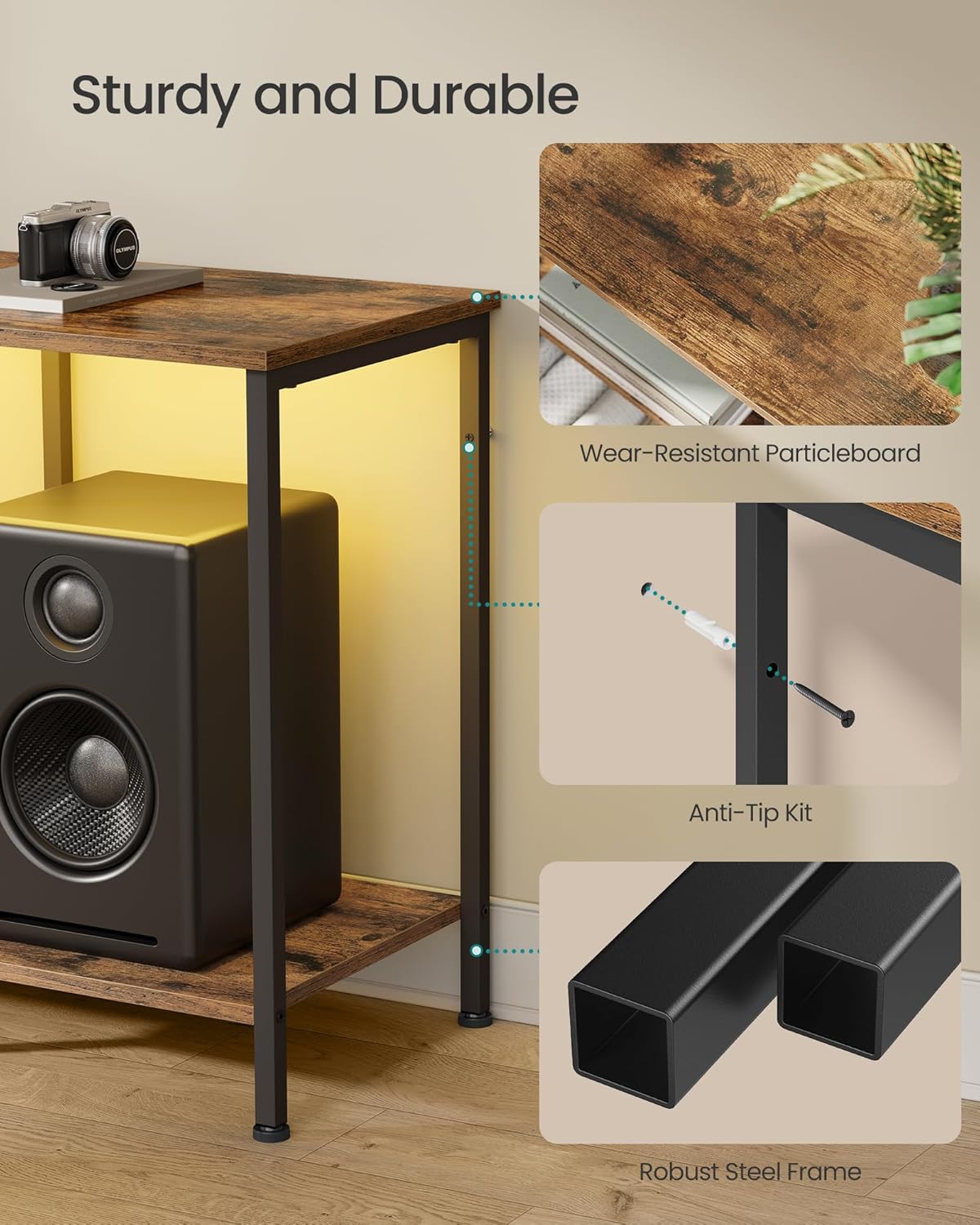
Image: Detail of the robust steel frame construction and anti-tip kit attachment point.
Step 3: Attach Shelves and Drawer Components
Install the particleboard top and lower shelves. Assemble the drawer using the MDF-reinforced components and polyester gabardine fabric. Ensure the drawer slides smoothly.

Image: Detail of the drawer construction, featuring a rustic brown front and fabric sides.
Step 4: Install Anti-Tip Kit
For safety, attach the anti-tip kit to the back of the TV stand and secure it to a wall stud. This prevents the stand from tipping over, especially important for stability with a television mounted on top.

Image: Illustration of the anti-tip kit installation process.
Step 5: Adjust Leveling Feet
The TV stand is equipped with adjustable feet. Turn the feet clockwise or counter-clockwise to level the stand on uneven floors, ensuring maximum stability.

Image: Adjustable feet for leveling the TV stand on uneven surfaces.
Інструкцыя па эксплуатацыі
Святлодыёднае навакольнае асвятленне
The TV console features an integrated LED strip for ambient lighting. This can be controlled via a physical button on the unit or through a dedicated smartphone application.
- Кнопка кіравання: Use the button to cycle through preset colors and modes.
- Кіраванне праграмамі: Download the companion app (refer to the separate LED instruction sheet for QR code or app name). The app allows access to over 60,000 colors, brightness adjustment, setting timers, and syncing lights with music or microphone input.

Image: The TV stand with its LED ambient lighting, illustrating both app and manual control options.

Выява: Падрабязная view of the smartphone application interface for controlling the LED lighting features.
Integrated Charging Ports
The entertainment center includes built-in charging capabilities to keep your devices powered.
- 2 разеткі пераменнага току (250 В/15 А)
- 1 порт USB-A (5 В/2 А)
- 1 порт USB-C (5 В/2 А)
Connect your TV, game consoles, phones, and other devices directly to these ports for convenient power access.

Image: Integrated charging panel with AC outlets, USB-A, and USB-C ports for convenient device charging.
Выкарыстанне сховішча
Тумба пад тэлевізар прапануе мноства варыянтаў захоўвання:
- Адкрытыя паліцы: Ideal for organizing and displaying streaming players, game consoles, DVD players, and decorative items.
- шуфляда: Provides enclosed space for remotes, accessories, cables, and other small items to maintain a tidy appearance. The drawer is MDF-reinforced for rigidity.

Image: Comparison showing the effectiveness of the TV stand's storage in organizing media components.
Тэхнічнае абслугоўванне
To ensure the longevity and appearance of your TV stand, follow these simple maintenance guidelines:
- Уборка: Працярыце паверхні сухой мяккай тканінай. Для выдалення ўстойлівых плям злёгкуamp cloth followed by a dry one can be used. Avoid harsh chemicals or abrasive cleaners.
- Разлівы: Immediately wipe up any liquid spills to prevent damage to the particleboard and MDF surfaces.
- Сыход за скрыняй: The fabric drawer can be spot cleaned with a mild detergent and damp тканінай. Дайце цалкам высахнуць.
- Інспекцыі: Перыядычна правярайце ўсе шрубы і злучэнні, каб пераканацца, што яны зацягнуты. Пры неабходнасці падцягвайце.

Image: Demonstrating how to clean the TV stand surface with a dry cloth.
Ліквідацыю непаладак
If you encounter any issues with your TV stand, refer to the following common solutions:
- Падстаўка хісткая: Ensure all assembly screws are tightened. Adjust the leveling feet on the bottom of the stand to compensate for uneven flooring.
- Святлодыёдныя ліхтары не працуюць: Check if the power adapter is securely plugged into both the stand and a working wall outlet. If using app control, ensure Bluetooth is enabled on your device and the app is correctly paired.
- Зарадныя парты не працуюць: Verify the main power cord for the stand is plugged into a live outlet. Test with different devices and cables to rule out device-specific issues.
- Drawer Sticks or Doesn't Close: Check for any obstructions within the drawer compartment. Ensure the drawer is assembled correctly and not overloaded.
For issues not covered here, please contact SONGMICS customer support.
Тэхнічныя характарыстыкі
| Асаблівасць | Дэталь |
|---|---|
| Нумар мадэлі | ULGS131K101S |
| Колер | Вясковы карычневы |
| Памеры (Д x Ш x В) | 13.8 цалі х 61.8 цалі х 23.6 цалі (35 см х 157 см х 60 см) |
| Вага прадмета | 28.6 фунтаў (13 кг) |
| Матэрыял | MDF (Medium Density Fiberboard), Particleboard, Steel, Polyester Gabardine |
| Max. Load Capacity (Top Surface) | 88 фунтаў (40 кг) |
| Максімальная грузападымальнасць (кожная паліца) | 66 фунтаў (30 кг) |
| Максімальная ёмістасць загрузкі (шуфляда) | 17.6 фунтаў (8 кг) |
| Сумяшчальнасць па памеры тэлевізара | Да 70 цаляў |
| Парты для зарадкі | 2 x AC Outlets (250V/15A), 1 x USB-A (5V/2A), 1 x USB-C (5V/2A) |
| Патрабуецца зборка | так |

Image: Detailed dimensions and weight capacity diagram for the TV stand.

Image: The TV stand accommodating a television, highlighting its compatibility with TVs up to 70 inches.
Гарантыя і падтрымка
SONGMICS products are designed for quality and durability. For specific warranty details, please refer to the documentation included with your purchase or visit the official SONGMICS webсайт.
If you require assistance with assembly, have questions about product features, or need to report a missing/damaged part, please contact SONGMICS customer support. Have your model number (ULGS131K101S) and purchase information ready when contacting support.
Кантактная інфармацыя: Please refer to the contact details provided on the packaging or the official SONGMICS webсайт з найбольш актуальнымі каналамі падтрымкі.