
1. Уводзіны
This manual provides detailed instructions for the setup, operation, and maintenance of your BMW Multi-Function Clock, Alarm, and Weather Station. This device combines a digital clock, an alarm with a snooze function, and a weather station that displays temperature. Please read this manual carefully before use to ensure proper functionality and to maximize your experience with the product.
2. Змесціва ўпакоўкі
Калі ласка, праверце змесціва ўпакоўкі пасля распакавання. Калі якія-небудзь прадметы адсутнічаюць або пашкоджаныя, звярніцеся да прадаўца.
- BMW Multi-Function Clock, Alarm, and Weather Station Unit
- Кіраўніцтва карыстальніка (гэты дакумент)
3. Настройка
3.1. Устаноўка батарэі
Прылада патрабуе 2 батарэйкі ААА (not included) for operation. Follow these steps to install the batteries:
- Знайдзіце вечка батарэйнага адсека на задняй панэлі прылады.
- Акуратна зрушце або падніміце вечка, каб адкрыць адсек.
- Устаўце дзве батарэйкі тыпу ААА, сочачы за правільнай палярнасцю (+ і -), як паказана ўнутры адсека.
- Надзейна заменіце крышку батарэйнага адсека.
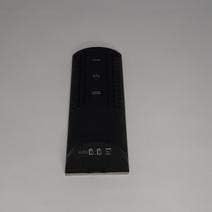
Малюнак 3.1: Назад view of the device, illustrating the battery compartment and control buttons for setup.
3.2. Пачатковае ўключэнне
After battery installation, the device display will illuminate, and it will typically show a default time or begin searching for a signal (if applicable for weather functions). Proceed to the operating instructions to set the time and other functions.
4. Інструкцыя па эксплуатацыі
4.1. Устаноўка часу і даты
Каб усталяваць бягучы час і дату:
- Націсніце і ўтрымлівайце РЭЖЫМ button (usually located on the back or side) for a few seconds until the time display starts flashing.
- Выкарыстоўвайце UP or УНІЗ buttons (often labeled '+' or '-') to adjust the hour.
- Прэса РЭЖЫМ again to confirm the hour and move to the minutes.
- Адрэгулюйце хвіліны з дапамогай UP or УНІЗ кнопкі.
- Працягвайце націскаць РЭЖЫМ and adjusting with УВЕРХ/УНІЗ for year, month, and day settings.
- Прэса РЭЖЫМ апошні раз, каб выйсці з рэжыму налад.
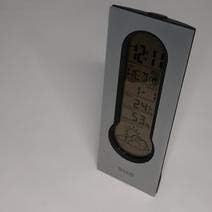
Малюнак 4.1: Front display of the device, showing the digital clock, temperature, and weather forecast icons.
4.2. Устаноўка будзільніка
Каб усталяваць час будзільніка:
- У звычайным рэжыме адлюстравання часу націсніце ТРЫВОГА кнопка (ці РЭЖЫМ repeatedly until 'AL' or an alarm icon appears).
- Націсніце і ўтрымлівайце ТРЫВОГА кнопку, пакуль не пачне міргаць час будзільніка.
- Выкарыстоўвайце UP or УНІЗ кнопкі, каб усталяваць патрэбную гадзіну будзільніка.
- Прэса ТРЫВОГА again to confirm the hour and move to the minutes.
- Адрэгулюйце хвіліны з дапамогай UP or УНІЗ кнопкі.
- Прэса ТРЫВОГА one last time to save the alarm setting. An alarm icon will typically appear on the display to indicate the alarm is active.
4.3. Using Snooze Function
Калі прагучыць сігнал трывогі, націсніце СНАОЗ button (usually a large button on the top of the unit) to temporarily silence the alarm. The alarm will sound again after a few minutes (typically 5-10 minutes, depending on the model). To turn off the alarm completely, press any other button or let it ring until it automatically stops.

Малюнак 4.2: Топ view of the device, highlighting the prominent SNOOZE button.
4.4. Адлюстраванне тэмпературы
The device continuously displays the ambient temperature. The temperature unit (Celsius or Fahrenheit) can usually be switched by pressing a dedicated button (e.g., 'C/F' or 'TEMP') or by holding down one of the adjustment buttons during time setting.
4.5. Weather Station Function
The integrated weather station provides a basic weather forecast using graphical icons (e.g., sun, clouds, rain). This forecast is based on internal barometric pressure changes and is an estimation for the local area. It is not connected to external weather services.
5. Тэхнічнае абслугоўванне
5.1. Уборка
To clean the device, use a soft, dry cloth. Do not use abrasive cleaners, solvents, or chemical sprays, as these can damage the surface and electronic components. Avoid getting moisture into the device.
5.2. Замена батарэі
When the display dims or functions become erratic, it is time to replace the batteries. Follow the battery installation steps in Section 3.1. Always replace both batteries at the same time with new AAA batteries.
6. Выпраўленне непаладак
Калі ў вас узніклі праблемы з прыладай, звярніцеся да наступных распаўсюджаных праблем і рашэнняў:
- Дысплей пусты або цьмяны:
Check if batteries are installed correctly. Replace with fresh AAA batteries. - Няправільны час або дата:
Refer to Section 4.1 to reset the time and date. Ensure you confirm each setting step. - Сігналізацыя не гучыць:
Verify that the alarm is set and activated (look for an alarm icon on the display). Ensure the volume is not set to zero if adjustable. - Temperature reading seems inaccurate:
Ensure the device is not placed in direct sunlight, near heat sources, or in drafts, which can affect readings. Allow some time for the sensor to stabilize after placement. - Weather forecast icons are not changing:
The weather forecast is based on local barometric pressure changes and may take time to update. It provides a general trend, not a precise forecast.
7. Тэхнічныя характарыстыкі
| Асаблівасць | Дэталь |
|---|---|
| Марка | BMW |
| Нумар мадэлі | 06017443015007 |
| Асаблівасці | Alarm, Snooze, Temperature Display |
| Крыніца харчавання | акумулятар |
| Тып батарэі | 2 х ААА батарэі (не ўключаны) |
| ASIN | B089QGJ9VR |
8. Гарантыя і падтрымка
This product is covered by a standard manufacturer's warranty. For specific warranty terms and conditions, please refer to the documentation provided at the time of purchase or contact your retailer. For technical support or service inquiries, please reach out to the point of purchase or the manufacturer's customer service department.