
1. Уводзіны
This instruction manual provides comprehensive information for the YOSUN Universal Replacement Remote Control, model RMT-TX100U. Designed for seamless compatibility with a wide range of Sony Bravia LCD LED HDTV Smart TVs, this remote offers a direct replacement solution without requiring complex programming. It aims to restore full control over your television with reliable performance and an intuitive layout.
2. Асаблівасці прадукту
- Шырокая сумяшчальнасць: Fully compatible with all Sony Bravia LCD LED HDTV Smart TVs.
- Праграмаванне не патрабуецца: Ready to use straight out of the box, eliminating the need for manual setup.
- Стабільная прадукцыйнасць: Equipped with an upgraded smart chip for consistent and reliable operation.
- Пашыраны дыяпазон: Transmits signals effectively over long distances, up to 10 meters (33 feet).
- Хуткі час водгуку: Features a rapid transmission response time of approximately 0.2 seconds for immediate command execution.
- Трывалая канструкцыя: Made from high-quality ABS and silicone materials for a sturdy, non-slip shell and comfortable, sensitive buttons.
- Identical Layout: Designed to be visually and functionally identical to the original Sony remote control.
- Netflix Shortcut: Includes a dedicated Netflix button for quick access to the streaming service.
3. Кіраўніцтва па наладцы
3.1 Устаноўка батарэі
Для працы пульта дыстанцыйнага кіравання патрэбныя дзве (2) батарэйкі тыпу AAA (не ўваходзяць у камплект). Выканайце наступныя дзеянні, каб усталяваць батарэйкі:
- Знайдзіце крышку батарэйнага адсека на задняй частцы пульта дыстанцыйнага кіравання.
- Зрушыце вечка ўніз, каб адкрыць адсек.
- Устаўце дзве батарэйкі тыпу AAA, пераканаўшыся, што станоўчая (+) і адмоўная (-) клемы правільна сумяшчаюцца з індыкатарамі ўнутры адсека.
- Адсуньце крышку батарэйнага адсека на месца, пакуль яна не зашчоўкнецца.

Figure 3.1: Battery installation and remote dimensions. The remote is 7.8 inches long, 1.8 inches wide, and 0.7 inches thick. The diagram shows sliding the battery cover and inserting two AAA batteries.
3.2 Initial Use (No Programming Required)
This YOSUN replacement remote control is designed to work immediately with compatible Sony TVs without any programming or pairing. Once batteries are installed, point the remote towards your TV and begin using it.
Video 3.2: Demonstration of the remote control's simple operation, highlighting that no pairing is required for use with Sony TVs.
4. Інструкцыя па эксплуатацыі
The remote control features a standard layout with clearly labeled buttons for easy navigation and control of your Sony TV. Refer to the diagram below for button identification and their primary functions.
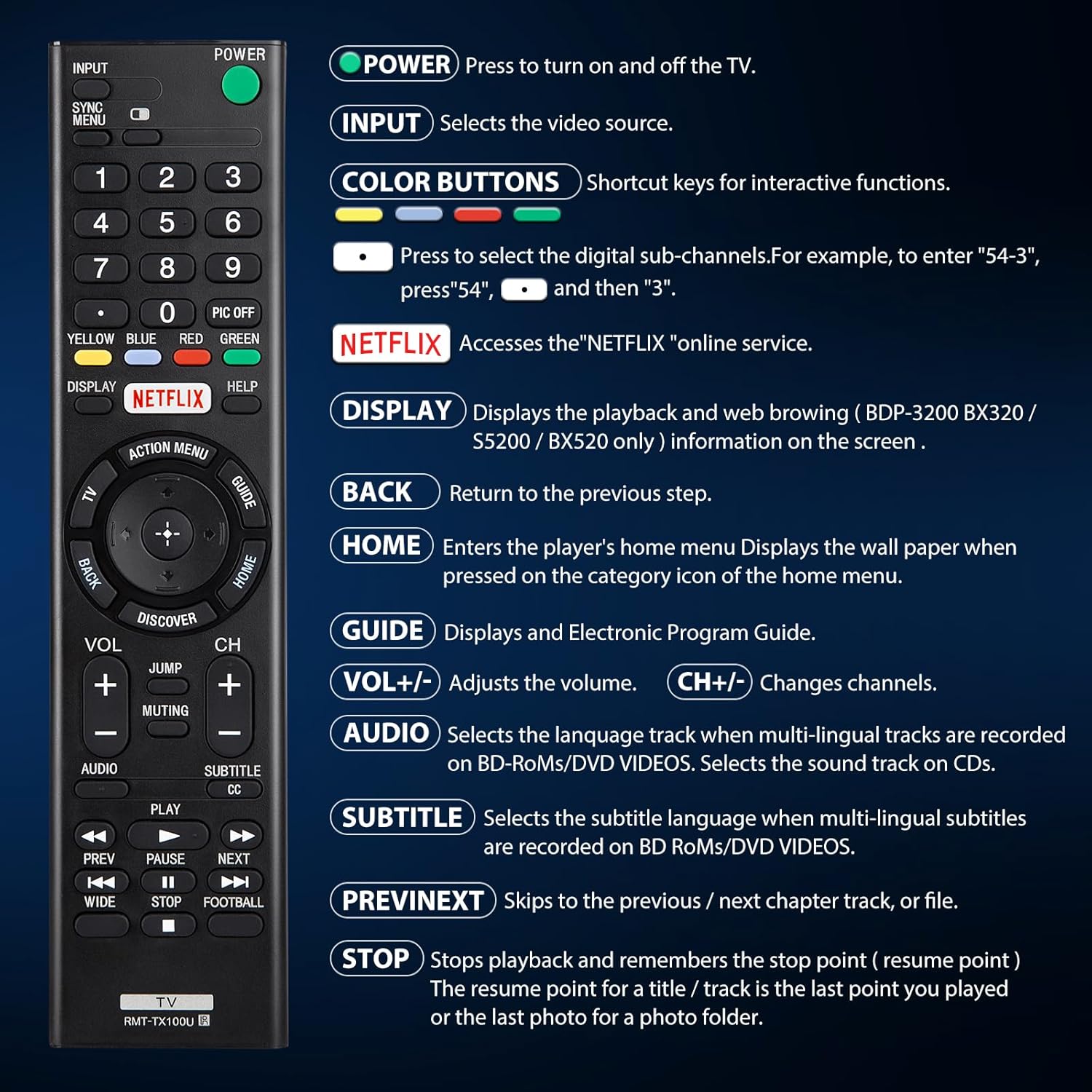
Малюнак 4.1: Закончанаview кнопак пульта дыстанцыйнага кіравання і іх функцыі.
| Кнопка | Функцыя |
|---|---|
| УЛАДА | Press to turn the TV on and off. |
| УВОД | Selects the video source (e.g., HDMI 1, AV). |
| COLOR BUTTONS (Yellow, Blue, Red, Green) | Shortcut keys for interactive functions or digital sub-channels (e.g., to enter "5-4", press "5", then "4"). |
| NETFLIX | Directly accesses the Netflix online streaming service. |
| ДЫСПЛЕЙ | Displays playback and web browsing information on the screen (for compatible models like BDP-3200 BX320 / S5200 / BX520 only). |
| НАЗАД | Returns to the previous step or menu. |
| ДОМ | Enters the player's home menu or displays the wallpaper when pressed on the category icon of the home menu. |
| КІРАЎНІЦТВА | Displays the Electronic Program Guide (EPG). |
| ГУЧНАСЦЬ +/- | Рэгулюе ўзровень гучнасці. |
| CH +/- | Змяняе тэлевізійныя каналы. |
| АЎДЫЁ | Selects the language track when multi-lingual tracks are recorded on BD-ROMs/DVD VIDEOS. Selects the sound track on CDs. |
| СУБТЫТРЫ | Selects the subtitle language when multi-lingual subtitles are recorded on BD ROMs/DVD VIDEOS. |
| НАПЕРАД/ДАЛЕЙ | Skips to the previous or next chapter, track, or file падчас прайгравання мультымедыя. |
| СТОП | Stops playback and remembers the stop point (resume point) for a title/track, or the last photo for a photo folder. |
5. Сумяшчальнасць
5.1 сумяшчальныя прылады
This remote control is specifically designed for and compatible with the following:
- All Sony Bravia LCD LED HDTV Smart TVs.

Figure 5.1: The remote is compatible with Sony Smart TVs, Sony Bravia TVs, and Sony Google TVs.
5.2 Non-Compatible Devices
Гэты пульт дыстанцыйнага кіравання НЕ compatible with the following devices:
- Blu-ray Disc Players
- DVD прайгравальнікі
- AV -прыёмнікі
- Сабвуферы
- Гукавыя панэлі
- Сістэмы хатняга кінатэатра

Figure 5.2: The remote is not compatible with Blu-ray players, DVD players, AV receivers, subwoofers, sound bars, or home theater systems.
6. Выпраўленне непаладак
If you experience issues with your remote control, please consider the following common troubleshooting steps:
- Праверце батарэі: Ensure that the batteries are correctly installed with the proper polarity and are not depleted. Replace with fresh AAA batteries if necessary.
- Лінія візавання: Make sure there are no obstructions between the remote control and the TV's infrared receiver. The remote operates using an infrared signal, which requires a clear line of sight.
- Аддаленая сумяшчальнасць: Verify that your TV model is a compatible Sony Bravia LCD LED HDTV Smart TV. Refer to Section 5 for detailed compatibility information.
- Аддалены скід: Remove the batteries, press and hold any button on the remote for 5 seconds to discharge any residual power, then reinsert the batteries.
- TV Power Cycle: Unplug your TV from the power outlet for 60 seconds, then plug it back in. This can sometimes resolve minor communication issues.
7. Тэхнічнае абслугоўванне
Каб забяспечыць даўгавечнасць і аптымальную працу пульта дыстанцыйнага кіравання, выконвайце наступныя рэкамендацыі па тэхнічным абслугоўванні:
- Уборка: Рэгулярна працірайце пульт дыстанцыйнага кіравання мяккай сухой тканінай. Для выдалення ўстойлівага бруду злёгкуampПрацярыце тканіну вадой або мяккім неабразіўным ачышчальнікам. Пазбягайце выкарыстання агрэсіўных хімікатаў або абразіўных матэрыялаў.
- Замена батарэі: Replace batteries promptly when the remote's performance degrades or it stops responding. Remove batteries if the remote will not be used for an extended period to prevent leakage.
- захоўванне: Захоўвайце пульт у прахалодным, сухім месцы, удалечыні ад прамых сонечных прамянёў, экстрэмальных тэмператур і высокай вільготнасці.
- Пазбягайце кропель: While durable, repeated drops can damage internal components. Handle the remote with care.
8. Тэхнічныя характарыстыкі
| Атрыбут | Дэталь |
|---|---|
| Памеры прадукту | 7.87 х 1.89 х 0.78 цалі |
| Вага прадмета | 3.17 унцыі |
| Нумар мадэлі | RMT-TX100U |
| Патрабуюцца батарэі | 2 батарэйкі AAA (не ўваходзяць у камплект) |
| Асаблівасць | Праграмаванне не патрабуецца |
| Колер | Чорны |
| Максімальная колькасць падтрымоўваных прылад | 18 (Refers to the range of Sony TV models it can control) |
| Сумяшчальныя прылады | Television (Sony Bravia LCD LED HDTV Smart TVs) |
| Вытворца | YOSUN |
9. Гарантыя і падтрымка
YOSUN offers an unlimited return and refund service for this remote control within 30 days of purchase. If you have any questions, concerns, or require assistance with your order or the product, please do not hesitate to contact YOSUN customer service directly. Our team is committed to providing support and will respond to your inquiries within 12 hours during the work week.
For further assistance, please refer to the contact information provided with your purchase or visit the official YOSUN webсайт.