
Уводзіны
Welcome to your new Gembird GHS-U-5.1-01 USB 5.1 Surround Headset. This manual provides essential information for setup, operation, and maintenance to ensure optimal performance and an immersive audio experience.
Змест пакета
Пакет павінен змяшчаць наступныя рэчы:
- Gembird GHS-U-5.1-01 USB 5.1 Surround Headset

Image: Retail packaging for the Gembird GHS-U-5.1-01 USB 5.1 Surround Headset, showing the headset inside a clear window.
Прадукт скончаныview
The Gembird GHS-U-5.1-01 is a USB headset designed for immersive audio experiences with 5.1 surround sound. It features an adjustable microphone, built-in volume control, comfortable ear pads, and an adjustable headband for extended use.
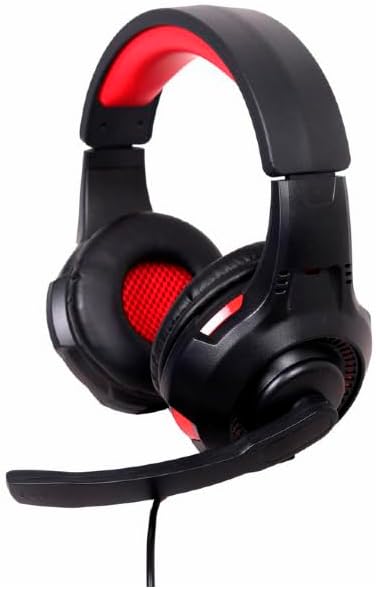
Выява: Пад вуглом view of the Gembird GHS-U-5.1-01 USB 5.1 Surround Headset, showcasing its black and red design with the microphone boom extended.

Выява: спераду view of the Gembird GHS-U-5.1-01 USB 5.1 Surround Headset, highlighting the adjustable headband and earcups.

Image: Close-up of the in-line control unit for the Gembird GHS-U-5.1-01 headset, showing volume up/down and microphone mute buttons.
Настройка
Падключэнне гарнітуры
The Gembird GHS-U-5.1-01 headset connects via a standard USB port.
- Знайдзіце даступны USB-порт на вашым кампутары.
- Падключыце USB-раздым гарнітуры да USB-порта.
- Ваша аперацыйная сістэма павінна аўтаматычна выявіць і ўсталяваць неабходныя драйверы. Гэты працэс можа заняць некалькі хвілін.
- Once installed, the headset will be ready for use as an audio input and output device.
Audio Settings Configuration
For optimal 5.1 surround sound experience, you may need to configure your computer's audio settings.
- Windows: Go to "Sound Settings" (right-click speaker icon in taskbar) > "Sound Control Panel" > "Playback" tab. Select the Gembird headset, click "Configure," and choose "5.1 Surround."
- MacOS: Go to "System Preferences" > "Sound" > "Output" tab. Select the Gembird headset.
Інструкцыя па эксплуатацыі
Рэгулятар гучнасці
The headset features an in-line remote control for easy volume adjustment.
- Выкарыстоўвайце "+" кнопка для павелічэння гучнасці.
- Выкарыстоўвайце "-" кнопка для памяншэння гучнасці.
Выкарыстанне мікрафона
The adjustable microphone boom allows for precise positioning.
- Position the microphone approximately 1-2 inches from your mouth for clear voice capture.
- Use the microphone mute button on the in-line remote to toggle the microphone on or off.
Рэгуляванне камфорту
Adjust the headband to fit comfortably on your head. The ear pads are designed for extended use.
Тэхнічнае абслугоўванне
To ensure the longevity and performance of your headset, follow these maintenance guidelines:
- Уборка: Use a soft, dry cloth to wipe the headset. Do not use harsh chemicals or abrasive cleaners.
- захоўванне: Store the headset in a clean, dry place away from extreme temperatures.
- Сыход за кабелем: Пазбягайце рэзкіх выгібаў або празмернага нацягвання USB-кабеля, каб пазбегнуць пашкоджанняў.
Ліквідацыю непаладак
Няма гуку або не працуе мікрафон
- Праверце падключэнне USB: Пераканайцеся, што USB-раздым цалкам устаўлены ў порт. Паспрабуйце іншы USB-порт.
- Праверце ўзроўні гучнасці: Verify that the volume on the in-line control, your computer's system volume, and application-specific volumes are not muted or set too low.
- Праверце налады гуку: Confirm that the Gembird headset is selected as the default playback and recording device in your computer's sound settings.
- Перазагрузіце кампутар: Sometimes a simple restart can resolve driver or software conflicts.
Праблемы з якасцю гуку
- Абнаўленне драйвера: Ensure your operating system drivers are up to date.
- Якасць крыніцы: Poor audio quality may stem from the audio source itself. Test with different audio files або прыкладанняў.
Тэхнічныя характарыстыкі
| Назва мадэлі | ГГС-У-5.1-01 |
| Сувязь | Правадной USB |
| Формаў-фактар | На вуха |
| Колер | Чорны |
| Матэрыял | Aluminum (Enclosure) |
| Вага | 0.4 кілаграма |
| Дадатковыя магчымасці | Adjustable microphone boom, Built-in volume control, Comfortable ear pads, Adjustable headband |
Інфармацыя аб гарантыі
This Gembird headset comes with a 24 Month Manufacturer Guarantee. Please retain your proof of purchase for warranty claims. For detailed warranty terms and conditions, refer to the documentation provided with your product or contact Gembird customer support.
Падтрымка
If you encounter issues not covered in this manual or require further assistance, please visit the official Gembird website or contact their customer support for technical assistance.