
E-Yooso K630
E-YOOSO K630 Mechanical Keyboard User Manual
Model: K630 | Brand: E-Yooso
Уводзіны
This manual provides detailed instructions for the E-YOOSO K630 Mechanical Keyboard. Please read this guide thoroughly to ensure proper setup, operation, and maintenance of your device. The E-YOOSO K630 is a compact 87-key mechanical keyboard featuring low-profile blue switches and customizable rainbow backlighting, designed for both typing and gaming.
Змест пакета
Праверце, ці ёсць у вашай упакоўцы ўсе пералічаныя ніжэй прадметы:
- 1 x E-YOOSO K630 Mechanical Keyboard
- 1 х USB-кабель
- 1 х Кіраўніцтва карыстальніка на англійскай мове
Асаблівасці прадукту
- Кампактная 87-клавішная раскладка: Ultra-thin and light design, measuring approximately 350x120x12 mm and weighing 750g.
- Нізкі-Profile Blue Switches: Provides tactile feedback and a distinct clicky sound, suitable for gaming and typing. Designed for a lifespan of up to 50 million clicks.
- 100% анты-прывіды: Ensures every keystroke is registered accurately, even when multiple keys are pressed simultaneously.
- Воданепранікальны дызайн: Constructed from top-grade ABS and metal material with a matte-finish texture. Features three drain holes for spill resistance.
- Customizable Rainbow Backlighting: Offers 9 different lighting modes, adjustable via function keys.
- Трывалая канструкцыя: Features double-shot keycaps and a robust build for extended use.
- Шырокая сумяшчальнасць: Compatible with Windows XP, Vista, 7, 8, 10, and Mac operating systems. No additional drivers required.
Настройка
- Распакуйце клавіятуру: Carefully remove the E-YOOSO K630 Mechanical Keyboard and its accessories from the packaging.
- Падключыце USB-кабель: Insert the USB-C end of the provided cable into the port on the back of the keyboard.
- Падключыцеся да кампутара: Падключыце стандартны канец кабеля USB-A да даступнага порта USB на вашым кампутары.
- Аўтаматычнае распазнаванне: The keyboard is plug-and-play. Your operating system should automatically detect and install the necessary drivers. No manual driver installation is required.

выява: The E-YOOSO K630 keyboard connected via its USB-C cable, highlighting its thin profile і падключэнне.
Інструкцыя па эксплуатацыі
Function Key Combinations (FN)
The keyboard features several function key combinations to control various settings and shortcuts:
- FN + INS: Cycles through 9 different backlight modes.
- FN + W: Swaps the WASD keys with the arrow keys. Press again to revert.
- FN + клавіша Windows: Locks the Windows key to prevent accidental presses during gaming. Press again to unlock.
- FN+F12: Locks the entire keyboard. Press again to unlock.
- FN + F1-F12: Accesses various multimedia and system shortcuts (e.g., calculator, email, web browser, volume control).
Рэгуляванне падсветкі
The brightness and speed of the looped lighting effects can be adjusted:
- FN + Up Arrow Key: Павялічвае яркасць падсветкі.
- FN + Down Arrow Key: Змяншае яркасць падсветкі.
- FN + Left Arrow Key: Adjusts the speed of looped lighting effects (slower).
- FN + Right Arrow Key: Adjusts the speed of looped lighting effects (faster).

выява: Буйны план view of the E-YOOSO K630 keyboard, highlighting the illuminated keys and the blue mechanical switches beneath the keycaps.

выява: A user's hands actively typing on the E-YOOSO K630 mechanical keyboard, showcasing its rainbow backlighting in use.
Тэхнічнае абслугоўванне
To ensure the longevity and optimal performance of your E-YOOSO K630 Mechanical Keyboard, follow these maintenance guidelines:
- Уборка: Use a soft, dry cloth to wipe down the keyboard surface. For dust and debris between keys, use compressed air.
- Кіраванне разлівамі: While the keyboard is water-resistant, it is not waterproof. In case of a spill, immediately disconnect the keyboard from your computer, turn it upside down to drain liquid, and allow it to dry completely before reconnecting.
- Зняцце каўпачка клавіш: Keycaps can be carefully removed for deeper cleaning or switch replacement using a keycap puller (not included). Exercise caution to avoid damaging the switches.
- захоўванне: Захоўвайце клавіятуру ў чыстым, сухім месцы, удалечыні ад экстрэмальных тэмператур і прамых сонечных прамянёў.
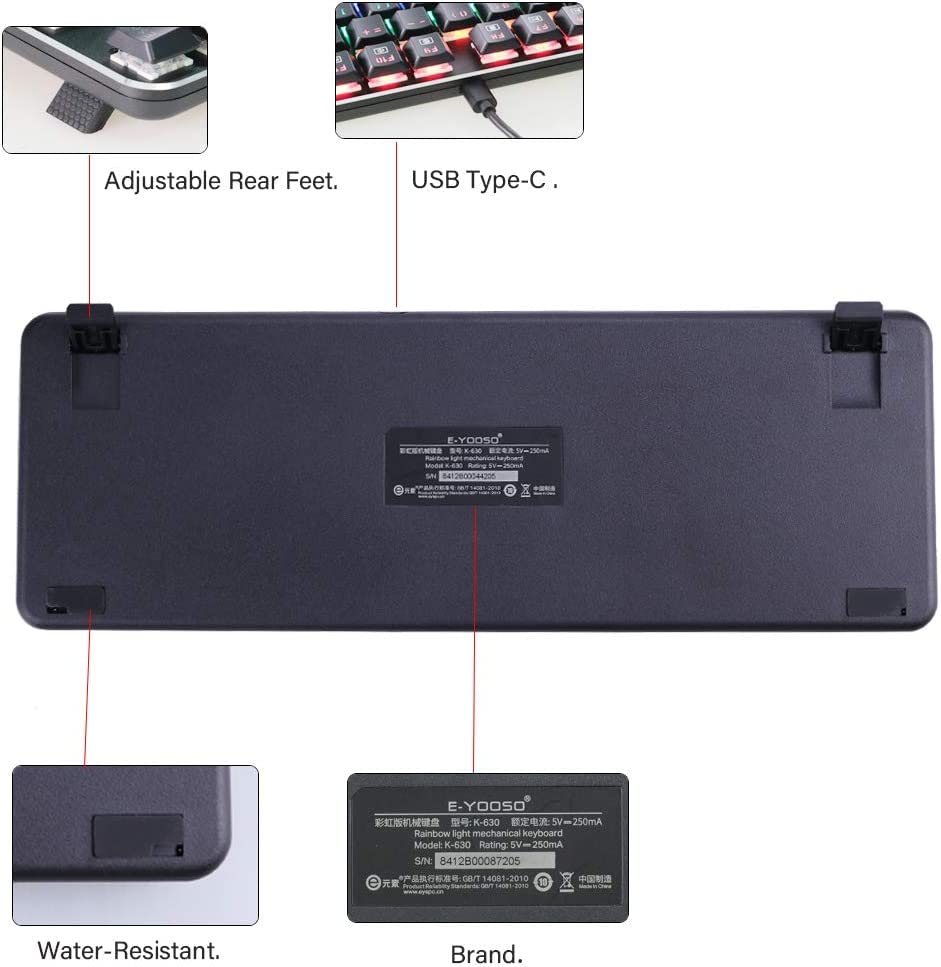
выява: The underside of the E-YOOSO K630 keyboard, illustrating its adjustable rear feet, USB Type-C port, and water-resistant design with drain holes.
Ліквідацыю непаладак
If you encounter issues with your E-YOOSO K630 Mechanical Keyboard, refer to the following common solutions:
- Клавіятура не адказвае:
- Пераканайцеся, што USB-кабель надзейна падключаны як да клавіятуры, так і да кампутара.
- Паспрабуйце падключыць клавіятуру да іншага USB-порта на вашым кампутары.
- Перазагрузіце кампутар.
- Check if the keyboard lock (FN+F12) is activated.
- Не працуе падсветка:
- Ensure the backlight brightness is not set to minimum (FN + Up Arrow Key to increase).
- Cycle through backlight modes using FN + INS.
- Ключы не рэгіструюцца:
- Ачысціце вакол пашкоджаных клавіш, каб выдаліць смецце.
- Ensure the keyboard is not locked (FN+F12).
- Windows Key Locked:
- Press FN + Windows Key to unlock the Windows key.
Тэхнічныя характарыстыкі
| Асаблівасць | Дэталь |
|---|---|
| Нумар мадэлі | К630 |
| Тып клавіятуры | Mechanical, 87-Key Compact |
| Тып перамыкача | Нізкі-Profile Сінія пераключальнікі |
| Трываласць ключа | Да 50 мільёнаў клікаў |
| Сувязь | USB (правадной) |
| Падсвятленне | Rainbow LED, 9 modes |
| Анты-прывіды | 100% Anti-Ghosting with 87 Key Roll-over |
| Матэрыял | ABS і метал |
| Памеры (ДхШхВ) | Approximately 350 x 120 x 12 mm (13.7" x 4.7" x 0.47") |
| Вага | Прыблізна 750 г (26.45 унцый) |
| Сумяшчальнасць аперацыйнай сістэмы | Windows XP/Vista/7/8/10, Mac |
| Асаблівасці | Water Resistant, Backlit, Multimedia Shortcuts |
Гарантыя і падтрымка
For warranty information and technical support, please refer to the documentation included with your purchase or contact E-Yooso customer service through their official webсайт. Захоўвайце чэк аб куплі як пацвярджэнне пакупкі для гарантыйных прэтэнзій.
Ask a question about this manual
Ask about setup, troubleshooting, compatibility, parts, safety, or missing instructions. Manuals+ will review the question and use this page’s manual context to help answer it.