
1. Уводзіны
Thank you for choosing the Lepro Smart LED Strip Light. This manual provides essential information for the safe and efficient use of your new LED strip light. Please read these instructions carefully before installation and operation, and retain them for future reference.
2. Інфармацыя па бяспецы
- Перад устаноўкай або тэхнічным абслугоўваннем пераканайцеся, што крыніца харчавання адключаны.
- Аперацыйная выпtage is 12V. Use only the provided power adapter.
- This product is IP65 waterproof, suitable for both indoor and outdoor use. However, the power adapter and controller are not waterproof and must be protected from moisture.
- Do not bend the LED strip sharply or apply excessive force, as this may damage the circuit.
- Захоўваць у месцах, недаступных дзецям.
- The LED strip is designed with short-circuit protection for enhanced safety.
- Avoid direct eye exposure to the light source for prolonged periods.
3. Змесціва ўпакоўкі
Праверце наяўнасць усіх кампанентаў у камплекце:
- 5m RGB IP65 Waterproof LED Strip
- WiFi кантролер
- Power Adapter (European Adapter 12V 1.5A)
- Пульт дыстанцыйнага кіравання
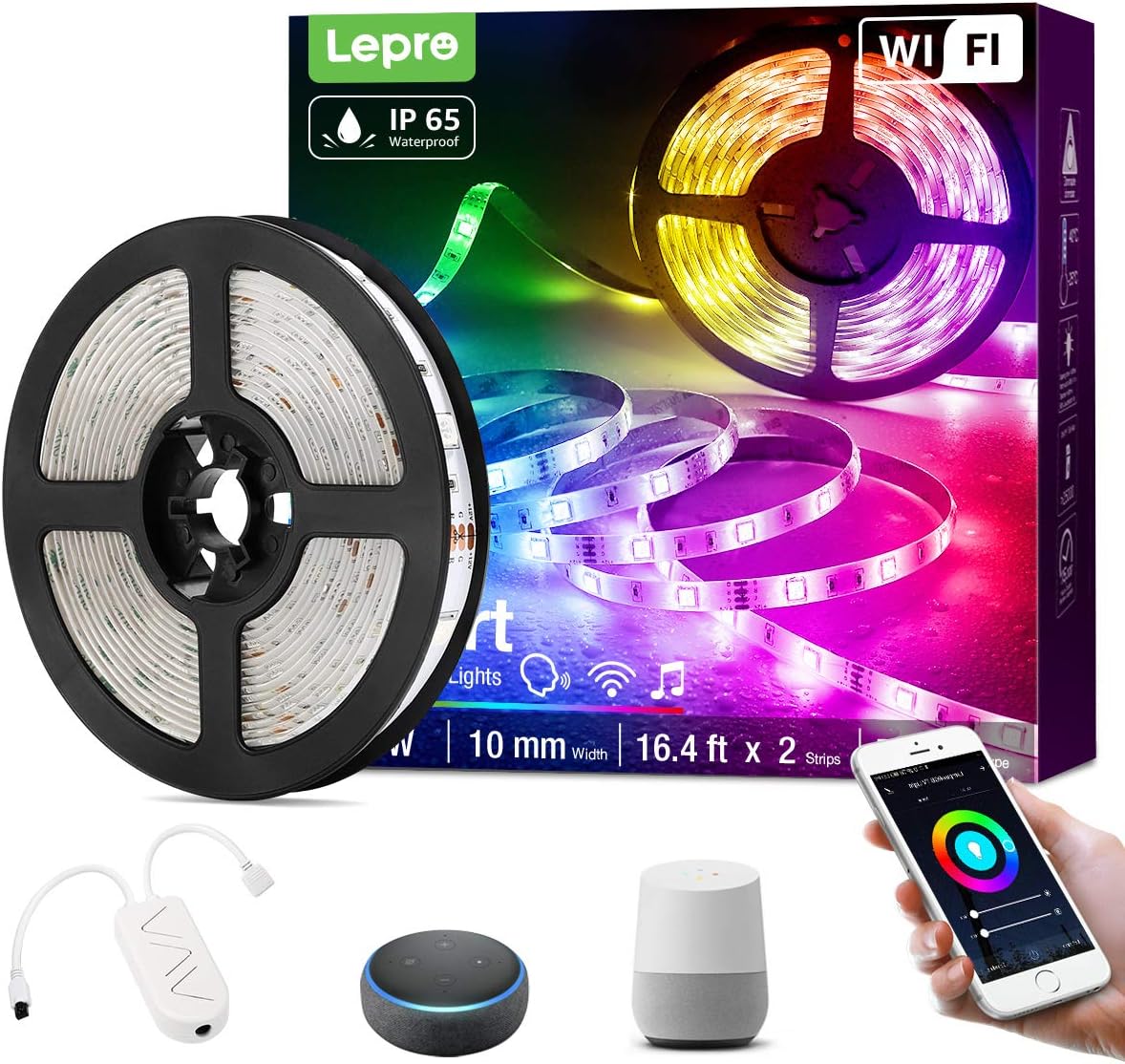
Малюнак 3.1: Скончанаview of the Lepro Smart LED Strip Light and its included components, such as the LED strip reel, WiFi controller, and power adapter.
4. Асаблівасці прадукту
- Разумнае кіраванне: Connects via WiFi (2.4 GHz only) for stable control.
- Галасавое кіраванне: Compatible with Amazon Alexa and Google Assistant, no additional hub required.
- Функцыянальнасць прыкладання: Features include countdown, automatic execution, timer function for preset scenarios, and various scene modes.
- Dimmable RGB: Offers a wide range of colors and adjustable brightness.
- Воданепранікальнасць IP65: Designed for versatile indoor and outdoor decoration.
- Высокая яркасць: Equipped with 30 LEDs per meter for enhanced illumination.
- Бяспечны для дакранання: Operates at a low 12V, ensuring minimal heat and safety.

Малюнак 4.1: The IP65 waterproof LED strip installed in an outdoor setting, demonstrating its suitability for various environments.

Малюнак 4.2: Top image shows a hand safely holding the illuminated LED strip. Bottom image provides a close-up view of the IP65 waterproof coating on the LED strip.
5. Кіраўніцтва па ўстаноўцы
- Ачысціце паверхню: Пераканайцеся, што паверхня ўстаноўкі чыстая, сухая і гладкая.
- Вымераць і адрэзаць (неабавязкова): If necessary, measure the desired length and cut the LED strip only at the designated cutting marks (usually indicated by a scissor icon or copper pads).
- Ачысціць і прыляпіць: Remove the adhesive backing from the LED strip and firmly press it onto the desired surface.
- Падключэнне кампанентаў: Connect the LED strip to the WiFi controller, and then connect the controller to the power adapter.
- Падключыць: Падключыце адаптар сілкавання да стандартнай электрычнай разеткі.
6. Інструкцыя па эксплуатацыі
6.1 Basic Control with Controller Button
After plugging in the strip, you can use the physical button on the controller to:
- Turn the lights ON/OFF.
- Cycle through different scene modes.
- Reset the device (usually by holding the button for several seconds).
6.2 Smart Control via Lepro LampUX App
For full functionality, download the "Lepro LampUX" app from your smartphone's app store.
- Спампаваць прыкладанне: Пошук "Lepro LampUX" and install it.
- Рэгістрацыя/Уваход: Стварыце ўліковы запіс або ўвайдзіце.
- Дадаць прыладу: Follow the in-app instructions to add your LED strip light. Ensure your phone is connected to a 2.4 GHz WiFi network during setup.
- кантроль: Once connected, you can control power, color, brightness, set timers, schedules, and customize scene modes directly from the app.

Малюнак 6.1: A smartphone screen showing the Lepro LampUX app interface, including a color wheel for light customization and options for smart control. The image also depicts a modern home with LED strip lighting.

Малюнак 6.2: A collage of smartphone screens illustrating various features of the Lepro LampUX app, such as timer settings, scheduling, color options, smart modes, scene modes, and DIY customization.
6.3 Voice Control with Alexa/Google Assistant
To enable voice control, link your Lepro LampUX account with Amazon Alexa or Google Assistant:
- Open Smart Assistant App: Open the Amazon Alexa or Google Home app on your smartphone.
- Уключыць навык/дзеянне: Пошук "LE L"ampux" skill (for Alexa) or action (for Google Assistant) and enable it.
- Прывязаць уліковы запіс: Follow the prompts to link your Lepro LampUX account.
- Адкрыйце для сябе прылады: Once linked, ask your smart assistant to discover new devices.
- Галасавыя каманды: You can now use voice commands such as "Alexa, turn on the bedroom light" or "Hey Google, change the strip light to purple."

Малюнак 6.3: A visual guide on a smartphone screen demonstrating the process of linking the Lepro LampUX app with Amazon Alexa, showing the steps to enable the skill and connect accounts.

Малюнак 6.4: A family enjoying LED strip lighting in their living room, with smart speakers visible, illustrating the convenience of voice control with commands like "Alexa, change the strip light to purple."
7. Тэхнічнае абслугоўванне
- Уборка: Gently wipe the LED strip with a soft, dry cloth. Do not use abrasive cleaners or solvents.
- агляд: Periodically check the strip and connections for any signs of damage or wear.
- захоўванне: If storing the strip for an extended period, ensure it is clean, dry, and coiled loosely to prevent damage.
8. Выпраўленне непаладак
| праблема | Магчымая прычына | Рашэнне |
|---|---|---|
| Святлодыёдная стужка не свеціцца. | Няма харчавання, дрэннае злучэнне, няспраўны адаптар. | Праверце разетку, пераканайцеся, што ўсе злучэнні надзейныя, паспрабуйце іншую разетку. |
| Немагчыма падключыцца да Wi-Fi. | Incorrect WiFi band (not 2.4 GHz), incorrect password, too far from router. | Ensure your router is broadcasting a 2.4 GHz signal. Verify WiFi password. Move the strip closer to the router. Reset the controller and try again. |
| Галасавое кіраванне не працуе. | Skill/Action not enabled, account not linked, incorrect commands. | Check if the "LE Lampux" skill/action is enabled and your account is linked in the Alexa/Google Home app. Use precise commands. |
| Colors are inconsistent or incorrect. | Damaged section of the strip, connection issue. | Inspect the strip for physical damage. Ensure connections are firm. |
9. Тэхнічныя характарыстыкі
| Атрыбут | Дэталь |
|---|---|
| Марка | Праказа |
| Нумар мадэлі | PR904116-RGB-WP-EU |
| Памеры прадукту | 16.5 х 16.5 х 6.5 см (у ўпакоўцы) |
| Вага прадмета | 320 грамаў |
| Даўжыня | 5 метраў |
| Колер | RGB |
| Рэйтынг воданепранікальнасці | IP65 (LED Strip only) |
| тtage | 12 вольт |
| Магутнасць | 24 ват |
| Тып лямпы | святлодыёд |
| Сувязь | WiFi (2.4 GHz only) |
| Сумяшчальнасць | Amazon Alexa, Google Assistant |
| Уключаныя кампаненты | LED Strip, WiFi Controller, Remote Control, Power Adapter |
10. Гарантыя і падтрымка
For warranty information or technical support, please refer to the documentation included with your purchase or visit the official Lepro webсайт. Кантактная інфармацыя службы падтрымкі кліентаў звычайна даступная на ўпакоўцы прадукту або на старонцы падтрымкі брэнда ў Інтэрнэце.