
1. Уводзіны
Welcome to your new qunyiCO Y10 Android Tablet. This manual provides essential information for setting up, operating, and maintaining your device. Please read it thoroughly to ensure optimal performance and longevity.
Інфармацыя па бяспецы
- Do not expose the tablet to extreme temperatures or direct sunlight.
- Пазбягайце падзення планшэта і моцных удараў.
- Выкарыстоўвайце толькі зарадную прыладу і аксэсуары, якія ўваходзяць у камплект.
- Трымайце таблетку далей ад вады і іншых вадкасцей.
- Do not attempt to disassemble or repair the tablet yourself.
2. Прадукт скончыўсяview
Фізічныя кампаненты
The qunyiCO Y10 tablet features a sleek design with essential ports and buttons for ease of use.
Фронт View

This image shows the front of the qunyiCO Y10 tablet, highlighting its 10.1-inch IPS HD display.
Тыл View

This image displays the back of the qunyiCO Y10 tablet, featuring the rear camera and the qunyiCO logo.
Кнопкі і парты
Familiarize yourself with the location of key controls and connections.
An illustrative diagram highlighting key features such as Android 10.0, Quad-core CPU, 5000mAh battery, 10.1-inch display, 2.4GHz Wi-Fi, Dual Camera, 2GB RAM + 32GB ROM, and 1280x800 IPS HD.
- Power/Volume Buttons: Located on the side for power on/off and volume control.
- Раз'ём для навушнікаў: Standard 3.5mm audio output.
- Слот для SD-карты: Для пашырэння памяці да 128 ГБ.
- Порт для зарадкі: Порт Micro USB для зарадкі.
- Камеры: 2-мегапіксельная франтальная камера і 8-мегапіксельная задняя камера.
3. Настройка
Першапачатковая зарадка
Before first use, fully charge your tablet using the provided power adapter.
Уключэнне/выключэнне харчавання
- Уключэнне: Press and hold the Power button until the qunyiCO logo appears.
- Выключэнне: Націсніце і ўтрымлівайце кнопку харчавання, затым абярыце з прапанаваных опцый «Выключыць харчаванне».
- Перазапуск: Націсніце і ўтрымлівайце кнопку харчавання, затым абярыце з опцый «Перазагрузка».
Першая ўстаноўка
Выконвайце падказкі на экране, каб завяршыць пачатковую наладу, у тым ліку выбар мовы, падключэнне да Wi-Fi і ўваход у ўліковы запіс Google.
4. Інструкцыя па эксплуатацыі
Базавая навігацыя
Your tablet runs on Android 11, offering an intuitive user interface.
- Сэнсарныя жэсты: Націсніце, каб выбраць, правядзіце пальцам, каб пракруціць, звядзіце пальцамі, каб павялічыць.
- Галоўны экран: Доступ да вашых праграм і віджэтаў.
- Апавяшчэнні: Правядзіце пальцам зверху ўніз, каб view апавяшчэнні і хуткія налады.
Падключэнне Wi-Fi
Каб атрымаць доступ да Інтэрнэту, падключыцеся да сеткі Wi-Fi.
- Перайсці да Налады > Сетка і інтэрнэт > Wi-Fi.
- Уключыць/выключыць Wi-Fi On.
- Выберыце патрэбную сетку са спісу і ўвядзіце пароль, калі будзе прапанавана.
Кіраванне праграмамі
Спампоўвайце і кіруйце праграмамі з крамы Google Play.

This image illustrates the tablet's screen with various popular application icons, demonstrating its compatibility with a wide range of apps.
- Адкрыйце Play Store дадатак.
- Пошук apps and games.
- Націсніце Усталяваць спампаваць.
Выкарыстанне камеры
Здымайце фота і відэа з дапамогай убудаваных камер.

A visual comparison demonstrating the clarity and quality of images captured by the tablet's 2MP front and 8MP rear cameras.
- Адкрыйце Камера дадатак.
- Пераключайцеся паміж пярэдняй і задняй камерамі па меры неабходнасці.
- Націсніце кнопку спуску засаўкі, каб зрабіць фотаздымак або пачаць/спыніць відэазапіс.
5. Кіраванне сховішчам
Унутраная памяць
The tablet comes with 32GB of internal storage for your apps and files.
Сховішча з магчымасцю пашырэння
You can expand the storage up to 128GB using a microSD card.
This image visually represents the tablet's storage capabilities, indicating 32GB of internal ROM and the option to expand up to 128GB, suitable for storing various media and applications.
- Устаўце карту microSD у прызначаны слот.
- Follow on-screen prompts to format the card if necessary.
- Note: While expandable up to 128GB, 32GB is recommended for optimal performance. Larger cards may slow down the system.
6. Інфармацыя аб батарэі
Тэрмін службы батарэі
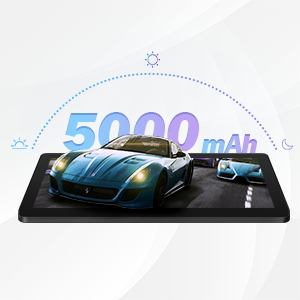
The qunyiCO Y10 is equipped with a 5000mAh battery, providing up to 8 hours of usage on a single charge, depending on usage patterns.

An image highlighting the 5000mAh battery, with icons indicating approximate usage times for video playback (6H), gaming (6H), and browsing (12H), showcasing its long-lasting capability.
Зарадка
Use the provided charger to ensure proper charging and battery health.
- Connect the charger to the tablet's charging port and a power outlet.
- Значок батарэі на экране будзе паказваць стан зарадкі.
7. Сувязь
Wi-Fi
Supports 2.4G Wi-Fi for stable internet connection.
Bluetooth
Connect to Bluetooth devices such as headphones or speakers.
- Перайсці да Налады > Падключаныя прылады > Bluetooth.
- Пераключыць Bluetooth On.
- Select the device you wish to pair with from the list.
8. Мультымедыя
Атрымлівайце асалоду ад кантэнту
The 1280x800 IPS HD display provides clear visuals for various media.
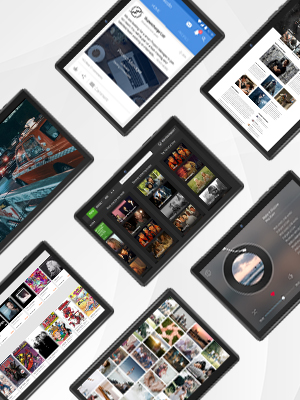
This image presents a collage of tablet screens, each showing different forms of digital content such as social media feeds, news articles, movie interfaces, and music players, emphasizing the tablet's versatility for media consumption.
You can enjoy movies, music, photos, and e-books.
Афіцыйнае відэа пра прадукт
Глядзіце гэтае афіцыйнае відэа для візуальнага ўражанняview of the qunyiCO Y10 Tablet's features and capabilities.
This video, titled "qunyiCO Y10 Tablet 10 inch Android 10.0", provides a comprehensive look at the tablet's design, performance, and user experience.
9. Выпраўленне непаладак
Агульныя праблемы і рашэнні
| выпуск | Патэнцыйная прычына | Рашэнне |
|---|---|---|
| Tablet keeps shutting off / rebooting | Software glitch, low battery, faulty charger/port, overheating. | Ensure full charge. Perform a factory reset if software related. Check charger and port for damage. Avoid heavy usage in hot environments. |
| Сэнсарны экран не рэагуе | Software freeze, screen protector interference, physical damage. | Restart the tablet. Remove any screen protectors. If problem persists, contact support. |
| Won't charge | Damaged charging cable/adapter, dirty charging port, battery issue. | Try a different compatible charger. Clean the charging port gently. If still no charge, battery may need service. |
| Праблемы з падключэннем да Wi-Fi | Incorrect password, router issues, tablet software glitch. | Double-check password. Restart router and tablet. Forget and reconnect to the network. |
| Apps flip/rotate incorrectly | Auto-rotate setting, app compatibility, sensor issue. | Check auto-rotate settings in quick panel/settings. Some apps may not support all orientations. If persistent, sensor may be faulty. |
10. Тэхнічныя характарыстыкі
Тэхнічныя дэталі
| Асаблівасць | Дэталь |
|---|---|
| мадэль | Y10 |
| Аперацыйная сістэма | Android 11 |
| Працэсар | 1.6 GHz Quad-Core (Allwinner) |
| АЗП | 2 ГБ DDR4 SDRAM |
| Унутраная памяць | 32 ГБ |
| Сховішча з магчымасцю пашырэння | Да 128 ГБ (MicroSD) |
| Памер экрана | 10.1 цалі |
| Дазвол экрана | 1280x800 IPS HD |
| Задняя камера | 8 МП |
| Пярэдняя камера | 2 МП |
| акумулятар | 5000mAh літый-іённы |
| Сувязь | Wi-Fi (2.4G), Bluetooth |
| Памеры (ДхШхВ) | 9.62 х 6.83 х 0.39 цалі |
| Вага прадмета | 1.08 фунта |
11. Тэхнічнае абслугоўванне
Чыстка і догляд
- Выкарыстоўвайце мяккую тканіну без ворса для чысткі экрана і корпуса планшэта.
- Не выкарыстоўвайце абразіўныя ачышчальнікі або растваральнікі.
- Keep the tablet in a protective case to prevent scratches and damage.
Абнаўлення праграмнага забеспячэння
Рэгулярна правярайце наяўнасць абнаўленняў сістэмы, каб забяспечыць аптымальную прадукцыйнасць і бяспеку.
- Перайсці да Налады > сістэма > Абнаўленне сістэмы.
- Выконвайце інструкцыі на экране, каб загрузіць і ўсталяваць усе даступныя абнаўленні.
12. Гарантыя і падтрымка
Інфармацыя аб гарантыі
Your qunyiCO Y10 tablet comes with a standard manufacturer's warranty. Please refer to the warranty card included in your product packaging for specific terms and conditions.
Падтрымка кліентаў
For technical assistance, troubleshooting beyond this manual, or warranty claims, please contact qunyiCO customer support through their official webсайт або кантактную інфармацыю, указаную ў дакументацыі да прадукту.
You can also visit the official qunyiCO store on Amazon for more information: qunyiCO Store.