
MateStar BlackBlue4p10ft_1208
MateStar 40W USB C Charger Block Instruction Manual
Model: BlackBlue4p10ft_1208
1. Уводзіны
Thank you for choosing the MateStar 40W USB C Charger Block. This product is designed to provide efficient and fast charging for multiple devices simultaneously. With its compact design and advanced safety features, it is an ideal charging solution for home, office, and travel. This manual provides essential information on how to safely and effectively use your new charger.

Image: Two MateStar 40W USB C Charger Blocks, showcasing their compact form factor and multiple ports.
2. Інфармацыя па бяспецы
Your MateStar charger block is equipped with a smart chip to ensure safe and reliable operation. It includes multiple protection mechanisms:
- Абарона ад перагрузкі па току: Запабягае пашкоджанняў ад празмернага току.
- Аверволtagе абарона: Меры засцярогі ад непрыстойнасціtagэлектронныя скокі.
- Абарона ад перагрэву: Рэгулюе тэмпературу, каб прадухіліць перагрэў.
- Абарона ад кароткага замыкання: Абараняе ад кароткага замыкання.
The charger is constructed from ABS + PC fireproof material for enhanced stability and safety. Always ensure the charger is used in a well-ventilated area and avoid covering it during operation. Do not expose the charger to liquids or extreme temperatures.

Image: An illustration highlighting the internal smart chip and various safety protections, including over-voltage, over-current, over-temperature, and short circuit protection.
3. Змесціва ўпакоўкі
Пасля адкрыцця ўпакоўкі вы павінны знайсці наступныя прадметы:
- 2 x MateStar 40W USB Charger Block (Black)
Калі якія-небудзь элементы адсутнічаюць або пашкоджаныя, неадкладна звярніцеся ў службу падтрымкі.
4. Асаблівасці прадукту
The MateStar 40W USB C Charger Block offers a range of features designed for optimal charging performance:
- Хуткая зарадка 40 Вт: Supports Power Delivery (PD) and Quick Charge (QC) functions for rapid charging. The USB-C port delivers up to 20W, and the USB-A port offers 3.1A/5V.
- 4-in-1 Compact Design: Features dual USB-C ports and dual USB-A ports, allowing simultaneous charging of up to four devices. This design minimizes the need for multiple wall sockets and saves space.
- Універсальная сумяшчальнасць: Compatible with a wide range of devices, including iPhones, Samsung Galaxy phones, iPads, tablets, and more.
- Бяспечны і надзейны: Built-in smart chip with multi-protection features (overcurrent, overvoltage, overheating, short circuit) and fireproof ABS + PC material.

Image: A visual representation of the MateStar 4-port charger highlighting its key features: dual USB-C ports, dual USB-A ports, quick charging capability, and travel-friendly design.

Image: A graphic illustrating the speed of PD fast charging, indicating it is 3 times faster than standard charging methods.
5. Настройка
Setting up your MateStar 40W USB C Charger Block is straightforward:
- Unpack the charger block from its packaging.
- Insert the charger block into a standard wall outlet (110 Volts input).
- Падключыце зарадны кабель прылады да аднаго з даступных партоў USB-C або USB-A на зараднай прыладзе.
- Падключыце другі канец зараднага кабеля да прылады.
The charger is designed to be compact and space-saving, reducing clutter from multiple adapters.

Image: A visual comparison demonstrating how the 4-in-1 compact design of the charger reduces cable and adapter clutter compared to using multiple individual chargers.
6. Інструкцыя па эксплуатацыі
Once connected, the charger will automatically detect your device and begin charging. The smart chip optimizes power delivery to ensure efficient and safe charging for each connected device.
- For optimal fast charging, use high-quality USB-C to USB-C cables for devices supporting Power Delivery (PD) and appropriate USB-A cables for Quick Charge (QC) compatible devices.
- You can charge up to four devices simultaneously. The charger intelligently distributes power across the ports.
- Disconnect devices once fully charged or when not in use.

Image: A person utilizing the MateStar charger to power multiple electronic devices, including a smartphone, tablet, and e-reader, demonstrating its multi-device charging capability in a practical setting.
7. Сумяшчальнасць
The MateStar 40W USB C Charger Block offers broad compatibility with a wide range of electronic devices:
- Смартфоны: Compatible with iPhone 16/16 Plus/16 Pro/16 Pro Max, iPhone 15/15 Plus/15 Pro/15 Pro Max, iPhone 14/14 Plus/14 Pro/14 Pro Max, iPhone 13/13 Mini/13 Pro/13 Pro Max, iPhone 12/12 Mini/12 Pro/12 Pro Max, iPhone 11/11 Pro/11 Pro Max, iPhone XS Max/XS/XR/X/8/8 Plus/7/7 Plus/6/6S/SE. Also compatible with Samsung Galaxy S24/S23/S22/S21/S20/Note 10/Note 20/S10/S9/S8, Google Pixel series, LG, Huawei, Xiaomi, OPPO, Vivo, and more.
- Таблеткі: Compatible with iPad Pro/mini, iPad Air/Mini, Samsung Galaxy Tab S8/S7/S6/Tab A8/A7, Amazon Fire HD, and other tablets.
- Іншыя прылады: Nintendo Switch, Echo/Alexa devices, AirPods, Smart Buds, iWatch Series, and other USB-powered devices.
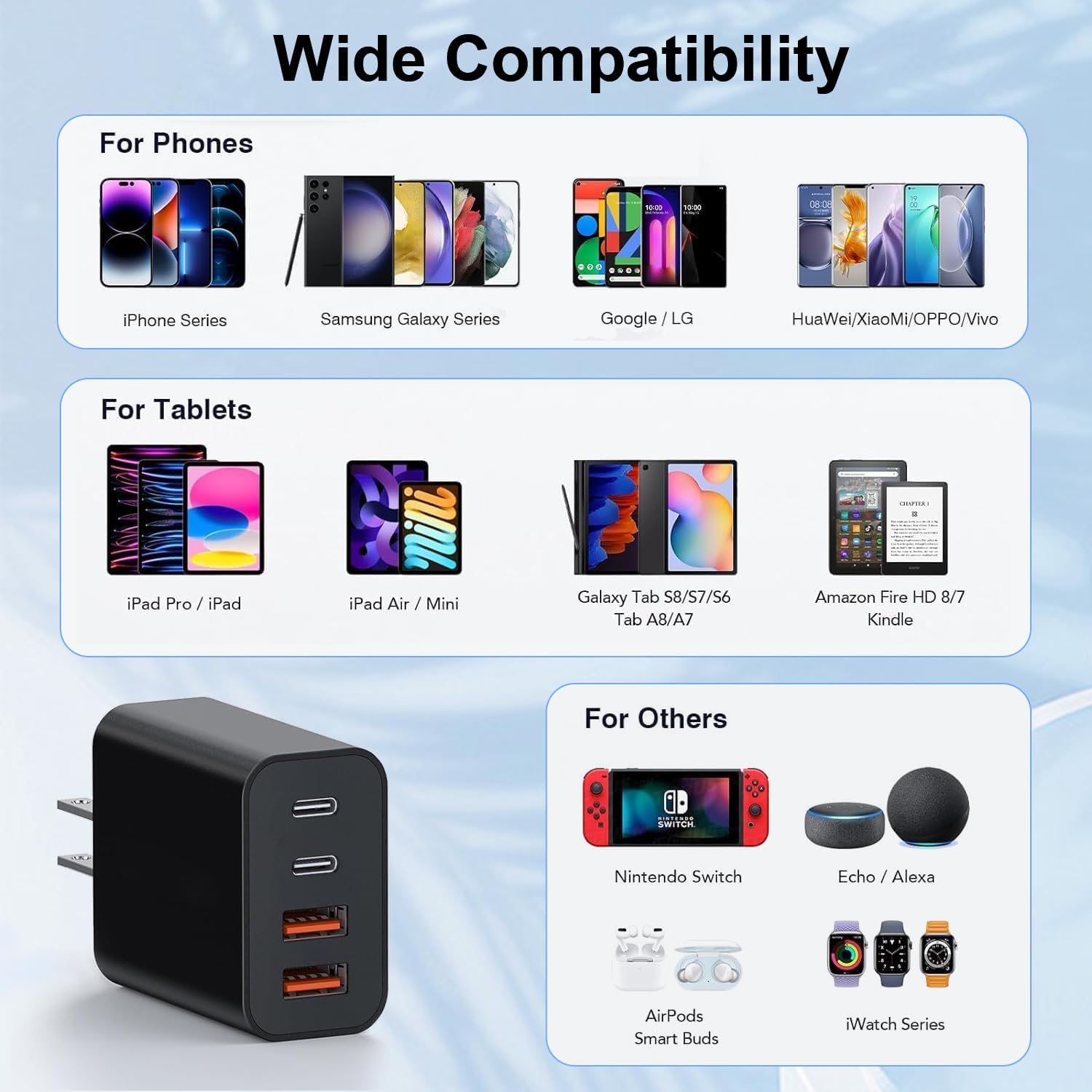
Image: A comprehensive compatibility chart displaying various phone models (iPhone, Samsung Galaxy, Google/LG, Huawei/Xiaomi/OPPO/Vivo), tablets (iPad Pro/iPad, iPad Air/Mini, Galaxy Tab, Amazon Fire HD/Kindle), and other devices (Nintendo Switch, Echo/Alexa, AirPods, iWatch Series) that are compatible with the charger.
8. Тэхнічныя характарыстыкі
| Асаблівасць | Дэталь |
|---|---|
| Нумар мадэлі | BlackBlue4p10ft_1208 |
| Агульная магутнасць | 40 Вт (макс.) |
| Выхад порта USB-C | 20 Вт (макс.) |
| Выхад порта USB-A | 3.1A/5V |
| Уваходны кнtage | 110 вольт |
| Тэхналогія падлучэння | USB |
| Тып раздыма | USB тыпу C, USB тыпу A |
| Асаблівасці | Lightweight Design, Fast Charging |
| Памеры | 3.58 х 2.09 х 1.14 цалі |
| Вага прадмета | 0.212 унцыі |
| Матэрыял | ABS + PC вогнетрывалы матэрыял |
9. Тэхнічнае абслугоўванне
To ensure the longevity and optimal performance of your MateStar charger block, follow these maintenance guidelines:
- Уборка: Адключыце зарадную прыладу ад разеткі перад чысткай. Выкарыстоўвайце мяккую сухую тканіну для працірання паверхні. Не выкарыстоўвайце вадкія ачышчальнікі або абразіўныя матэрыялы.
- захоўванне: Захоўвайце зарадную прыладу ў прахалодным, сухім месцы, удалечыні ад прамых сонечных прамянёў і вільгаці, калі яна не выкарыстоўваецца.
- Апрацоўка: Avoid dropping or subjecting the charger to strong impacts. Do not attempt to disassemble or modify the charger.
- Сыход за кабелем: Сачыце за тым, каб кабелі зарадкі не былі рэзка сагнутыя і не заблытаныя, бо гэта можа пашкодзіць іх і паўплываць на прадукцыйнасць зарадкі.
10. Выпраўленне непаладак
If you encounter any issues with your MateStar charger block, please refer to the following common troubleshooting steps:
- Прылада не зараджаецца:
- Пераканайцеся, што зарадная прылада надзейна падключана да спраўнай разеткі.
- Праверце, ці правільна падключаны зарадны кабель як да зараднай прылады, так і да прылады.
- Паспрабуйце выкарыстаць іншы зарадны кабель, каб выключыць няспраўнасць кабеля.
- Test the charger with a different device to confirm the charger's functionality.
- Павольная зарадка:
- Verify that your device and cable support fast charging (PD or QC) and are connected to the appropriate port (USB-C for PD, USB-A for QC).
- Ensure no background applications on your device are consuming excessive power.
- Charging multiple devices simultaneously may distribute the total 40W output, potentially reducing individual port speeds.
- Перагрэў зараднай прылады:
- Disconnect the charger and allow it to cool down.
- Пераканайцеся, што зарадная прылада знаходзіцца ў добра вентыляваным памяшканні і не накрыта.
- Калі перагрэў не знікае, спыніце выкарыстанне і звярніцеся ў службу падтрымкі кліентаў.
If these steps do not resolve your issue, please contact customer support for further assistance.
11. Гарантыя і падтрымка
MateStar provides a Гарантыя 24 месяцаў for your USB C Charger Block. This warranty covers manufacturing defects and ensures your product performs as expected under normal use.
For any questions, concerns, or warranty claims, please contact MateStar customer support. We are committed to resolving your problems within 24 hours.
You can visit the official MateStar store for more information and support: MateStar Store
Ask a question about this manual
Ask about setup, troubleshooting, compatibility, parts, safety, or missing instructions. Manuals+ will review the question and use this page’s manual context to help answer it.