
Wireless Gear G0687
Wireless Gear True Wireless Case Earbuds User Manual
Мадэль: G0687
Уводзіны
Thank you for choosing the Wireless Gear True Wireless Case Earbuds. These in-ear headphones are designed for comfort and convenience, offering a seamless audio experience with advanced features. This manual provides detailed instructions on how to set up, operate, maintain, and troubleshoot your new earbuds to ensure optimal performance.
Асноўныя функцыі ўключаюць у сябе:
- Мікрафон гучнай сувязі: Integrated microphone for seamless transition between music and calls.
- Зручная пасадка: Flexible Fit-Gel ear gels ensure a secure and comfortable fit for extended wear.
- Падоўжаны час прайгравання: Up to 8 hours of continuous play and talk time.
- Партатыўны чахол для зарадкі: The included charging case provides 4-5 full recharges, extending total playtime significantly.
- Extreme Bass Sound: High-performance wireless earbuds delivering rich, superior sound with ultra-deep bass.
Змест пакета
Калі ласка, пастаўце галачку для наступных пунктаў:
- Wireless Gear True Wireless Case Earbuds (Left and Right)
- Партатыўны чахол для зарадкі
- USB-кабель для зарадкі
- Кіраўніцтва карыстальніка
- Multiple sizes of Fit-Gel ear tips
Прадукт скончаныview
Familiarize yourself with the components of your Wireless Gear True Wireless Case Earbuds.

Малюнак 1: The Wireless Gear True Wireless Earbuds resting inside their open charging case. The earbuds are black with a sleek design, and the case is also black with a translucent lid, showing the charging indicators.

Малюнак 2: Фронт view of the retail packaging for the Wireless Gear True Wireless Case Earbuds. The box prominently displays the product name, brand logo, and key features such as "8 HRS" playtime, "4-5 RECHARGES PER FULL CASE", and "EXTREME BASS".
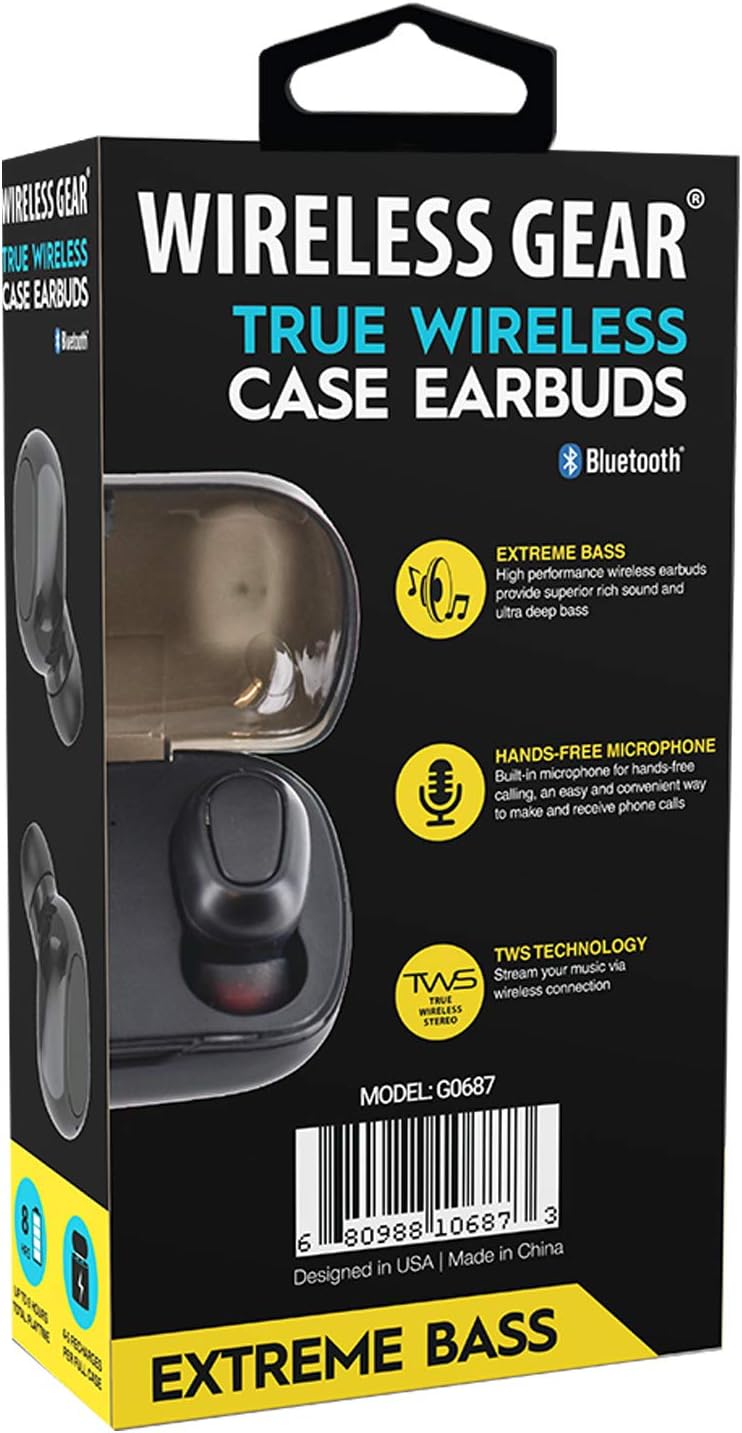
Малюнак 3: Назад view of the retail packaging, highlighting additional features like "Hands-Free Microphone" and "TWS Technology". The model number G0687 and UPC 0680988106873 are visible at the bottom.
Кампаненты навушнікаў-ўкладышаў:
- Multi-function Touch/Button Area: For controlling playback, calls, and voice assistant.
- Мікрафон: Для званкоў па гучнай сувязі.
- Святлодыёдны індыкатар: Паказвае стан спалучэння, стан зарадкі і магутнасць.
- Кантакты для зарадкі: Located at the bottom of each earbud.
Кампаненты зараднага чахла:
- Зарадныя слоты для навушнікаў: Надзейна трымайце і зараджайце навушнікі.
- Святлодыёдныя індыкатары зараднага чахла: Show the charging status of the case and earbuds.
- Порт для зарадкі USB: Для зарадкі самога корпуса.
Настройка
1. Пачатковая зарадка
- Place both earbuds into the charging case. Ensure they are properly seated so the charging contacts align.
- Падключыце USB-кабель для зарадкі да порта зарадкі на корпусе, а другі канец — да крыніцы харчавання USB (напрыклад, адаптара для сеткі, USB-порта кампутара).
- The LED indicators on the earbuds and/or case will illuminate to show charging status. A full charge for the case and earbuds typically takes 1-2 hours.
- Once fully charged, disconnect the charging cable. The case holds enough power for 4-5 full earbud recharges.
2. Спалучэнне з вашай прыладай
- Уключэнне: Open the charging case, or remove the earbuds from the case. They should automatically power on and enter pairing mode. The LED indicator on one earbud will flash, indicating it's ready to pair.
- Актываваць Bluetooth: На смартфоне, планшэце або іншай прыладзе з падтрымкай Bluetooth перайдзіце ў налады Bluetooth і ўключыце Bluetooth.
- Пошук прылады: Your device will scan for available Bluetooth devices. Look for "Wireless Gear Earbuds" or a similar name in the list.
- Падключыць: Select the earbuds from the list. Once connected, the LED indicator on the earbud will stop flashing or change color. You will hear an audible confirmation.
- Аўтаматычнае паўторнае падключэнне: After the initial pairing, the earbuds will automatically connect to the last paired device when removed from the case and Bluetooth is active on your device.
Note: If pairing fails, turn off Bluetooth on your device, place earbuds back in the case, close and reopen, then try again.
Інструкцыя па эксплуатацыі
Basic Controls (Touch/Button Functions):
| Функцыя | Дзеянне |
|---|---|
| Уключэнне | Remove from charging case. |
| Выключэнне | Змясціце назад у зарадны чахол. |
| Прайграванне/прыпыненне музыкі | Адзін націск на любы навушнік. |
| Наступны трэк | Двойчы націсніце на правы навушнік. |
| Папярэдні трэк | Двойчы націсніце на левы навушнік-ўкладыш. |
| Адказаць/завяршыць выклік | Адно націсканне на любы навушнік падчас уваходнага званка. |
| Адхіліць выклік | Падчас уваходнага званка націсніце і ўтрымлівайце любы з навушнікаў на працягу 2 секунд. |
| Актывуйце галасавой памочнік | Тройчы націсніце на любы навушнік. |
| Павялічыць гучнасць | Press and hold Right earbud. |
| Памяншэнне гучнасці | Press and hold Left earbud. |
Note: Specific touch/button functions may vary slightly. Refer to the quick start guide included in your package for precise controls if different.
Тэхнічнае абслугоўванне
Cleaning Your Earbuds and Case:
- Выкарыстоўвайце мяккую, сухую тканіну без ворса, каб праціраць навушнікі і зарадны футляр.
- Для ўстойлівага бруду злёгку ачысціцеampen тканіна з вадой або мяккім неабразіўным ачышчальнікам.
- Do not use harsh chemicals, aerosols, or abrasive cleaners.
- Пераканайцеся, што кантакты зарадкі на навушніках і ў чахле чыстыя і без смецця, каб забяспечыць належную зарадку.
- Remove ear tips and clean them separately with water and mild soap if necessary, then dry completely before reattaching.
захоўванне:
- Калі навушнікі не выкарыстоўваюцца, заўсёды захоўвайце іх у зарадным чахле, каб абараніць і падтрымліваць зараджанасць.
- Store the device in a cool, dry place, away from extreme temperatures, humidity, and direct sunlight.
Сыход за батарэяй:
- Каб падоўжыць тэрмін службы батарэі, пазбягайце частай поўнай разрадкі навушнікаў і кейса.
- Charge the device regularly, even if not in frequent use, to prevent deep discharge.
Ліквідацыю непаладак
If you encounter issues with your Wireless Gear True Wireless Case Earbuds, try the following solutions:
- Навушнікі не спалучаюцца з прыладай:
- Пераканайцеся, што Bluetooth уключаны на вашай прыладзе.
- Пераканайцеся, што навушнікі зараджаны.
- Place earbuds back in the case, close the lid, wait a few seconds, then open the lid and try pairing again.
- Forget/delete the earbuds from your device's Bluetooth list and re-pair.
- Ensure earbuds are within Bluetooth range (typically 10 meters/33 feet).
- Працуе толькі адзін навушнік:
- Пераканайцеся, што абодва навушнікі зараджаны.
- Place both earbuds back into the charging case, close the lid, and then remove them simultaneously. This often re-syncs them.
- Try resetting the earbuds (refer to specific reset instructions if available in the quick start guide, usually involves holding a button for a long time).
- Навушнікі не зараджаюцца:
- Пераканайцеся, што зарадны кабель надзейна падключаны як да корпуса, так і да крыніцы харчавання.
- Праверце, ці чыстыя і без смецця кантакты зарадкі на навушніках і ўнутры футляра.
- Паспрабуйце іншы кабель USB або адаптар сілкавання.
- Пераканайцеся, што сам зарадны чахол мае харчаванне.
- Дрэнная якасць гуку або перарывістае злучэнне:
- Падыдзіце бліжэй да спалучанай прылады, каб паменшыць перашкоды.
- Пазбягайце перашкод паміж навушнікамі і прыладай.
- Пераканайцеся, што паблізу няма іншых моцных бесправадных сігналаў, якія могуць выклікаць перашкоды.
- Clean the ear tips and earbud speakers.
Тэхнічныя характарыстыкі
| Асаблівасць | Дэталь |
|---|---|
| Нумар мадэлі | G0687 |
| Тэхналогія бесправадной сувязі | Bluetooth |
| Тэхналогія падлучэння | Bluetooth |
| Формаў-фактар | Унутрывушныя (інтравушныя) |
| Колер | Чорны |
| Час прайгравання/размовы | Да 8 гадзін |
| Зарадка зараднага чахла | 4-5 full recharges |
| Тып батарэі | Lithium Ion (rechargeable) |
| Асаблівасці | Bluetooth, Wireless, Microphone Included |
| Вытворца | ESI Wireless Accessories |
| Памеры прадукту | 13.97 x 7.62 x 3.81 cm; 226.8 g (Package) |
| ASIN | B08DCTH7DW |
| UPC | 0680988106873 |
Гарантыя і падтрымка
Інфармацыя аб гарантыі:
Wireless Gear products are manufactured to the highest quality standards. For specific warranty details, please refer to the warranty card included with your purchase or visit the official Wireless Gear website. Typically, products come with a limited warranty covering manufacturing defects from the date of purchase.
Падтрымка кліентаў:
If you have any questions, require technical assistance, or need to report an issue, please contact Wireless Gear customer support. You can usually find contact information (phone number, email, or support portal) on the product packaging or the official brand webсайт.
Каб атрымаць дадатковую дапамогу, наведайце: Wireless Gear Support Page (Note: This is a placeholder link. Please refer to your product's official documentation for the correct support URL.)