
Уводзіны
This manual provides detailed instructions for the setup, operation, maintenance, and troubleshooting of your Macally BTWKEYMB-ES Extended Wireless Bluetooth Keyboard. Please read this manual thoroughly to ensure proper use and to maximize the performance of your device.
The Macally BTWKEYMB-ES is an elegant and ultra-thin (17 mm thick) wireless Bluetooth keyboard with a brushed metallic finish. It is specifically designed for Mac, iPad, iPhone, PC, and Android devices with Bluetooth capability. It features a stable and reliable radio connection, allowing for a clean, wireless workspace. This keyboard supports connection to up to three Bluetooth devices simultaneously, with direct switching via the Quick-Switch function. It includes 110 flat keys with a scissor-lift mechanism for sensitive and responsive typing, 21 function buttons for easy access to Mac functions, and a 17-key numeric keypad to boost productivity. The keyboard features a Spanish layout.

Зверху ўніз view of the Macally BTWKEYMB-ES keyboard, showcasing its full Spanish QWERTY layout with numeric keypad and function keys.
Настройка
1. Зарадка клавіятуры
Before first use, ensure the keyboard is fully charged. Connect the included USB charging cable to the keyboard's charging port and to a USB power source (e.g., computer USB port, USB wall adapter). The charging indicator light will show the charging status.
2. Спарванне Bluetooth
- Уключыце клавіятуру з дапамогай выключальніка харчавання, які звычайна знаходзіцца збоку або ззаду.
- Press and hold one of the Bluetooth channel keys (e.g., B1, B2, B3) for a few seconds until the corresponding indicator light starts blinking rapidly. This indicates the keyboard is in pairing mode.
- On your device (Mac, PC, iPad, iPhone, Android), go to Bluetooth settings.
- Пошук available Bluetooth devices. The keyboard should appear as "Macally BTWKEYMB-ES" or similar.
- Select the keyboard from the list to initiate pairing. Follow any on-screen prompts, such as entering a code displayed on your screen.
- Once paired, the indicator light for that channel will stop blinking and remain solid, indicating a successful connection.
3. Quick-Switch Pairing (Multi-Device Connection)
The keyboard supports connecting up to three devices. To connect additional devices, repeat the Bluetooth pairing steps using a different Bluetooth channel key (B2 or B3). Once multiple devices are paired, you can switch between them instantly by simply pressing the corresponding Bluetooth channel key (B1, B2, or B3).

The Macally BTWKEYMB-ES keyboard in a workspace setting, connected wirelessly to a desktop monitor and a tablet, demonstrating its multi-device capability.
Інструкцыя па эксплуатацыі
Функцыянальныя клавішы
The keyboard features 21 function keys (F1-F12 and additional media/system control keys) that provide quick access to various functions on your Mac or other compatible devices. These include brightness control, mission control, media playback, volume control, and more. For specific functions, refer to your device's operating system documentation.
Лікавая клавіятура
The integrated 17-key numeric keypad allows for efficient data entry and calculations. Ensure Num Lock is enabled if necessary for your operating system.
Вопыт набору тэксту
The scissor-lift key mechanism provides a comfortable and responsive typing experience with a satisfying tactile feedback. The Spanish layout includes specific characters and key placements relevant to the Spanish language.
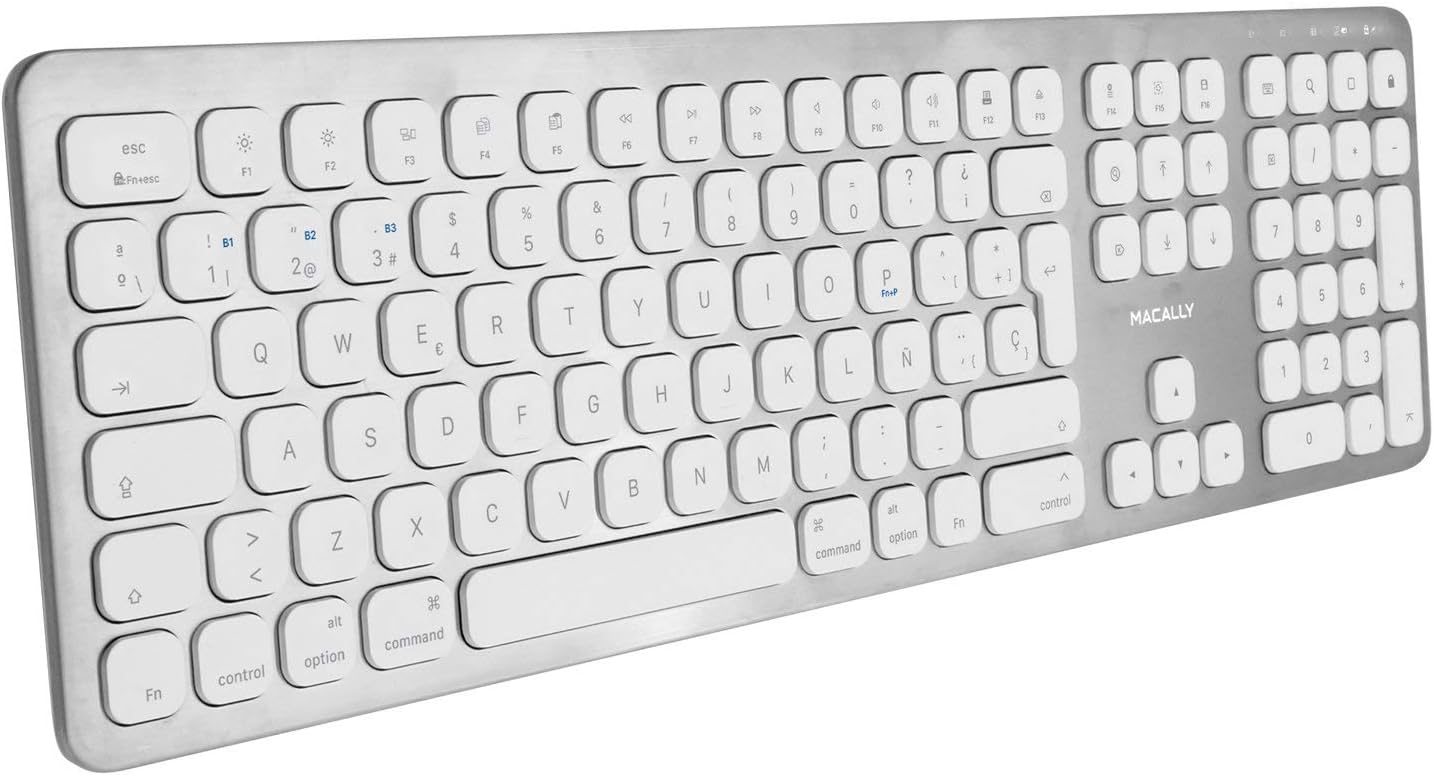
Overhead angled view of the Macally BTWKEYMB-ES keyboard, providing a clear look at all keys and the overall layout.
Тэхнічнае абслугоўванне
Уборка
To clean the keyboard, first turn it off. Use a soft, lint-free cloth slightly dampened with water or a mild cleaning solution. Avoid using harsh chemicals, abrasive cleaners, or excessive moisture. Do not spray liquid directly onto the keyboard. For dust and debris between keys, use compressed air.
Захоўванне
When not in use for extended periods, store the keyboard in a cool, dry place away from direct sunlight and extreme temperatures. Ensure the keyboard is turned off to conserve battery life.
Ліквідацыю непаладак
Клавіятура не падключаецца/не спалучаецца
- Пераканайцеся, што клавіятура ўключана і цалкам зараджана.
- Пераканайцеся, што Bluetooth уключаны на вашай прыладзе.
- Перамясціце клавіятуру бліжэй да прылады, каб пераканацца, што яна знаходзіцца ў зоне дзеяння Bluetooth.
- Паспрабуйце адлучыць клавіятуру ў наладах Bluetooth вашай прылады, а затым зноў падключыць яе.
- Restart both the keyboard (turn off and on) and your device.
- Пераканайцеся, што іншыя прылады Bluetooth не ствараюць перашкод.
Клавішы не рэагуюць
- Праверце, ці правільна падключана клавіятура праз Bluetooth.
- Ensure the battery is not critically low. Charge the keyboard if needed.
- Ачысціце клавіятуру, каб выдаліць любыя смецце, якія могуць перашкаджаць клавішам.
- Праверце клавіятуру з іншай прыладай, каб вызначыць, у чым праблема: з клавіятурай ці з арыгінальнай прыладай.
Затрымка або адтэрмінаваны ўвод
- Reduce the distance between the keyboard and your device.
- Мінімізуйце перашкоды ад іншых бесправадных прылад (маршрутызатараў Wi-Fi, іншых прылад Bluetooth).
- Пераканайцеся, што аперацыйная сістэма вашай прылады і драйверы Bluetooth абноўлены.
Тэхнічныя характарыстыкі
| Нумар мадэлі | BTWKEYMB-ES |
| Тэхналогія падлучэння | Bluetooth |
| Асаблівасць | Акумулятарная |
| Сумяшчальныя прылады | ПК, смартфон, планшэт |
| Колькасць ключоў | 110 |
| Раскладка клавіятуры | QWERTY (Spanish) |
| Number of Buttons (Function) | 21 |
| Вытворца | Макальна |
Інфармацыя аб гарантыі
Specific warranty details for the Macally BTWKEYMB-ES keyboard are typically provided with the product packaging or on the manufacturer's official website. Please refer to these sources for comprehensive warranty terms and conditions.
Падтрымка
For technical support, frequently asked questions, or additional assistance, please visit the official Macally support website. Contact information for customer service may also be found on the product packaging or the manufacturer's webсайт.