
1. Прадукт скончыўсяview
The Cello C2220FSDE is a compact 22-inch Full HD LED television designed for versatile use. It features an integrated DVD player and a triple tuner (DVBT2/S2) for comprehensive signal reception. Its sleek design makes it suitable for various environments, including guest rooms, motorhomes, caravans, trucks, or boats.
Key features include HDMI and USB inputs for connecting external devices like game consoles and hard drives. The USB functionality also supports recording live television and playing stored media. This TV can also function as a monitor for laptops or desktop computers.

Малюнак 1.1: The integrated DVD player allows for direct playback of DVDs without additional devices.

Малюнак 1.2: Experience clear and detailed images with Full HD 1080p resolution.
2. Настройка і ўстаноўка
2.1 Распакоўка і змесціва
Асцярожна выміце ўсе кампаненты з упакоўкі. Пераканайцеся, што ў наяўнасці наступныя прадметы:
- 1 x Cello 22-inch LED TV
- Шнур харчавання
- Пульт дыстанцыйнага кіравання
- Кароткае кіраўніцтва
- 2 х ААА батарэі
- Падстаўка для тэлевізара
2.2 Прымацаванне падстаўкі
Place the TV screen face down on a soft, clean surface to prevent scratches. Align the stand with the mounting holes on the bottom of the TV and secure it using the provided screws.
2.3 Connecting Power and Antenna
- Падключыце шнур харчавання да ўваходу харчавання тэлевізара, а затым да разеткі.
- Connect your TV aerial cable to the 'TV Aerial' input on the back of the TV.
- For satellite reception, connect a satellite dish cable (not supplied) to the 'DVB-S2' input.

Малюнак 2.1: Тыл view of the TV showing power, antenna, and other connectivity ports.
2.4 Падключэнне знешніх прылад
Тэлевізар мае розныя парты для падключэння знешніх прылад:
- HDMI: Падключыце прылады высокай выразнасці, такія як прайгравальнікі Blu-ray, гульнявыя прыстаўкі або тэлевізійныя прыстаўкі.
- USB: Connect USB storage devices for media playback or recording.
- VGA: Падключыце камп'ютар для выкарыстання ў якасці манітора.
- Аўдыёвыхад 3.5 мм: Падключыце знешнія навушнікі або дынамікі.

Малюнак 2.2: Illustration of HDMI and USB ports for connecting various devices.

Малюнак 2.3: The integrated satellite tuner allows connection to a satellite dish for satellite TV reception.
3. Інструкцыя па эксплуатацыі
3.1 Пачатковае ўключэнне і сканаванне каналаў
- Устаўце батарэйкі ААА ў пульт дыстанцыйнага кіравання.
- Націсніце кнопку харчавання на пульце дыстанцыйнага кіравання або на тэлевізары, каб уключыць яго.
- Follow the on-screen instructions for initial setup, including language selection and automatic channel scanning for DVB-T2 (terrestrial) and DVB-S2 (satellite) signals.
3.2 Асноўныя функцыі тэлевізара
- Выбар канала: Use the 'CH+' / 'CH-' buttons or the numeric keypad on the remote control.
- Рэгулятар гучнасці: Use the 'VOL+' / 'VOL-' buttons.
- Выбар крыніцы: Press the 'SOURCE' button to switch between inputs (TV, HDMI, USB, DVD).
- Навігацыя па меню: Use the 'MENU' button to access settings and navigation arrows to browse.
3.3 Integrated DVD Player Operation
- Ensure the TV is powered on and the input source is set to 'DVD'.
- Gently insert a DVD disc into the slot on the side of the TV, label side facing the mirror side (as indicated on the slot).
- The DVD should load automatically. Use the remote control for playback functions (Play, Pause, Stop, Skip).
3.4 USB Recording and Media Playback
- Прайграванне мультымедыя: Insert a USB storage device into the USB port. Select 'USB' as the input source. Navigate through your files (photos, music, videos) using the remote control.
- USB Recording (PVR): While watching live TV, insert a USB storage device. Press the 'RECORD' button on the remote to start recording. You can also use the 'PAUSE' function for time-shifting live TV.
Відэа 3.1: This video demonstrates the physical controls on the TV and the various input/output ports available on the back and side of the unit, including the DVD slot, USB, HDMI, and antenna connections.
4. Тэхнічнае абслугоўванне
4.1 Чыстка тэлевізара
- Заўсёды адключайце тэлевізар ад электрычнай разеткі перад чысткай.
- Выкарыстоўвайце мяккую сухую тканіну для працірання экрана і корпуса. Для ўстойлівых плям злёгку працярыцеampпрацярыце тканіну вадой або мяккім неабразіўным ачышчальнікам для экранаў.
- Do not use alcohol, benzene, thinners, or other volatile substances, as they may damage the screen or finish.
4.2 DVD Player Care
- Keep the DVD slot free from dust and debris.
- Only insert clean, undamaged discs.
5. Выпраўленне непаладак
If you encounter issues with your Cello TV, refer to the following common problems and solutions:
| праблема | Магчымая прычына | Рашэнне |
|---|---|---|
| Няма ўлады | Шнур сілкавання не падключаны; разетка няспраўная | Check power cord connection; try a different outlet |
| Няма выявы, але гук ёсць | Incorrect input source selected; faulty cable connection | Press 'SOURCE' to select correct input; check HDMI/VGA cable connections |
| Няма гуку, але выява ёсць | Volume too low or muted; external audio device issue | Increase volume; check mute status; ensure external audio devices are connected correctly |
| Poor picture quality (TV channels) | Weak antenna signal; incorrect antenna connection | Adjust antenna position; check antenna cable connection; perform a channel rescan |
| DVD не прайграваецца | Disc inserted incorrectly; dirty or damaged disc; incorrect source selected | Re-insert disc correctly; clean or replace disc; select 'DVD' source |
| Пульт дыстанцыйнага кіравання не працуе | Batteries depleted or inserted incorrectly; obstruction between remote and TV | Replace batteries; ensure correct polarity; remove obstructions; point remote directly at TV sensor |
For further assistance, please refer to the support section or the full instruction manual available online.
6. Тэхнічныя характарыстыкі
Below are the detailed technical specifications for the Cello C2220FSDE 22-inch Full HD LED TV:
| Асаблівасць | Спецыфікацыя |
|---|---|
| Памер экрана | 22 цалі (54.6 см па дыяганалі) |
| Марка | Віяланчэль |
| Тэхналогія адлюстравання | святлодыёд |
| дазвол | 1080p (Full HD, 1920 x 1080 пікселяў) |
| Частата абнаўлення | 60 Гц |
| Асаблівасць | Integrated DVD Player |
| Тэхналогія падлучэння | HDMI, USB, VGA |
| Суадносіны бакоў | 16:9 |
| Памеры прадукту (Д х Ш х У) | 5P x 50.4W x 34.2H см |
| Вага прадмета | 2.55 кілаграма |
| Каэфіцыент кантраснасці | 600:1 |
| Максімальная яркасць | 180 NIT Coating |
| Падтрымка HDR | HDR10 |
| Час водгуку | 10 мілісекунд |
| Тып цюнэра | DVB-C, DVB-S2, DVB-T2 |
| Рэжым выхаду гуку | Стэрэа |
| Апісанне дынаміка | 2 x 3 W Pitch Perfect Sound |
| Энергаспажыванне | 21 кВт.гадз |
| тtage | 230 Volts (100-240 V AC 50-60 Hz) |
| Стандарт мацавання VESA | 100 х 100 мм |
| Мадэльны год | 2023 |
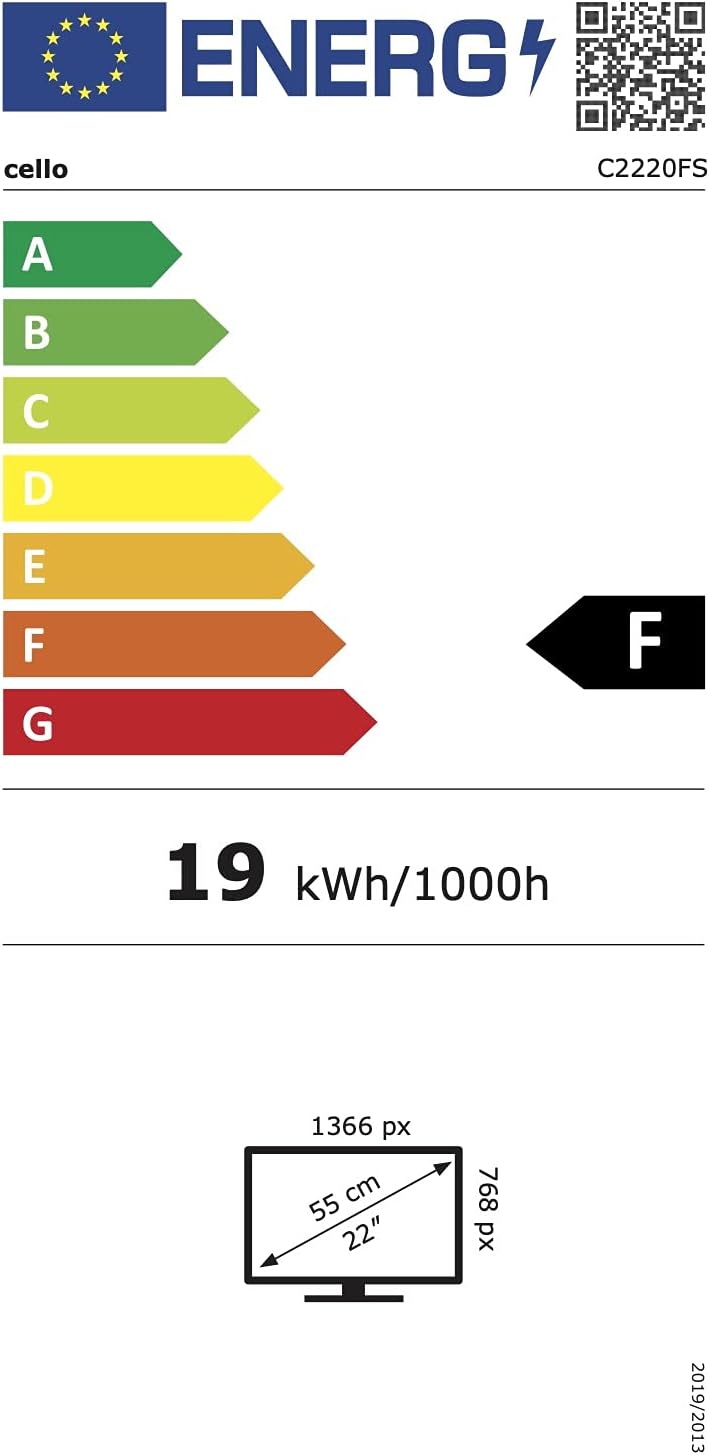
Малюнак 6.1: Energy efficiency label for the Cello C2220FSDE TV. For more details, visit База даных EPREL.

Малюнак 6.2: Detailed product information sheet. For more details, visit База даных EPREL.
7. Гарантыя і падтрымка
7.1 Інфармацыя аб гарантыі
This Cello TV comes with a 1-гадовая абмежаваная гарантыяКалі ласка, захавайце пацвярджэнне пакупкі для прэтэнзій па гарантыі.
7.2 Падтрымка кліентаў
For technical support or customer service, please contact Cello Electronics:
- Webсайт: www.celloelectronics.de
- электронная пошта: consumersupport@celloelectronics.com
- тэлефон: 03334330312
- Адрас: Dovecot Hills, Bishop Auckland, DL14 6XW Durham, United Kingdom
You can also download the full instruction manual for your device in your preferred language from the official Cello webсайт: https://celloelectronics.de/instruction-books/.