
CHUNGHOP K-1038E
Універсальны пульт дыстанцыйнага кіравання кандыцыянерам CHUNGHOP K-1038E. Інструкцыя карыстальніка.
Model: K-1038E
Уводзіны
This manual provides detailed instructions for the setup, operation, and maintenance of your CHUNGHOP K-1038E Universal Air Conditioner Remote Control. This remote is designed for broad compatibility with over 1000 air conditioner brands. Please read this manual carefully before use to ensure proper functionality and to maximize the lifespan of your device.
Прадукт скончаныview
The CHUNGHOP K-1038E is a versatile remote control for air conditioning units, featuring a simple design with a sliding cover for dust protection and a large LCD screen for easy readability. It includes essential functions such as clock, timer, fast cooling, and fast heating.
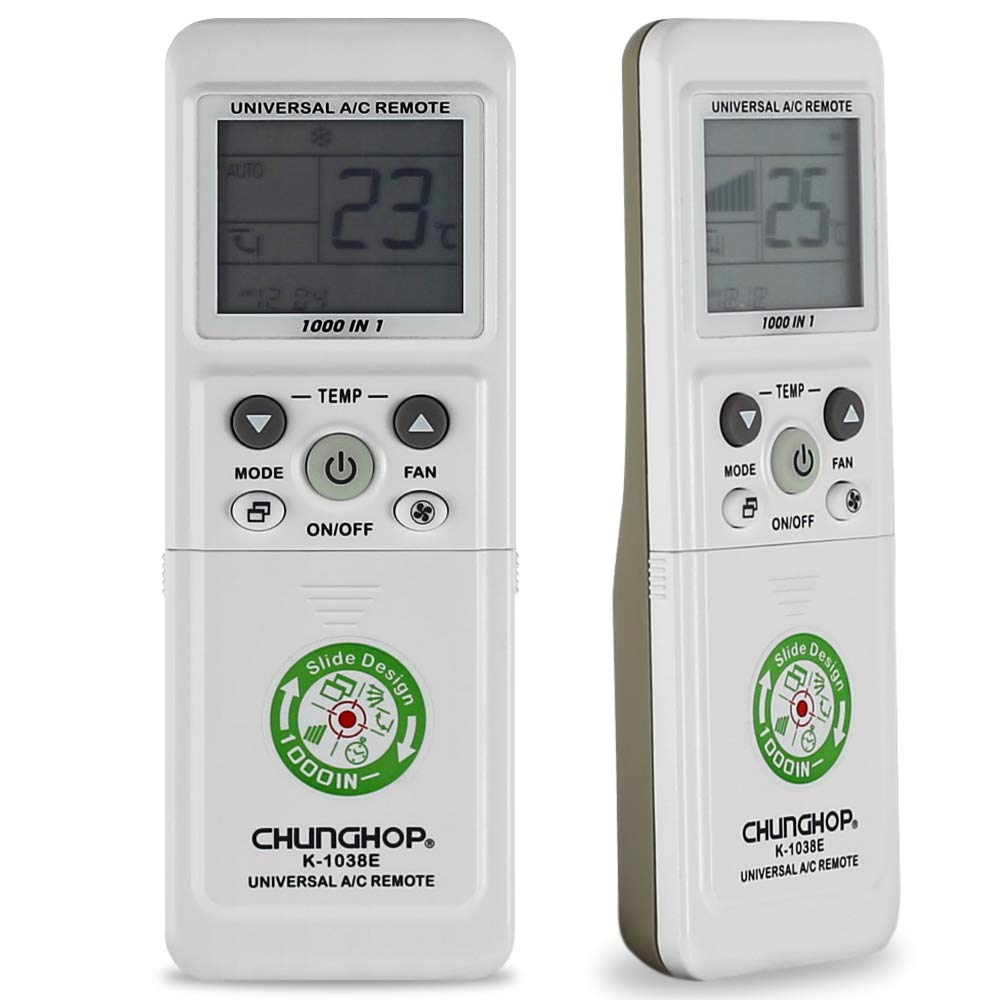
Выява: спераду view of the CHUNGHOP K-1038E Universal Air Conditioner Remote Control, showing the LCD display, power button, mode, fan, and temperature controls, along with a sliding cover revealing additional function buttons.
Асноўныя характарыстыкі:
- Шырокая сумяшчальнасць: Compatible with a wide range of air conditioner brands (over 1000).
- Асноўныя функцыі: Includes clock, timer (if supported by AC unit), fast cooling, and fast heating.
- Зручны дызайн: Features a sliding cover for protection and a large LCD screen for clear display.
- Функцыя памяці: Built-in memory retains settings during short-term battery replacement.
Настройка
1. Устаноўка батарэі
The remote control requires two AAA batteries (not included). Ensure correct polarity when inserting the batteries.
- Адкрыйце вечка батарэйнага адсека, размешчанага на задняй панэлі пульта дыстанцыйнага кіравання.
- Устаўце дзве батарэйкі тыпу AAA, сумяшчаючы палярнасць кантактаў (+) і (-), як паказана ўнутры адсека.
- Надзейна зачыніце крышку батарэйнага адсека.
2. Pairing with Your Air Conditioner
There are several methods to pair the remote control with your air conditioner. It is recommended to try the "Manual Code Input" method first if you know your AC brand's code, or "Automatic Search" for convenience.
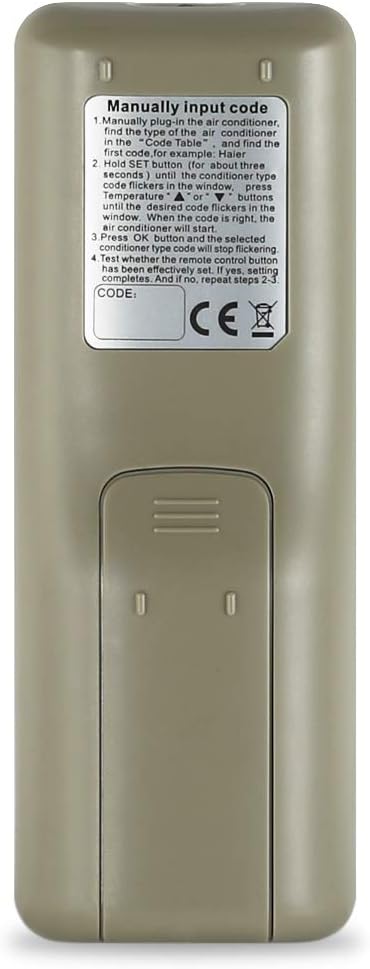
Выява: Спіна view of the CHUNGHOP K-1038E Universal Air Conditioner Remote Control, showing the battery compartment and printed instructions for manual code input.
Method 1: Manual Code Input (Recommended if code is known)
Refer to the code list provided with your remote (or search online for CHUNGHOP K-1038E codes) to find the code for your air conditioner brand.
- Manually plug in the air conditioner.
- Find the type of the air conditioner in the code table. For example, Haier.
- Трымай НАБОР button (for about three seconds) until the code type code flickers in the window. Press temperature UP or УНІЗ buttons until the desired code flickers in the window. When the code is right, the air conditioner will start.
- Націсніце OK button and the selected conditioner type code will stop flickering.
- Test whether the remote control button has been effectively set. If not, repeat steps 2-3.
Метад 2: Аўтаматычны пошук
- Пераканайцеся, што ваш кандыцыянер уключаны.
- Point the remote control towards the air conditioner.
- Націсніце і ўтрымлівайце НАБОР button for approximately 6 seconds until the code on the LCD screen starts flashing. The remote will begin searching for the correct code automatically.
- Адпусціце НАБОР button when your air conditioner responds (e.g., turns on, off, or changes mode).
- Націсніце OK button to confirm the code. Test all functions to ensure proper operation. If not, repeat the process.
Method 3: Brand Button (If available on your remote model)
Some versions of this remote may have dedicated brand buttons. If present, press and hold the button corresponding to your AC brand until the AC responds, then release.
Method 4: Manual Code Search (Alternative to Automatic Search)
- Пераканайцеся, што ваш кандыцыянер уключаны.
- Націсніце НАБОР button once. The code on the LCD screen will flash.
- Націсніце ТЭМПЕРАТУРА or ТЭМП buttons repeatedly to cycle through the codes one by one.
- Stop pressing when your air conditioner responds.
- Націсніце OK button to confirm the code. Test all functions. If not working correctly, continue cycling through codes.
Інструкцыя па эксплуатацыі
Once paired, the remote control provides access to various functions of your air conditioner.
Функцыі кнопак:
- ВКЛ/ВЫКЛ: Уключае або выключае кандыцыянер.
- Рэжым: Цыклічнае пераключэнне рэжымаў працы (напрыклад, астуджэнне, ацяпленне, вентылятар, сушка, аўтаматычны рэжым).
- TEMP UP/DOWN (▲/▼): Рэгулюе наладу тэмпературы.
- ВЕНТАЛІЯР: Adjusts the fan speed (e.g., Auto, Low, Med, High).
- M.SWING: Кіруе гарызантальным хістаннем паветранага дэфлектара.
- A.SWING: Кіруе вертыкальным разгойдваннем паветранага дэфлектара.
- ГАДЗІННІК: Усталёўвае бягучы час на дысплеі пульта дыстанцыйнага кіравання.
- TIME ON: Усталёўвае таймер для аўтаматычнага ўключэння кандыцыянера.
- ВЫХОДНЫ ЧАС: Усталёўвае таймер для аўтаматычнага выключэння кандыцыянера.
- F.Cool (Fast Cool): Activates the fast cooling function for rapid temperature reduction.
- F.Heat (Fast Heat): Activates the fast heating function for rapid temperature increase.
- УСТАВ: Used for entering setup/pairing mode and confirming settings.
- OK: Confirms selections or exits certain menus.
Note: Not all functions may be supported by every air conditioner model. The timer function, for example, requires your original air conditioner to have this capability.
Тэхнічнае абслугоўванне
- Уборка: Працірайце пульт дыстанцыйнага кіравання мяккай сухой тканінай. Не выкарыстоўвайце вадкія ачышчальнікі або абразіўныя матэрыялы.
- Замена батарэі: Replace batteries when the remote's display becomes dim or the remote becomes unresponsive. Always replace both batteries at the same time with new AAA batteries.
- захоўванне: Калі пульт не будзе выкарыстоўвацца працяглы час, выміце батарэйкі, каб прадухіліць іх уцечку. Захоўвайце ў прахалодным, сухім месцы.
- Рассоўная вечка: Keep the sliding cover closed when not in use to protect buttons from dust and accidental presses.
Ліквідацыю непаладак
| праблема | Магчымая прычына | Рашэнне |
|---|---|---|
| Remote does not power on or display is blank. | Разраджаныя або няправільна ўстаўленыя батарэйкі. | Замяніце батарэйкі новымі батарэйкамі тыпу AAA, сачыце за правільнай палярнасцю. |
| Кандыцыянер не рэагуе на пульт. | Incorrect pairing code; remote not pointed at AC; obstruction; AC receiver issue. | Re-pair the remote using one of the pairing methods. Ensure direct line of sight to AC. Check for obstructions. |
| Працуюць толькі некаторыя функцыі. | Partial code match; AC unit does not support all functions. | Try another code for your AC brand. Confirm if your AC unit originally supported the function. |
| Remote display shows code flashing continuously. | Remote is in search mode or awaiting confirmation. | Націсніце OK button to confirm the code once the AC responds. |
Тэхнічныя характарыстыкі
- Нумар мадэлі: К-1038Э
- Марка: CHUNGHOP
- Сумяшчальныя прылады: Кандыцыянер
- Тэхналогія падключэння: Інфрачырвоны
- Крыніца харчавання: 2 х ААА батарэі (не ўключаны)
- асаблівасць: Universal compatibility with over 1000 AC brands
- Памеры ўпакоўкі: 3.15 х 2.36 х 0.79 цалі (прыблізна)
- Першыя даступныя: 1 жніўня 2020 г
Гарантыя і падтрымка
For warranty information or technical support, please refer to the retailer where the product was purchased or contact CHUNGHOP customer service directly. Please have your model number (K-1038E) and purchase details ready when contacting support.
Manufacturer: CHUNGHOP
Ask a question about this manual
Ask about setup, troubleshooting, compatibility, parts, safety, or missing instructions. Manuals+ will review the question and use this page’s manual context to help answer it.