
1. Уводзіны
This manual provides detailed instructions for setting up, operating, and maintaining your D-Link COVR 1100 AC1200 Whole Home EasyMesh Wi-Fi Router. The COVR-1100 is designed to provide seamless, high-speed Wi-Fi coverage throughout your home.
Асноўныя характарыстыкі:
- AC1200 Mbps WAVE 2 Dual Band Wi-Fi
- Certified EasyMesh for whole-home coverage
- Supports 802.11 a/b/g/n/ac standards
- Speeds of 300 Mbps on 2.4 GHz and 867 Mbps on 5 GHz
- Triple Play VLAN for multiple service support
- Single SSID for a unified Wi-Fi network
- Two Gigabit Ethernet ports per unit
- Voice assistant compatibility (Google Assistant & Alexa)
- Easy setup via D-Link Wi-Fi Mobile App or Web GUI
- профіfile-based parental controls
- Expandable mesh network with additional COVR-1100 units
2. Змесціва ўпакоўкі
Пераканайцеся, што ваш пакет змяшчае наступныя элементы:
- 1 x D-Link COVR-1100 Router Unit
- 1 х адаптар сілкавання
- 1 х Ethernet кабель
- 1 карта хуткай ўстаноўкі
- Device Setup Information
- Voice Control Information
3. Фізічны канецview
The D-Link COVR-1100 unit features a compact design with essential ports and indicators for network connectivity.

Малюнак 1: Спераду view of the D-Link COVR-1100 router, showcasinг яго мінімалістычны белы дызайн.
Парты і індыкатары:
- Порт харчавання: Падключаецца да адаптара харчавання, які ўваходзіць у камплект.
- WAN/LAN Gigabit Ethernet Ports: Two ports for connecting to your modem or wired devices. These ports automatically detect WAN or LAN function.
- Кнопка скіду: Выкарыстоўваецца для аднаўлення заводскіх налад прылады.
- Святлодыёдны індыкатар: Provides status information (e.g., power, internet connectivity, mesh status).
4. Інструкцыі па ўсталёўцы
Follow these steps to set up your D-Link COVR-1100 router.
4.1 Initial Setup (Single Unit)
- Распакуйце: Акуратна выміце ўсе прадметы з упакоўкі.
- Пасада: Place the COVR-1100 unit in a central location within your home, away from obstructions and other electronic devices that may cause interference.
- Падключыце харчаванне: Connect the power adapter to the COVR-1100's power port and plug it into a power outlet. Wait for the LED indicator to turn solid white (or blue, depending on the specific model's indicator behavior, refer to Quick Install Card).
- Падключэнне да мадэма: Connect one end of the included Ethernet cable to the WAN/LAN port on the COVR-1100 and the other end to your internet modem's LAN port.
- Спампаваць прыкладанне: Download the D-Link Wi-Fi app from your mobile device's app store (App Store for iOS, Google Play Store for Android).
- Launch App & Follow Prompts: Open the D-Link Wi-Fi app and follow the on-screen instructions to set up your new Wi-Fi network, including creating a Wi-Fi name (SSID) and password.
- Альтэрнатыўны Web Настройка: If you prefer, you can connect a computer to the COVR-1100 via Ethernet or its default Wi-Fi network (details on Quick Install Card) and navigate to
http://covr.local./or the IP address provided in the Quick Install Card to access the webна аснове майстра ўстаноўкі.
4.2 Expanding Your Mesh Network (Multiple Units)
The COVR-1100 supports EasyMesh, allowing you to add additional units to expand your Wi-Fi coverage. You can add up to 4 COVR-1100 units to create a seamless whole-home mesh network.

Figure 2: Illustration of multiple D-Link COVR-1100 units deployed to create a whole-home mesh Wi-Fi network.
- Уключэнне: Place the additional COVR-1100 unit(s) in areas requiring extended coverage and connect them to power outlets.
- Add via App: Open the D-Link Wi-Fi app, navigate to the mesh network settings, and follow the instructions to add new COVR units to your existing mesh network. The app will guide you through the pairing process.
- Размяшчэнне: Ensure optimal placement of additional units to maintain strong signal strength between them and the primary COVR unit for seamless roaming.
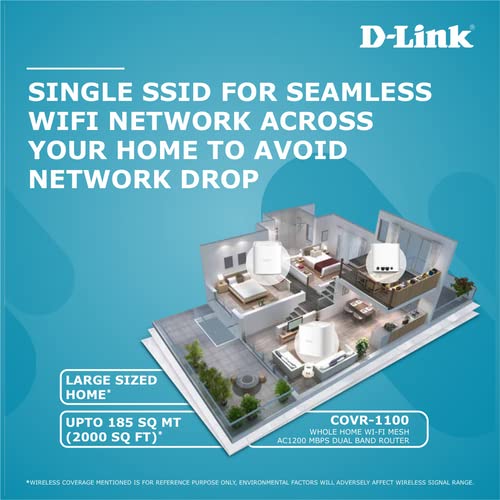
Figure 3: A diagram illustrating how a single COVR-1100 unit provides Wi-Fi coverage across a large area, and how multiple units can extend this coverage throughout a multi-story home.
5. Інструкцыя па эксплуатацыі
5.1 Падключэнне прылад
- Бесправадныя прылады: Пошук your Wi-Fi network name (SSID) on your smartphone, tablet, or computer and enter the password you created during setup.
- Правадныя прылады: Connect devices such as smart TVs, gaming consoles, or desktop computers to the available Gigabit Ethernet ports on the COVR-1100 unit using an Ethernet cable.
5.2 Бацькоўскі кантроль
The D-Link Wi-Fi app allows you to set up profile-based parental controls to manage internet access for specific devices or users. This includes scheduling internet access and blocking certain webсайты.
- Open the D-Link Wi-Fi app.
- Navigate to the Parental Controls section.
- Стварыце профіfiles for family members and assign devices.
- Configure access schedules and content filters as needed.
5.3 Галасавое кіраванне
The COVR-1100 is compatible with Google Assistant and Amazon Alexa. You can use voice commands to manage certain router functions.
- Ensure your voice assistant device is set up and connected to your COVR Wi-Fi network.
- Enable the D-Link skill/action in your Google Home or Amazon Alexa app.
- Follow the app instructions to link your D-Link account.
- Refer to the voice control information provided in your package for specific commands.
6. Тэхнічнае абслугоўванне
6.1 Абнаўленне прашыўкі
D-Link regularly releases firmware updates to improve performance, add features, and enhance security. It is recommended to keep your router's firmware up to date.
- Check for updates via the D-Link Wi-Fi app or the webінтэрфейс кіравання на аснове.
- Follow the on-screen instructions to perform firmware updates. Do not power off the device during an update.
6.2 Скід да заводскіх налад
A factory reset will erase all custom settings and restore the router to its original factory defaults. This can be useful for troubleshooting persistent issues or when reconfiguring the device.
- With the router powered on, use a paperclip or similar pointed object to press and hold the Reset button (usually located on the back or bottom of the unit) for approximately 10 seconds.
- Release the button when the LED indicator changes color or flashes.
- The router will restart with factory default settings. You will need to reconfigure it as if it were a new device.
7. Выпраўленне непаладак
This section addresses common issues you might encounter with your COVR-1100 router.
7.1 Няма падключэння да Інтэрнэту
- Праверце кабелі: Ensure all Ethernet cables are securely connected to the COVR-1100 and your modem.
- Статус мадэма: Verify that your internet modem is working correctly and has an active internet connection.
- Перазапуск прылад: Power cycle your modem, then your COVR-1100 router. Wait a few minutes for each device to fully boot up.
- Налады інтэрнэт-правайдэра: Confirm that your Internet Service Provider (ISP) settings (e.g., PPPoE username/password, DHCP) are correctly configured in the router.
7.2 Слабы сігнал Wi-Fi або мёртвыя зоны
- Размяшчэнне маршрутызатара: Relocate the COVR-1100 to a more central location, away from walls, large metal objects, and other electronics that may cause interference.
- Add COVR Units: If you have a large home, consider adding additional COVR-1100 units to expand your mesh network coverage.
- Перашкоды: Пазбягайце размяшчэння маршрутызатара побач з мікрахвалевымі печамі, бесправаднымі тэлефонамі або прыладамі Bluetooth.
7.3 Немагчыма атрымаць доступ да налад маршрутызатара
- Правільны адрас: Ensure you are using the correct web адрас (
http://covr.local./) or IP address. - Падключэнне да сеткі: Verify your device is connected to the COVR-1100's Wi-Fi network or via an Ethernet cable.
- Кэш браўзера: Ачысціць свой web кэш і файлы cookie браўзера або паспрабуйце іншы браўзер.
- Скід да заводскіх налад: If all else fails, perform a factory reset (see Section 6.2) and reconfigure the router.
8. Тэхнічныя характарыстыкі
| Асаблівасць | Дэталь |
|---|---|
| Марка | D-Link |
| Нумар мадэлі | COVR-1100 |
| бесправадной стандарт | 802.11a/b/g/n/ac |
| Клас дыяпазону частот | Двухдыяпазонны (2.4 ГГц і 5 ГГц) |
| Хуткасць бесправадной сувязі | AC1200 (300 Мбіт/с на 2.4 ГГц, 867 Мбіт/с на 5 ГГц) |
| Парты Ethernet | 2 x Gigabit WAN/LAN Auto-Sensing Ports |
| Вусікі | 2 унутраных антэн |
| Памеры (ДхШхВ) | 11.8 х 12.1 х 17 см |
| Вага прадмета | 470 г |
| Тып падключэння | Wi-Fi |
| Асаблівасці | EasyMesh, MU-MIMO, Voice Control Compatible (Google Assistant & Alexa), Parental Controls, Access Point Mode |
| Сумяшчальнасць аперацыйнай сістэмы | Windows (for web interface access), iOS/Android (for D-Link Wi-Fi App) |
9. Гарантыя і падтрымка
9.1 Інфармацыя аб гарантыі
The D-Link COVR-1100 router comes with a 3-гадовая гарантыя брэнда з даты пакупкі. Калі ласка, захавайце пацвярджэнне пакупкі для прэтэнзій па гарантыі. Гарантыя распаўсюджваецца на вытворчыя дэфекты пры нармальных умовах выкарыстання.
9.2 Тэхнічная падтрымка
For further assistance, technical support, or to report issues not covered in this manual, please visit the official D-Link support website or contact their customer service. Contact details can typically be found on the D-Link webсайце або на ўпакоўцы прадукту.
Падтрымка D-Link Webсайт: www.dlink.com/support (Please replace with the specific regional support link if available)