
Beatfoxx SDH-340
Beatfoxx SDH-340 Silent Disco V2 Wireless Stereo Headset User Manual
Model: SDH-340 | Brand: Beatfoxx
Уводзіны
Thank you for choosing the Beatfoxx SDH-340 Silent Disco V2 Wireless Stereo Headset. This manual provides detailed instructions for the proper use, setup, maintenance, and troubleshooting of your new headset. Please read this manual thoroughly before operating the device to ensure optimal performance and longevity.
Інфармацыя па бяспецы
- Не падвяргайце гарнітуру ўздзеянню экстрэмальных тэмператур, вільготнасці або прамых сонечных прамянёў.
- Пазбягайце падзення або моцных удараў гарнітуры.
- Не разбірайце і не спрабуйце рамантаваць гарнітуру самастойна. Гэта прывядзе да анулявання гарантыі.
- Keep the headset away from water and other liquids. The headset is not waterproof.
- Prolonged listening at high volume levels can cause permanent hearing damage. Adjust the volume to a safe level.
- Dispose of the battery and electronic components responsibly according to local regulations.
Што ў скрынцы
- Beatfoxx SDH-340 Silent Disco V2 Wireless Stereo Headset
- 3.5 мм аўдыякабель
- USB-кабель для зарадкі
- Кіраўніцтва карыстальніка (гэты дакумент)
Прадукт скончаныview
Familiarize yourself with the various components and controls of your Beatfoxx SDH-340 headset.

Figure 1: Beatfoxx SDH-340 Silent Disco V2 Headset (Front View)
This image shows the overall design of the Beatfoxx SDH-340 headset, highlighting its sleek black finish and the illuminated Beatfoxx logo on the earcups.
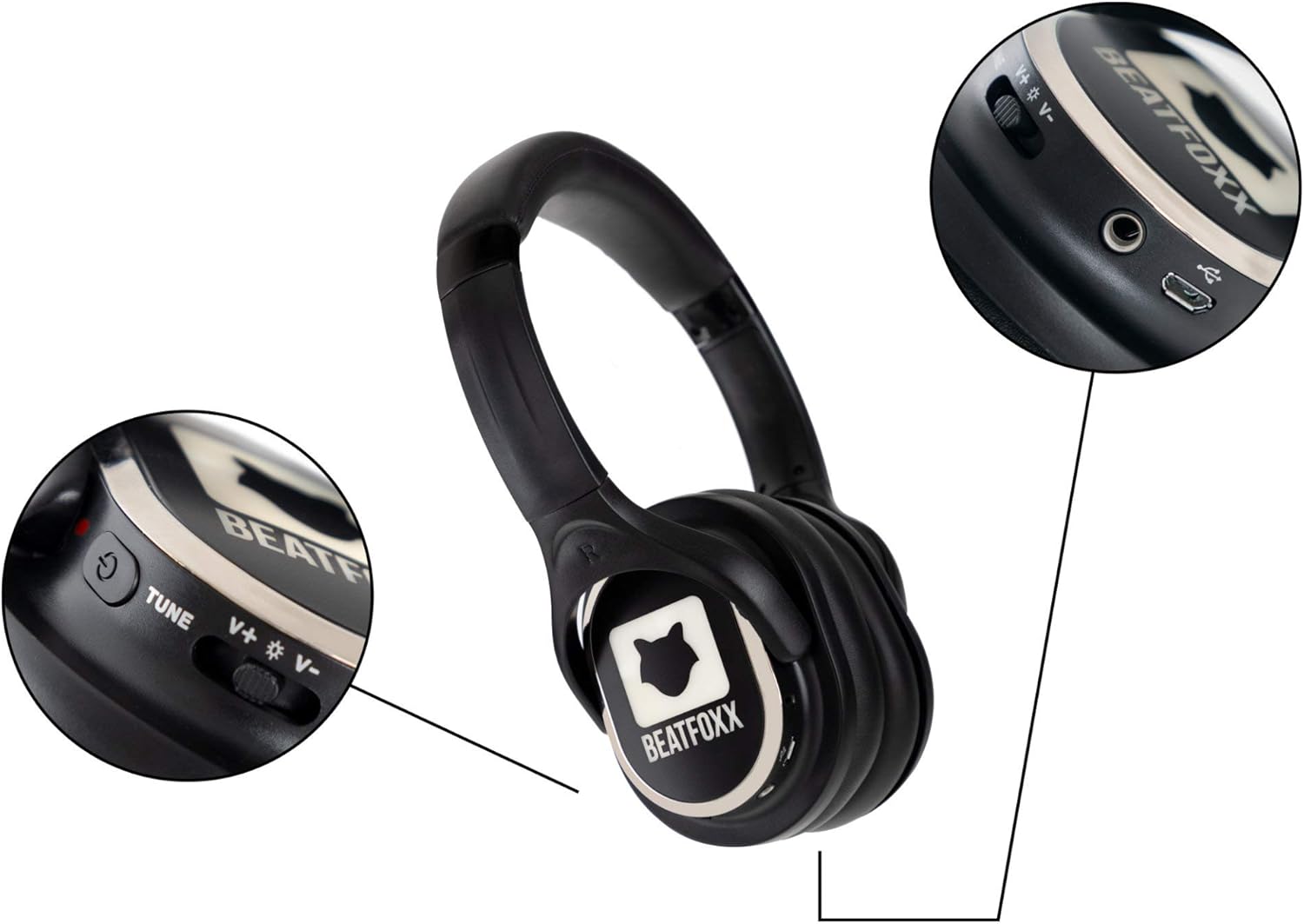
Figure 2: Headset Controls and Ports
Гэта выява паказвае буйны план view of the headset's controls, including the volume rocker, channel tune button, power switch, 3.5mm audio jack, and micro USB charging port.

Figure 3: Adjustable Headband Mechanism
This image illustrates the adjustable headband, allowing users to customize the fit for maximum comfort. The arrows indicate the direction of adjustment.
Ключавыя кампаненты:
- Выключальнік сілкавання: Уключае або выключае гарнітуру.
- Рэгулятар гучнасці: Рэгулюе ўзровень выхаднога гуку.
- Channel Switch (Tune): Selects between the 3 available reception channels (Blue, Red, Green).
- Святлодыёдная падсветка: Indicates the active channel and can be toggled on/off.
- 3.5 мм аўдыяраз'ём: Для праваднога падключэння да аўдыёкрыніц.
- Порт для зарадкі Micro USB: Для падзарадкі ўнутранай батарэі.
- Рэгуляваная павязка на галаву: Забяспечвае камфортную і надзейную пасадку.
- Soft Ear Pads: Provide comfort during extended use.
Настройка
1. Пачатковая зарадка
Before first use, fully charge the headset. The integrated lithium-polymer battery (600 mAh) requires approximately 4 hours for a full charge.
- Connect the supplied USB charging cable to the micro USB port on the headset.
- Connect the other end of the USB cable to a USB power source (e.g., computer USB port, USB wall adapter, power bank).
- The LED indicator will show charging status (red for charging, green for fully charged).

Figure 4: Headset Charging Connections
This image demonstrates how to connect the USB charging cable to the headset and various power sources such as a computer, power bank, or wall adapter.
2. Правадное падключэнне (неабавязкова)
The headset can also be used with a wired connection using the 3.5mm audio cable.
- Insert one end of the 3.5mm audio cable into the 3.5mm jack on the headset.
- Insert the other end into the audio output port of your device (e.g., smartphone, tablet, laptop).

Figure 5: Wired Headset Usage
This image shows a user connecting the headset to a smartphone using the 3.5mm audio cable, illustrating the wired usage option.
Інструкцыя па эксплуатацыі
1. Уключэнне/выключэнне харчавання
- To power on the headset, slide the power switch to the "ON" position. The LED illumination will light up.
- To power off the headset, slide the power switch to the "OFF" position. The LED illumination will turn off.
2. Выбар канала
The headset supports 3 distinct reception channels, indicated by different LED colors.
- Press the "Tune" button to cycle through the available channels: Blue, Red, and Green.
- Select the channel that matches the audio source you wish to listen to.
3. Рэгуляванне гучнасці
- Use the volume rocker switch to increase or decrease the audio volume.
- Push the rocker up to increase volume (+).
- Push the rocker down to decrease volume (-).
4. LED Illumination Control
The LED illumination on the earcups can be turned off if desired.
- Locate the LED switch (often integrated with the power or channel switch, refer to Figure 2).
- Toggle the switch to turn the LED illumination on or off.

Figure 6: Silent Disco Event with Headsets
This image depicts individuals at a silent disco event, each wearing a Beatfoxx headset and enjoying their chosen audio channel, indicated by the glowing earcups.
Тэхнічнае абслугоўванне
Уборка
- Працярыце гарнітуру мяккай сухой тканінай.
- Не выкарыстоўвайце абразіўныя ачышчальнікі, спірт або растваральнікі, бо яны могуць пашкодзіць паверхню.
- For ear pads, gently wipe with a slightly damp тканінай і дайце цалкам высахнуць на паветры перад выкарыстаннем.
Захоўванне
- Захоўвайце гарнітуру ў прахалодным, сухім месцы, удалечыні ад прамых сонечных прамянёў і экстрэмальных тэмператур.
- Калі вы захоўваеце акумулятар працяглы час, зараджайце яго кожныя 3-6 месяцаў, каб падтрымліваць яго ў працоўным стане.
Ліквідацыю непаладак
| праблема | Магчымая прычына | Рашэнне |
|---|---|---|
| Няма гуку з гарнітуры. | Headset is off; Battery is low; Incorrect channel selected; Volume too low; Transmitter issue. | Ensure headset is ON; Charge the battery; Select the correct channel (Blue, Red, or Green); Increase volume; Check the silent disco transmitter for proper operation. |
| LED illumination not working. | LED feature is turned off; Battery is low. | Toggle the LED switch to ON; Charge the battery. |
| Кароткі тэрмін службы батарэі. | Not fully charged; High volume usage; Old battery. | Ensure full charge (4 hours); Reduce volume; Battery degradation is normal over time. |
| Скажонае аўдыя. | Weak signal; Interference; Volume too high. | Move closer to the transmitter; Avoid sources of strong electromagnetic interference; Reduce volume. |
Тэхнічныя характарыстыкі
| Асаблівасць | Спецыфікацыя |
|---|---|
| мадэль | СДХ-340 |
| Тэхналогія падлучэння | RF UHF Wireless |
| Reception Channels | 3 (Blue, Red, Green LED indication) |
| Дыяметр дынаміка | 38 mm Mylar membrane |
| АЧХ | 20 - 15,000 Гц |
| Суадносіны сігнал/шум (SNR) | >80 дБ |
| Агульныя гарманічныя скажэнні (THD) | <1% |
| Тып батарэі | Integrated Lithium-Polymer (600 mAh) |
| Тэрмін службы батарэі | 8 - 10 hours (depending on usage and volume) |
| Час зарадкі | Прыбл. 4 гадзіны |
| Вага | 225 грамаў |
| Матэрыял | Штучная скура (амбушюры) |
| Уключаныя кампаненты | 3.5 mm Audio Cable, USB Charging Cable |
Гарантыя і падтрымка
Beatfoxx products are designed for reliability and performance. For warranty information and technical support, please refer to the official Beatfoxx webсайт або звярніцеся да прадаўца. Захоўвайце пацвярджэнне пакупкі для прэтэнзій па гарантыі.
Каб атрымаць дадатковую дапамогу, наведайце Beatfoxx Brand Store on Amazon.
Ask a question about this manual
Ask about setup, troubleshooting, compatibility, parts, safety, or missing instructions. Manuals+ will review the question and use this page’s manual context to help answer it.