
1. Прадукт скончыўсяview
The Victrix Gambit Gaming Headset offers both wireless and wired connectivity for versatile use with Xbox One, Xbox Series X|S, and PC. Designed for competitive gaming, it features Dolby Atmos surround sound, 50mm HD speaker drivers, and a bi-directional noise-canceling microphone.

Image 1.1: The Victrix Gambit Gaming Headset, showcasing its sleek black design and over-ear cups.

Image 1.2: The Victrix Gambit headset highlighting its dual wireless and wired modes for home and tournament play.
2. Інструкцыі па ўсталёўцы
2.1 Змест пакета
- Victrix Gambit Gaming Headset
- Бесправадны USB -ключ
- 3.5mm Audio Cable with In-line Controls
- USB-кабель для зарадкі
- Кіраўніцтва карыстальніка (гэты дакумент)
2.2 Зарадка гарнітуры
Before initial use, fully charge the headset. Connect the USB charging cable to the headset's charging port and to a powered USB port (e.g., console, PC, or USB wall adapter). The LED indicator will show charging status.
2.3 Wireless Connection (Xbox/PC)
- Insert the wireless USB dongle into an available USB port on your Xbox console or PC.
- Уключыце гарнітуру, націснуўшы і ўтрымліваючы кнопку харчавання, пакуль не загарыцца святлодыёдны індыкатар.
- The headset and dongle should automatically pair. A solid LED on both indicates a successful connection.
- If pairing does not occur automatically, press the pairing button on the USB dongle, then press and hold the Power/Pairing button on the headset until the LED flashes rapidly, then becomes solid.
2.4 Wired Connection (3.5mm)
For wired use or tournament play, connect the supplied 3.5mm audio cable from the headset's 3.5mm port to your controller or device's audio jack. The headset will automatically switch to wired mode.
3. Кіраванне гарнітурай
3.1 Уключэнне/выключэнне сілкавання
- Уключэнне: Press and hold the Power button on the headset until the LED illuminates.
- Выключэнне: Press and hold the Power button until the LED turns off.
3.2 Volume and Audio Controls
The headset features on-ear controls for convenient audio adjustments.

Image 3.1: Close-up of the headset's right earcup, showing the power button, mode switch, and game/chat balance dial.
- Асноўны аб'ём: Use the volume dial on the earcup to adjust the overall audio level.
- Баланс гульні/чата: Use the dedicated dial to balance game audio and chat volume.
- Пераключальнік рэжымаў: Toggle between different audio modes or profiles if available (refer to specific software for customization).
3.3 Выкарыстанне мікрафона
The bi-directional noise-canceling microphone ensures clear communication.

Image 3.2: The flexible boom microphone of the Victrix Gambit headset, designed for clear voice capture.
- Перагортванне для адключэння гуку: Flip the microphone boom arm upwards to mute the microphone. Flip it down to unmute.
- Microphone Monitoring: The headset may offer a three-stage mic monitor. Adjust this feature through the headset's companion software on PC or console settings to hear your own voice feedback.
3.4 Dolby Atmos Integration
The headset includes integrated Dolby Atmos for immersive surround sound. A lifetime subscription is included. Ensure Dolby Atmos is enabled in your console or PC audio settings for the best experience.
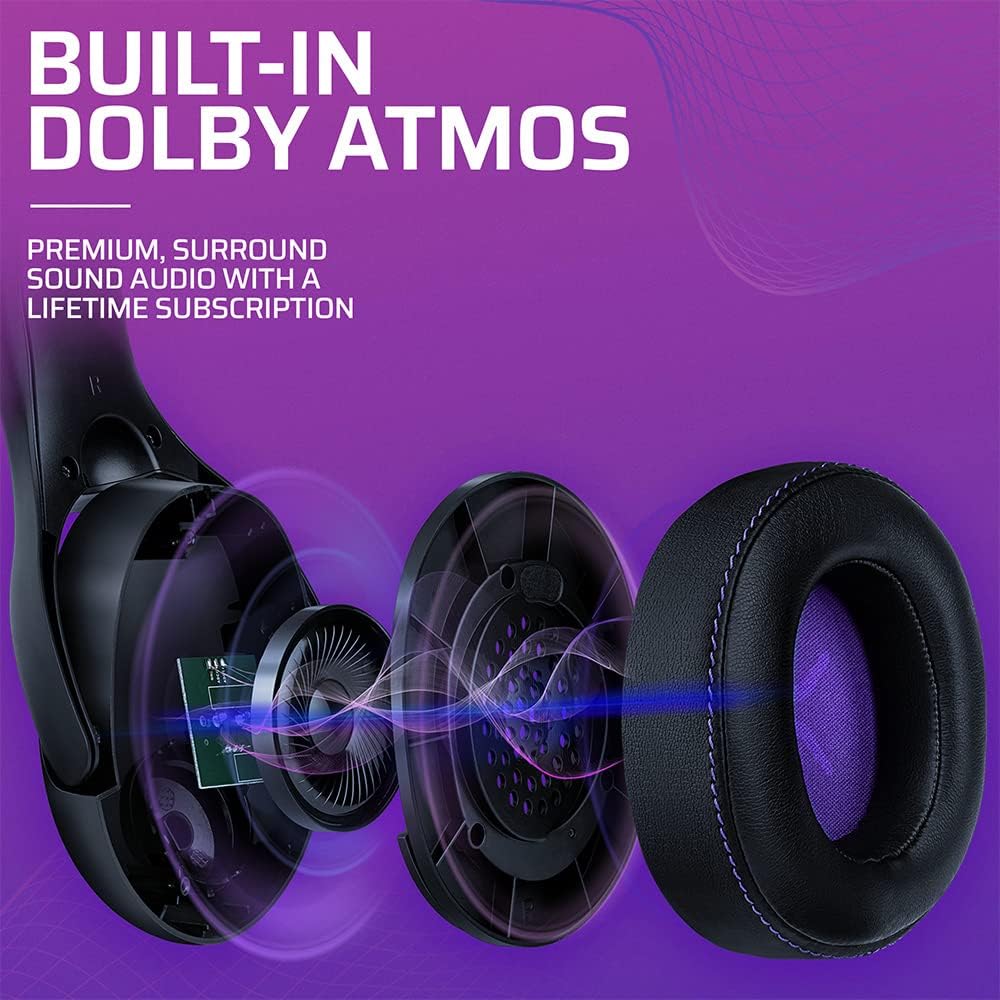
Малюнак 3.3: Выбухнутае view of the Victrix Gambit earcup, illustrating the 50mm speaker drivers and the audio waves representing Dolby Atmos sound.
4. Тэхнічнае абслугоўванне
4.1 Ачыстка
- Выкарыстоўвайце мяккую, сухую тканіну для чысткі паверхняў гарнітуры.
- Акуратна працярыце амбушуры рэкламайamp анучай і пры неабходнасці мяккім мыльным растворам, затым старанна высушыце. Пазбягайце празмернай вільготнасці.
- Не выкарыстоўвайце агрэсіўныя хімічныя рэчывы або абразіўныя мыйныя сродкі.
4.2 Захоўванне
Store the headset in a cool, dry place away from direct sunlight and extreme temperatures. Avoid placing heavy objects on the headset to prevent damage.
4.3 Сыход за акумулятарам
To prolong battery life, avoid fully discharging the headset frequently. Charge the headset regularly, even if not in use for extended periods.
5. Выпраўленне непаладак
5.1 Няма гуку
- Ensure the headset is powered on and properly paired (for wireless) or connected (for wired).
- Check the volume levels on the headset, your console/PC, and the game/application.
- Праверце, ці ў наладах сістэмы выбрана правільная прылада вываду гуку.
- For wireless, try re-pairing the headset with the USB dongle.
5.2 Мікрафон не працуе
- Пераканайцеся, што мікрафон пераключаны ўніз (гук уключаны).
- Check microphone input settings on your console/PC and in-game chat settings.
- Verify that the correct microphone input device is selected in your system settings.
- Калі магчыма, праверце мікрафон з дапамогай іншага прыкладання або прылады.
5.3 Праблемы з падключэннем
- Бесправадная сувязь: Ensure the USB dongle is securely plugged in. Try a different USB port. Move closer to the dongle to rule out range issues.
- Wired: Ensure the 3.5mm cable is fully inserted into both the headset and the device. Try a different 3.5mm cable if available.
5.4 Гарнітура не зараджаецца
- Ensure the USB charging cable is securely connected to both the headset and a powered USB port.
- Паспрабуйце іншы USB-порт або кабель для зарадкі.
- Пераканайцеся, што крыніца харчавання актыўная.
6. Тэхнічныя характарыстыкі
| Нумар мадэлі | 049-003-НА |
| Сувязь | Wireless (USB Dongle, up to 12.19 meters range), Wired (3.5mm audio cable) |
| Драйверы дынамікаў | 50 мм HD |
| Аўдыётэхналогія | Dolby Atmos (lifetime subscription included) |
| Мікрафон | Bi-directional, Noise-Canceling, Flip-to-Mute |
| акумулятар | 1 літый-іённы акумулятар (у камплекце) |
| Памеры (Д х Ш х У) | 1 х 260.4 х 215.9 см |
| Вага | 610 грамаў |
| Сумяшчальнасць | Microsoft Xbox One, Xbox Series X|S, PC |
7. Інфармацыя аб гарантыі
For detailed warranty information, please refer to the official PDP webсайт або гарантыйны талон, які ўваходзіць у камплект пастаўкі прадукту. Умовы гарантыі могуць адрознівацца ў залежнасці ад рэгіёна.
8. Падтрымка кліентаў
If you encounter any issues or have questions not covered in this manual, please contact PDP customer support. Visit the official PDP website for support contact details, FAQs, and additional resources.