
Hugolog HU01-SNL
Інструкцыя па эксплуатацыі электроннага замка з клавіятурай Hugolog Deadbolt
Model: HU01-SNL | Brand: Hugolog
1. Уводзіны
This manual provides detailed instructions for the installation, operation, and maintenance of your Hugolog Electronic Keypad Deadbolt Lock. Please read this manual thoroughly before installation and use to ensure proper function and security.

Малюнак 1.1: Пярэдняя і задняя часткі view of the Hugolog Electronic Keypad Deadbolt Lock.
2. Асноўныя магчымасці
- High Security Material: Constructed from high-hardness aluminum alloy, offering anti-collision and anti-smashing properties. FCC SDOC certified for enhanced safety.
- Лёгкая ўстаноўка: Designed for simple installation with a screwdriver, suitable for door thicknesses of 35-50mm and standard door hole diameters (38/54mm). Adjustable bolt side distance (60mm/70mm).
- Бяспека клавіятуры: Features a keypad that locks for three minutes after ten consecutive incorrect PIN code attempts. Buttons are rated for 250,000 presses with clear visibility.
- Індыкатары стану: Provides low battery alerts (below 20%) and features backlit keys for visibility in low-light conditions.
- Воданепранікальны дызайн: IP54 waterproof rating allows for daily outdoor use, though not recommended for severe external environments.
- Зручнасць бесключавога кіравання: Offers motorized auto-locking and supports up to 20 user PIN codes.
- Password Privacy Protection: Includes an anti-peep virtual PIN code feature to safeguard against unauthorized viewing of your code.

Выява 2.1: Канецview of Assure Lock features.

Image 2.2: Backlit keypad and battery compartment.
3. Змесціва ўпакоўкі
Перад пачаткам усталёўкі пераканайцеся, што ўсе кампаненты наяўныя:
- Exterior Assembly (Keypad)
- Interior Assembly (Thumb Turn)
- Засоўванне засаўкі
- Мантажная пласціна
- Страйк пліты
- Армавальная пліта
- Рэзервовыя ключы (2)
- Мацавальныя шрубы (розныя памеры)
- Вал кручэння
- Installation Guide & Template
Note: Batteries are not included. 4 AA alkaline batteries are required.
4. Кіраўніцтва па ўстаноўцы
Before you begin, ensure your door is prepared according to the provided template for drilling if necessary. The lock is suitable for door thicknesses of 35-50mm, door hole diameters of 38/54mm, and an adjustable bolt side distance of 60mm/70mm.
4.1 Праверка перад устаноўкай
Watch this video for important information before starting the installation process:
Video 4.1: Important considerations before installation.
4.2 Пакрокавая ўстаноўка
For a detailed visual guide on installation and product composition, refer to the video below:
Video 4.2: Detailed deadbolt installation and product composition.
- Усталюйце зашчапку засаўкі: Insert the deadbolt latch into the door edge. Ensure the bolt is in the retracted (unlocked) position. Be careful about the direction of the bolt. Secure with two screws.
- Attach Exterior Assembly: Pass the cable from the exterior assembly through the door hole under the bolt. Ensure the tailpiece is kept in a horizontal position.
- Усталяваць мантажную пласціну: Place the mounting plate over the exterior assembly, ensuring the cable and tailpiece pass through the correct openings. Secure the mounting plate to the exterior assembly with screws. Make sure the exterior assembly is vertically aligned.
- Усталяваць унутраную зборку: Place the rotation shaft in the hole of the interior assembly. Attach the cable assembly to the interior assembly PCB. Ensure the thumb turn is vertical. Install the interior assembly onto the inside mounting plate. Secure using screws through the interior assembly onto the mounting plate.
- Тэставая аперацыя: Test if the deadbolt works smoothly by turning the thumb turn and using the backup key.
- Устаўце батарэі: Keep your lock in the "unlock" status. Insert 3 AA batteries into the battery pack. Keep holding the reset button with a clip, then insert the last battery and continue holding the reset button for another 3 seconds. If reset is successful, the latch bolt will extend on its own to learn the orientation of the door. Install the battery cover.
5. Аперацыя
5.1 Default Master PIN Code
The default Master PIN Code is 12345678. It is highly recommended to change this code immediately after installation for security purposes.

Image 5.1: Choose between code or key for entry.
5.2 Changing the Master PIN Code
To change the Master PIN Code, follow these steps:
- Enter Master Mode: Press ** + [Master PIN Code] + #. Wait for 2 green lights and 2 beeps.
- Націсніце 1.
- Enter New Master PIN Code: Enter your new Master PIN Code (4-10 digits) + #. Wait for 2 green lights and 2 beeps.
- Confirm New Master PIN Code: Enter the same new Master PIN Code + #. Wait for 2 green lights and 2 beeps. Success.
For a visual demonstration, please watch this video:
Video 5.2: How to change the master code.
5.3 Adding User PIN Codes
You can add up to 20 user PIN codes. To add a user PIN code:
- Enter Master Mode: Press ** + [Master PIN Code] + #. Wait for 2 green lights and 2 beeps.
- Націсніце 2.
- Enter New User PIN Code: Enter your new User PIN Code (4-10 digits) + #. Wait for 2 green lights and 2 beeps.
- Confirm New User PIN Code: Enter the same new User PIN Code + #. Wait for 2 green lights and 2 beeps. Success.
For a visual demonstration, please watch this video:
Video 5.3: How to add a user PIN code.
5.4 Unlocking and Locking
- Каб разблакіраваць: Enter a valid User PIN Code or Master PIN Code, then press #. The deadbolt will retract.
- Каб заблакаваць: Press any key on the keypad for 2 seconds, or use the thumb turn from the inside.
- Аўтаматычная паўторная блакіроўка: In Auto Re-lock mode, the bolt will extend automatically 30 seconds after unlocking.
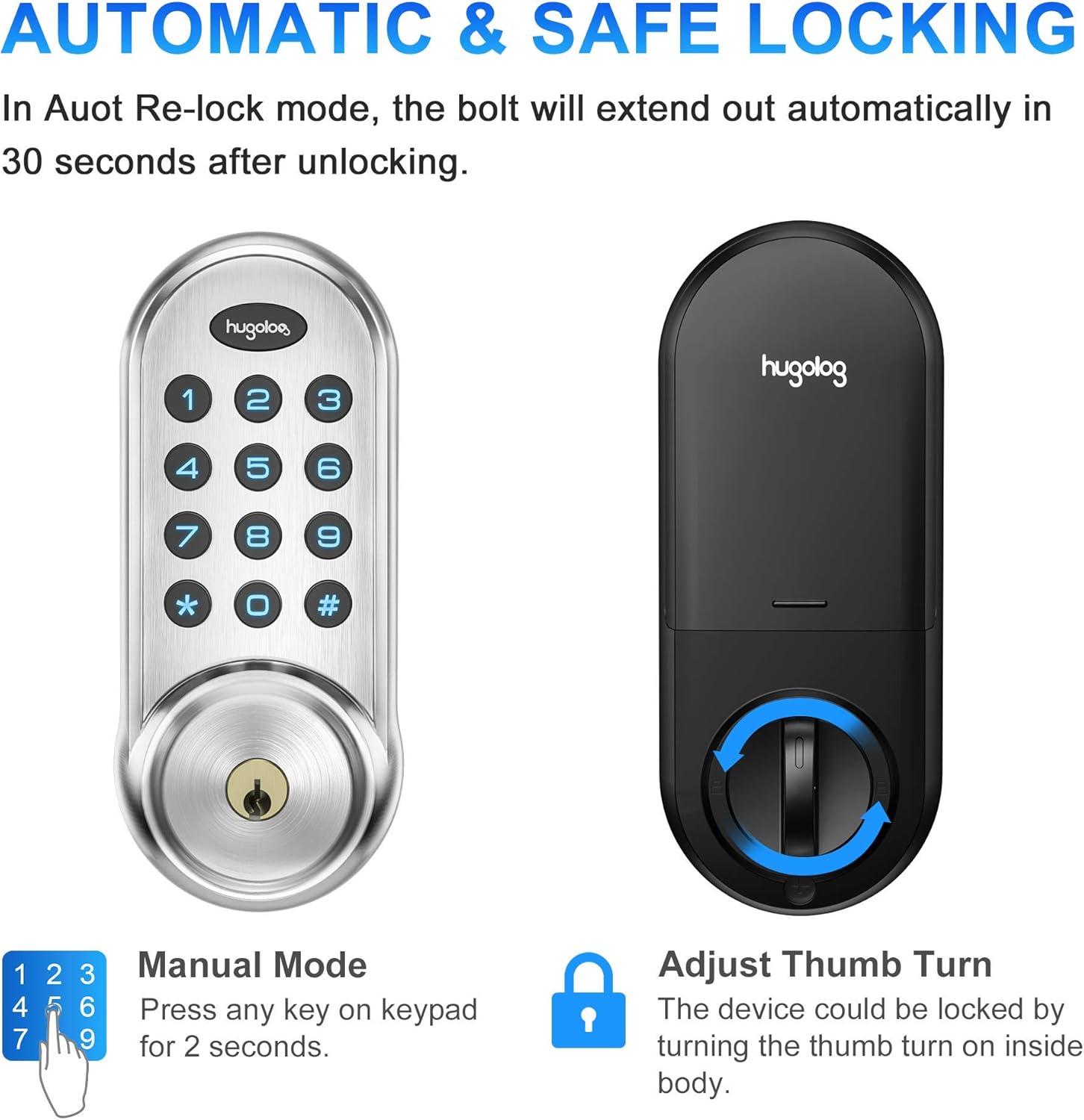
Image 5.4: Automatic and manual locking options.
5.5 Password Privacy Protection (Anti-Peep)
To prevent others from guessing your code, you can enter random digits before or after your actual PIN code. The lock will still recognize the correct sequence within the longer entry.

Image 5.5: Anti-peep virtual PIN code for enhanced security.
6. Тэхнічнае абслугоўванне
6.1 Замена батарэі
The lock will provide a continuous red flash on the keypad when the battery level is low (below 20%). Replace all four AA alkaline batteries promptly to ensure continuous operation.
6.2 Ачыстка
Працірайце клавіятуру і корпус замка мяккай сухой тканінай. Пазбягайце выкарыстання абразіўных ачышчальнікаў або растваральнікаў, якія могуць пашкодзіць пакрыццё або электронныя кампаненты.
7. Выпраўленне непаладак
- Замок заклінаваў: If the deadbolt jams, the lock will alternate beeping about every 2 seconds with a long beep sound. This often indicates an installation issue where the bolt is not moving freely. Ensure the door frame and strike plate are properly aligned and the bolt can extend and retract without obstruction.
- Keypad Lockdown: If 10 consecutive incorrect PIN code attempts are made, the keypad will be locked down for 3 minutes. During this time, all keypad operations will be restricted. You can disable the lockdown by unlocking the door with a mechanical key or by using the thumb turn from the inside.
- Індыкацыя разраду батарэі: When the panel is woken up, red flashes continuously, indicating that the battery is low. Replace batteries immediately.
- No Response from Keypad: Check battery installation and ensure batteries are fresh. If the issue persists, perform a factory reset.
8. Тэхнічныя характарыстыкі
| Асаблівасць | Дэталь |
|---|---|
| Марка | Гюголаг |
| Назва мадэлі | HU01-SNL |
| Нумар мадэлі тавару | 711731000176 |
| Тып замка | Замак клавіятуры |
| Матэрыял | High-hardness Aluminum Alloy, Metal |
| Колер | матавы нікель |
| Памеры прадмета (Д х Ш х У) | 2.89 х 1.42 х 7.09 цалі |
| Вага прадмета | 2.5 фунта |
| Сумяшчальнасць таўшчыні дзвярэй | 35-50 мм |
| Door Hole Diameter Compatibility | 38/54 мм |
| Backset (Side Distance of Bolt) | Adjustable 60mm/70mm |
| Крыніца харчавання | 4 шчолачных батарэек АА (не ўключаны) |
| тtage | 1.5 вольт |
| Рэйтынг воданепранікальнасці | IP54 |
| Атэстацыя | FCC SDOC |
| Пратакол злучэння | Wi-Fi (Note: Product description mentions Wi-Fi, but features do not detail smart home integration. Refer to product packaging for specific smart features.) |
9. Гарантыя і падтрымка
For warranty information and customer support, please refer to the documentation included with your product or visit the official Hugolog website. Contact information for technical assistance is typically provided in the product packaging.
Ask a question about this manual
Ask about setup, troubleshooting, compatibility, parts, safety, or missing instructions. Manuals+ will review the question and use this page’s manual context to help answer it.