
1. паview
The BLACK+DECKER BCF601AA Alkaline Cordless Screwdriver is designed for quick and efficient driving and removal of screws in various household projects. This compact and versatile tool comes with a 42-piece accessory set, providing a wide range of bits for different applications. Its ergonomic design and integrated features enhance user convenience and productivity.
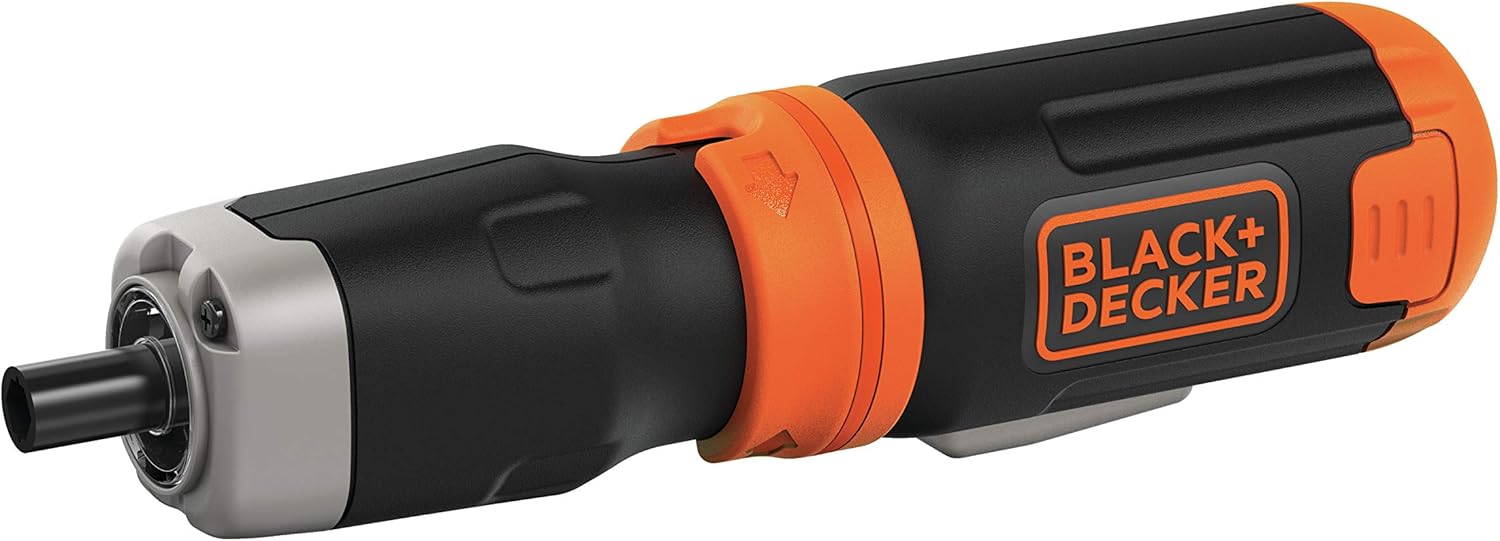
Figure 1: BLACK+DECKER BCF601AA Cordless Screwdriver with a Phillips bit inserted.
Асноўныя характарыстыкі:
- Хуткасць 220 абаротаў у хвіліну: Provides quick driving for various tasks.
- Падаўжальны вал: Offers further reach for accessing tight or recessed areas.
- Убудаваны святлодыёдны святло: Illuminates poorly lit work surfaces for improved visibility.
- Ideal Sizes: Includes a variety of 1-inch screwdriver bits suitable for frequent use and installation projects.
- Magnetic Drive Guide: Helps to hold screws in place for easier starting.
2. Настройка
2.1 Устаноўка батарэі
The BLACK+DECKER BCF601AA screwdriver operates on four (4) AA alkaline batteries. To install or replace batteries:
- Locate the battery compartment at the base of the screwdriver handle.
- Squeeze the two pressure points on the sides of the battery compartment cover and pull it downwards to remove.
- Insert four (4) fresh AA alkaline batteries, ensuring correct polarity (+/-) as indicated inside the compartment.
- Засуньце вечка батарэйнага адсека на месца, пакуль яна надзейна не зашчоўкне.
2.2 Bit Insertion
The screwdriver uses standard 1-inch hex shank bits. To insert a bit:
- Select the appropriate bit from the 42-piece accessory set for your task.
- Simply push the bit firmly into the chuck at the front of the screwdriver until it is seated. The bits are held in place by friction.
- To remove a bit, pull it straight out from the chuck.

Figure 2: The included 42-piece screwdriver bit set.
3. Інструкцыя па эксплуатацыі
3.1 Уключэнне/выключэнне і кіраванне напрамкам
The screwdriver features a simple two-button control for operation and direction:
- Націсніце левая кнопка to rotate the bit counter-clockwise (for unscrewing).
- Націсніце правая кнопка to rotate the bit clockwise (for screwing).
- Release the button to stop the rotation.
3.2 Засцерагальнік
To prevent accidental activation, the screwdriver is equipped with a safety lock mechanism. This is typically a collar or switch near the chuck:
- Rotate the collar to the 'locked' position (often indicated by a padlock symbol) when not in use or during storage. This will prevent the buttons from being pressed.
- Rotate the collar to the 'unlocked' position to enable the forward/reverse buttons for operation.
3.3 Інтэграваная святлодыёдная лямпа
The screwdriver includes an LED light to illuminate your work area:
- The LED light automatically activates when either the forward or reverse button is pressed, providing visibility in dimly lit spaces.

Малюнак 3: бок view of the screwdriver, highlighting its compact design.
3.4 Using the Extension Shaft
For tasks requiring extended reach or access to confined areas, the screwdriver features an extension shaft:
- To attach the extension shaft, align it with the chuck and push it firmly until it locks into place.
- Insert your desired screwdriver bit into the end of the extension shaft.
- To remove the extension shaft, pull it firmly away from the screwdriver.

Figure 4: Screwdriver with the extension shaft for increased reach.
4. Тэхнічнае абслугоўванне
4.1 Ачыстка
- Падтрымлівайце вентыляцыйныя адтуліны інструмента ў чысціні, каб пазбегнуць перагрэву.
- Выкарыстоўвайце мяккі, damp cloth to clean the exterior of the screwdriver. Do not use harsh chemicals or abrasive cleaners.
- Ensure the tool is dry before storing.
4.2 Сыход за акумулятарам
- Заўсёды выкарыстоўвайце высакаякасныя шчолачныя батарэйкі для аптымальнай прадукцыйнасці.
- Remove batteries from the tool if it will not be used for an extended period to prevent leakage.
- Утылізуйце выкарыстаныя батарэі адказна ў адпаведнасці з мясцовымі правіламі.
4.3 Bit Care
- Store screwdriver bits in their provided case to keep them organized and prevent loss or damage.
- Replace worn or damaged bits to ensure efficient and safe operation.
5. Выпраўленне непаладак
Агульныя праблемы і рашэнні:
- Адвёртка не ўключаецца:
- Check if the safety lock is disengaged.
- Пераканайцеся, што акумулятары ўсталяваны правільна з захаваннем палярнасці.
- Замяніце старыя або разраджаныя батарэйкі новымі.
- Bit slipping or not engaging screw:
- Ensure the correct bit type and size are used for the screw head.
- Check if the bit is fully inserted into the chuck or extension shaft.
- Replace worn or damaged bits.
- Зніжэнне магутнасці або хуткасці:
- Магчыма, батарэйкі разраджаныя; заменіце іх.
- Ensure the tool is not being overloaded with tasks beyond its intended capacity.
6. Тэхнічныя характарыстыкі
| Асаблівасць | Дэталь |
|---|---|
| Марка | БЛЭК+ДЭКЕР |
| Назва мадэлі | BCF601AA |
| Крыніца харчавання | Alkaline Batteries (4 x AA) |
| хуткасць | 220 XNUMX абаротаў у хвіліну |
| Стыль галавы | Кватэра, Філіпс |
| Матэрыял | Метал, пластык |
| Колер | Чорны |
| Асаблівасць | Cordless, Integrated LED Light, Extension Shaft, Magnetic Drive Guide |
| Рэкамендуемае выкарыстанне | Добраўпарадкаванне дома |
7. Гарантыя і падтрымка
For warranty information, technical support, or service inquiries, please refer to the documentation included with your product or visit the official BLACK+DECKER webсайт. Захоўвайце чэк аб куплі як пацвярджэнне пакупкі для гарантыйных прэтэнзій.
Больш падрабязную інфармацыю і кантактныя дадзеныя вы можаце знайсці на Крама BLACK+DECKER на Amazon.